




Facebook Twitter Instagram
    Trending
    • Xiaomi’s new phone has made an appearance at GSMA: The MIX TriFold triple foldable screen phone is expected to be released in Q3 next year
    • Android 16 QPR2 system APK installer has been exposed and is compatible with the Material 3 design language
    • The Prototype photos of Xiaomi 17 Ultra phone have been exposed, featuring a triple-camera layout on the back
    • TRASPED HG4-411 RC Car Review: A Miniature Powerhouse Redefining Desktop RC Adventure
    • BlitzWolf BW-VISION A1 Projector Review at $69.99: A Compact Android Powerhouse for Modern Viewing
    • BX-N19-JL TWS Earbuds Review: A Feature-Packed Contender for Athletes and Gamers
    • X10 128G Mech TV Game Console Flash Sale at $93.99: A Nostalgic Powerhouse with Modern Polish
    • IPLAY OOKA 150K Disposable Vape Review: A Flavor-Powered Marathon of Vaping
    Facebook YouTube
    Login Register
    IGeeKphone China Phone, Tablet PC, VR, RC Drone News, Reviews
    • HOME
      • NEWS
        • DeepSeek
        • ChatGPT
        • Minecraft
    • Amazon
    • CHRISTMAS
    • PHONE
      • Top Phones For Your First Choice
      • Phone Comparison
      • Xiaomi
      • Blackview
      • Unihertz
      • Doogee
      • Black Shark
      • Geekbuying
      • Banggood
      • TEMU
      • TikTok
      • Aliexpress
      • Walmart
      • Newegg
      • MercadoLibre
      • Lazada
    • TOP VAPE Awards for 2025
    • VAPES
      • E-CIGAR Upcoming
      • Vape News
      • Vape Market Trend
      • Vape Deals
      • Expo News
      • Vape Comparison
      • Vape Guide
        • Guide For Beginners
        • Guide for Best Users
      • Giveaway
    • BEST VAPE
      • Best Vape Stores
      • Best Starter Vape Kits
      • Best Vapes for Beginners
      • Best Disposable Vapes
      • Best Pod Systems
      • Best Pod Mod Vapes
      • Best Mods
      • Best Nicotine Pouches
      • Best Clearomizers/Tanks
      • Best E-Liquid
      • Best EGO/Pens
      • Best Vapes for Nic Salt E-Juice
      • Best Vapes to Quit Smoking
      • RDA vs. RDTA vs. RTA
    • Best Vape Brand 2025
      • VAPORESSO
      • VOOPOO
      • OXVA
      • NEXA BAR
      • ORIONBARTECH
      • MASKKING VAPE
      • VEIIK
      • MEMERS
      • SP2S
      • JNR
      • TODOO
      • MRFOG
    • REVIEW
      • E-cigar Review
      • Phones
      • Tablet PC
      • TV Box
      • RC Drone
      • Wearables
      • Camera
      • Accessories
      • VR Headset
    • MORE
      • 3D PRINTER
        • 3D Printer Review
        • Anycubic
        • FLSUN
        • Xtool
        • LONGER
        • Top 3D printer to Choose First
      • TREND
      • CLOTHES
      • AUTO CAR
      • POWER STATION
        • Oukitel
        • FOSSIBOT
      • GAMING
        • Top Gaming Products
      • E-BIKE
        • Samebike
        • Happyrun
        • ENGWE
      • TABLET
        • Chuwi
        • INNOCN
        • Teclast
        • Top Tablet for Your First Choice
        • Tablet/Laptop Comparison
      • WEARABLES
        • OneOdio
        • BlitzWolf
        • Top Smartwatch for First Choice
      • SMART HOME
      • TV BOX
        • Chuwi mini pc
        • Beelink
        • GMKTEC
        • MOREFINE
      • RC DRONE
        • DJI
        • MJX
        • JJRC
        • Hubsan
        • Top RC Drone
      • CAMERA
        • Gopro
        • Insta360
        • Andoer
      • ACCESSORIES
      • VR HEADSET
      • ROM
        • SAMSUNG
        • XIAOMI
        • ASUS
        • MEIZU
        • LENOVO
        • HUAWEI
        • ONEPLUS
        • ZTE
        • UMIDIGI
        • DOOGEE
        • HOMTOM
        • ELEPHONE
        • ULEFONE
        • BLACKVIEW
        • VERNEE
        • LEAGOO
        • CHUWI
        • TECLAST
        • PIPO
        • TV BOX ROM
    • DEAL
    • Shop
    IGeeKphone China Phone, Tablet PC, VR, RC Drone News, Reviews
    You are at:Home»Guide»How to Unlock iPhone without Passcode or Face ID With MagFone iPhone Unlocker
    Guide

    How to Unlock iPhone without Passcode or Face ID With MagFone iPhone Unlocker

    Brady CottonBy Brady CottonApril 17, 2023
    Facebook Twitter Pinterest LinkedIn Tumblr Email

    If you find yourself unable to access your iPhone due to a forgotten passcode or Face ID malfunction, don’t worry. There are other ways to unlock your iPhone without using a passcode or Face ID. One of the most reliable methods to unlock an iPhone is by using a specialized iPhone unlock tool like the MagFone iPhone Unlocker.

    What is MagFone iPhone Unlocker:

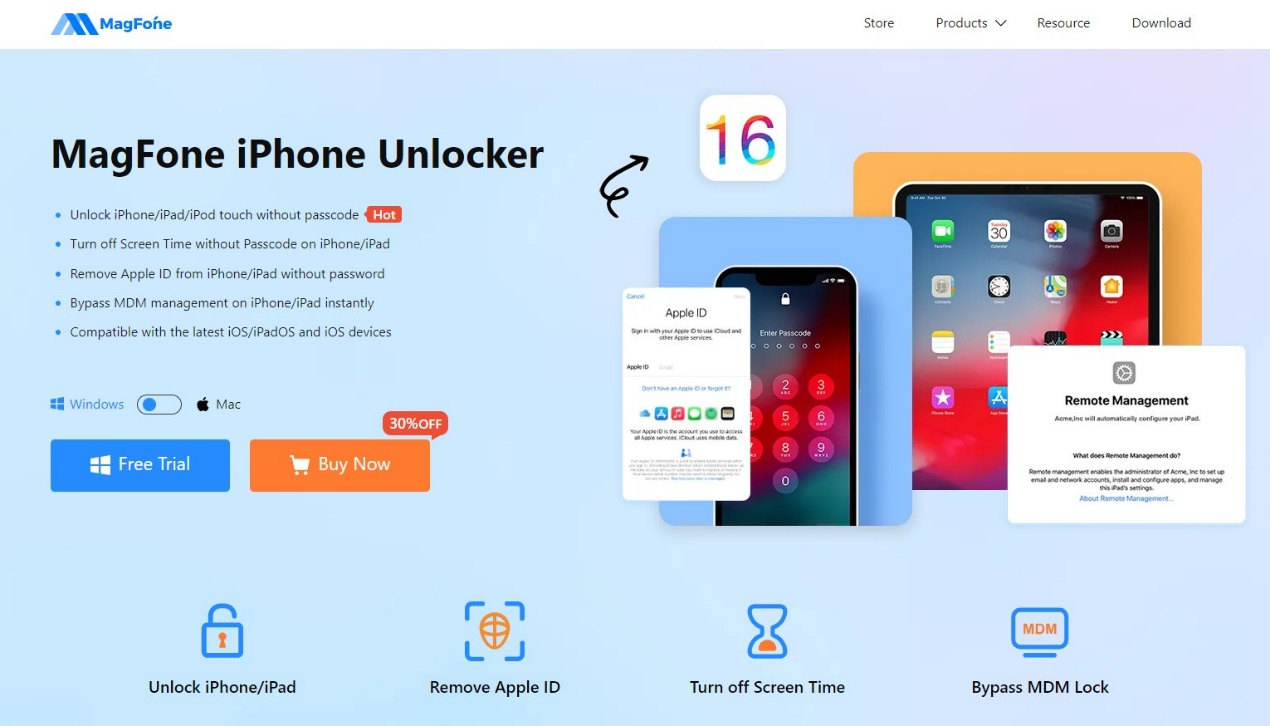
    The MagFone iPhone Unlocker is an excellent software tool that is designed specifically to remove screen passcodes, Apple ID, MDM restrictions, and Screen Time passcodes from iPhone, iPad, and iPod touch devices. With this tool, you can quickly know how to unlock iPhone without passcode or Face ID.
    What can be highlighted about MagFone iPhone Unlocker:

    Basically, the software was designed and programmed to become an easy-to-use tool for any user. Here is the list of what MagFone iPhone Unlocker can do for you.

    1. Unlock any kinds of iOS screen

    MagFone iPhone Unlocker can fully support for below 4 types of screen locks to help you unlock an iPhone without passcode or Face/Touch ID:

    • 4-digital passcode
    • 6-digital passcode
    • Face ID
    • Touch ID

    Regardless of the scenario we are experiencing, for example, a passcode suddenly forgotten that ends up with the device locked due to multiple wrong attempts, or you bought a second-hand iPhone, but it has screen lock etc. MagFone iPhone Unlocker is the perfect software if you want to apply to unlock your screen and gain access again in such situations.
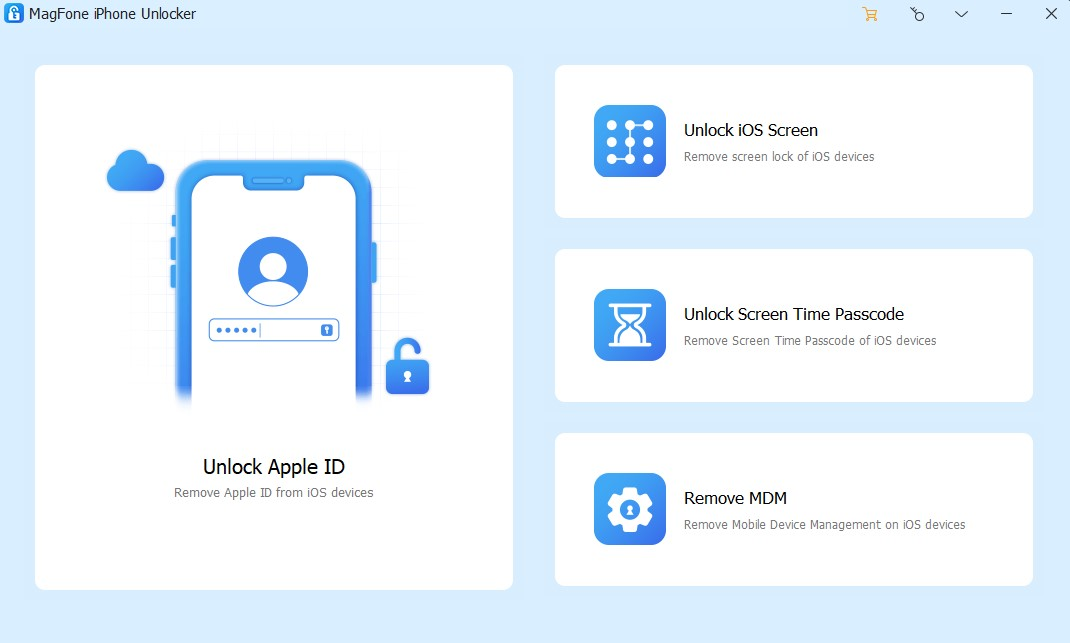
    1. Unlock Apple ID without password

    We all know that Apple is strict when it comes to securing its devices. If the password is entered too many times, we will surely have problems such as unable to enter Apple ID, deactivation or even blocking of Apple ID. Luckily, MagFone iPhone Unlocker is also a good tool to help iOS users to unlock Apple ID at ease.

    1. Bypass Screen Time passcode without any data loss:

    Surely, many device users have already set Screen Time to control their smartphone usage but then accidentally forgot the password… But of course to quickly remove Screen Time without passcode or restart passcode, MagFone iPhone Unlocker is ready to help with the advantage of no data loss. One less headache.

    1. Bypass the MDM Profile restrictions profile without data loss:

    Logically, each case is different and depending on the needs of each user, MagFone iPhone Unlocker was designed to be able to help in the most diverse situations, as has already been mentioned.

    So, if you want to access the features and applications without device restrictions, MagFone iPhone Unlocker helps us to remove mobile device management restrictions from your iPhone or iPad. Absolutely noteworthy is the fact that no data is lost, as the user’s name and account access code are not required.

    How to Remove Passcode from iPhone Screen, Step by Step

    How to unlock iPhone without Face ID or passcode with MagFone iPhone Unlocker? It is very easy, follow below steps to make it.

    Step 1: Run MagFone iPhone Unlocker and connect iPhone with computer
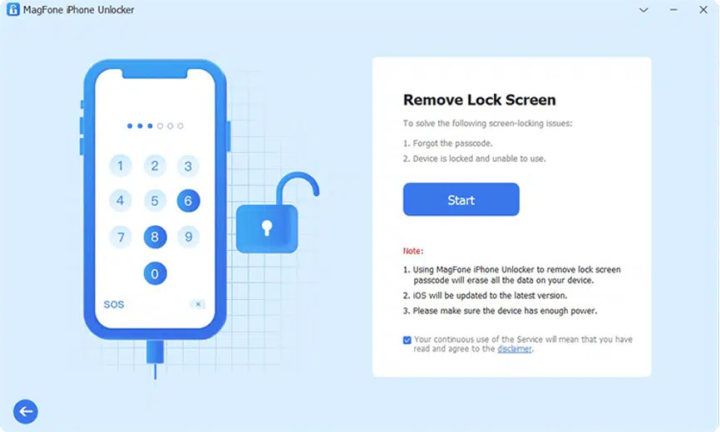
    After download and install MagFone iPhone Unlocker on your computer, quickly launch it on your desktop and connect your iPhone to your computer. Then choose “Unlock iOS Screen” from the main interface to continue.

    Step 2: Put iPhone in DFU/Recovery Mode
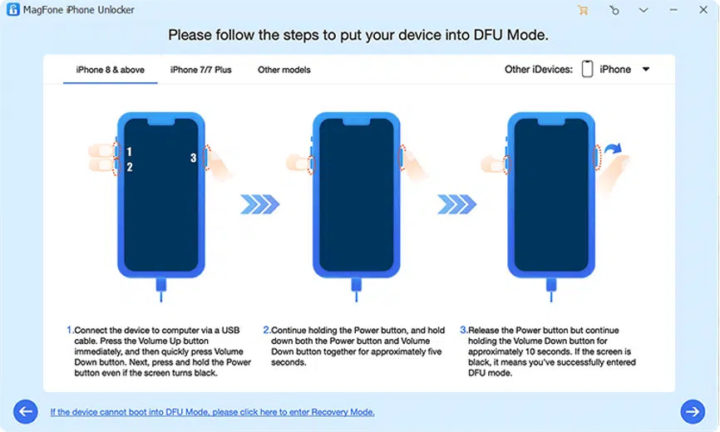
    Put your iPhone in DFU or recovery mode, so that MagFone iPhone Unlocker can detect your device.

    Step 3: Download Firmware package
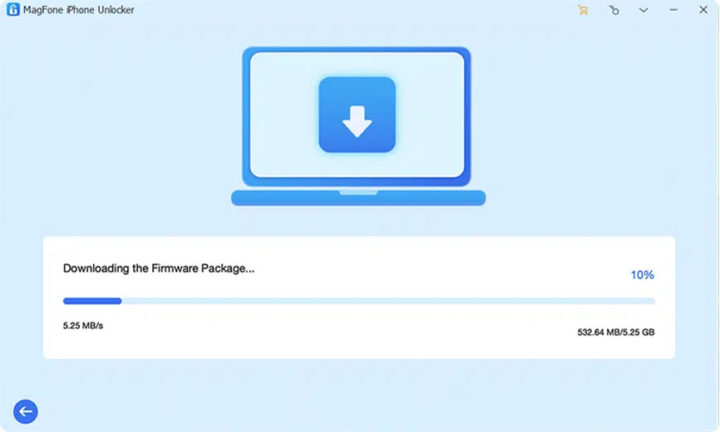
    After that, there are some model information about your iPhone, check if it is correct. If there is no problem, then you can download the firmware package and complete the verification.

    Step 4: Unlock iPhone passcode
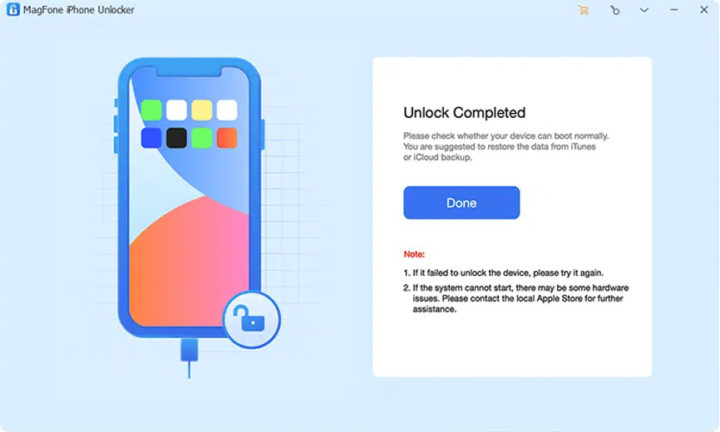
    Click “Unlock” to start unzipping the downloaded firmware package and begin the unlocking process.

    Second, make sure your device is always on and wait for the unlock to always reach the end.

    After that, your iPhone can be accessed again like a new device.

    Other guides to use with MagFone iPhone Unlocker

    How to Unlock Apple ID:

    • Turn on the iPhone and choose “Unlock Apple ID”,
    • Check and confirm device status,
    • Start unlocking Apple ID.

    How to unlock screen time passcode:

    • Turn on iPhone and select “Unlock Screen Time Passcode”,
    • Unlock Screen Time Passcode Unlock,
    • Finish setting up your iPhone.

    How to remove MDM:

    • Turn on iPhone and select “Remove MDM” option,
    • Quickly remove MDM from your device.

    Video

    https://www.youtube.com/watch?v=XIcOo_HJzRw

    Be sure to watch the video of the programmer, which cannot be more explicit.

    Compatibility of MagFone iPhone Unlocker:

    In general, we can indicate compatibility with the following Apple models:
    iPhone: From iPhone 4 to iPhone 14

    iPad: All kinds of iPad models

    iPod: From iPod touch 2 to iPod touch 7

    iOS version: From iOS 7 to the latest iOS 16


    Software available for:

    Windows: Windows XP or later

    Mac: Mac OS X 10.8 and later

    Prices of MagFone iPhone Unlocker:

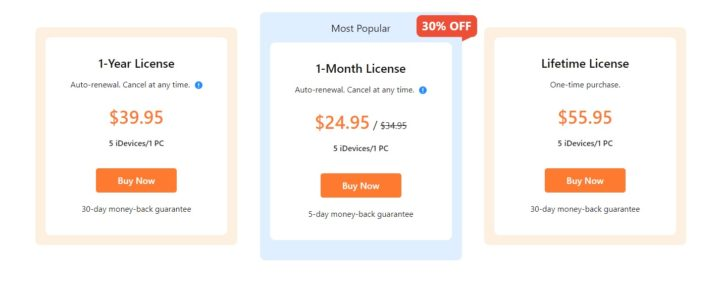
    However, given all the features of the software, one would expect that all of this would come at a cost. And come on, it’s not worth hiding. However, this software, in its great asset, is powerful enough to be recognized as a paid program and presents several options, depending on the needs of each one:

    • 1 month license: $24.95 for 5 iOS devices (iPhone/iPad/iPod). There is a 30% discount here.
    • 1 year license: $39.95 for 5 iOS devices (iPhone/iPad/iPod).
    • Lifetime License: $55.95 for 5 devices (iPhone/iPad/iPod).
    Conclusion

    It can happen to anyone that their iPhone gets blocked for whatever reason, and finding a solution is not always easy. Sharing the software in this article, the MagFone iPhone Unlocker, demonstrates precisely that, for an affordable price, we can solve major situations in a simple way and designed for the everyday user, always with high compatibility and an intuitive interface. It is highly recommended you to have a try.

    Share. Facebook Twitter Pinterest LinkedIn Tumblr Email

    Related Posts

    Xiaomi’s new phone has made an appearance at GSMA: The MIX TriFold triple foldable screen phone is expected to be released in Q3 next year

    Android 16 QPR2 system APK installer has been exposed and is compatible with the Material 3 design language

    The Prototype photos of Xiaomi 17 Ultra phone have been exposed, featuring a triple-camera layout on the back

    Leave A Reply Cancel Reply

    You must be logged in to post a comment.

    voopoo drag s3
    oxva xlim go 2
    sp2s sen x disposable vape
    jnr 100k
    • Popular
    • 3D Printer REVIEW
    • XIAOMI
    November 23, 2025

    VOOPOO DRAG X3 – Big Battery, Smart Tech, Pod-Mod Powerhouse (Review)

    November 23, 2025

    VOOPOO VINCI S: Pocket-Power Pod with a 2,000 mAh Heart — Big Battery, Simple Use (Review)

    November 19, 2025

    OXVA XLIM PRO 3 Pod Vape Quick Hands-on Review (Video Test Included)

    November 19, 2025

    OXVA XLIM 3 Ultra Pod Vape: Hands-on Review (Video Test Included)

    June 23, 2024

    ACMER P2 20W Laser Engraver Fixed Focus Engraving: Hands on Review

    May 30, 2024

    xTool F1 Ultra Review: World’s First 20W Fiber & 20W Diode Laser Engraver

    May 30, 2024

    Anycubic Kobra 3 Combo Review: The Multicolor Masterpiece?

    May 15, 2024

    SCULPFUN SF-A9 40W Laser Engraver Cutting Machine: Hands On Review

    December 5, 2025

    Xiaomi’s new phone has made an appearance at GSMA: The MIX TriFold triple foldable screen phone is expected to be released in Q3 next year

    December 5, 2025

    The Prototype photos of Xiaomi 17 Ultra phone have been exposed, featuring a triple-camera layout on the back

    December 2, 2025

    Xiaomi REDMI Turbo5 Pro phone will be launched before the Spring Festival, equipped with the only flagship chip in its class

    December 2, 2025

    Xiaomi has Released REDMI TV X55/65/75 2026: Mini LED starts at only 2,499 yuan

    fc 26 coins
    New Arrivals
    • IPLAY OOKA150k Disposable vape IPLAY OOKA150k Disposable vape
    • IPLAY LUMO 8K Puffs 2+10ml Prefilled Pod Kit IPLAY LUMO 8K Puffs 2+10ml Prefilled Pod Kit
    • Uwell Caliburn G5 Lite SE Pod System Kit Uwell Caliburn G5 Lite SE Pod System Kit
    • Uwell Caliburn G5 Lite KOKO Pod System Kit Uwell Caliburn G5 Lite KOKO Pod System Kit
    • Uwell Caliburn G5 Lite Pod System Kit Uwell Caliburn G5 Lite Pod System Kit
    • Freeton Trimax 60k Disposable Vape Freeton Trimax 60k Disposable Vape
    • Smoant Pasito 3 Vape Smoant Pasito 3 Vape
    • Yocan Flat 2.0 series Yocan Flat 2.0 series
    • Snowplus Swift Pod Vape Snowplus Swift Pod Vape
    About
  • Igeekphone.com provides the first global tech news and reviews about smartphone, vapes, e-cigar, smart home, 3D printers, e-bike,tablets, RC drones, VR headset, and other accessories. It's the best platform to improve your brand and product.
  • Contact us: info@igeekphone.com
  • Check Our Privacy Policy Here.
  • Note: *Right now we have US editor and EU editors for review, especially for Amazon US and EU.
  • *Shop and Compare Price Here*
  • Facebook
  • Youtube
  • OUR BEST VAPE PARTNERS
  • VAPE ONLINE STORE
  • HAYATI PRO MAX PLUS
  • VAPORESSO
  • VOOPOO
  • OXVA
  • NEXA
  • MASKKING
  • LOSTVAPE ORIONBAR
  • VEIIK
  • MEMERS
  • TODOO
  • SP2S
  • JNR
  • OTHER BEST PARTNERS
  • SVBONY
  • Chuwi
  • Blackview
  • Fossibot
  • Unihertz
  • Flsun
  • Anycubic
  • Xtool
  • Oukitel
  • Mukkpet Ebike
  • Ugreen
  • Copyright © 2025 igeekphone

    Type above and press Enter to search. Press Esc to cancel.