







Facebook Twitter Instagram
    Trending
    • Best Crypto Cloud Mining Platforms for 2026: 7 Safer Picks and a Guide to Earning Up to $9,700
    • New JTI Research Examines Illicit Tobacco Exposure in the UK and Ireland
    • UK Vaping Tax 2026: How the New £2.20 Per 10ml Duty Could Change E-Liquid and Pod Prices
    • IVG NEXiO Pre-Filled Pod System Launches With 10,000-Puff Reusable Design
    • Al Fakher Crown Bar Cloud Force Max Review: How Close Does It Come to the Traditional Hookah Experience?
    • Nexa Ultra II Disposable Vape Longevity Test: Can Its Flavor Stay Fresh Over Time?
    • Maskking Malux 50K Review: 50,000 Puffs with Dual Mesh
    • Lenovo RS103 vs. Premium Earclip Earbuds: What Does $30 Actually Buy You?
    Facebook YouTube
    IGeeKphone China Phone, Tablet PC, VR, RC Drone News, Reviews
    • HOME
    • BREAKING NEWS
      • AI NEWS
    • Amazon
    • PHONE
      • Top Phones For Your First Choice
      • Phone Comparison
      • Xiaomi
      • Blackview
      • Doogee
      • Black Shark
      • Geekbuying
      • Banggood
      • TEMU
      • TikTok
      • Aliexpress
      • Walmart
      • MercadoLibre
      • Lazada
    • TOP VAPE Awards for 2026
    • VAPES
      • E-CIGAR Upcoming
      • Vape News
      • Vape Deals
      • Vape Comparison
      • Vape Guide
      • VAPE LAWS
      • Giveaway
    • BEST VAPE
      • Best Vape Stores
      • Best Starter Vape Kits
      • Best Vapes for Beginners
      • Best Disposable Vapes
      • Best Pod Systems
      • Best Pod Mod Vapes
      • Best Mods
      • Best Nicotine Pouches
      • Best Clearomizers/Tanks
      • Best E-Liquid
      • Best EGO/Pens
      • Best Vapes for Nic Salt E-Juice
      • Best Vapes to Quit Smoking
      • RDA vs. RDTA vs. RTA
    • Best Vape Brand 2026
      • VAPORESSO
      • VOOPOO
      • OXVA
      • NEXA BAR
      • MASKKING VAPE
      • SP2S
      • IPLAY
      • TODOO
      • MRFOG
      • LOSTVAPE
      • VEIIK
    • REVIEW
      • E-cigar Review
      • Phones
      • Tablet PC
      • TV Box
      • RC Drone
      • Wearables
      • Camera
      • Accessories
      • VR Headset
    • MORE
      • TABLET
        • Chuwi
        • INNOCN
        • Teclast
        • Top Tablet for Your First Choice
        • Tablet/Laptop Comparison
      • RC DRONE
      • CAMERA
      • WEARABLES
        • OneOdio
        • BlitzWolf
        • Top Smartwatch for First Choice
      • 3D PRINTER
        • 3D Printer Review
        • Anycubic
        • FLSUN
        • Xtool
        • LONGER
        • Top 3D printer to Choose First
      • POWER STATION
        • Oukitel
        • FOSSIBOT
      • GAMING
        • Top Gaming Products
      • E-BIKE
        • Samebike
        • Happyrun
        • ENGWE
      • SMART HOME
      • TV BOX
      • ACCESSORIES
      • VR HEADSET
      • CLOTHES
      • AUTO CAR
    • DEAL
    • Shop
    IGeeKphone China Phone, Tablet PC, VR, RC Drone News, Reviews
    You are at:Home»Guide»How to Unlock iPhone without Passcode or Face ID With MagFone iPhone Unlocker
    Guide

    How to Unlock iPhone without Passcode or Face ID With MagFone iPhone Unlocker

    Brady CottonBy Brady CottonApril 17, 2023
    Facebook Twitter Pinterest LinkedIn Tumblr Email

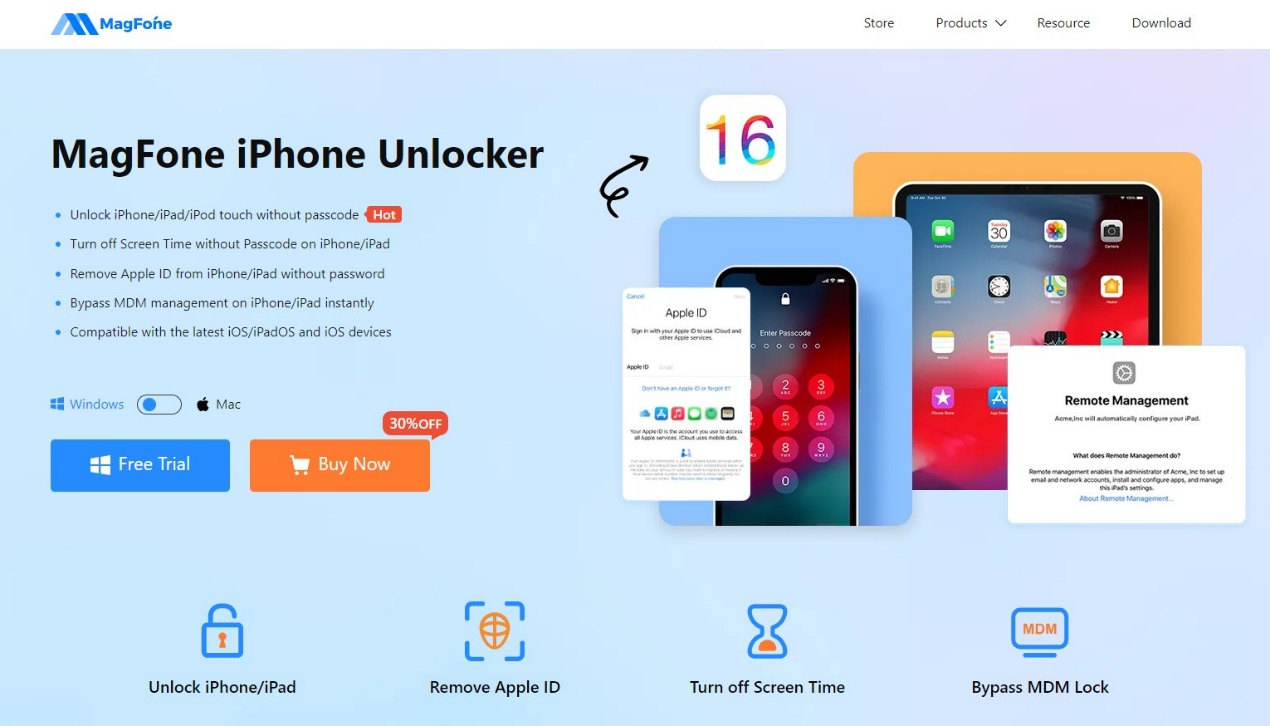
    If you find yourself unable to access your iPhone due to a forgotten passcode or Face ID malfunction, don’t worry. There are other ways to unlock your iPhone without using a passcode or Face ID. One of the most reliable methods to unlock an iPhone is by using a specialized iPhone unlock tool like the MagFone iPhone Unlocker.

    What is MagFone iPhone Unlocker:

    The MagFone iPhone Unlocker is an excellent software tool that is designed specifically to remove screen passcodes, Apple ID, MDM restrictions, and Screen Time passcodes from iPhone, iPad, and iPod touch devices. With this tool, you can quickly know how to unlock iPhone without passcode or Face ID.
    What can be highlighted about MagFone iPhone Unlocker:

    Basically, the software was designed and programmed to become an easy-to-use tool for any user. Here is the list of what MagFone iPhone Unlocker can do for you.

    1. Unlock any kinds of iOS screen

    MagFone iPhone Unlocker can fully support for below 4 types of screen locks to help you unlock an iPhone without passcode or Face/Touch ID:

    • 4-digital passcode
    • 6-digital passcode
    • Face ID
    • Touch ID

    Regardless of the scenario we are experiencing, for example, a passcode suddenly forgotten that ends up with the device locked due to multiple wrong attempts, or you bought a second-hand iPhone, but it has screen lock etc. MagFone iPhone Unlocker is the perfect software if you want to apply to unlock your screen and gain access again in such situations.
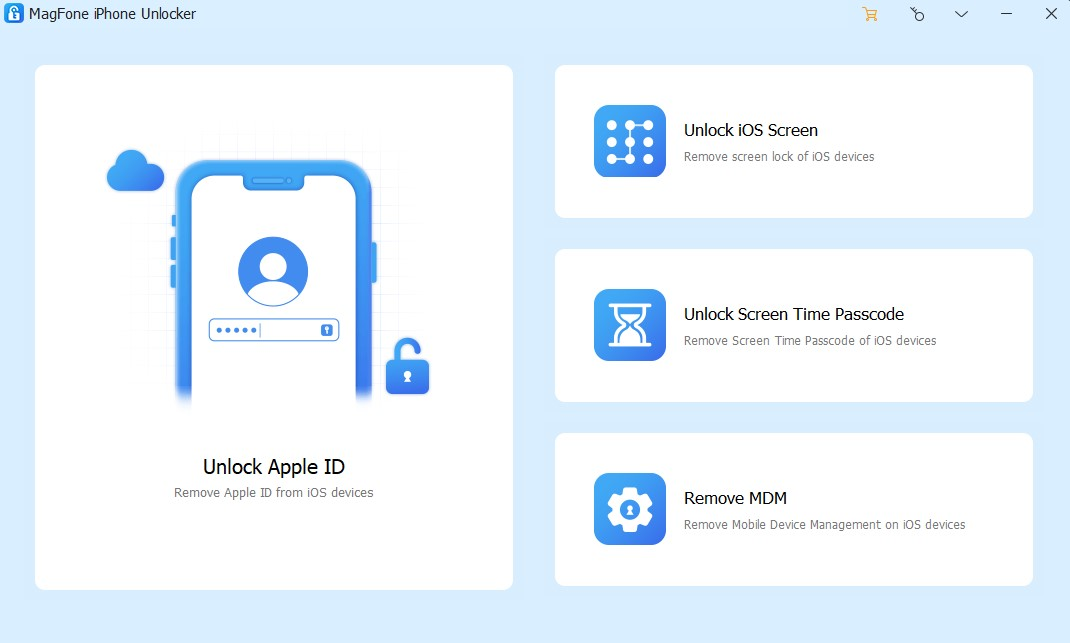
    1. Unlock Apple ID without password

    We all know that Apple is strict when it comes to securing its devices. If the password is entered too many times, we will surely have problems such as unable to enter Apple ID, deactivation or even blocking of Apple ID. Luckily, MagFone iPhone Unlocker is also a good tool to help iOS users to unlock Apple ID at ease.

    1. Bypass Screen Time passcode without any data loss:

    Surely, many device users have already set Screen Time to control their smartphone usage but then accidentally forgot the password… But of course to quickly remove Screen Time without passcode or restart passcode, MagFone iPhone Unlocker is ready to help with the advantage of no data loss. One less headache.

    1. Bypass the MDM Profile restrictions profile without data loss:

    Logically, each case is different and depending on the needs of each user, MagFone iPhone Unlocker was designed to be able to help in the most diverse situations, as has already been mentioned.

    So, if you want to access the features and applications without device restrictions, MagFone iPhone Unlocker helps us to remove mobile device management restrictions from your iPhone or iPad. Absolutely noteworthy is the fact that no data is lost, as the user’s name and account access code are not required.

    How to Remove Passcode from iPhone Screen, Step by Step

    How to unlock iPhone without Face ID or passcode with MagFone iPhone Unlocker? It is very easy, follow below steps to make it.

    Step 1: Run MagFone iPhone Unlocker and connect iPhone with computer
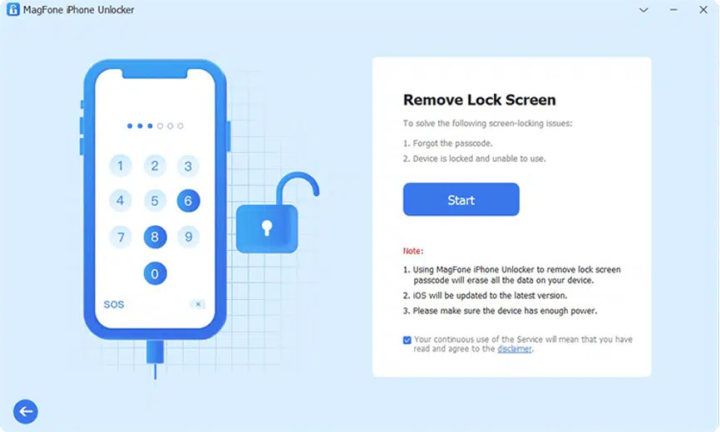
    After download and install MagFone iPhone Unlocker on your computer, quickly launch it on your desktop and connect your iPhone to your computer. Then choose “Unlock iOS Screen” from the main interface to continue.

    Step 2: Put iPhone in DFU/Recovery Mode
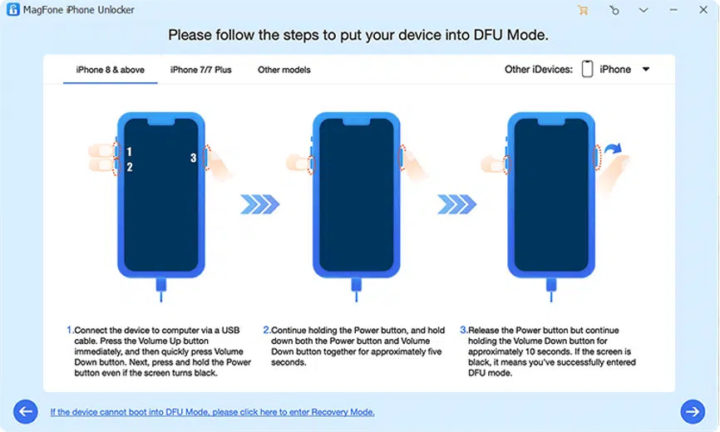
    Put your iPhone in DFU or recovery mode, so that MagFone iPhone Unlocker can detect your device.

    Step 3: Download Firmware package
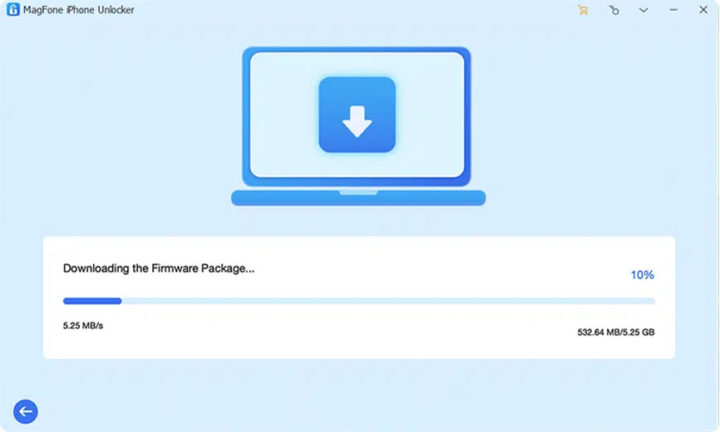
    After that, there are some model information about your iPhone, check if it is correct. If there is no problem, then you can download the firmware package and complete the verification.

    Step 4: Unlock iPhone passcode
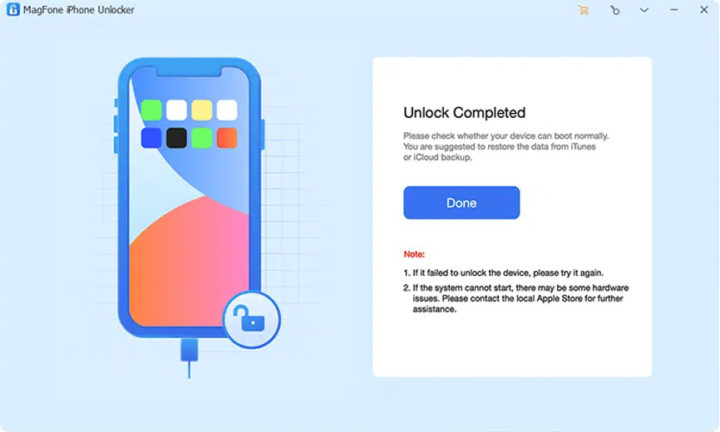
    Click “Unlock” to start unzipping the downloaded firmware package and begin the unlocking process.

    Second, make sure your device is always on and wait for the unlock to always reach the end.

    After that, your iPhone can be accessed again like a new device.

    Other guides to use with MagFone iPhone Unlocker

    How to Unlock Apple ID:

    • Turn on the iPhone and choose “Unlock Apple ID”,
    • Check and confirm device status,
    • Start unlocking Apple ID.

    How to unlock screen time passcode:

    • Turn on iPhone and select “Unlock Screen Time Passcode”,
    • Unlock Screen Time Passcode Unlock,
    • Finish setting up your iPhone.

    How to remove MDM:

    • Turn on iPhone and select “Remove MDM” option,
    • Quickly remove MDM from your device.

    Video

    https://www.youtube.com/watch?v=XIcOo_HJzRw

    Be sure to watch the video of the programmer, which cannot be more explicit.

    Compatibility of MagFone iPhone Unlocker:

    In general, we can indicate compatibility with the following Apple models:
    iPhone: From iPhone 4 to iPhone 14

    iPad: All kinds of iPad models

    iPod: From iPod touch 2 to iPod touch 7

    iOS version: From iOS 7 to the latest iOS 16


    Software available for:

    Windows: Windows XP or later

    Mac: Mac OS X 10.8 and later

    Prices of MagFone iPhone Unlocker:

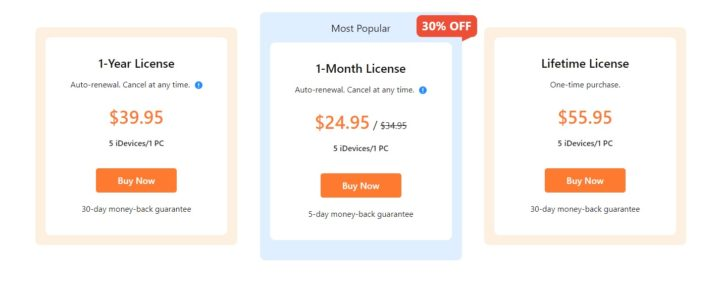
    However, given all the features of the software, one would expect that all of this would come at a cost. And come on, it’s not worth hiding. However, this software, in its great asset, is powerful enough to be recognized as a paid program and presents several options, depending on the needs of each one:

    • 1 month license: $24.95 for 5 iOS devices (iPhone/iPad/iPod). There is a 30% discount here.
    • 1 year license: $39.95 for 5 iOS devices (iPhone/iPad/iPod).
    • Lifetime License: $55.95 for 5 devices (iPhone/iPad/iPod).
    Conclusion

    It can happen to anyone that their iPhone gets blocked for whatever reason, and finding a solution is not always easy. Sharing the software in this article, the MagFone iPhone Unlocker, demonstrates precisely that, for an affordable price, we can solve major situations in a simple way and designed for the everyday user, always with high compatibility and an intuitive interface. It is highly recommended you to have a try.

    Share. Facebook Twitter Pinterest LinkedIn Tumblr Email

    Related Posts

    Important Things You Must Consider As A Small Business Owner

    Xiaomi 18 Series: First to Feature 2nm Snapdragon 8 Elite Gen 6 Pro, Dedicated AI Button, and 8000mAh Battery

    To conduct business effectively, utilize a Genome business account

    Leave A Reply Cancel Reply

    You must be logged in to post a comment.

    voopoopintch
    oxva nexlim 2
    sp2s sen x disposable vape
    • Popular
    • 3D Printer REVIEW
    • XIAOMI
    July 13, 2026

    OXVA Nexlim 2 Mini Pod Vape Hands on Review

    July 13, 2026

    OXVA Nexlim 2 Pod Vape Hands on Review

    June 21, 2026

    iPlay LUMO 8K Review – A Compact Prefilled Pod Kit with Big Flavor and Everyday Convenience

    June 21, 2026

    iPlay HOOLA 150K Review – A Cloud-Chasing Giant with Music, Modes & Massive Longevity

    December 26, 2025

    ACMER ASCARVA 4S: Precision CNC Power for Makers, DIYers & Small Workshops

    June 23, 2024

    ACMER P2 20W Laser Engraver Fixed Focus Engraving: Hands on Review

    May 30, 2024

    xTool F1 Ultra Review: World’s First 20W Fiber & 20W Diode Laser Engraver

    May 30, 2024

    Anycubic Kobra 3 Combo Review: The Multicolor Masterpiece?

    August 18, 2026

    Xiaomi 18 Series: First to Feature 2nm Snapdragon 8 Elite Gen 6 Pro, Dedicated AI Button, and 8000mAh Battery

    August 18, 2026

    Xiaomi 18 Ultra International Cancelled? OPPO and Vivo Also Pull Back Ultra Phones Overseas – Report

    August 15, 2026

    Xiaomi MIX Fold 5 Rumors: XRing O3, HyperOS 4 and Major Upgrade Expected

    August 15, 2026

    Xiaomi 18 Series Rumors: Standard Model Delayed to Early 2027, “MiaoXiang Rear Display” Exclusive to Pro Models

    fc 26 coins
    New Arrivals
    • Al Fakher Crown Bar Cloud Force Max 50K Disposable Vape Al Fakher Crown Bar Cloud Force Max 50K Disposable Vape
    • Vaporesso Prix Pod System Kit Vaporesso Prix Pod System Kit
    • Royal Tobacco Extracts x Pod Juice E-juice Royal Tobacco Extracts x Pod Juice E-juice
    • Geek Vape Go Pod System Kit Geek Vape Go Pod System Kit
    • EVRFOG 100K Disposable Vape Kit EVRFOG 100K Disposable Vape Kit
    • Loon Air Plus 6000 Disposable Vape Loon Air Plus 6000 Disposable Vape
    • Pod Juice Tobacco Series E-juice Pod Juice Tobacco Series E-juice
    • Huawei Watch GT 7 Pro Huawei Watch GT 7 Pro
    • Huawei Watch GT 7 Huawei Watch GT 7
    About
  • Igeekphone.com provides the first global tech news and reviews about smartphone, vapes, e-cigar, smart home, 3D printers, e-bike,tablets, RC drones, VR headset, and other accessories. It's the best platform to improve your brand and product.
  • Contact us: info@igeekphone.com
  • Check Our Privacy Policy Here.
  • Note: *Right now we have US editor and EU editors for review, especially for Amazon US and EU.
  • *Shop and Compare Price Here*
  • Facebook
  • Youtube
  • OUR BEST VAPE PARTNERS
  • VAPE ONLINE STORE
  • VAPORESSO
  • VOOPOO
  • OXVA
  • NEXA
  • MASKKING
  • SP2S
  • IPLAY
  • TODOO
  • OTHER BEST PARTNERS
  • SVBONY
  • Chuwi
  • Blackview
  • Fossibot
  • Unihertz
  • Flsun
  • Anycubic
  • Xtool
  • Oukitel
  • Mukkpet Ebike
  • Ugreen
  • Copyright © 2026 igeekphone

    Type above and press Enter to search. Press Esc to cancel.