





Facebook Twitter Instagram
    Trending
    • Nexa Ultra 50K II Disposable Vape vs. Remit Solar 50K Disposable Vape Review-Which One Should You Pick?
    • Picking a vape kit? Here’s why refillable could beat prefilled
    • France implements ban on nicotine pouches – BAT says it has stopped selling and is focusing on Vape business
    • YUMI Nebula 50K Disposable Vape Kit Review— A Powerful Long‑Lasting Vape Experience
    • Why Sports Game Apps are the Ultimate Entertainment: Top Reasons
    • How Smart AC Companies Are Turning Homes into Climate-Controlled Tech Zones
    • From Gadgets to Evidence: The Role of Technology in Modern Criminal Defense Strategies
    • How can I Directly Flip iPhone Air to the Top?
    Facebook YouTube
    IGeeKphone China Phone, Tablet PC, VR, RC Drone News, Reviews
    • HOME
      • NEWS
        • DeepSeek
        • ChatGPT
        • Minecraft
    • Amazon
    • PHONE
      • Top Phones For Your First Choice
      • Phone Comparison
      • Xiaomi
      • Blackview
      • Doogee
      • Black Shark
      • Geekbuying
      • Banggood
      • TEMU
      • TikTok
      • Aliexpress
      • Walmart
      • MercadoLibre
      • Lazada
    • TOP VAPE Awards for 2026
    • VAPES
      • E-CIGAR Upcoming
      • Vape News
      • Vape Deals
      • Vape Comparison
      • Vape Guide
      • Giveaway
    • BEST VAPE
      • Best Vape Stores
      • Best Starter Vape Kits
      • Best Vapes for Beginners
      • Best Disposable Vapes
      • Best Pod Systems
      • Best Pod Mod Vapes
      • Best Mods
      • Best Nicotine Pouches
      • Best Clearomizers/Tanks
      • Best E-Liquid
      • Best EGO/Pens
      • Best Vapes for Nic Salt E-Juice
      • Best Vapes to Quit Smoking
      • RDA vs. RDTA vs. RTA
    • Best Vape Brand 2026
      • VAPORESSO
      • VOOPOO
      • OXVA
      • NEXA BAR
      • ORIONBARTECH
      • MASKKING VAPE
      • MEMERS
      • SP2S
      • TODOO
      • MRFOG
      • VEIIK
    • REVIEW
      • E-cigar Review
      • Phones
      • Tablet PC
      • TV Box
      • RC Drone
      • Wearables
      • Camera
      • Accessories
      • VR Headset
    • MORE
      • TABLET
        • Chuwi
        • INNOCN
        • Teclast
        • Top Tablet for Your First Choice
        • Tablet/Laptop Comparison
      • RC DRONE
      • CAMERA
      • WEARABLES
        • OneOdio
        • BlitzWolf
        • Top Smartwatch for First Choice
      • 3D PRINTER
        • 3D Printer Review
        • Anycubic
        • FLSUN
        • Xtool
        • LONGER
        • Top 3D printer to Choose First
      • POWER STATION
        • Oukitel
        • FOSSIBOT
      • GAMING
        • Top Gaming Products
      • E-BIKE
        • Samebike
        • Happyrun
        • ENGWE
      • SMART HOME
      • TV BOX
      • ACCESSORIES
      • VR HEADSET
      • CLOTHES
      • AUTO CAR
    • DEAL
    • VAPE LAWS
    • Shop
    IGeeKphone China Phone, Tablet PC, VR, RC Drone News, Reviews
    You are at:Home»Amazon»The Ultimate Guide to Wireless HDMI: Plug-and-Play Simplicity for Modern Streaming & Conferencing
    Amazon

    The Ultimate Guide to Wireless HDMI: Plug-and-Play Simplicity for Modern Streaming & Conferencing

    Brady CottonBy Brady CottonSeptember 30, 2025
    Facebook Twitter Pinterest LinkedIn Tumblr Email

    Cut the Cords with Wireless HDMI Technology

    In an era where flexibility and efficiency reign supreme, traditional HDMI cables feel like relics of the past. Enter wireless HDMI—a game-changing solution that lets you transmit high-quality video and audio without the hassle of tangled wires. Whether you’re streaming movies, hosting a conference call, or setting up a multi-room entertainment system, HDMI wireless video transmission offers unparalleled convenience.

    This guide dives deep into the world of wireless HDMI extenders, focusing on plug-and-play HDMI systems that eliminate technical headaches. We’ll explore how technologies like 5GHz HDMI transmission ensure low latency, and why devices like the SVBONY Transair3 ST4 are redefining wireless connectivity for both home and professional use.

    What Is Wireless HDMI? How Does It Work?

    Wireless HDMI replaces physical cables with a transmitter-receiver pair that streams video and audio signals through the air. Here’s how it breaks down:

    • Transmitter: Connects to your source device (e.g., laptop, gaming console) via HDMI.
    • Receiver: Plugs into your display (TV, projector, monitor).
    • Transmission: Uses radio frequencies (typically 5GHz) to send uncompressed video, ensuring minimal lag.

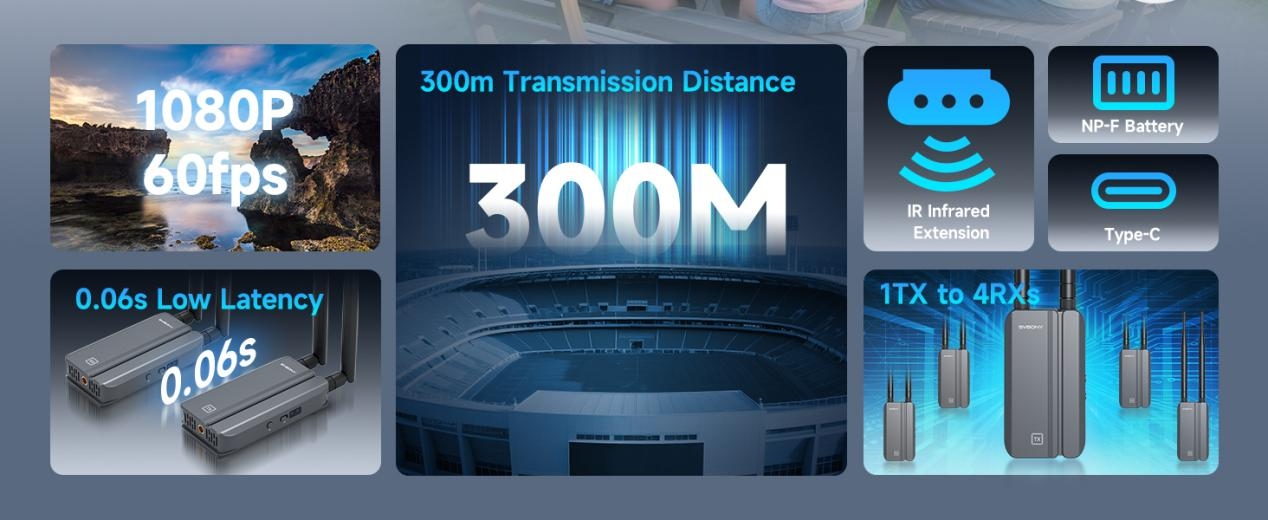
    Unlike Bluetooth or Wi-Fi streaming, HDMI wireless video transmission prioritizes quality and reliability, making it ideal for low latency HDMI applications like gaming or live streaming. The SVBONY Transair3 ST4, for example, leverages 5GHz HDMI transmission to deliver 1080P/60fps video with just 0.06s delay—perfect for real-time interactions.

    Key Features to Look For in a Wireless HDMI System

    Not all wireless HDMI solutions are created equal. Here’s what matters most:

    1. Plug-and-Play Simplicity

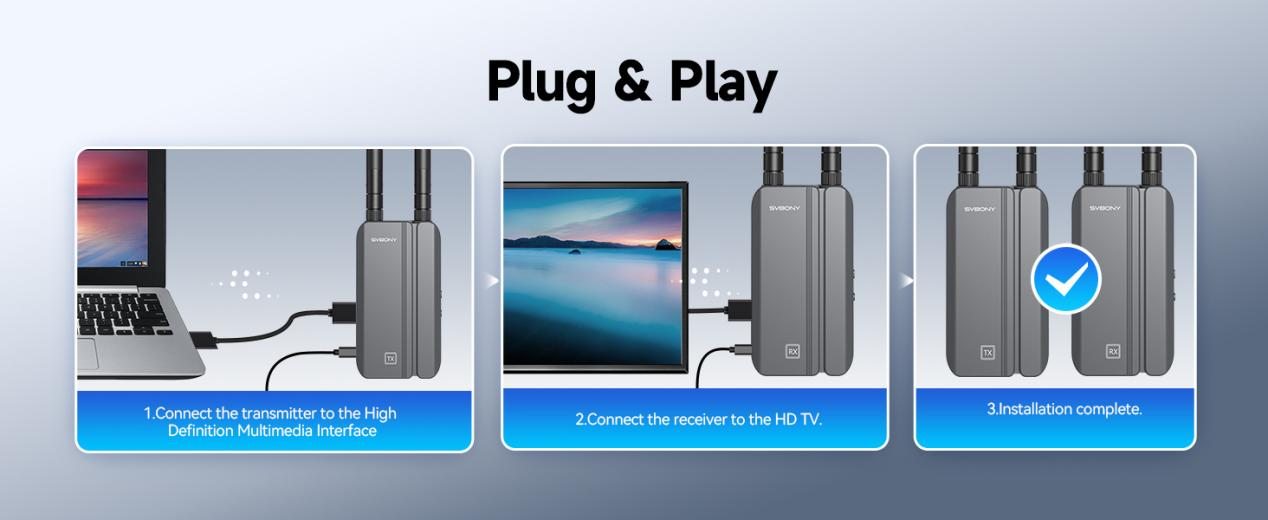
    The best systems, like the SVBONY Transair3 ST4, require no software installation or complex setup. Just connect the transmitter and receiver to power and HDMI ports, and you’re ready to go. This plug-and-play HDMI design is a lifesaver for non-tech-savvy users or quick presentations.

    1. Low Latency for Real-Time Use

    For HDMI for live streaming or gaming, latency must be minimal. The Transair3 ST4 achieves an ultra-low 0.06s latency via 5GHz HDMI transmission, which avoids interference from crowded 2.4GHz bands.

    1. Multi-Room Streaming Capabilities

    Need to share content across rooms? Some extenders support HDMI multi-room streaming by pairing multiple receivers to one transmitter. The Transair3 ST4 supports 1 transmitter to 4 receivers, making it perfect for whole-home entertainment or conference room setups.

    1. Strong Signal Penetration

    With a range of up to 300 meters in open areas and strong wall-penetrating capability, this system ensures stable performance even in large spaces.
    Why Choose the SVBONY Transair3 ST4? A Deep Dive

    • The Transair3 ST4 stands out for its balance of performance and ease of use. Here’s why it’s a top pick:
    • True Plug-and-Play: No drivers, apps, or passwords needed.
    • 1080P/60fps Support: Crystal-clear visuals for movies, gaming, and professional use.
    • 300m Range: Works through walls and floors, ideal for large homes or offices.
    • Infrared Remote Extension: Control your set-top box from another room.
    • Dual Power Options: Use Type-C or NP-F batteries for flexibility.

    One user raves:

    “I set up the Transair3 ST4 in minutes for my church’s live streams. The low latency means the audience sees exactly what I’m doing in real time—no awkward delays!”

    Step-by-Step Setup Guide

    Let’s walk through configuring the SVBONY Transair3 ST4:

    Unbox and Power Up:

    • Plug the transmitter into your source device’s HDMI port.
    • Connect the receiver to your display’s HDMI input.
    • Use the included Type-C cables or NP-F batteries for power.

    Test Your Connection:

    • Play a video or slideshow. Adjust antenna angles if signal strength is weak.

    Optimize Settings:

    • Ensure your source and display support 1080P/60fps.
    • Keep devices within line of sight for best performance.

    Common Use Cases for Wireless HDMI
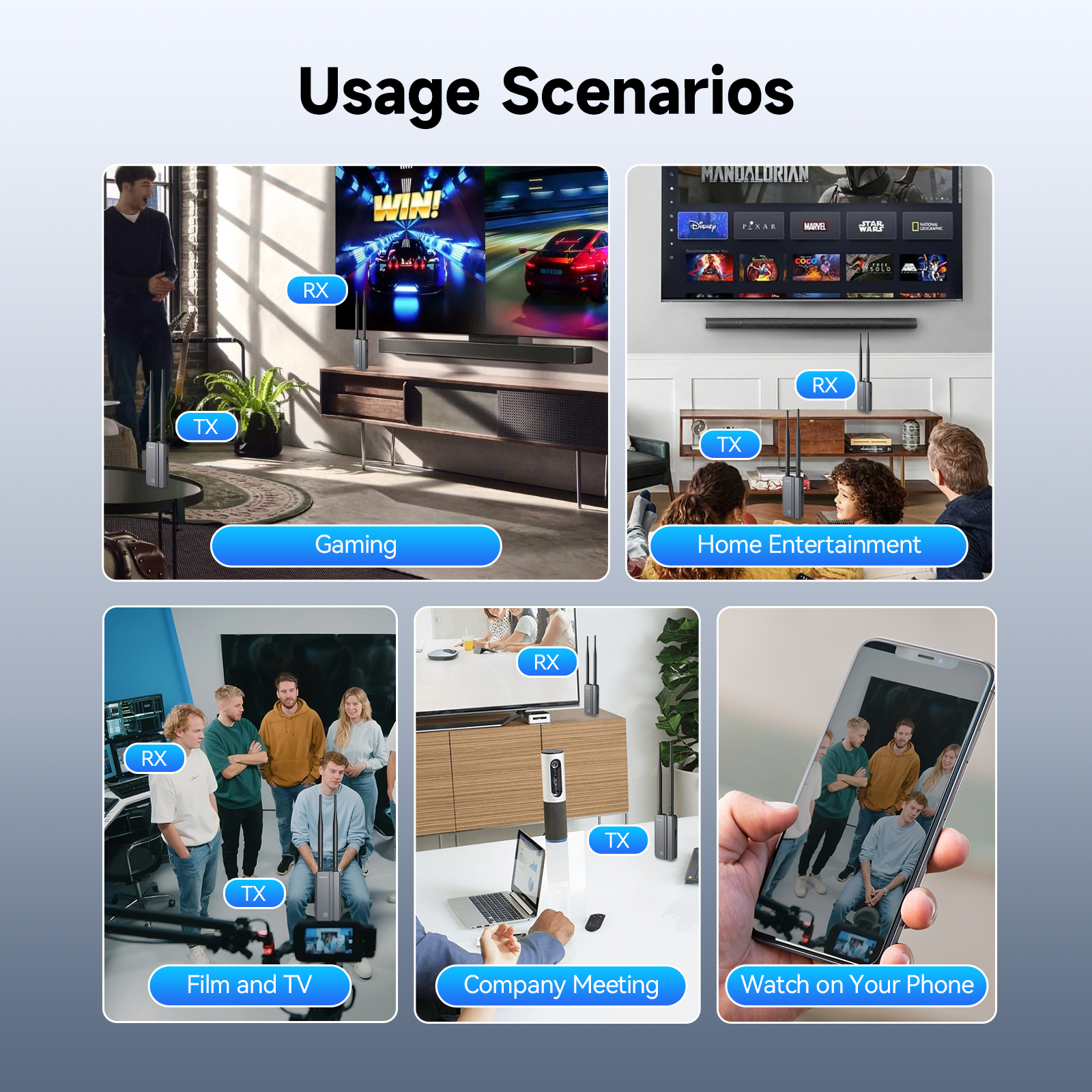
    Home Entertainment:

    • Stream from your laptop to the TV without moving furniture.
    • Connect a gaming console to a projector for outdoor movie nights.

    Professional Settings:

    • HDMI for conference room: Share presentations wirelessly from laptops to screens.
    • HDMI for live streaming: Connect cameras to monitors for real-time monitoring.

    Education:

    • Teachers can roam freely while projecting lessons onto interactive whiteboards.

    Troubleshooting Tips

    Even plug-and-play systems can hit snags. Here’s how to fix them:

    ❌ No Signal? Check power connections and HDMI ports. Try restarting devices.

    ❌ Laggy Video? Move closer to the receiver or reduce interference from other wireless devices.

    ❌ Audio Sync Issues? Update your display’s firmware or use an HDMI audio extractor.

    Conclusion: Embrace the Wireless Future

    Wireless HDMI isn’t just a convenience—it’s a productivity booster and a clutter-buster. With plug-and-play HDMI systems like the SVBONY Transair3 ST4, anyone can enjoy HDMI wireless video transmission without technical expertise. Whether you’re streaming, gaming, or presenting, cutting the cord frees you to focus on what matters most.

    Ready to upgrade? Explore the SVBONY Transair3 ST4 today and rediscover the joy of cable-free living.Amazon.com: SVBONY TransAir3 Wireless HDMI Transmitter and 2 Receiver, 328FT Wireless Hdmi Extender, 5G 0.06s Latency, 1080P/60FPS, Support HDMI Loop-Out, IR Remote, APP Control, for Camera Projector Home Office : Electronics

    Share. Facebook Twitter Pinterest LinkedIn Tumblr Email

    Related Posts

    SriHome DH013 Plus 4MP HD Smart Pet Camera Review-The Ultimate Pet Monitoring Solution

    QCY MeloBuds N50 ANC Earbuds Review at $21.99-Premium Sound Meets Smart Noise Cancellation

    AOV 4G 15MP HD Three‑lens Solar Security Camera Review– Ultimate Outdoor Protection

    Leave A Reply Cancel Reply

    You must be logged in to post a comment.

    voopoo drag 6
    oxva xlim 3 ultra
    sp2s sen x disposable vape
    • Popular
    • 3D Printer REVIEW
    • XIAOMI
    March 16, 2026

    OXVA Slimstick VS OXVA Slimstick X Vape Hands-on Review

    March 5, 2026

    OXVA XLIM PRO 3 vs XLIM Pro 2 DNA: Hands-On Review

    March 5, 2026

    OXVA XLIM PRO 3 vs XLIM GO 2: Hands-On Review

    March 2, 2026

    OXVA XLIM PRO 3 vs XLIM 3 ULTRA: Hands-On Review

    December 26, 2025

    ACMER ASCARVA 4S: Precision CNC Power for Makers, DIYers & Small Workshops

    June 23, 2024

    ACMER P2 20W Laser Engraver Fixed Focus Engraving: Hands on Review

    May 30, 2024

    xTool F1 Ultra Review: World’s First 20W Fiber & 20W Diode Laser Engraver

    May 30, 2024

    Anycubic Kobra 3 Combo Review: The Multicolor Masterpiece?

    April 7, 2026

    Redmi K90 Max from Xiaomi Revealed as a Competing Product for the Same Month: equipped with MediaTek 9500 chip

    April 4, 2026

    Xiaomi Watch S5 Review: 316L Stainless Steel, Ultra-Long Battery Life

    April 1, 2026

    Xiaomi Smart Camera 4 Max AI Zoom Edition Released: 12x zoom, supports elderly/children/pet monitoring at 799 yuan!

    March 26, 2026

    The Telephoto Lens of Xiaomi 18 Ultra has Undergone a Comprehensive Upgrade: with an Ultra-Large Sensor, LOFIC Technology

    fc 26 coins
    New Arrivals
    • Remit Solar 50K Disposable Vape Remit Solar 50K Disposable Vape
    • YUMI Nebula 50K Disposable Vape Kit YUMI Nebula 50K Disposable Vape Kit
    • Dotmod dotBox V2 Vape Mod Kit Dotmod dotBox V2 Vape Mod Kit
    • Valaya Amp 60K By Uwell Disposable Vape Valaya Amp 60K By Uwell Disposable Vape
    • Vivo V70 Vivo V70
    • Waspe Bar 60K Disposable Vape Waspe Bar 60K Disposable Vape
    • Dojo Purex 60K Disposable Vape Dojo Purex 60K Disposable Vape
    • Geekvape Kloud Refillable Disposable Vape Geekvape Kloud Refillable Disposable Vape
    • Suonon Amber 80K Disposable Vape Kit Suonon Amber 80K Disposable Vape Kit
    About
  • Igeekphone.com provides the first global tech news and reviews about smartphone, vapes, e-cigar, smart home, 3D printers, e-bike,tablets, RC drones, VR headset, and other accessories. It's the best platform to improve your brand and product.
  • Contact us: info@igeekphone.com
  • Check Our Privacy Policy Here.
  • Note: *Right now we have US editor and EU editors for review, especially for Amazon US and EU.
  • *Shop and Compare Price Here*
  • Facebook
  • Youtube
  • OUR BEST VAPE PARTNERS
  • VAPE ONLINE STORE
  • HAYATI PRO MAX PLUS
  • VAPORESSO
  • VOOPOO
  • OXVA
  • NEXA
  • MASKKING
  • TODOO
  • SP2S
  • VEIIK
  • OTHER BEST PARTNERS
  • SVBONY
  • Chuwi
  • Blackview
  • Fossibot
  • Unihertz
  • Flsun
  • Anycubic
  • Xtool
  • Oukitel
  • Mukkpet Ebike
  • Ugreen
  • Copyright © 2026 igeekphone

    Type above and press Enter to search. Press Esc to cancel.