







Facebook Twitter Instagram
    Trending
    • How D4Gold.com Can Enhance Your Diablo 4 Experience: A Guide to Buying Gold and Items
    • Countdown Begins: FOSSiBOT F116 Pro Smartphone Launching on Kickstarter March 17
    • High-Quality Seeds: The Foundation of a Successful Garden
    • SJCAM SJ6 Ultra Action Camera Review: Capture Your Adventures in Stunning 4K
    • Record Your Singing For Youtube with this guide
    • Lenovo Erazer XP6 OWS Earbuds Review at $47.99: The Ultimate Open-Ear Sports Headphones
    • SP2S Ocean vs Friobar IC18K: Comparison Review
    • Srihome SH028 8MP 4K Outdoor Security Camera Review: High-Definition, Smart Security for Your Home
    Facebook YouTube
    Login Register
    IGeeKphone China Phone, Tablet PC, VR, RC Drone News, Reviews
    • HOME
      • NEWS
        • DeepSeek
        • ChatGPT
        • Minecraft
    • Amazon
    • PHONE
      • Top Phones For Your First Choice
      • Phone Comparison
      • Xiaomi
      • Blackview
      • Doogee
      • Black Shark
      • Geekbuying
      • Banggood
      • TEMU
      • TikTok
      • Aliexpress
      • Walmart
      • MercadoLibre
      • Lazada
    • TOP VAPE Awards for 2026
    • VAPES
      • E-CIGAR Upcoming
      • Vape News
      • Vape Deals
      • Vape Comparison
      • Vape Guide
      • Giveaway
    • BEST VAPE
      • Best Vape Stores
      • Best Starter Vape Kits
      • Best Vapes for Beginners
      • Best Disposable Vapes
      • Best Pod Systems
      • Best Pod Mod Vapes
      • Best Mods
      • Best Nicotine Pouches
      • Best Clearomizers/Tanks
      • Best E-Liquid
      • Best EGO/Pens
      • Best Vapes for Nic Salt E-Juice
      • Best Vapes to Quit Smoking
      • RDA vs. RDTA vs. RTA
    • Best Vape Brand 2026
      • VAPORESSO
      • VOOPOO
      • OXVA
      • NEXA BAR
      • ORIONBARTECH
      • MASKKING VAPE
      • MEMERS
      • SP2S
      • JNR
      • TODOO
      • MRFOG
      • VEIIK
    • REVIEW
      • E-cigar Review
      • Phones
      • Tablet PC
      • TV Box
      • RC Drone
      • Wearables
      • Camera
      • Accessories
      • VR Headset
    • MORE
      • TABLET
        • Chuwi
        • INNOCN
        • Teclast
        • Top Tablet for Your First Choice
        • Tablet/Laptop Comparison
      • RC DRONE
      • CAMERA
      • WEARABLES
        • OneOdio
        • BlitzWolf
        • Top Smartwatch for First Choice
      • 3D PRINTER
        • 3D Printer Review
        • Anycubic
        • FLSUN
        • Xtool
        • LONGER
        • Top 3D printer to Choose First
      • POWER STATION
        • Oukitel
        • FOSSIBOT
      • GAMING
        • Top Gaming Products
      • E-BIKE
        • Samebike
        • Happyrun
        • ENGWE
      • SMART HOME
      • TV BOX
      • ACCESSORIES
      • VR HEADSET
      • CLOTHES
      • AUTO CAR
    • DEAL
    • VAPE LAWS
    • Shop
    IGeeKphone China Phone, Tablet PC, VR, RC Drone News, Reviews
    You are at:Home»Guide»What should I do if the camera on OnePlus Ace 6 fails to turn off the black screen?
    Guide

    What should I do if the camera on OnePlus Ace 6 fails to turn off the black screen?

    Brady CottonBy Brady CottonFebruary 10, 2026
    Facebook Twitter Pinterest LinkedIn Tumblr Email

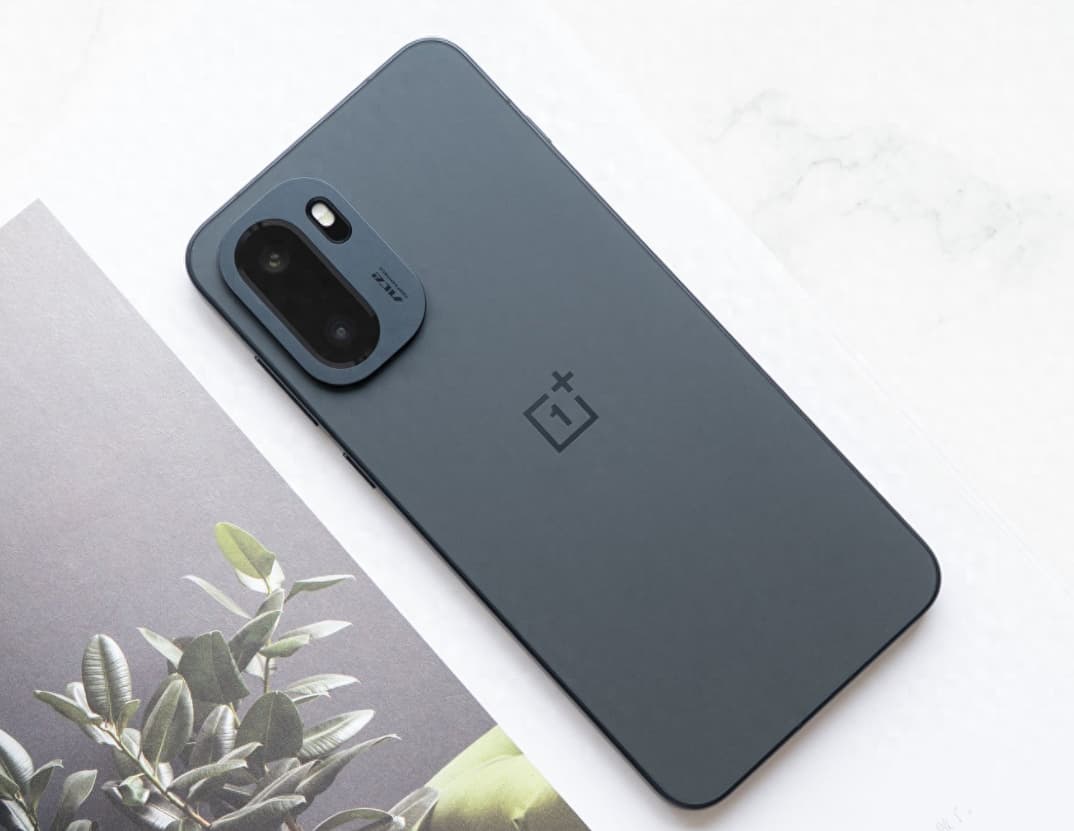
    The camera function of smart phones has become an important tool for recording life. However, some users may encounter problems such as the camera not starting or a black screen when using OnePlus Ace 6. Such malfunctions are usually caused by software conflicts, system abnormalities or hardware obstruction. By systematically troubleshooting, the problem can be quickly identified and resolved. The following provides six solutions from three dimensions: software optimization, hardware inspection, and system maintenance.

    I. Force a restart to release resources

    Press and hold the power button for 10 seconds until the phone vibrates, then release it. This forced restart can clear the temporary cache of the system and release the occupied camera resources. This operation is applicable to black screen issues caused by conflicts between background programs or system lag. For example, when applications such as WeChat video calls or scanning tools are not completely exited, they may occupy the camera permissions. After restarting, the system will reallocate the resources.

    II. Checking Permissions and Configuration Files

    Go to “Settings > Privacy > Camera” and make sure that the system camera and third-party photo application permissions are enabled. If the permissions are mistakenly turned off, the application will not be able to access the camera hardware. At the same time, long press the camera icon and select “App Info > Storage Usage > Clear Data”. This operation will reset the camera configuration files but will not delete the photos that have been taken. If the camera goes black due to a damaged configuration file, this method can quickly fix the issue.

    III. Upgrade the system and fix the drivers

    Go to “Settings > System Update” and check and install the latest system version. System updates often include camera driver optimizations and compatibility improvements. For example, in version 16.0.0.211 of OnePlus 15, the camera startup smoothness was optimized, resolving some black screen issues. If users do not update the system in time, they may encounter functional abnormalities due to outdated driver versions.

    IV. Check for hardware obstructions and damage

    Check whether the camera area is blocked by metal protective cases, magnetic lens films or fingerprints. Some third-party accessories may interfere with the camera sensor. Remove them and restart the device to test. If only the front or rear camera is abnormal, it may be related to poor contact or hardware damage of the module wiring. Tap the camera area on the back of the phone. If the image briefly flashes, contact the after-sales service for testing and checking the wiring.

    V. Factory Reset Ultimate Repair

    If the above methods do not work, you can try backing up the data and then restoring to factory settings (path: “Settings > Other Settings > Restore Phone > Completely Clear All Data”). This operation will delete all user data. You need to back up important files through cloud services or a computer in advance. Restoring to factory settings can solve stubborn problems caused by damaged system files or deep software conflicts.

    VI. Professional Detection of Hardware Failures

    If the problem persists, it is recommended that you bring the purchase receipt to the official OPPO service center for professional engineers to test the motherboard or camera module for faults. For example, if there are hardware issues such as broken camera cables or damaged sensors, they need to be detected using professional equipment. Users must not attempt to repair the device themselves.
    Daily Usage Suggestions:

    Regularly clean up the storage space and keep at least 10GB of available space to prevent insufficient system cache.

    2. Avoid running multiple camera applications simultaneously to reduce the risk of permission conflicts;

    3. Use official or security-certified third-party camera applications and avoid installing software from unknown sources.

    Through systematic troubleshooting and targeted handling, the camera black screen issue of OnePlus Ace 6 can usually be resolved quickly. If the problem is caused by a hardware failure and cannot be fixed, the official after-sales service providing replacement of original factory parts can effectively ensure the long-term usage experience of the device.

    Share. Facebook Twitter Pinterest LinkedIn Tumblr Email

    Related Posts

    Discovering Hidden Gems: The Unexpected Benefits of Independent Living for Seniors

    Easy Tips to Protect Your Phone from Damage

    How to Connect the Car Bluetooth with Oppo Reno 15 Pro?

    Leave A Reply Cancel Reply

    You must be logged in to post a comment.

    voopoo drag 6
    oxva xlim 3 ultra
    sp2s sen x disposable vape
    jnr 100k
    • Popular
    • 3D Printer REVIEW
    • XIAOMI
    March 5, 2026

    OXVA XLIM PRO 3 vs XLIM Pro 2 DNA: Hands-On Review

    March 5, 2026

    OXVA XLIM PRO 3 vs XLIM GO 2: Hands-On Review

    March 2, 2026

    OXVA XLIM PRO 3 vs XLIM 3 ULTRA: Hands-On Review

    February 23, 2026

    Voopoo DRAG S3 vs DRAG X3 Review – Which One Fits Your Vaping Lifestyle?

    December 26, 2025

    ACMER ASCARVA 4S: Precision CNC Power for Makers, DIYers & Small Workshops

    June 23, 2024

    ACMER P2 20W Laser Engraver Fixed Focus Engraving: Hands on Review

    May 30, 2024

    xTool F1 Ultra Review: World’s First 20W Fiber & 20W Diode Laser Engraver

    May 30, 2024

    Anycubic Kobra 3 Combo Review: The Multicolor Masterpiece?

    March 13, 2026

    Xiaomi Watch S5 has been officially announced to be released this month! It features a new integrated bezel design and offers an impressive 21-day battery life

    March 13, 2026

    Xiaomi Notebook Pro 14 is equipped with a 72Wh large battery: it comes with a standard 100W nitrogen-gallium adapter

    March 12, 2026

    The three color options for Xiaomi Notebook Pro 14 have been announced: white, elegant gray, and soft mist blue.

    March 10, 2026

    Xiaomi 18 Pro Max leaks out: First to Feature Snapdragon 8E6 Pro with a 6.9-inch Large Screen

    fc 26 coins
    New Arrivals
    • ICEBOMB 18K Disposable Vape ICEBOMB 18K Disposable Vape
    • Juice Head iFlex Nixodine 50K Disposable Vape Juice Head iFlex Nixodine 50K Disposable Vape
    • MASKKING CAMO Disposable Vape MASKKING CAMO Disposable Vape
    • Pod Salt Air 40K Disposable Vape Pod Salt Air 40K Disposable Vape
    • OXVA Xlim Go Lite Pod System Kit OXVA Xlim Go Lite Pod System Kit
    • OXVA ARTIO 2 Vape OXVA ARTIO 2 Vape
    • Wala Yo 50000 Disposable Vape Wala Yo 50000 Disposable Vape
    • BD Vape Mod Rayden 220 Box Mod BD Vape Mod Rayden 220 Box Mod
    • Airmez Lux 60K Disposable Vape Airmez Lux 60K Disposable Vape
    About
  • Igeekphone.com provides the first global tech news and reviews about smartphone, vapes, e-cigar, smart home, 3D printers, e-bike,tablets, RC drones, VR headset, and other accessories. It's the best platform to improve your brand and product.
  • Contact us: info@igeekphone.com
  • Check Our Privacy Policy Here.
  • Note: *Right now we have US editor and EU editors for review, especially for Amazon US and EU.
  • *Shop and Compare Price Here*
  • Facebook
  • Youtube
  • OUR BEST VAPE PARTNERS
  • VAPE ONLINE STORE
  • HAYATI PRO MAX PLUS
  • VAPORESSO
  • VOOPOO
  • OXVA
  • NEXA
  • MASKKING
  • LOSTVAPE ORIONBAR
  • MEMERS
  • TODOO
  • SP2S
  • JNR
  • VEIIK
  • OTHER BEST PARTNERS
  • SVBONY
  • Chuwi
  • Blackview
  • Fossibot
  • Unihertz
  • Flsun
  • Anycubic
  • Xtool
  • Oukitel
  • Mukkpet Ebike
  • Ugreen
  • Copyright © 2026 igeekphone

    Type above and press Enter to search. Press Esc to cancel.