









I believe many friends are like me, never expecting that Xiaomi would hold a special press conference to unveil the brand-new Surge OS 3 before the flagship update. After all, as a conceptual god capable of generating abstract Bibles, the previous reputation of Hyper OS was far from outstanding. However, unlike the previous impression of “changing the form but not the essence” during system iterations, this time Hyper OS 3 is clearly much more sincere. Now let’s take a look together.
In the past few generations of Hyper OS, when first getting started, the impression was often that there were not many changes. Only after a careful experience could one discover some minor adjustments. This time, the visual novelty of Hyper OS 3 is obvious.
The newly designed desktop ICONS, status bar elements, and “advanced materials” covering more system scenarios have given the system interface a more modern look. For instance, the control center, pull-down search and widget areas have all incorporated a three-dimensional effect similar to liquid glass, which not only retains clarity but also adds a touch of dynamic atmosphere.
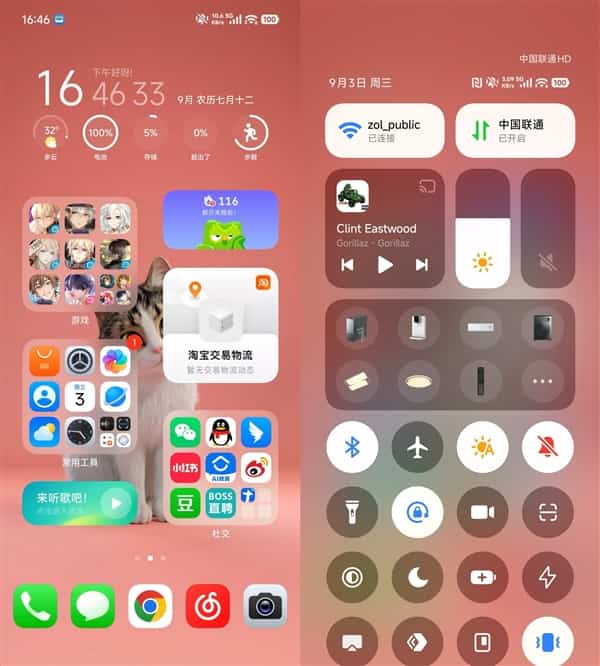
Of course, not all the changes are satisfactory. For instance, the ICONS of the album and Settings have sparked a lot of discussions. However, Xiaomi did not adopt a “one-size-fits-all” approach as it did in the past. Instead, it allowed users to freely switch back to the “classic” style in the theme Settings. This flexibility is user-friendly.
The ability of personalized lock screen has also been upgraded in OS 3. In the previous version, each lock screen style could only be paired with a specific clock display, and AI wallpapers were also scattered across different pages, making the operation appear fragmented. In the new version, all the customization options have finally been integrated together, allowing users to combine and adjust them more freely.
The improvement of the photo album is also worth mentioning. Now, you can customize the placement of folders and photo albums. Although the sorting function by time or tiled display at the press conference has not been implemented yet, the official promised to make up for it through subsequent OTA updates. Although these adjustments may not seem revolutionary, they have truly addressed many pain points in daily use.
The enhancement of the imaging experience is also reflected in the Hyper OS 3, especially the watermark function of the camera has been significantly expanded. The five major categories of Leica watermarks, standard watermarks, check-in watermarks, classic watermarks and film watermarks offer users more personalized choices.
The number of watermark styles has increased several times compared to the past. The border, background color, text position and even the avatar can all be customized, and all support direct output from the camera. This is highly practical for users who enjoy documenting their lives or sharing social media content.
The details of the animation have also become more meticulous. In the past, when opening an application from a small component and then returning, the animation logic often got out of place. For instance, after opening the calendar from a desktop widget, when returning, it would jump back to the App icon on the desktop, which seemed abrupt. The Hyper OS 3 has made corrections to this, making the starting and ending points of the animation more consistent and intuitive. Although this is a detail, it greatly enhances the overall experience of the system.
What is more worthy of attention is the newly added “Super Island”. Xiaomi has chosen to officially introduce an interaction method similar to Apple’s Dynamic Island in this generation. However, their idea is not merely to imitate but to further expand. The Super Island of the Hyper OS 3 supports up to three islands coexisting. The display effect adopts the color mixing blur of high-grade materials. When entering scenes such as music playback and charging, different animations will be presented.
The operation of the pull-down small window is also quite smooth, supporting scenarios such as food delivery, navigation, and taxi-hailing. Although there are not many applications currently compatible, the initial experience has already demonstrated its potential. In addition, with the “Copy Direct” function, when users copy the tracking number, address or password of the express delivery, the system will automatically invoke the relevant application in the form of a super island, which makes the interaction more direct and reduces the steps.
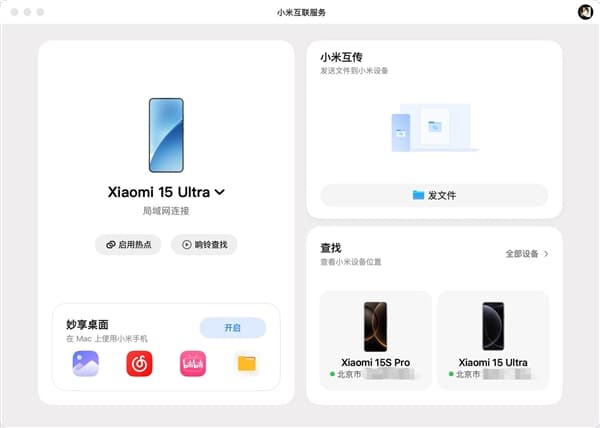
In terms of cross-ecosystem interconnection, the Hyper OS 3 has also brought many new ideas. For users who work with Mac, the updated “Xiaomi Connect” interface has been completely restructured and is more powerful in terms of functionality.
The newly added features such as ringing search, hotspot sharing, device location viewing, tablet screen projection and quick opening of frequently used apps make the collaboration between mobile phones and computers smoother. Especially the optimization of quick apps, when opening recently used apps on the phone on the computer, they will be displayed in a large-screen adaptation way. For example, the album and wechat can run in an interface similar to that of a tablet, with more reasonable interaction.
The new “Device Ball” feature is also worth praising. Users only need to drag files onto the device ball in the status bar to quickly transfer them to their mobile phones, which is more intuitive than traditional transfer methods. In addition, Mac devices can now unlock Xiaomi phones, and even messages from Xiaomi phones can be replied to on iphones. The addition of these features further breaks down the barriers between ecosystems, making multi-device collaboration more in line with real needs.
The intelligent assistant “Super Xiao Ai” has also been upgraded in the Hyper OS 3. The new version offers intelligent suggestions, one-step access and screen circling functions. However, it is still in the Beta stage at present, and the completion degree of some functions is not high. For instance, in applications that have been adapted to wechat or Taobao, Super Xiaoai can offer quick entry points such as QR codes, payment codes, scanning, and searching for the same product, and the user experience is relatively smooth.
However, in some scenarios where there is no adaptation, the answers it provides are rather random and even somewhat deviate from the requirements. The circle screen function theoretically enables you to circle and save or share pictures, but it is not yet fully available.
The search results of a direct one are quite accurate, but it may not be suitable for everyone in terms of usage habits. Overall, Super Xiaoai is still positioned as a core assistant in OS 3, but to truly leverage the advantages of AI, continuous iterations are still needed.
Overall, the experience of the Hyper OS 3 is more complete than that of the previous two generations. It not only brings more intuitive changes in design, but also solves many detailed problems in operation logic.
At the same time, with the addition of functions such as Super Island, cross-ecological interconnection and intelligent assistants, the scalability and intelligence of the system have also been significantly enhanced. Of course, the current version is still in Beta, and some functions still need to be optimized. However, the progress and potential it has demonstrated are already enough to make people look forward to it.