







Facebook Twitter Instagram
    Trending
    • Lost Vape Thelema Go Pro Mod Kit with Thelema UGO MTL Tank Review: Compact Power Meets Premium MTL Vaping
    • How Switching Providers Can Improve Your Internet Connection
    • Play For Real Money in an Exciting European Game in 2025
    • The Benefits of Playing High-RTP Online Slot Machines From Pragmatic Play
    • A Step-By-Step Guide on Changing the Default RDP Number
    • The Growing Influence of Free Music and Video Search Tools in the Digital Era
    • VOOPOO Argus Rise Pod System Kit Review-A Sleek, Powerful, and User‑Friendly Vape Pod Kit
    • JNR Glide Pen 1000 Puffs Prefilled & Replaceable Pod Kit Review-A Compact and Convenient Vaping Solution
    Facebook YouTube
    IGeeKphone China Phone, Tablet PC, VR, RC Drone News, Reviews
    • HOME
      • NEWS
        • DeepSeek
        • ChatGPT
        • Minecraft
    • Amazon
    • PHONE
      • Top Phones For Your First Choice
      • Phone Comparison
      • Xiaomi
      • Blackview
      • Doogee
      • Black Shark
      • Geekbuying
      • Banggood
      • TEMU
      • TikTok
      • Aliexpress
      • Walmart
      • MercadoLibre
      • Lazada
    • TOP VAPE Awards for 2026
    • VAPES
      • E-CIGAR Upcoming
      • Vape News
      • Vape Deals
      • Vape Comparison
      • Vape Guide
      • Giveaway
    • BEST VAPE
      • Best Vape Stores
      • Best Starter Vape Kits
      • Best Vapes for Beginners
      • Best Disposable Vapes
      • Best Pod Systems
      • Best Pod Mod Vapes
      • Best Mods
      • Best Nicotine Pouches
      • Best Clearomizers/Tanks
      • Best E-Liquid
      • Best EGO/Pens
      • Best Vapes for Nic Salt E-Juice
      • Best Vapes to Quit Smoking
      • RDA vs. RDTA vs. RTA
    • Best Vape Brand 2026
      • VAPORESSO
      • VOOPOO
      • OXVA
      • NEXA BAR
      • ORIONBARTECH
      • MASKKING VAPE
      • MEMERS
      • SP2S
      • TODOO
      • MRFOG
      • VEIIK
    • REVIEW
      • E-cigar Review
      • Phones
      • Tablet PC
      • TV Box
      • RC Drone
      • Wearables
      • Camera
      • Accessories
      • VR Headset
    • MORE
      • TABLET
        • Chuwi
        • INNOCN
        • Teclast
        • Top Tablet for Your First Choice
        • Tablet/Laptop Comparison
      • RC DRONE
      • CAMERA
      • WEARABLES
        • OneOdio
        • BlitzWolf
        • Top Smartwatch for First Choice
      • 3D PRINTER
        • 3D Printer Review
        • Anycubic
        • FLSUN
        • Xtool
        • LONGER
        • Top 3D printer to Choose First
      • POWER STATION
        • Oukitel
        • FOSSIBOT
      • GAMING
        • Top Gaming Products
      • E-BIKE
        • Samebike
        • Happyrun
        • ENGWE
      • SMART HOME
      • TV BOX
      • ACCESSORIES
      • VR HEADSET
      • CLOTHES
      • AUTO CAR
    • DEAL
    • VAPE LAWS
    • Shop
    IGeeKphone China Phone, Tablet PC, VR, RC Drone News, Reviews
    You are at:Home»Apple»5 Ways to Unlock an iPhone When You Forget Your Passcode
    Apple

    5 Ways to Unlock an iPhone When You Forget Your Passcode

    HabibBy HabibJune 16, 2024
    Facebook Twitter Pinterest LinkedIn Tumblr Email

    What steps should be taken if the iPhone is inaccessible due to a forgotten passcode? The editor presents several techniques to bypass the iPhone passcode requirement in today’s guide. These methods apply to various iPhones, from the latest iPhone 14 to older models like iPhone 8, 7, and 6. Furthermore, these solutions are equally effective for any iPad. Let’s delve into the strategies for unlocking an iPhone without relying on the Passcode.

    Frequently Asked Questions about Unlocking iPhones

    Approach 1. Swift Procedure to Unlock Any iPhone Without Passcode

    The quickest and most efficient method to overcome a forgotten passcode is to utilize a software known as Niu Xuechang Apple Screen Unlock Tool. This software is adept at unlocking iPhones and iPads without needing a passcode, regardless of whether the device is new or old. It eliminates the necessity for iTunes or iCloud, streamlining the process into a few simple clicks.

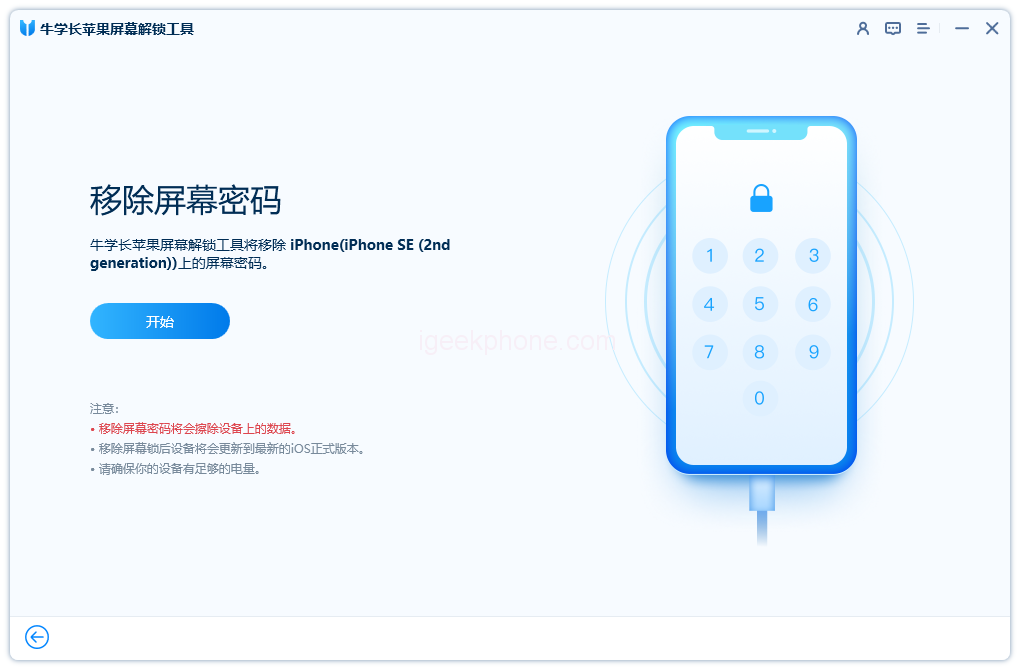
    Upon downloading and installing the Niu Xuechang Apple Screen Unlock Tool, initiate the program and select the “Start” option to create the unlocking process.

    Install the Apple Screen Unlock Tool

    Link your device to your computer, and the software will promptly recognize it. Click the “Next” button.

    Connect your device to the computer
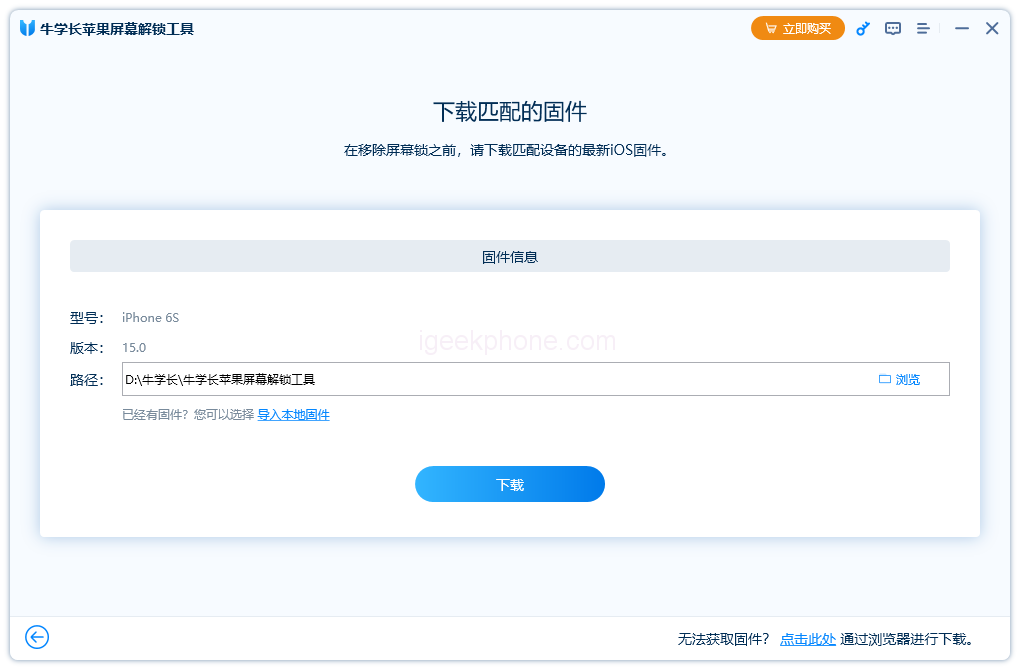
    .Download the most recent firmware package and designate a location for it. Once the download concludes, initiate the “Start Removal” process.

    Download the latest firmware package
    .Await the completion of the Niu Xuechang Apple Screen Unlock Tool’s unlocking procedure. In a matter of minutes, your iPhone will reboot.

    Unlocking the screen lock is now complete.

    Approach 2. Bypassing the iPhone Passcode by Erasing the Device
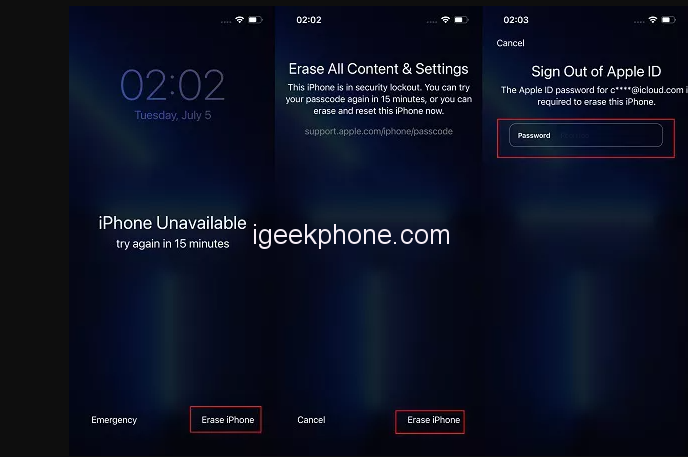
    Erasing the iPhone is a secondary option to unlock a locked device, whether on the lock screen or through Find My iPhone. This process entails inputting your Apple ID and its corresponding password to wipe the iPhone clean without needing a passcode.

    For unlocking an iPhone without a passcode on the lock screen, upgrading to iOS 15.2 or later is necessary.

    After numerous incorrect passcode attempts, your iPhone will display “iPhone Unavailable” and offer the choice to “Erase iPhone.”

    Select “Erase iPhone,” confirm your decision, and then enter your Apple ID password to initiate the wipe and unlock.

    The more common Erase iPhone option is accessible via iCloud Find My iPhone, compatible with iOS versions below and beyond 15.2. However, an additional device or computer is required in this scenario.

    • Visit iCloud.com/find on your computer and log in with your account credentials.
    • Identify your iPhone from the roster of devices requiring screen unlock.
    • Opt for the “Erase iPhone” option, effectively removing the Passcode from your device.

    Approach 3. Unlocking an iPhone without Passcode Using iTunes
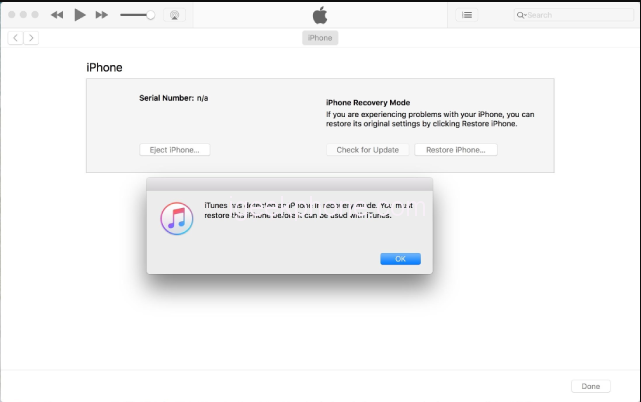
    Should your iPhone become locked, iTunes can also open it without a passcode. This method enables data recovery from your iPhone, including the forgotten Passcode. Review the steps below.

    • Connect your iPhone to the computer via a USB cable.
    • Initiate iTunes or Finder. If your device is already synced with iTunes, clicking “Restore iPhone” is a straightforward solution.
    • If iTunes fails to detect your iPhone, initiate recovery mode to access the “Restore iPhone” option.
    • Frequently Asked Questions about Unlocking iPhones

    Q1. What might be the reason for my iPhone passcode malfunctioning?

    Multiple factors could render the password you entered invalid. A common cause is an incorrect password entry. Anomalies or glitches in iOS functionality might also contribute to the issue.

    Q2. How can I reset a 6-digit iPhone passcode?

    If the 6-digit Passcode is forgotten, the methods mentioned earlier can be employed. If you recall the 6-digit code, navigate to Settings > Face ID & Passcode for a straightforward passcode alteration.

    Q3. Is it possible to unlock an iPhone without data loss?

    The sole avenue to unlock an iPhone sans data loss involves inputting the correct Passcode. Other methods of unlocking an iPhone without a passcode necessitate data erasure, although you can restore the data from a previous backup.

    Q4. How can I unlock my iPhone after forgetting the Passcode?

    In case of a forgotten iPhone passcode, attempting to use 4uKey, iTunes, or iCloud for unlocking and reentry is recommended.

    Lay to rest any concerns about locked iPhones or iPads. The methods above encompass all conceivable means to unlock an iPhone without a passcode. The Niu Xuechang Apple Screen Unlock Tool mentioned initially offers exceptional outcomes. Remember to share your experience with us.

    Read Also: 3 Easy Ways to Unlock Your iPhone SE 2023 Without a Passcode.

    Do not forget to follow us on our Facebook group and page to keep you always aware of the latest advances, News, Updates, review, and giveaway on smartphones, tablets, gadgets, and more from the technology world of the future.

    Share. Facebook Twitter Pinterest LinkedIn Tumblr Email

    Related Posts

    How Switching Providers Can Improve Your Internet Connection

    A Step-By-Step Guide on Changing the Default RDP Number

    The Growing Influence of Free Music and Video Search Tools in the Digital Era

    Leave A Reply Cancel Reply

    You must be logged in to post a comment.

    voopoo drag 6
    oxva xlim 3 ultra
    sp2s sen x disposable vape
    • Popular
    • 3D Printer REVIEW
    • XIAOMI
    April 18, 2026

    VOOPOO DRAG 6 Hands on Review: Vape Beast with Smart Power & Premium Control

    April 8, 2026

    OXVA NeXLIM vs XLIM Pro 2 Pod Hands-On Review (2026)

    March 16, 2026

    OXVA Slimstick VS OXVA Slimstick X Vape Hands-on Review

    March 5, 2026

    OXVA XLIM PRO 3 vs XLIM GO 2: Hands-On Review

    December 26, 2025

    ACMER ASCARVA 4S: Precision CNC Power for Makers, DIYers & Small Workshops

    June 23, 2024

    ACMER P2 20W Laser Engraver Fixed Focus Engraving: Hands on Review

    May 30, 2024

    xTool F1 Ultra Review: World’s First 20W Fiber & 20W Diode Laser Engraver

    May 30, 2024

    Anycubic Kobra 3 Combo Review: The Multicolor Masterpiece?

    April 30, 2026

    Xiaomi Gaming Mouse 2 officially Announced, equipped with the latest Pixart flagship sensor

    April 29, 2026

    Based on Android 17 Beta 2, the developer preview version of Xiaomi Hyper OS has been Released

    April 27, 2026

    It is Reported that a Certain Factory has Launched a 7-inch 2K Ultra-high Refresh Rate Straight Screen

    April 27, 2026

    Review: Is REDMI K90 MAX the Ultimate Gaming Phone in 2026?

    fc 26 coins
    New Arrivals
    • Lost Vape Thelema Go Pro Mod Kit Lost Vape Thelema Go Pro Mod Kit
    • Voopoo Argus Rise Vape Voopoo Argus Rise Vape
    • Lost Vape Thelema Q200 Pro Box Mod 200W Lost Vape Thelema Q200 Pro Box Mod 200W
    • Motorola Razr 70 Plus Motorola Razr 70 Plus
    • Motorola Razr Ultra 2026 Motorola Razr Ultra 2026
    • Realme 16x 5G Realme 16x 5G
    • SMOK Arco Nano Pod System Kit SMOK Arco Nano Pod System Kit
    • IPLAY SPARK 50k Disposable Pod IPLAY SPARK 50k Disposable Pod
    • vivo Y500s vivo Y500s
    About
  • Igeekphone.com provides the first global tech news and reviews about smartphone, vapes, e-cigar, smart home, 3D printers, e-bike,tablets, RC drones, VR headset, and other accessories. It's the best platform to improve your brand and product.
  • Contact us: info@igeekphone.com
  • Check Our Privacy Policy Here.
  • Note: *Right now we have US editor and EU editors for review, especially for Amazon US and EU.
  • *Shop and Compare Price Here*
  • Facebook
  • Youtube
  • OUR BEST VAPE PARTNERS
  • VAPE ONLINE STORE
  • HAYATI PRO MAX PLUS
  • VAPORESSO
  • VOOPOO
  • OXVA
  • NEXA
  • MASKKING
  • TODOO
  • SP2S
  • VEIIK
  • OTHER BEST PARTNERS
  • SVBONY
  • Chuwi
  • Blackview
  • Fossibot
  • Unihertz
  • Flsun
  • Anycubic
  • Xtool
  • Oukitel
  • Mukkpet Ebike
  • Ugreen
  • Copyright © 2026 igeekphone

    Type above and press Enter to search. Press Esc to cancel.