







Facebook Twitter Instagram
    Trending
    • Swedish food product manufacturer WiJo is set to establish a manufacturing base in the United States
    • The manual of Samsung’s most expensive mobile phone: Galaxy Z TriFold has been exposed
    • Xiaomi’s new phone has made an appearance at GSMA: The MIX TriFold triple foldable screen phone is expected to be released in Q3 next year
    • Android 16 QPR2 system APK installer has been exposed and is compatible with the Material 3 design language
    • The Prototype photos of Xiaomi 17 Ultra phone have been exposed, featuring a triple-camera layout on the back
    • TRASPED HG4-411 RC Car Review: A Miniature Powerhouse Redefining Desktop RC Adventure
    • BlitzWolf BW-VISION A1 Projector Review at $69.99: A Compact Android Powerhouse for Modern Viewing
    • BX-N19-JL TWS Earbuds Review: A Feature-Packed Contender for Athletes and Gamers
    Facebook YouTube
    Login Register
    IGeeKphone China Phone, Tablet PC, VR, RC Drone News, Reviews
    • HOME
      • NEWS
        • DeepSeek
        • ChatGPT
        • Minecraft
    • Amazon
    • CHRISTMAS
    • PHONE
      • Top Phones For Your First Choice
      • Phone Comparison
      • Xiaomi
      • Blackview
      • Unihertz
      • Doogee
      • Black Shark
      • Geekbuying
      • Banggood
      • TEMU
      • TikTok
      • Aliexpress
      • Walmart
      • Newegg
      • MercadoLibre
      • Lazada
    • TOP VAPE Awards for 2025
    • VAPES
      • E-CIGAR Upcoming
      • Vape News
      • Vape Market Trend
      • Vape Deals
      • Expo News
      • Vape Comparison
      • Vape Guide
        • Guide For Beginners
        • Guide for Best Users
      • Giveaway
    • BEST VAPE
      • Best Vape Stores
      • Best Starter Vape Kits
      • Best Vapes for Beginners
      • Best Disposable Vapes
      • Best Pod Systems
      • Best Pod Mod Vapes
      • Best Mods
      • Best Nicotine Pouches
      • Best Clearomizers/Tanks
      • Best E-Liquid
      • Best EGO/Pens
      • Best Vapes for Nic Salt E-Juice
      • Best Vapes to Quit Smoking
      • RDA vs. RDTA vs. RTA
    • Best Vape Brand 2025
      • VAPORESSO
      • VOOPOO
      • OXVA
      • NEXA BAR
      • ORIONBARTECH
      • MASKKING VAPE
      • VEIIK
      • MEMERS
      • SP2S
      • JNR
      • TODOO
      • MRFOG
    • REVIEW
      • E-cigar Review
      • Phones
      • Tablet PC
      • TV Box
      • RC Drone
      • Wearables
      • Camera
      • Accessories
      • VR Headset
    • MORE
      • 3D PRINTER
        • 3D Printer Review
        • Anycubic
        • FLSUN
        • Xtool
        • LONGER
        • Top 3D printer to Choose First
      • TREND
      • CLOTHES
      • AUTO CAR
      • POWER STATION
        • Oukitel
        • FOSSIBOT
      • GAMING
        • Top Gaming Products
      • E-BIKE
        • Samebike
        • Happyrun
        • ENGWE
      • TABLET
        • Chuwi
        • INNOCN
        • Teclast
        • Top Tablet for Your First Choice
        • Tablet/Laptop Comparison
      • WEARABLES
        • OneOdio
        • BlitzWolf
        • Top Smartwatch for First Choice
      • SMART HOME
      • TV BOX
        • Chuwi mini pc
        • Beelink
        • GMKTEC
        • MOREFINE
      • RC DRONE
        • DJI
        • MJX
        • JJRC
        • Hubsan
        • Top RC Drone
      • CAMERA
        • Gopro
        • Insta360
        • Andoer
      • ACCESSORIES
      • VR HEADSET
      • ROM
        • SAMSUNG
        • XIAOMI
        • ASUS
        • MEIZU
        • LENOVO
        • HUAWEI
        • ONEPLUS
        • ZTE
        • UMIDIGI
        • DOOGEE
        • HOMTOM
        • ELEPHONE
        • ULEFONE
        • BLACKVIEW
        • VERNEE
        • LEAGOO
        • CHUWI
        • TECLAST
        • PIPO
        • TV BOX ROM
    • DEAL
    • Shop
    IGeeKphone China Phone, Tablet PC, VR, RC Drone News, Reviews
    You are at:Home»Guide»HOW TO RECOVER PHOTOS FROM WATER DAMAGED IPHONE?
    Guide

    HOW TO RECOVER PHOTOS FROM WATER DAMAGED IPHONE?

    Brady CottonBy Brady CottonJune 22, 2022
    Facebook Twitter Pinterest LinkedIn Tumblr Email

    Apple devices are considered to have the best camera quality in comparison to many top smartphone brands. People generally love taking pictures from their iPhones as it is the most convenient way of storing memories. However, it feels devastating when your iPhone gets water damaged. The thought of losing your precious memories could be saddening. Even though most iPhones are water-resistant, they are not waterproof. Extreme damage caused by water could lead to data loss and much more. In fact, your photos can be recovered from a water-damaged iPhone. This article will provide you with 3 methods for how to recover photos from water damaged iPhone.

    Method 1: Download Water Damaged iPhone Photos from iCloud

    Have you enabled iCloud on your iPhones?

    It is completely alright if you have not enabled iCloud and prefer to store the data locally. However, as a backup option, iCloud is the best choice to recover data in case of instances such as water damage.

    One of the most prominent ways of recovering your photos is to access iCloud backups. The benefit of enabling iCloud is that it stores files and photos securely which can be recovered from any of your devices. All you need to do is to sign in iCloud website and download the photos..

    If you want to access iCloud via a web browser, then follow the steps provided below-

    1. First, visit “www.icloud.com” on your browser
    2. You are required to enter your Apple ID password and might also be asked to verify via “Two-factor authentication”
    3. After accessing iCloud, select the “Photos” folder
    4. Now, you can download your photos

    However, one must remember that the free version of iCloud comes with a storage of only 5GB. For more features, a subscription might be required. In that case, you might not have uploaded all important photos from iPhone. If you failed to recover water damaged iPhone photos by downloading from iCloud, then try alternative ways to recover your photos from a water-damaged iPhone.

    Method 2: Restore Water Damaged iPhone Photos to Another iPhone or iPad

    Have you backed up your iPhone to iTunes on the computer?

    Yes, iTunes is not just for music. If you have backed up your iPhone to iTunes, then you can restore the backup files to another iPhone or iPad and recover your photos. All you need to do is to connect iTunes to a computer and it automatically forms a backup. This method applies to those who possess an extra iPhone or an iPad.

    Steps for recovering your photos via iTunes-

    1. First, connect your extra iPhone or an iPad to a PC.
    2. A device icon will appear.
    3. Click on that.
    4. Select the “Summary” tab
    5. Now, you need to click on the “Restore backup” option while holding the “shift” key.
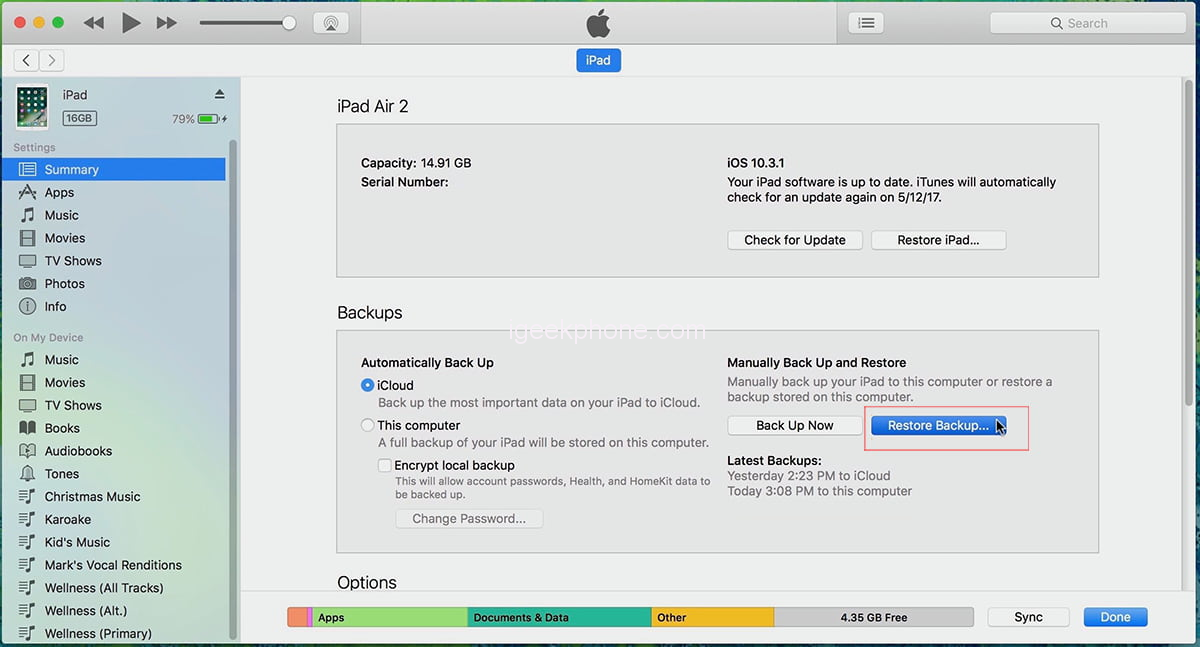
    6. You will find the backup files available.
    7. Choose the photos you want to recover.

    After you choose the backup file you want to recover iPhone photos from, the process gets initiated. Wait until the process is complete to see the photos you have recovered.

    Method 3:  Recover your photos with the help of Data Recovery Software

    In case you have not been able to back up your iPhone to iCloud or iTunes, you are left with one more option. That is to seek help from data recovery software.

    Your water-damaged iPhone might take a long period to get fixed. Or you might have to pay a huge sum for getting it fixed. In any case, one of the most recommended software for recovering your photos is “iBeesoft iPhone Data Recovery”. With a rating of 4.7, this is a highly trusted professional software amongst users. This software is the best option not just for water-damaged iPhones but also in case of virus attacks, system crashes, iPhones being stolen, and many other such problems. You can recover all types of files such as videos, text messages, notes, call histories, and much more. It not only supports iPhones or iPads but also can be accessed via windows and iOS.

    The best part about this software is that you will be guided through various tutorials by just accessing its website.

    Since this is a professional data recovery software, for iPhone users it will charge you $39.95 yearly. Considering its benefits, the price is worth the deal.

    Follow these steps for how to recover water damaged iPhone photos using “iBeesoft iPhone Data Recovery” .

    1. Connect your iPhone with your computer via a digital cable.
    2. After downloading the iPhone data recovery software, launch it on your computer.
    3. Choose “Recover from iOS Device”. Your phone will be listed. Choose the option “Scan”
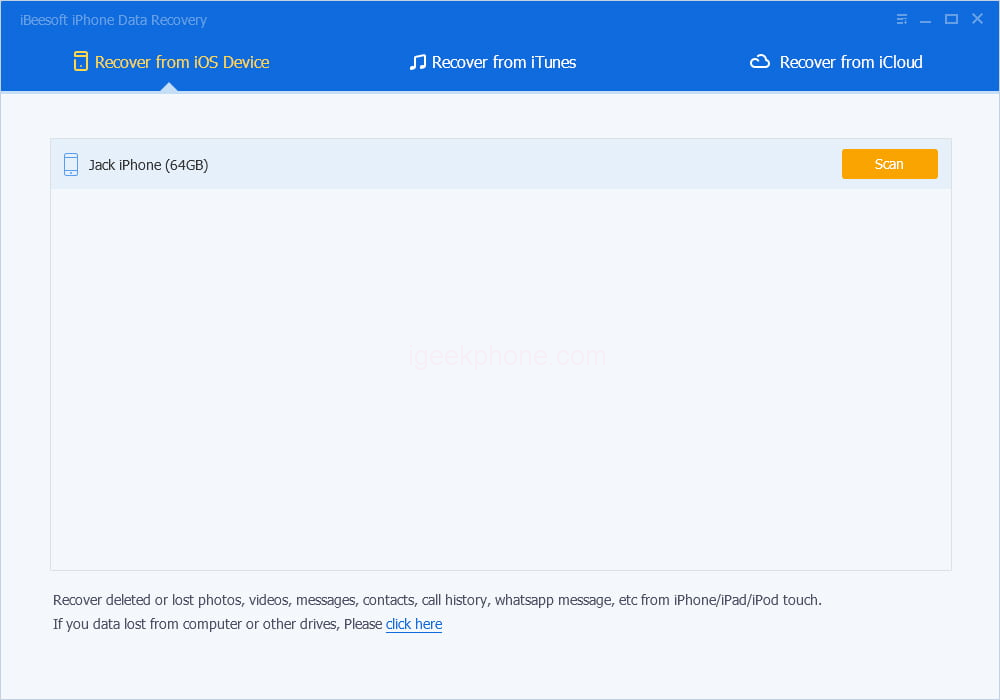
    4. Since you want to recover your photos, click on the “Photos” option. Choose photos you want to recover. Finally, click on the “Recover” option

    The “iBeesoft iPhone Data Recovery” software also has a feature of extracting the files from iCloud as well as iTunes backup. This is a great option in case you have lost your device. iBeesoft iPhone data recovery software is a great tool to recover files from iPhone, even recover photos from iPhone with broken screen.

    Losing your precious memories in the form of photos could be traumatizing. Worst if your device is damaged. Considering the scenario of a water damaged iPhone, this article has provided users with three important solutions to recover photos. Users are recommended to always enable backup options as accidents occur without warning. Backing up your device to iTunes and iCloud is very important to help you secure your data for future use.

    Share. Facebook Twitter Pinterest LinkedIn Tumblr Email

    Related Posts

    Quantum AI App, Useful or Not?

    How to Troubleshoot iPhone Personal Hotspot Issues

    How to Browse Securely On Public Wi-Fi with VPN in 2024

    Leave A Reply Cancel Reply

    You must be logged in to post a comment.

    voopoo drag s3
    oxva xlim go 2
    sp2s sen x disposable vape
    jnr 100k
    • Popular
    • 3D Printer REVIEW
    • XIAOMI
    November 23, 2025

    VOOPOO DRAG X3 – Big Battery, Smart Tech, Pod-Mod Powerhouse (Review)

    November 23, 2025

    VOOPOO VINCI S: Pocket-Power Pod with a 2,000 mAh Heart — Big Battery, Simple Use (Review)

    November 19, 2025

    OXVA XLIM PRO 3 Pod Vape Quick Hands-on Review (Video Test Included)

    November 19, 2025

    OXVA XLIM 3 Ultra Pod Vape: Hands-on Review (Video Test Included)

    June 23, 2024

    ACMER P2 20W Laser Engraver Fixed Focus Engraving: Hands on Review

    May 30, 2024

    xTool F1 Ultra Review: World’s First 20W Fiber & 20W Diode Laser Engraver

    May 30, 2024

    Anycubic Kobra 3 Combo Review: The Multicolor Masterpiece?

    May 15, 2024

    SCULPFUN SF-A9 40W Laser Engraver Cutting Machine: Hands On Review

    December 5, 2025

    Xiaomi’s new phone has made an appearance at GSMA: The MIX TriFold triple foldable screen phone is expected to be released in Q3 next year

    December 5, 2025

    The Prototype photos of Xiaomi 17 Ultra phone have been exposed, featuring a triple-camera layout on the back

    December 2, 2025

    Xiaomi REDMI Turbo5 Pro phone will be launched before the Spring Festival, equipped with the only flagship chip in its class

    December 2, 2025

    Xiaomi has Released REDMI TV X55/65/75 2026: Mini LED starts at only 2,499 yuan

    fc 26 coins
    New Arrivals
    • IPLAY OOKA150k Disposable vape IPLAY OOKA150k Disposable vape
    • IPLAY LUMO 8K Puffs 2+10ml Prefilled Pod Kit IPLAY LUMO 8K Puffs 2+10ml Prefilled Pod Kit
    • Uwell Caliburn G5 Lite SE Pod System Kit Uwell Caliburn G5 Lite SE Pod System Kit
    • Uwell Caliburn G5 Lite KOKO Pod System Kit Uwell Caliburn G5 Lite KOKO Pod System Kit
    • Uwell Caliburn G5 Lite Pod System Kit Uwell Caliburn G5 Lite Pod System Kit
    • Freeton Trimax 60k Disposable Vape Freeton Trimax 60k Disposable Vape
    • Smoant Pasito 3 Vape Smoant Pasito 3 Vape
    • Yocan Flat 2.0 series Yocan Flat 2.0 series
    • Snowplus Swift Pod Vape Snowplus Swift Pod Vape
    About
  • Igeekphone.com provides the first global tech news and reviews about smartphone, vapes, e-cigar, smart home, 3D printers, e-bike,tablets, RC drones, VR headset, and other accessories. It's the best platform to improve your brand and product.
  • Contact us: info@igeekphone.com
  • Check Our Privacy Policy Here.
  • Note: *Right now we have US editor and EU editors for review, especially for Amazon US and EU.
  • *Shop and Compare Price Here*
  • Facebook
  • Youtube
  • OUR BEST VAPE PARTNERS
  • VAPE ONLINE STORE
  • HAYATI PRO MAX PLUS
  • VAPORESSO
  • VOOPOO
  • OXVA
  • NEXA
  • MASKKING
  • LOSTVAPE ORIONBAR
  • VEIIK
  • MEMERS
  • TODOO
  • SP2S
  • JNR
  • OTHER BEST PARTNERS
  • SVBONY
  • Chuwi
  • Blackview
  • Fossibot
  • Unihertz
  • Flsun
  • Anycubic
  • Xtool
  • Oukitel
  • Mukkpet Ebike
  • Ugreen
  • Copyright © 2025 igeekphone

    Type above and press Enter to search. Press Esc to cancel.