






Facebook Twitter Instagram
    Trending
    • How to Find the Missing DCIM Folder When Connecting a Phone to a PC
    • UK Vaping Products Duty: How to Reduce Your Vaping Costs
    • NovuLife 1350W Espresso Machine Review: Hot and Cold Coffee at Home
    • Sofirn SP36 Pro Review: An 8000-Lumen Rechargeable Flashlight for Outdoor Use
    • S8MAX Smartwatch Review: 1.46-Inch Display, ECG Tracking and Built-In Flashlight
    • MONSTER MQT69 Review: Are These Bluetooth 6.0 Earclip Headphones Worth Buying?
    • Solar Security Camera Review: Dual Lenses, 3MP Resolution and 5200mAh Battery
    • What Is MagSafe? Key Features and Differences From Standard Wireless Charging
    Facebook YouTube
    IGeeKphone China Phone, Tablet PC, VR, RC Drone News, Reviews
    • HOME
    • NEWS
      • AI NEWS
    • Black Friday
    • PHONE
      • Top Phones For Your First Choice
      • Phone Comparison
      • Xiaomi
      • Blackview
      • Doogee
      • Black Shark
      • Geekbuying
      • Banggood
      • TEMU
      • TikTok
      • Aliexpress
      • Walmart
      • MercadoLibre
      • Lazada
    • TOP VAPE Awards for 2026
    • VAPES
      • E-CIGAR Upcoming
      • Vape News
      • Vape Deals
      • Vape Comparison
      • Vape Guide
      • VAPE LAWS
      • Giveaway
    • BEST VAPE
      • Best Vape Stores
      • Best Starter Vape Kits
      • Best Vapes for Beginners
      • Best Disposable Vapes
      • Best Pod Systems
      • Best Pod Mod Vapes
      • Best Mods
      • Best Nicotine Pouches
      • Best Clearomizers/Tanks
      • Best E-Liquid
      • Best EGO/Pens
      • Best Vapes for Nic Salt E-Juice
      • Best Vapes to Quit Smoking
      • RDA vs. RDTA vs. RTA
    • Best Vape Brand 2026
      • VAPORESSO
      • VOOPOO
      • OXVA
      • NEXA BAR
      • MASKKING VAPE
      • SP2S
      • IPLAY
      • TODOO
      • MRFOG
      • LOSTVAPE
      • VEIIK
    • REVIEW
      • E-cigar Review
      • Phones
      • Tablet PC
      • TV Box
      • RC Drone
      • Wearables
      • Camera
      • Accessories
      • VR Headset
    • MORE
      • TABLET
        • Chuwi
        • INNOCN
        • Teclast
        • Top Tablet for Your First Choice
        • Tablet/Laptop Comparison
      • RC DRONE
      • CAMERA
      • WEARABLES
        • OneOdio
        • BlitzWolf
        • Top Smartwatch for First Choice
      • 3D PRINTER
        • 3D Printer Review
        • Anycubic
        • FLSUN
        • Xtool
        • LONGER
        • Top 3D printer to Choose First
      • POWER STATION
        • Oukitel
        • FOSSIBOT
      • GAMING
        • Top Gaming Products
      • E-BIKE
        • Samebike
        • Happyrun
        • ENGWE
      • SMART HOME
      • TV BOX
      • ACCESSORIES
      • VR HEADSET
      • CLOTHES
      • AUTO CAR
    • DEAL
    • Shop
    IGeeKphone China Phone, Tablet PC, VR, RC Drone News, Reviews
    You are at:Home»Chuwi»Official ROM: Chuwi HI8 Pro Dual Boot,Single Boot Windows
    Chuwi

    Official ROM: Chuwi HI8 Pro Dual Boot,Single Boot Windows

    Brady CottonBy Brady CottonFebruary 20, 2023
    Facebook Twitter Pinterest LinkedIn Tumblr Email

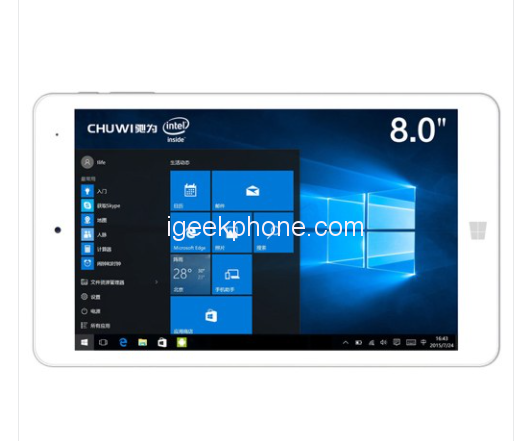
    I just found out that there is an easy way to convert your chuwi hi8 pro dual boot tablet to a windows only tablet with one big ~28GB C: drive.

    Here is what I did to archieve this:

    • Download the windows firmware image matching your tablet version from the official firmware thread:
    • Unpack the firmware image.
    • Navigate to [Firmware_ROOT]/Scripts , there should be one file named Main.cmd
    • Open Main.cmd and find following line ” set OS_Attributes=2 “
    • Change this line to ” set OS_Attributes=1 “
    • Copy this “modified” firmware to an USB Flashdrive and install it to your tablet like you would install the official windows firmware (See here: [https://forum.chuwi.com/ 59 ]
      ).

    OPTIONAL: (Remove OS Selection Screen when booting)

    • Find the SwitchNOW.exe in the hidden recovery folder (See here: ](https://forum.chuwi.com 12
      )
    • Run SwitchNOW.exe, a prompt will pop up asking you if you want to boot to Android. Select NO .
    • Another promt will pop up, select the Disable radio button at “Boot menu configuration” and exit the program.

    This will delete android and will reinstall windows onto one big partition.

    PS: You can always get Android/Dual Boot back using this tutorial:

    PSS: I am pretty sure this works for other tablets too! All windows firmwares come with this Main.cmd script. This script always has two installation routines, one for single OS and one for dual OS. You only have to edit the script so it executes the single OS routine instead of the dual OS. In most scripts you only need to change a variable (linke on hi8 pro, see above), in some other scripts you have to modify a goto statement.

    WARNING: Make sure to back up your data bevore performing this! I am not responisble for any damage or data loss!

    Share. Facebook Twitter Pinterest LinkedIn Tumblr Email

    Related Posts

    Huawei Pura 90 Plus Leak Reveals 1-Inch RYYB Camera, Variable Aperture and Large Display

    REDMI Book 14 2027 Teased With 20.2-Hour Battery Life and Super XiaoAI 2.0

    How Digital Asset Management Software Can Transform Your Workflow

    Leave A Reply Cancel Reply

    You must be logged in to post a comment.

    voopoopintch
    oxva vprime 2
    nomadz
    • Popular
    • 3D Printer REVIEW
    • XIAOMI
    October 13, 2026

    OXVA XLIM 4 Vape Hands on Review: Pocket Luxury, Serious Stamina

    October 11, 2026

    MAXRAY RUSH 80K Review – More Than Just a Puff Count: Meet the Disposable That Controls Its Own E-Liquid

    October 1, 2026

    VOOPOO ARGUS Z3 Review – Flip the Pod, Change the Vape! Keep It Simple!

    September 27, 2026

    Vaporesso ARMOUR OCTA Review – Built Like a Tank, Vapes Like a Beast

    December 26, 2025

    ACMER ASCARVA 4S: Precision CNC Power for Makers, DIYers & Small Workshops

    June 23, 2024

    ACMER P2 20W Laser Engraver Fixed Focus Engraving: Hands on Review

    May 30, 2024

    xTool F1 Ultra Review: World’s First 20W Fiber & 20W Diode Laser Engraver

    May 30, 2024

    Anycubic Kobra 3 Combo Review: The Multicolor Masterpiece?

    October 22, 2026

    REDMI Book 14 2027 Teased With 20.2-Hour Battery Life and Super XiaoAI 2.0

    October 15, 2026

    AnTuTu Q3 2026 Android Chipset Report: Xiaomi’s XRing Ranks Third

    October 14, 2026

    Xiaomi Watch S5 41mm Hands-On: Comfort, Features, and Battery Life

    October 7, 2026

    REDMI Headphones Neo Review: Features, ANC Performance and Battery Life

    fc 26 coins
    New Arrivals
    • Olit Hookalit Nex 120K Disposable Pod Olit Hookalit Nex 120K Disposable Pod
    • SMOK 120K Disposable Vape Kit SMOK 120K Disposable Vape Kit
    • AAOK 80K Disposable Vape AAOK 80K Disposable Vape
    • HQD SLYD 60K Disposable Vape Kit HQD SLYD 60K Disposable Vape Kit
    • Kangvape Hoka E-Hookah 150K Disposable Vape Kit Kangvape Hoka E-Hookah 150K Disposable Vape Kit
    • HQD SNAP PRO 50K Disposable Vape HQD SNAP PRO 50K Disposable Vape
    • Breeze Stratus Zero Nicotine Disposable Vape Breeze Stratus Zero Nicotine Disposable Vape
    • KAKY 80K Disposable PODS KAKY 80K Disposable PODS
    • Bubblemon Graffiti-C Battery Device Bubblemon Graffiti-C Battery Device
    About
  • Igeekphone.com provides the first global tech news and reviews about smartphone, vapes, e-cigar, smart home, 3D printers, e-bike,tablets, RC drones, VR headset, and other accessories. It's the best platform to improve your brand and product.
  • Contact us: info@igeekphone.com
  • Check Our Privacy Policy Here.
  • Note: *Right now we have US editor and EU editors for review, especially for Amazon US and EU.
  • *Shop and Compare Price Here*
  • Facebook
  • Youtube
  • OUR BEST VAPE PARTNERS
  • VAPE ONLINE STORE
  • VAPORESSO
  • VOOPOO
  • OXVA
  • NEXA
  • MASKKING
  • SP2S
  • IPLAY
  • TODOO
  • OTHER BEST PARTNERS
  • SVBONY
  • Chuwi
  • Blackview
  • Fossibot
  • Unihertz
  • Flsun
  • Anycubic
  • Xtool
  • Oukitel
  • Mukkpet Ebike
  • Ugreen
  • Copyright © 2026 igeekphone

    Type above and press Enter to search. Press Esc to cancel.