







Facebook Twitter Instagram
    Trending
    • A Guide to Inhaling a Vape Without Coughing
    • Dotmod DotBox V2 Vape Mod Kit Review: Elegance Meets Power in Modern Vaping
    • Fumo UK launches Delia heated tobacco cartridge, expanding IQOS Iluma product range
    • Imperial Tobacco Blu introduces Sour Berry flavor, expanding its product line to 17 varieties.
    • Top 10 Practical Tips for Maintaining Laptop Computers in 2026
    • Lenovo Yoga Slim 7x Notebook Released: Snapdragon X2 Elite Comes with Optional OLED Touchscreen
    • The Global Version of OPPO Find X9 Ultra smartphone was spotted on Geekbench: 12GB of RAM, Snapdragon 8 Elite Gen 5 Processor
    • Specifications of OPPO Find X9s Pro phone have been Revealed: a 6.32-inch Small Straight Screen
    Facebook YouTube
    IGeeKphone China Phone, Tablet PC, VR, RC Drone News, Reviews
    • HOME
      • NEWS
        • DeepSeek
        • ChatGPT
        • Minecraft
    • Amazon
    • PHONE
      • Top Phones For Your First Choice
      • Phone Comparison
      • Xiaomi
      • Blackview
      • Doogee
      • Black Shark
      • Geekbuying
      • Banggood
      • TEMU
      • TikTok
      • Aliexpress
      • Walmart
      • MercadoLibre
      • Lazada
    • TOP VAPE Awards for 2026
    • VAPES
      • E-CIGAR Upcoming
      • Vape News
      • Vape Deals
      • Vape Comparison
      • Vape Guide
      • Giveaway
    • BEST VAPE
      • Best Vape Stores
      • Best Starter Vape Kits
      • Best Vapes for Beginners
      • Best Disposable Vapes
      • Best Pod Systems
      • Best Pod Mod Vapes
      • Best Mods
      • Best Nicotine Pouches
      • Best Clearomizers/Tanks
      • Best E-Liquid
      • Best EGO/Pens
      • Best Vapes for Nic Salt E-Juice
      • Best Vapes to Quit Smoking
      • RDA vs. RDTA vs. RTA
    • Best Vape Brand 2026
      • VAPORESSO
      • VOOPOO
      • OXVA
      • NEXA BAR
      • ORIONBARTECH
      • MASKKING VAPE
      • MEMERS
      • SP2S
      • TODOO
      • MRFOG
      • VEIIK
    • REVIEW
      • E-cigar Review
      • Phones
      • Tablet PC
      • TV Box
      • RC Drone
      • Wearables
      • Camera
      • Accessories
      • VR Headset
    • MORE
      • TABLET
        • Chuwi
        • INNOCN
        • Teclast
        • Top Tablet for Your First Choice
        • Tablet/Laptop Comparison
      • RC DRONE
      • CAMERA
      • WEARABLES
        • OneOdio
        • BlitzWolf
        • Top Smartwatch for First Choice
      • 3D PRINTER
        • 3D Printer Review
        • Anycubic
        • FLSUN
        • Xtool
        • LONGER
        • Top 3D printer to Choose First
      • POWER STATION
        • Oukitel
        • FOSSIBOT
      • GAMING
        • Top Gaming Products
      • E-BIKE
        • Samebike
        • Happyrun
        • ENGWE
      • SMART HOME
      • TV BOX
      • ACCESSORIES
      • VR HEADSET
      • CLOTHES
      • AUTO CAR
    • DEAL
    • VAPE LAWS
    • Shop
    IGeeKphone China Phone, Tablet PC, VR, RC Drone News, Reviews
    You are at:Home»NEWS»Apple data recovery guide: How to get back erased memo on iPhone
    NEWS

    Apple data recovery guide: How to get back erased memo on iPhone

    HabibBy HabibMarch 10, 2023
    Facebook Twitter Pinterest LinkedIn Tumblr Email

    In today’s digital age, most of us rely on our smartphones to keep track of important information, such as urgent matters, account passwords, and other vital data. One common practice among office workers is jotting notes and records on their iPhone memo. This convenient habit enables them to capture important details quickly and solve them later.

    However, what happens if we accidentally delete the memo? Losing vital information can be a frustrating experience, especially if the data is critical to our daily tasks. In such situations, knowing how to recover the memo is crucial. This article will discuss some easy ways to restore deleted messages on an iPhone.

    Apple Notes Recovery:

    Undo Typing: If you accidentally delete important content while editing your memo, don’t panic. Shake your iPhone to prompt the “Undo Typing” message. Click “Undo,” and the deleted content will be restored.

    iCloud Backup: Apple mobile phones have an iCloud cloud service that automatically synchronizes your data to the cloud. If your memo is deleted, go to iCloud and view the backup record. You can select and restore the deleted message.

    Recently Deleted: The iPhone Memo software has a “Recently Deleted” function that stores all recently deleted memos. If you delete a message by mistake, check the recently deleted section first.

    Professional Data Recovery Tool: If none of the above methods work, use a professional data recovery tool like Xuechang Niu’s Apple data repair tool. This tool can recover local data like memos, text messages, contacts, and photos. The specific recovery steps are as follows:

    A. Download and install the Niu Xuechang tool and connect the device to the computer with a data cable.
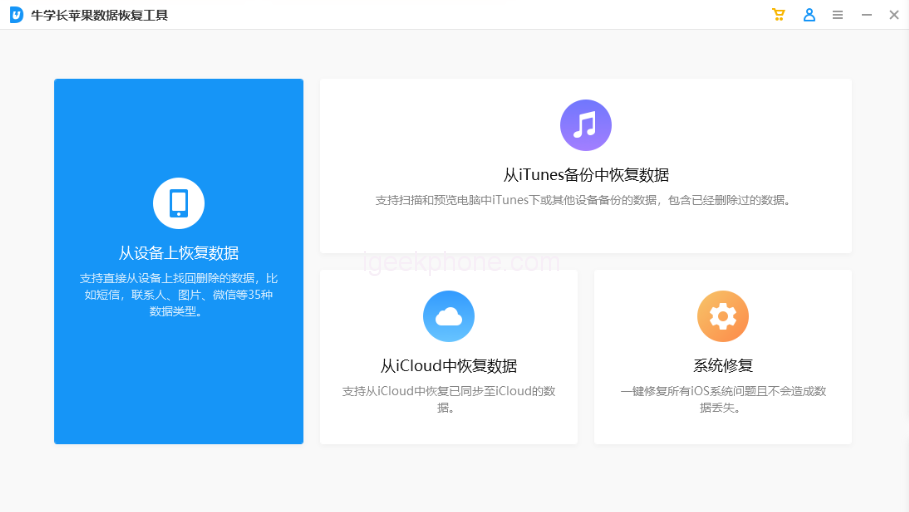
    B. Unlock the device and click “Trust” on the device side, then click “Restore Data from Device.”
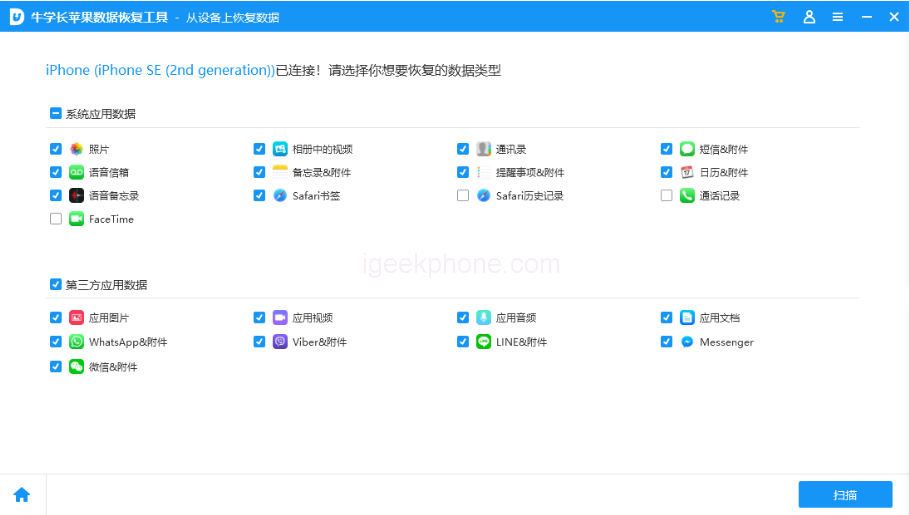
    C. The software will display all the file types the tool supports to recover. Check the data types that need to be rescued, select “Memo & Attachments,” and then click “Scan.”
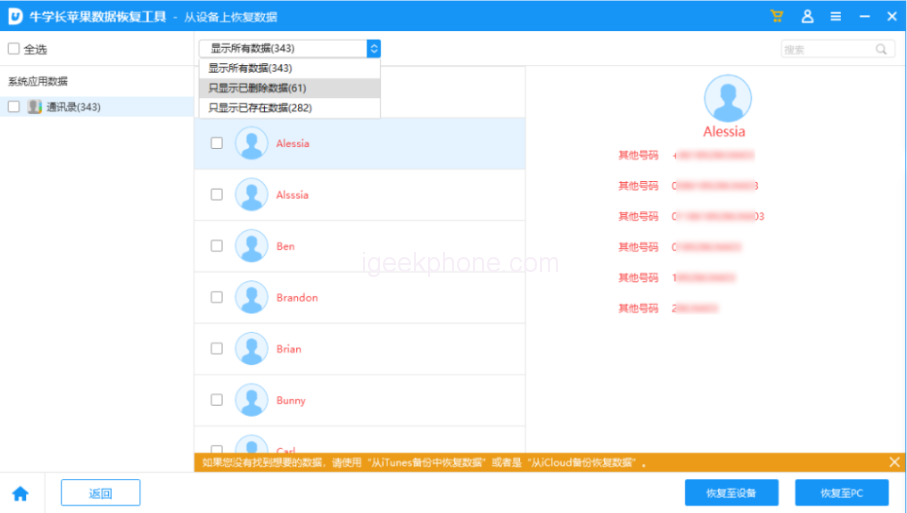
    D. Preview the recoverable data. The scanned files are arranged according to categories when the scan is complete. You can choose “Show all data” or “Show only deleted data” to find the necessary memo content.
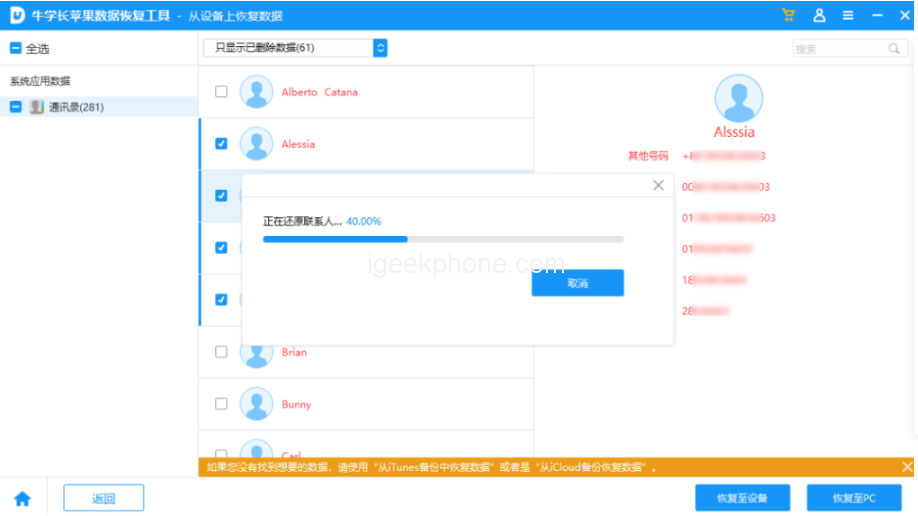
    E. Successfully recover accidentally deleted memos. After closing the search function, you can restore the selected message to be fixed directly to the device.

    It’s important to note that data recovery software cannot guarantee 100% complete recovery. However, the sooner you attempt to recover the memo, the higher the probability of success.

    In conclusion, deleting a memo accidentally can be frustrating. But with the right tools and techniques, you can recover your important information. Following the above methods, you can restore your deleted memo and return it to your daily tasks without hassle.

    Read Also: The Reasons Behind Americans’ Avoid iPhone Cases.

    Do not forget to follow us on our Facebook group and page to keep you always aware of the latest advances, News, Updates, review, and giveaway on smartphones, tablets, gadgets, and more from the technology world of the future.

    Share. Facebook Twitter Pinterest LinkedIn Tumblr Email

    Related Posts

    Lenovo Yoga Slim 7x Notebook Released: Snapdragon X2 Elite Comes with Optional OLED Touchscreen

    The Global Version of OPPO Find X9 Ultra smartphone was spotted on Geekbench: 12GB of RAM, Snapdragon 8 Elite Gen 5 Processor

    Specifications of OPPO Find X9s Pro phone have been Revealed: a 6.32-inch Small Straight Screen

    Leave A Reply Cancel Reply

    You must be logged in to post a comment.

    voopoo drag 6
    oxva xlim 3 ultra
    sp2s sen x disposable vape
    • Popular
    • 3D Printer REVIEW
    • XIAOMI
    March 16, 2026

    OXVA Slimstick VS OXVA Slimstick X Vape Hands-on Review

    March 5, 2026

    OXVA XLIM PRO 3 vs XLIM Pro 2 DNA: Hands-On Review

    March 5, 2026

    OXVA XLIM PRO 3 vs XLIM GO 2: Hands-On Review

    March 2, 2026

    OXVA XLIM PRO 3 vs XLIM 3 ULTRA: Hands-On Review

    December 26, 2025

    ACMER ASCARVA 4S: Precision CNC Power for Makers, DIYers & Small Workshops

    June 23, 2024

    ACMER P2 20W Laser Engraver Fixed Focus Engraving: Hands on Review

    May 30, 2024

    xTool F1 Ultra Review: World’s First 20W Fiber & 20W Diode Laser Engraver

    May 30, 2024

    Anycubic Kobra 3 Combo Review: The Multicolor Masterpiece?

    April 1, 2026

    Xiaomi Smart Camera 4 Max AI Zoom Edition Released: 12x zoom, supports elderly/children/pet monitoring at 799 yuan!

    March 29, 2026

    Xiaomi Watch S5 Review: 316L Stainless Steel, Ultra-Long Battery Life

    March 26, 2026

    The Telephoto Lens of Xiaomi 18 Ultra has Undergone a Comprehensive Upgrade: with an Ultra-Large Sensor, LOFIC Technology

    March 26, 2026

    Xiaomi Redmi Pad 2 Pro 5G Edition is available for purchase: Supports 5G all-network and China Unicom eSIM, 8G + 256G priced at 2599 yuan.

    fc 26 coins
    New Arrivals
    • Dotmod dotBox V2 Vape Mod Kit Dotmod dotBox V2 Vape Mod Kit
    • Valaya Amp 60K By Uwell Disposable Vape Valaya Amp 60K By Uwell Disposable Vape
    • Vivo V70 Vivo V70
    • Waspe Bar 60K Disposable Vape Waspe Bar 60K Disposable Vape
    • Dojo Purex 60K Disposable Vape Dojo Purex 60K Disposable Vape
    • Geekvape Kloud Refillable Disposable Vape Geekvape Kloud Refillable Disposable Vape
    • Suonon Amber 80K Disposable Vape Kit Suonon Amber 80K Disposable Vape Kit
    • iJOY XP50000 Zero Nicotine Disposable Vape iJOY XP50000 Zero Nicotine Disposable Vape
    • OXBAR ROVOTA DTL 40K Disposable Vape OXBAR ROVOTA DTL 40K Disposable Vape
    About
  • Igeekphone.com provides the first global tech news and reviews about smartphone, vapes, e-cigar, smart home, 3D printers, e-bike,tablets, RC drones, VR headset, and other accessories. It's the best platform to improve your brand and product.
  • Contact us: info@igeekphone.com
  • Check Our Privacy Policy Here.
  • Note: *Right now we have US editor and EU editors for review, especially for Amazon US and EU.
  • *Shop and Compare Price Here*
  • Facebook
  • Youtube
  • OUR BEST VAPE PARTNERS
  • VAPE ONLINE STORE
  • HAYATI PRO MAX PLUS
  • VAPORESSO
  • VOOPOO
  • OXVA
  • NEXA
  • MASKKING
  • TODOO
  • SP2S
  • VEIIK
  • OTHER BEST PARTNERS
  • SVBONY
  • Chuwi
  • Blackview
  • Fossibot
  • Unihertz
  • Flsun
  • Anycubic
  • Xtool
  • Oukitel
  • Mukkpet Ebike
  • Ugreen
  • Copyright © 2026 igeekphone

    Type above and press Enter to search. Press Esc to cancel.