







Facebook Twitter Instagram
    Trending
    • iQOO Pad6 Pro Tablet Released: 5th generation Snapdragon 8 supreme edition+4K gaming screen
    • iQOO 15T smartphone Released: MediaTek 9500 Monster chip + 8000mAh battery
    • Yesido EC29 25W Electric Coffee Grinder Review: Fresh Coffee Anytime, Anywhere
    • MJX HYPER GO 16218 RC Car Review: High-Speed Thrills in Full Proportional Control
    • GGIRC G101 RC Quadcopter Review at $39.99: Cutting-Edge Aerial Performance in a Foldable Design
    • QCY N20 TWS Bluetooth V6.0 Earphones Review: High-Fidelity Sound Meets Smart Convenience
    • NEXA FLEX 40000 VS IPLAY ENGINE 45000 Quick Comparison
    • JNR Lila Kiss⁺ 46K+ Puffs Refillable Vape Kit Review: Redefining Long-Lasting Vaping
    Facebook YouTube
    IGeeKphone China Phone, Tablet PC, VR, RC Drone News, Reviews
    • HOME
      • NEWS
        • DeepSeek
        • ChatGPT
        • Minecraft
    • Amazon
    • PHONE
      • Top Phones For Your First Choice
      • Phone Comparison
      • Xiaomi
      • Blackview
      • Doogee
      • Black Shark
      • Geekbuying
      • Banggood
      • TEMU
      • TikTok
      • Aliexpress
      • Walmart
      • MercadoLibre
      • Lazada
    • TOP VAPE Awards for 2026
    • VAPES
      • E-CIGAR Upcoming
      • Vape News
      • Vape Deals
      • Vape Comparison
      • Vape Guide
      • Giveaway
    • BEST VAPE
      • Best Vape Stores
      • Best Starter Vape Kits
      • Best Vapes for Beginners
      • Best Disposable Vapes
      • Best Pod Systems
      • Best Pod Mod Vapes
      • Best Mods
      • Best Nicotine Pouches
      • Best Clearomizers/Tanks
      • Best E-Liquid
      • Best EGO/Pens
      • Best Vapes for Nic Salt E-Juice
      • Best Vapes to Quit Smoking
      • RDA vs. RDTA vs. RTA
    • Best Vape Brand 2026
      • VAPORESSO
      • VOOPOO
      • OXVA
      • NEXA BAR
      • MASKKING VAPE
      • SP2S
      • IPLAY
      • TODOO
      • MRFOG
      • LOSTVAPE
      • VEIIK
    • REVIEW
      • E-cigar Review
      • Phones
      • Tablet PC
      • TV Box
      • RC Drone
      • Wearables
      • Camera
      • Accessories
      • VR Headset
    • MORE
      • TABLET
        • Chuwi
        • INNOCN
        • Teclast
        • Top Tablet for Your First Choice
        • Tablet/Laptop Comparison
      • RC DRONE
      • CAMERA
      • WEARABLES
        • OneOdio
        • BlitzWolf
        • Top Smartwatch for First Choice
      • 3D PRINTER
        • 3D Printer Review
        • Anycubic
        • FLSUN
        • Xtool
        • LONGER
        • Top 3D printer to Choose First
      • POWER STATION
        • Oukitel
        • FOSSIBOT
      • GAMING
        • Top Gaming Products
      • E-BIKE
        • Samebike
        • Happyrun
        • ENGWE
      • SMART HOME
      • TV BOX
      • ACCESSORIES
      • VR HEADSET
      • CLOTHES
      • AUTO CAR
    • DEAL
    • VAPE LAWS
    • Shop
    IGeeKphone China Phone, Tablet PC, VR, RC Drone News, Reviews
    You are at:Home»NEWS»Apple data recovery guide: How to get back erased memo on iPhone
    NEWS

    Apple data recovery guide: How to get back erased memo on iPhone

    HabibBy HabibMarch 10, 2023
    Facebook Twitter Pinterest LinkedIn Tumblr Email

    In today’s digital age, most of us rely on our smartphones to keep track of important information, such as urgent matters, account passwords, and other vital data. One common practice among office workers is jotting notes and records on their iPhone memo. This convenient habit enables them to capture important details quickly and solve them later.

    However, what happens if we accidentally delete the memo? Losing vital information can be a frustrating experience, especially if the data is critical to our daily tasks. In such situations, knowing how to recover the memo is crucial. This article will discuss some easy ways to restore deleted messages on an iPhone.

    Apple Notes Recovery:

    Undo Typing: If you accidentally delete important content while editing your memo, don’t panic. Shake your iPhone to prompt the “Undo Typing” message. Click “Undo,” and the deleted content will be restored.

    iCloud Backup: Apple mobile phones have an iCloud cloud service that automatically synchronizes your data to the cloud. If your memo is deleted, go to iCloud and view the backup record. You can select and restore the deleted message.

    Recently Deleted: The iPhone Memo software has a “Recently Deleted” function that stores all recently deleted memos. If you delete a message by mistake, check the recently deleted section first.

    Professional Data Recovery Tool: If none of the above methods work, use a professional data recovery tool like Xuechang Niu’s Apple data repair tool. This tool can recover local data like memos, text messages, contacts, and photos. The specific recovery steps are as follows:

    A. Download and install the Niu Xuechang tool and connect the device to the computer with a data cable.
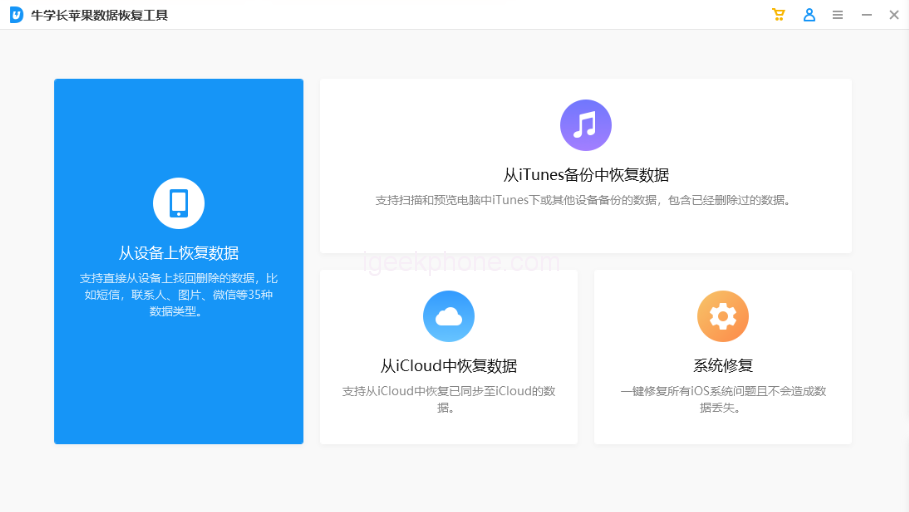
    B. Unlock the device and click “Trust” on the device side, then click “Restore Data from Device.”
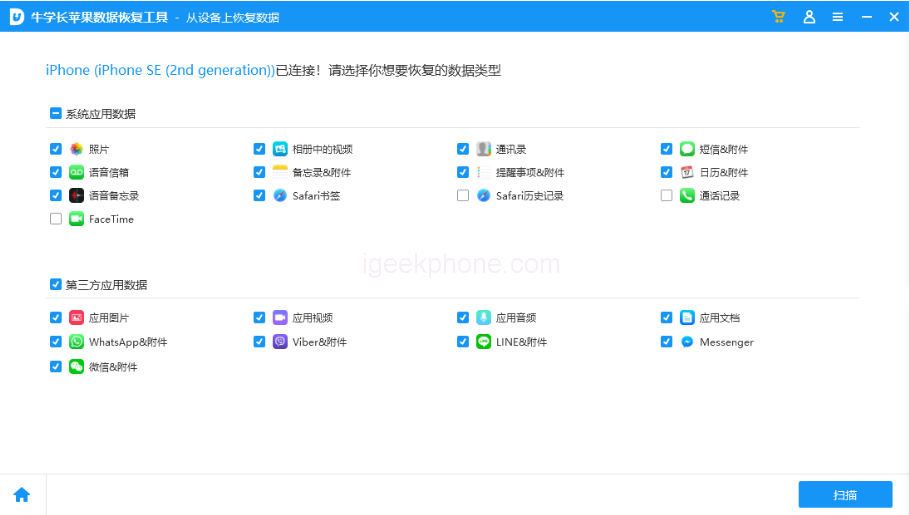
    C. The software will display all the file types the tool supports to recover. Check the data types that need to be rescued, select “Memo & Attachments,” and then click “Scan.”
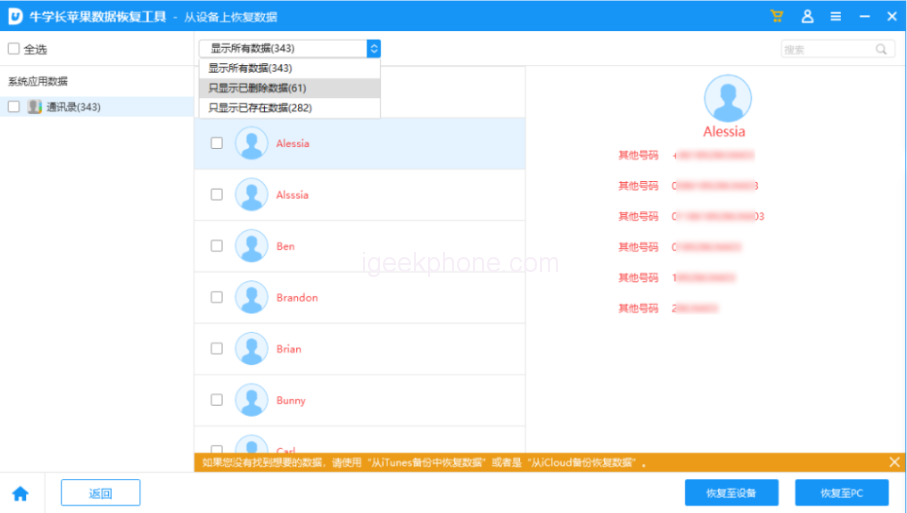
    D. Preview the recoverable data. The scanned files are arranged according to categories when the scan is complete. You can choose “Show all data” or “Show only deleted data” to find the necessary memo content.
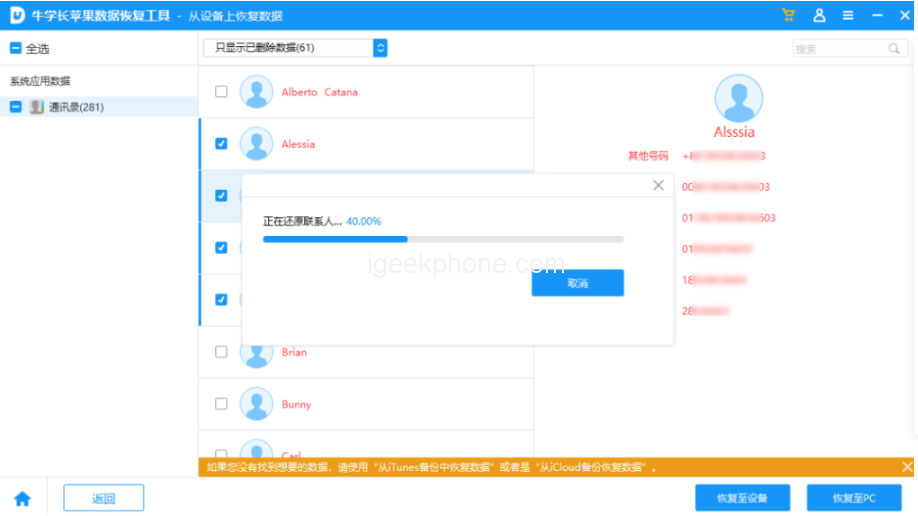
    E. Successfully recover accidentally deleted memos. After closing the search function, you can restore the selected message to be fixed directly to the device.

    It’s important to note that data recovery software cannot guarantee 100% complete recovery. However, the sooner you attempt to recover the memo, the higher the probability of success.

    In conclusion, deleting a memo accidentally can be frustrating. But with the right tools and techniques, you can recover your important information. Following the above methods, you can restore your deleted memo and return it to your daily tasks without hassle.

    Read Also: The Reasons Behind Americans’ Avoid iPhone Cases.

    Do not forget to follow us on our Facebook group and page to keep you always aware of the latest advances, News, Updates, review, and giveaway on smartphones, tablets, gadgets, and more from the technology world of the future.

    Share. Facebook Twitter Pinterest LinkedIn Tumblr Email

    Related Posts

    iQOO Pad6 Pro Tablet Released: 5th generation Snapdragon 8 supreme edition+4K gaming screen

    iQOO 15T smartphone Released: MediaTek 9500 Monster chip + 8000mAh battery

    Vape Smoke Pod: IGeekPhone’s Step-by-Step Guide

    Leave A Reply Cancel Reply

    You must be logged in to post a comment.

    voopoo drag 6
    oxva xlim 3 ultra
    sp2s sen x disposable vape
    • Popular
    • 3D Printer REVIEW
    • XIAOMI
    May 17, 2026

    iPlay Nova 45K Review – High Puff Performance with a Futuristic Twist

    May 17, 2026

    Vaporesso XROS 6 & XROS 6 Mini Review – The Evolution of Portable Vaping

    May 7, 2026

    OXVA Xlim Go Lite Review: Compact, Powerful, and Beginner-Friendly

    April 18, 2026

    VOOPOO DRAG 6 Hands on Review: Vape Beast with Smart Power & Premium Control

    December 26, 2025

    ACMER ASCARVA 4S: Precision CNC Power for Makers, DIYers & Small Workshops

    June 23, 2024

    ACMER P2 20W Laser Engraver Fixed Focus Engraving: Hands on Review

    May 30, 2024

    xTool F1 Ultra Review: World’s First 20W Fiber & 20W Diode Laser Engraver

    May 30, 2024

    Anycubic Kobra 3 Combo Review: The Multicolor Masterpiece?

    May 20, 2026

    The Benchmark scores of Xiaomi 17 Max phone have been revealed: Qualcomm’s 5th-Generation Snapdragon 8 Supreme Edition Chip

    May 19, 2026

    Xiaomi 17 Max smartphone is the first to feature a 8000mAh Jinshajiang battery. The official long video endurance test shows that it can last for over 33 hours.

    May 19, 2026

    REDMI K100 specifications leaked: Snapdragon 8E5 + 200 million pixels – the most powerful monster of the K series

    May 18, 2026

    Pre-release information for Xiaomi 17T series: Kirin chip + Leica photography

    fc 26 coins
    New Arrivals
    • Geek Bar Pulse X 2 50K Disposable Geek Bar Pulse X 2 50K Disposable
    • VOOPOO Drag H40 Pro VOOPOO Drag H40 Pro
    • DOOGEE Tab E3 Max Tablet PC DOOGEE Tab E3 Max Tablet PC
    • DOOGEE V Max 2 Pro Rugged Phone DOOGEE V Max 2 Pro Rugged Phone
    • Realme P5 Pro Realme P5 Pro
    • Innokin Coolfire Z Air Pod Mod Kit Innokin Coolfire Z Air Pod Mod Kit
    • L&A Click Pro 80K Nixodine Disposable Vape Kit L&A Click Pro 80K Nixodine Disposable Vape Kit
    • Xiaomi 17 Max Xiaomi 17 Max
    • Geek Bar Burj 80K Disposable Vape Geek Bar Burj 80K Disposable Vape
    About
  • Igeekphone.com provides the first global tech news and reviews about smartphone, vapes, e-cigar, smart home, 3D printers, e-bike,tablets, RC drones, VR headset, and other accessories. It's the best platform to improve your brand and product.
  • Contact us: info@igeekphone.com
  • Check Our Privacy Policy Here.
  • Note: *Right now we have US editor and EU editors for review, especially for Amazon US and EU.
  • *Shop and Compare Price Here*
  • Facebook
  • Youtube
  • OUR BEST VAPE PARTNERS
  • VAPE ONLINE STORE
  • HAYATI PRO MAX PLUS
  • VAPORESSO
  • VOOPOO
  • OXVA
  • NEXA
  • MASKKING
  • SP2S
  • IPLAY
  • TODOO
  • OTHER BEST PARTNERS
  • SVBONY
  • Chuwi
  • Blackview
  • Fossibot
  • Unihertz
  • Flsun
  • Anycubic
  • Xtool
  • Oukitel
  • Mukkpet Ebike
  • Ugreen
  • Copyright © 2026 igeekphone

    Type above and press Enter to search. Press Esc to cancel.