







Facebook Twitter Instagram
    Trending
    • How AI Cameras Are Changing Everyday Photography?
    • NEXA ULTRA II vs RODMAN Playoffs 50K: 50K Puff Disposable Vape Comparison
    • Your Phone Is Your Crypto Wallet: 9 Security Settings to Check Before Your First Trade
    • Vaporesso ARMOUR G2 vs ARMOUR GS2: Which Pod Mod Should You Choose?
    • HMD Slate Tab 5G Full Specifications Leak: 10.6-Inch 2K 90Hz Display and Snapdragon 7s Gen 2
    • Amazfit T-Rex Dual Solar Launches in China with Dual-Sided Solar Charging
    • Google Fitbit Edge Fitness Tracker Leaked: 7-Day Battery, GPS and Altimeter
    • AULA L99 Review: A Gaming Keyboard That Puts a Touchscreen on Your Desk
    Facebook YouTube
    IGeeKphone China Phone, Tablet PC, VR, RC Drone News, Reviews
    • HOME
    • BREAKING NEWS
      • AI NEWS
    • Amazon
    • PHONE
      • Top Phones For Your First Choice
      • Phone Comparison
      • Xiaomi
      • Blackview
      • Doogee
      • Black Shark
      • Geekbuying
      • Banggood
      • TEMU
      • TikTok
      • Aliexpress
      • Walmart
      • MercadoLibre
      • Lazada
    • TOP VAPE Awards for 2026
    • VAPES
      • E-CIGAR Upcoming
      • Vape News
      • Vape Deals
      • Vape Comparison
      • Vape Guide
      • VAPE LAWS
      • Giveaway
    • BEST VAPE
      • Best Vape Stores
      • Best Starter Vape Kits
      • Best Vapes for Beginners
      • Best Disposable Vapes
      • Best Pod Systems
      • Best Pod Mod Vapes
      • Best Mods
      • Best Nicotine Pouches
      • Best Clearomizers/Tanks
      • Best E-Liquid
      • Best EGO/Pens
      • Best Vapes for Nic Salt E-Juice
      • Best Vapes to Quit Smoking
      • RDA vs. RDTA vs. RTA
    • Best Vape Brand 2026
      • VAPORESSO
      • VOOPOO
      • OXVA
      • NEXA BAR
      • MASKKING VAPE
      • SP2S
      • IPLAY
      • TODOO
      • MRFOG
      • LOSTVAPE
      • VEIIK
    • REVIEW
      • E-cigar Review
      • Phones
      • Tablet PC
      • TV Box
      • RC Drone
      • Wearables
      • Camera
      • Accessories
      • VR Headset
    • MORE
      • TABLET
        • Chuwi
        • INNOCN
        • Teclast
        • Top Tablet for Your First Choice
        • Tablet/Laptop Comparison
      • RC DRONE
      • CAMERA
      • WEARABLES
        • OneOdio
        • BlitzWolf
        • Top Smartwatch for First Choice
      • 3D PRINTER
        • 3D Printer Review
        • Anycubic
        • FLSUN
        • Xtool
        • LONGER
        • Top 3D printer to Choose First
      • POWER STATION
        • Oukitel
        • FOSSIBOT
      • GAMING
        • Top Gaming Products
      • E-BIKE
        • Samebike
        • Happyrun
        • ENGWE
      • SMART HOME
      • TV BOX
      • ACCESSORIES
      • VR HEADSET
      • CLOTHES
      • AUTO CAR
    • DEAL
    • Shop
    IGeeKphone China Phone, Tablet PC, VR, RC Drone News, Reviews
    You are at:Home»Guide»How to transfer data from my old phone to my new phone when I change my phone?
    Guide

    How to transfer data from my old phone to my new phone when I change my phone?

    Brady CottonBy Brady CottonJune 7, 2023
    Facebook Twitter Pinterest LinkedIn Tumblr Email

    When replacing a new mobile phone, how to transfer the data inside the old mobile phone, today Xiaojun will share with you the method, elderly friends can also easily learn, believe that we buy a new mobile phone, there will be a problem, that is, how to transfer the data above the old mobile phone, such as pictures, contacts, and wechat chat records, etc. After all, we have used the old mobile phone for many years, and there are a lot of important data stored on it. We must save it in the new mobile phone, so as not to cause data loss. Next, I will teach you how to achieve this.

    First of all, if you are using a Huawei mobile phone, then we open the Settings on the new phone, then go down to find the mobile phone clone, click to open it, after opening, we will be asked to choose the device here, we choose the old phone, if the old phone is also a Huawei phone, then directly click to directly synchronize the data directly. If the old phone is not a Huawei phone, then we will choose Android and click Next, then a QR code will appear, and then we will install the APP of mobile phone clone on the old phone. After installation, we will open the app of mobile phone clone and use the mobile phone clone on the old phone to scan the QR code on the new phone, so that the two mobile phones can be connected together. After the connection is good, you can carry out data migration, we select the data to be migrated, such as contact information, call records, photos and other important data, waiting for the completion of migration, these data can be saved in the new phone!

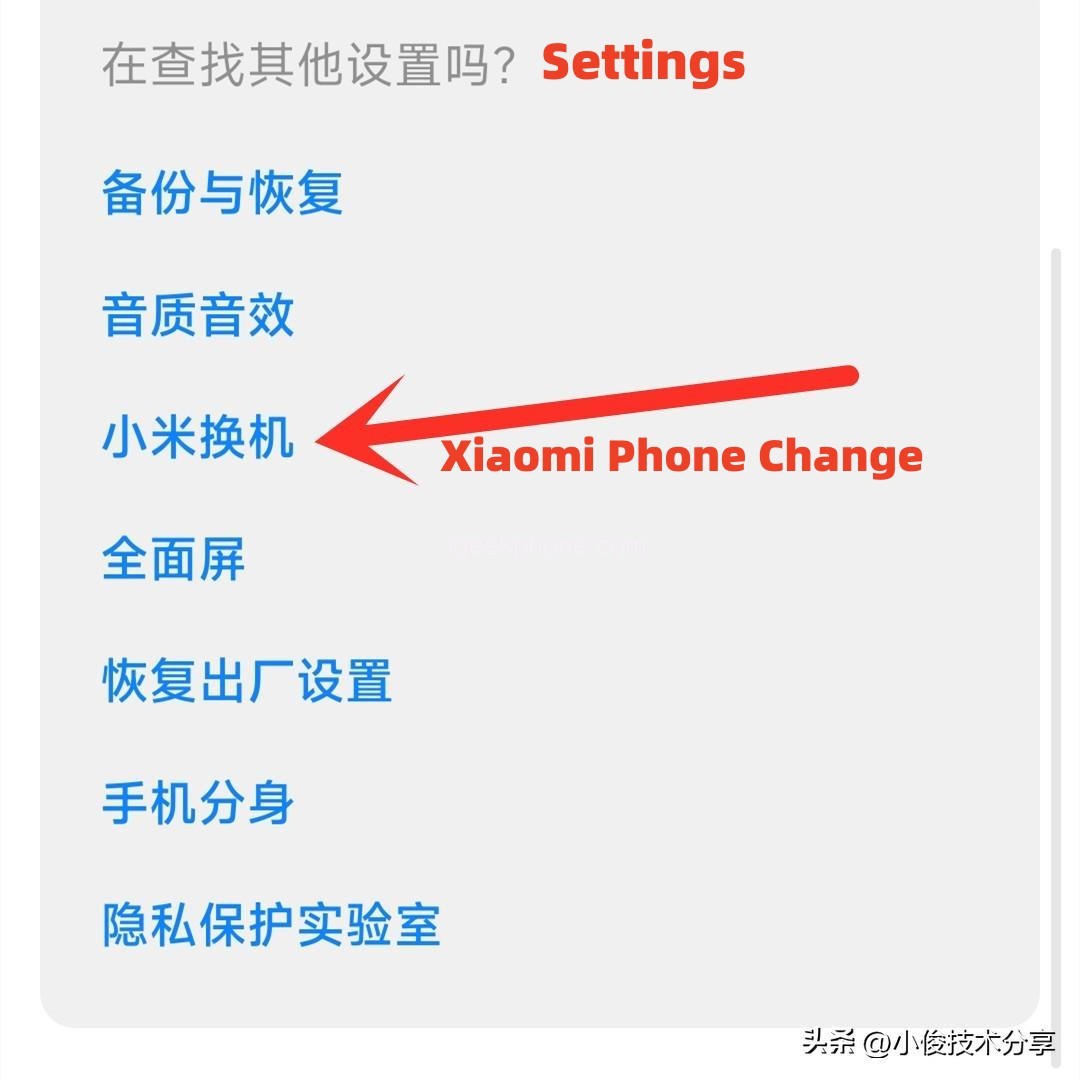
    The second kind if you use a mobile phone is not a Huawei mobile phone, is a millet mobile phone, then the operation method is roughly the same, at this time we find the millet in the mobile phone Settings.
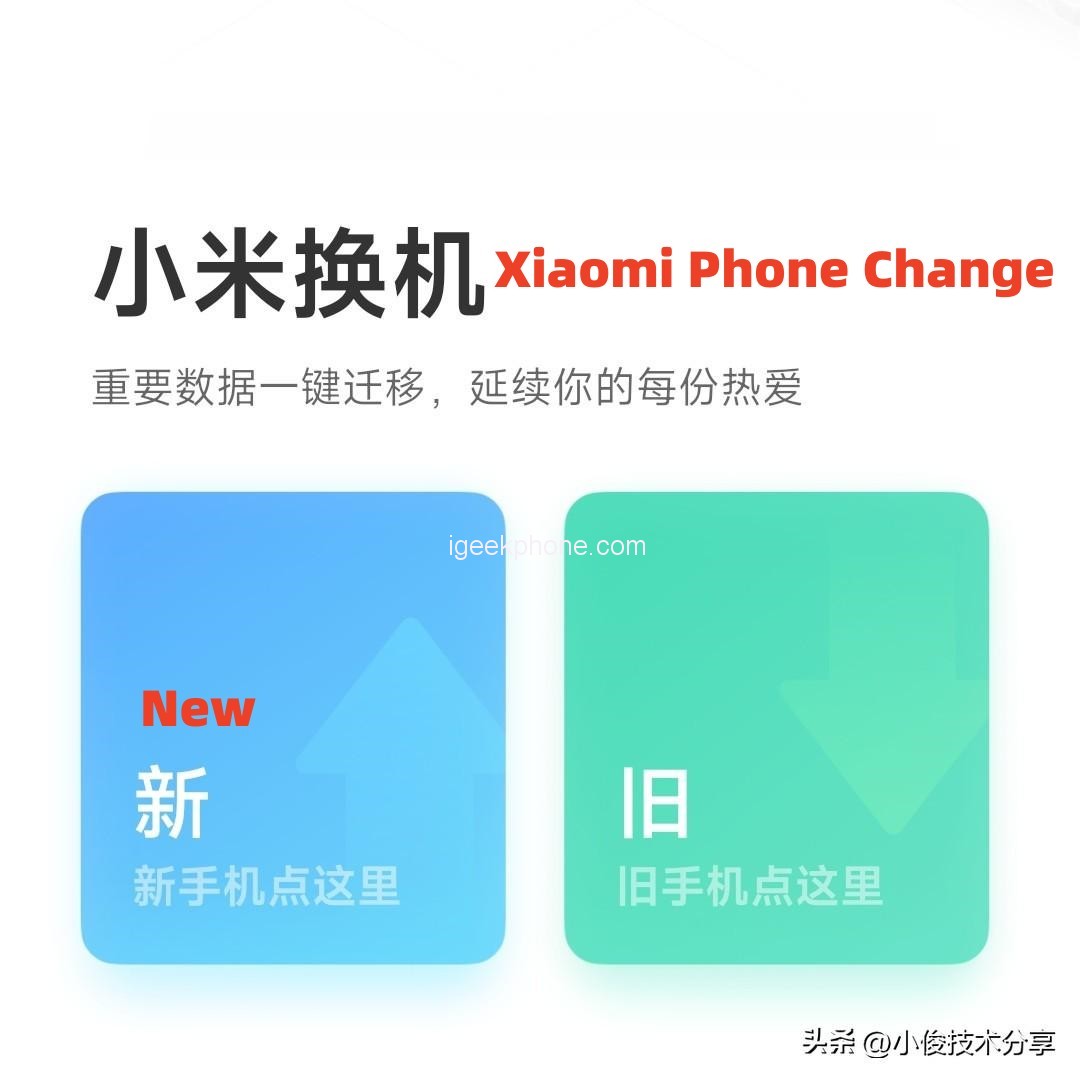
    If you have a new phone, tap New
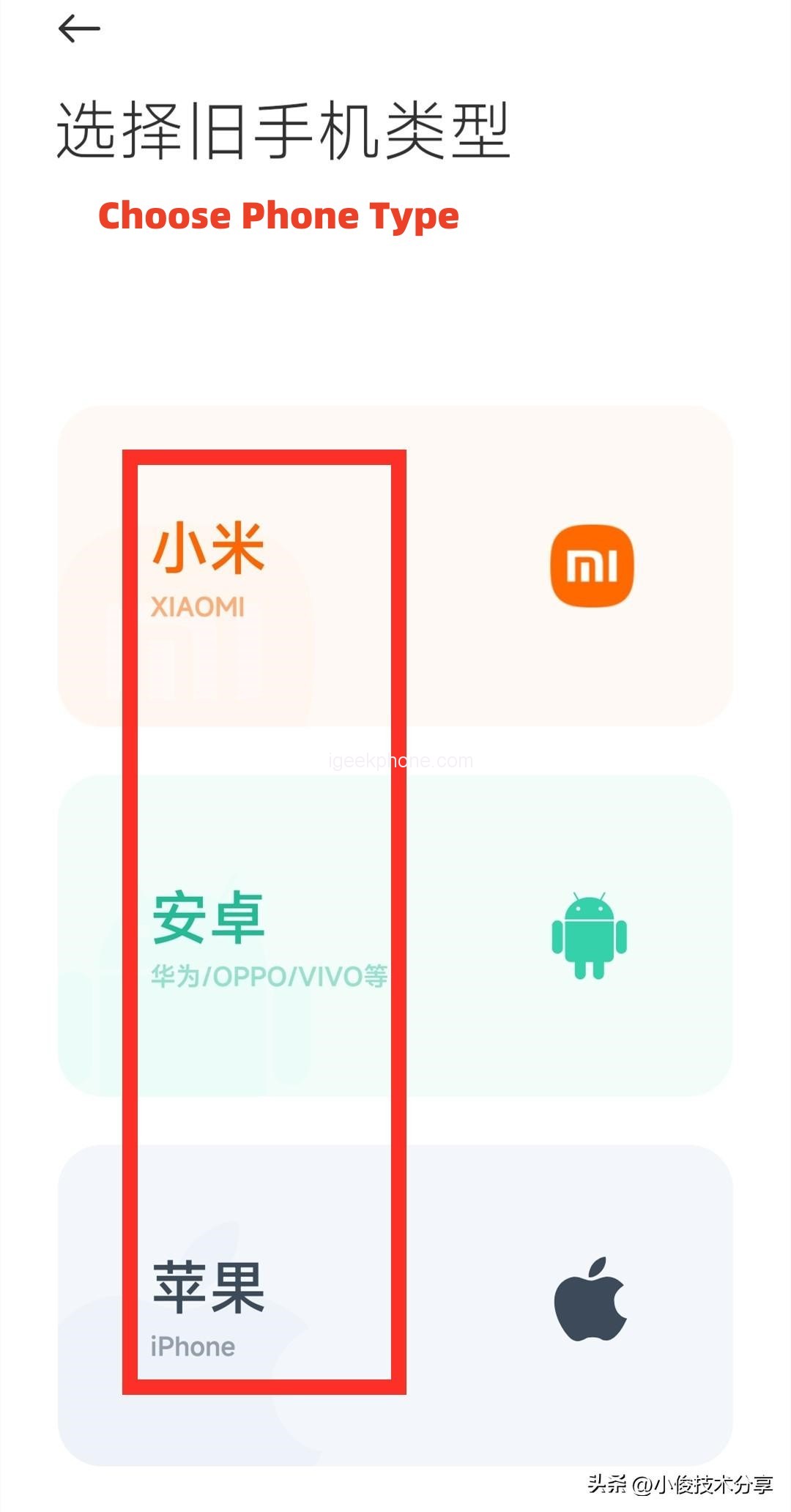
    Then click to select your old mobile phone type, if it is Xiaomi, choose Xiaomi, if it is other mobile phones, choose Android, Apple choose Apple, after selecting, there will be a two-dimensional code, and then we use the old mobile phone to scan the two-dimensional code, and then it will automatically install the millet replacement APP, we click the following to complete the installation and start the replacement!
    Then it will let us open the old mobile phone above the millet replacement APP, connect to the new mobile phone, after the connection is good, we can carry out data migration, we select the data to be migrated, and then click on the following start transmission, you can successfully put the old mobile phone above the data, perfect migration to the new mobile phone!

    Above is the knowledge igeekphone to share with you, how to migrate the old mobile phone data to the new mobile phone method, I hope to help you, you learn, you can share and forward to your family and friends, let more people know, help more people.

    Share. Facebook Twitter Pinterest LinkedIn Tumblr Email

    Related Posts

    How AI Cameras Are Changing Everyday Photography?

    Your Phone Is Your Crypto Wallet: 9 Security Settings to Check Before Your First Trade

    HMD Slate Tab 5G Full Specifications Leak: 10.6-Inch 2K 90Hz Display and Snapdragon 7s Gen 2

    Leave A Reply Cancel Reply

    You must be logged in to post a comment.

    voopoopintch
    oxva vprime 2
    nomadz
    • Popular
    • 3D Printer REVIEW
    • XIAOMI
    October 1, 2026

    VOOPOO ARGUS Z3 Review – Flip the Pod, Change the Vape! Keep It Simple!

    September 27, 2026

    Vaporesso ARMOUR OCTA Review – Built Like a Tank, Vapes Like a Beast

    September 27, 2026

    VOOPOO ARGUS Multi-Ohm Cartridge Review – One Magic Pod, Three Completely Different Vapes

    September 18, 2026

    OXVA VPRIME 2 vs VPRIME: What’s New in the Latest Version

    December 26, 2025

    ACMER ASCARVA 4S: Precision CNC Power for Makers, DIYers & Small Workshops

    June 23, 2024

    ACMER P2 20W Laser Engraver Fixed Focus Engraving: Hands on Review

    May 30, 2024

    xTool F1 Ultra Review: World’s First 20W Fiber & 20W Diode Laser Engraver

    May 30, 2024

    Anycubic Kobra 3 Combo Review: The Multicolor Masterpiece?

    October 5, 2026

    Xiaomi 18 Pro Max Transparent Edition Review: 200MP LOFIC & 8500mAh

    October 2, 2026

    REDMI Headphones Neo Review: Is 42dB ANC and 72-Hour Battery Enough?

    September 30, 2026

    Xiaomi Door and Window Sensor 3 Launches With Tunnel Magnetoresistance Sensor and 3-Year Battery

    September 23, 2026

    Xiaomi Pad 9 Pro Launches With 12.5-Inch 3.2K 144Hz Display and 11,000mAh Battery

    fc 26 coins
    New Arrivals
    • Vaporesso Armour GS2 Pod System Kit 80W Vaporesso Armour GS2 Pod System Kit 80W
    • iJOY XP100K Zero Nicotine Refillable Disposable Vape Kit iJOY XP100K Zero Nicotine Refillable Disposable Vape Kit
    • JNR PowerMate Pro JNR PowerMate Pro
    • MAXRAY RUSH 80K Disposable Vape MAXRAY RUSH 80K Disposable Vape
    • MERRYMI Blade 30000 Disposable Vape MERRYMI Blade 30000 Disposable Vape
    • Dip Devices Dipper Portable Vaporizer Dip Devices Dipper Portable Vaporizer
    • Exxus Vape Mini Plus Vaporizer Exxus Vape Mini Plus Vaporizer
    • JNR Lion King Shisha JNR Lion King Shisha
    • Fumot Eco 4-in-1 80K Disposable Vape Fumot Eco 4-in-1 80K Disposable Vape
    About
  • Igeekphone.com provides the first global tech news and reviews about smartphone, vapes, e-cigar, smart home, 3D printers, e-bike,tablets, RC drones, VR headset, and other accessories. It's the best platform to improve your brand and product.
  • Contact us: info@igeekphone.com
  • Check Our Privacy Policy Here.
  • Note: *Right now we have US editor and EU editors for review, especially for Amazon US and EU.
  • *Shop and Compare Price Here*
  • Facebook
  • Youtube
  • OUR BEST VAPE PARTNERS
  • VAPE ONLINE STORE
  • VAPORESSO
  • VOOPOO
  • OXVA
  • NEXA
  • MASKKING
  • SP2S
  • IPLAY
  • TODOO
  • OTHER BEST PARTNERS
  • SVBONY
  • Chuwi
  • Blackview
  • Fossibot
  • Unihertz
  • Flsun
  • Anycubic
  • Xtool
  • Oukitel
  • Mukkpet Ebike
  • Ugreen
  • Copyright © 2026 igeekphone

    Type above and press Enter to search. Press Esc to cancel.