







Facebook Twitter Instagram
    Trending
    • MerryMi Blade 30K Review: What Its Adjustable Power System Adds to a 30K Vape
    • DIP Devices Dipper Portable Vaporizer Review: A 2-in-1 Dab Pen and Electric Dab Straw
    • Exxus Vape Mini Plus Vaporizer Review: A Compact Dry Herb Device With Temperature Control
    • ARGUS Z3 by VOOPOO Launches With an Innovative Multi-Ohm Cartridge
    • How Orlistat Works to Support Your Weight Loss Journey
    • Honor Magic9 Pro Max Launches With ARRI Camera System and Dual 200MP Cameras
    • Honor MagicPad 4 Launches With 12.1-Inch 165Hz Display and Snapdragon 8-Series Chip
    • Best Foldable RC Drones With Obstacle Avoidance: What to Look For Before Buying
    Facebook YouTube
    IGeeKphone China Phone, Tablet PC, VR, RC Drone News, Reviews
    • HOME
    • BREAKING NEWS
      • AI NEWS
    • Amazon
    • PHONE
      • Top Phones For Your First Choice
      • Phone Comparison
      • Xiaomi
      • Blackview
      • Doogee
      • Black Shark
      • Geekbuying
      • Banggood
      • TEMU
      • TikTok
      • Aliexpress
      • Walmart
      • MercadoLibre
      • Lazada
    • TOP VAPE Awards for 2026
    • VAPES
      • E-CIGAR Upcoming
      • Vape News
      • Vape Deals
      • Vape Comparison
      • Vape Guide
      • VAPE LAWS
      • Giveaway
    • BEST VAPE
      • Best Vape Stores
      • Best Starter Vape Kits
      • Best Vapes for Beginners
      • Best Disposable Vapes
      • Best Pod Systems
      • Best Pod Mod Vapes
      • Best Mods
      • Best Nicotine Pouches
      • Best Clearomizers/Tanks
      • Best E-Liquid
      • Best EGO/Pens
      • Best Vapes for Nic Salt E-Juice
      • Best Vapes to Quit Smoking
      • RDA vs. RDTA vs. RTA
    • Best Vape Brand 2026
      • VAPORESSO
      • VOOPOO
      • OXVA
      • NEXA BAR
      • MASKKING VAPE
      • SP2S
      • IPLAY
      • TODOO
      • MRFOG
      • LOSTVAPE
      • VEIIK
    • REVIEW
      • E-cigar Review
      • Phones
      • Tablet PC
      • TV Box
      • RC Drone
      • Wearables
      • Camera
      • Accessories
      • VR Headset
    • MORE
      • TABLET
        • Chuwi
        • INNOCN
        • Teclast
        • Top Tablet for Your First Choice
        • Tablet/Laptop Comparison
      • RC DRONE
      • CAMERA
      • WEARABLES
        • OneOdio
        • BlitzWolf
        • Top Smartwatch for First Choice
      • 3D PRINTER
        • 3D Printer Review
        • Anycubic
        • FLSUN
        • Xtool
        • LONGER
        • Top 3D printer to Choose First
      • POWER STATION
        • Oukitel
        • FOSSIBOT
      • GAMING
        • Top Gaming Products
      • E-BIKE
        • Samebike
        • Happyrun
        • ENGWE
      • SMART HOME
      • TV BOX
      • ACCESSORIES
      • VR HEADSET
      • CLOTHES
      • AUTO CAR
    • DEAL
    • Shop
    IGeeKphone China Phone, Tablet PC, VR, RC Drone News, Reviews
    You are at:Home»Apple»iPhone Battery Hacks That Will Save You Hours: Complete Guide
    Apple

    iPhone Battery Hacks That Will Save You Hours: Complete Guide

    HabibBy HabibJuly 31, 2024
    Facebook Twitter Pinterest LinkedIn Tumblr Email

    The durability of Apple mobile phones is progressively diminishing, requiring users to charge them twice or even three times a day. While it’s understandable for power consumption to increase during activities like watching videos, dramas, or playing mobile games, the insufficient battery life of Apple phones during daily use significantly hampers users’ lives. If you find yourself constantly needing to charge your iPhone throughout the day, here are some techniques shared by Xuechang Niu that can help you conserve power and extend your iPhone’s battery life hacks.

    1. Identify the main causes of iPhone power consumption Navigate to [Settings] – [Battery] on your iPhone to determine which apps consume the most power. Assess whether the power consumption aligns with your usage time. If your phone rapidly drains power while using social apps, there may be underlying issues. Additionally, check the battery’s health and maximum capacity. If the maximum capacity is below 80%, it indicates battery aging, which can contribute to fast power depletion. In such cases, it is advisable to replace the battery promptly.
    2. Optimize iPhone power usage
    3. Activate “Low Power Mode” When you primarily use social and shopping apps without playing mobile games, enabling “Low Power Mode” can effectively extend your iPhone’s battery life. Simply go to [Settings] – [Battery] and enable “Low Power Mode.”
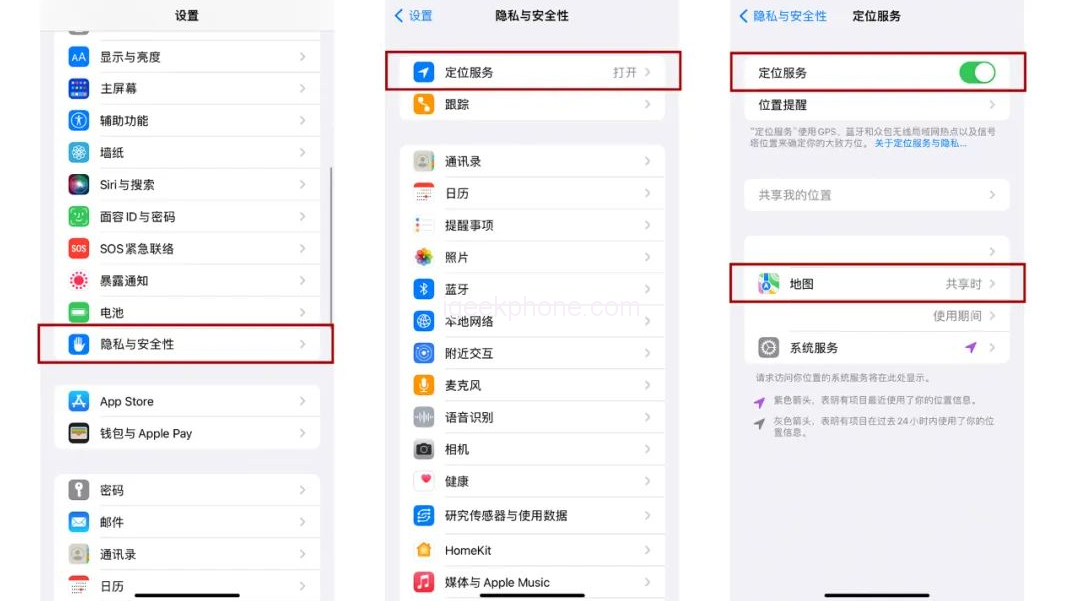
    4. Disable unnecessary app location services Most apps, aside from mapping applications, don’t require location services, which not only drain power but also compromise privacy. Navigate to [Settings] – [Privacy and Security] – [Location Services] to identify and disable unnecessary location access for apps
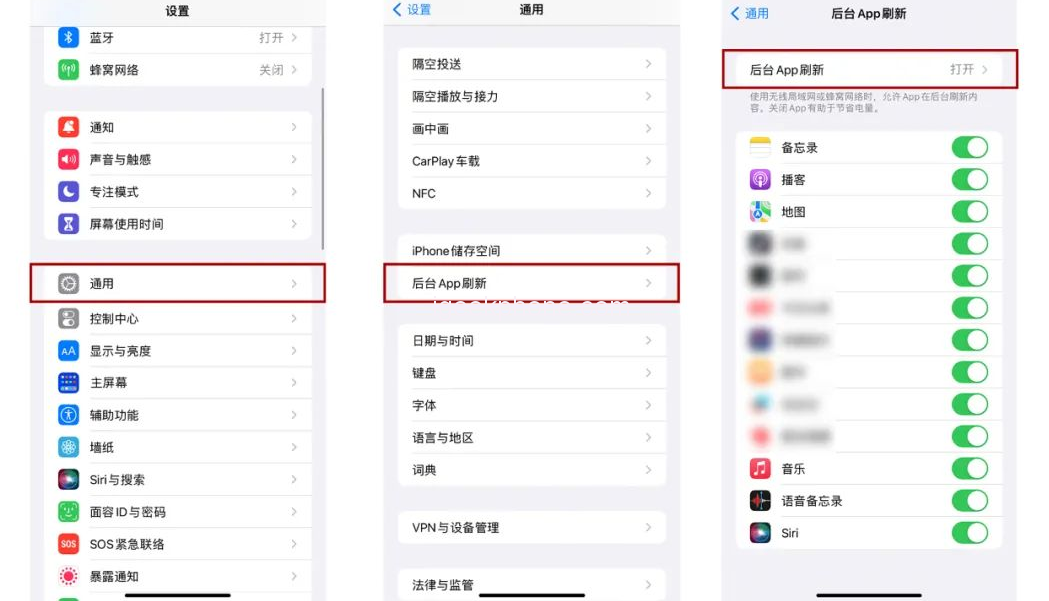
    5. Turn off “Background App Refresh” The “Background App Refresh” feature allows apps to refresh content in the background. Even if this feature is disabled, it won’t affect message reception and will conserve more power on your iPhone.
    6. Enable “Dark Mode” Professional evaluations have shown that enabling dark mode on iPhones with OLED screens can significantly reduce power consumption, saving you from 4.2 watts down to 0.2 watts.
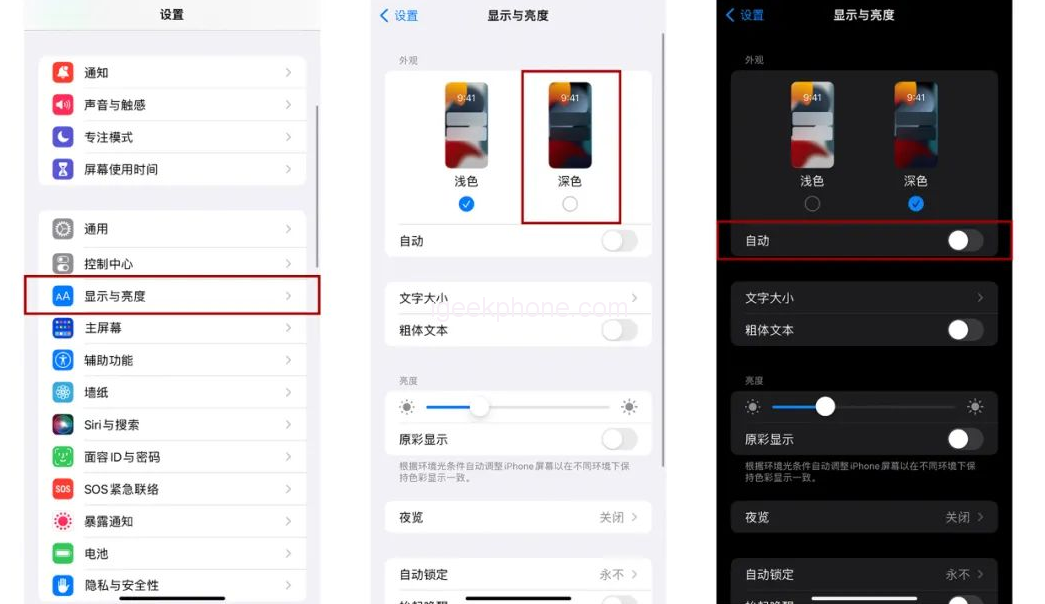
    To switch to dark mode, go to [Settings] – [Display and Brightness] – [Dark Mode]. If an all-black interface is not your preference, you can choose “Automatic” mode, which adapts to light colors during the day and dark colors at night.
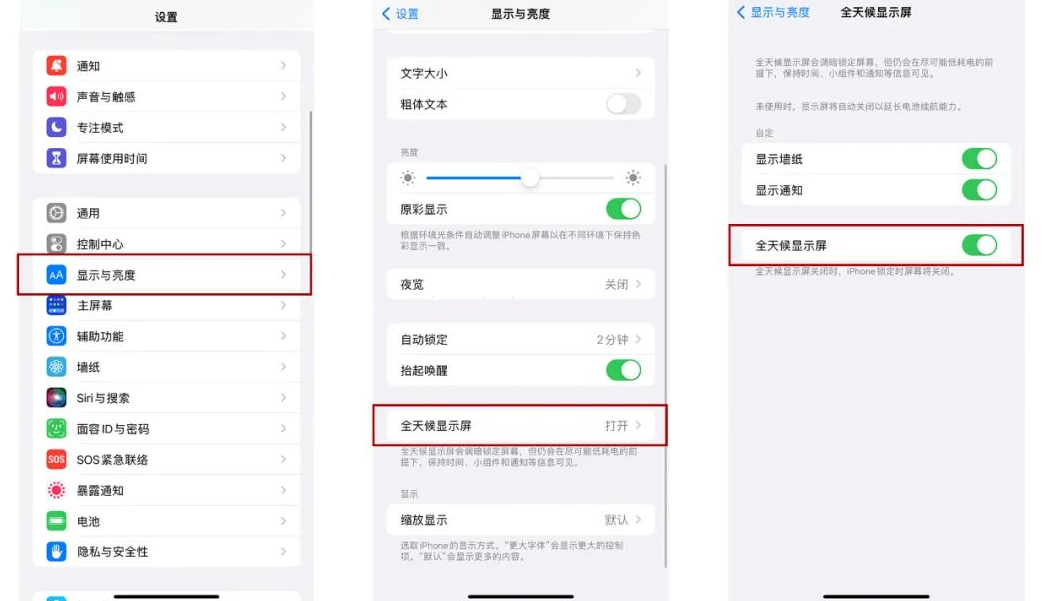
    1. Disable “Always-on Display” The iPhone 14 Pro and Pro Max introduced the “Always-on Display” feature, which maintains screen brightness and displays lock screen elements, including wallpaper, time, and widgets, even when the screen is locked. Some users find this feature power-consuming and risk-prone to screen burn-in. To disable it, navigate to [Settings] – [Display and Brightness], locate [Always-on Display], and toggle it off or selectively enable wallpaper or notification display.
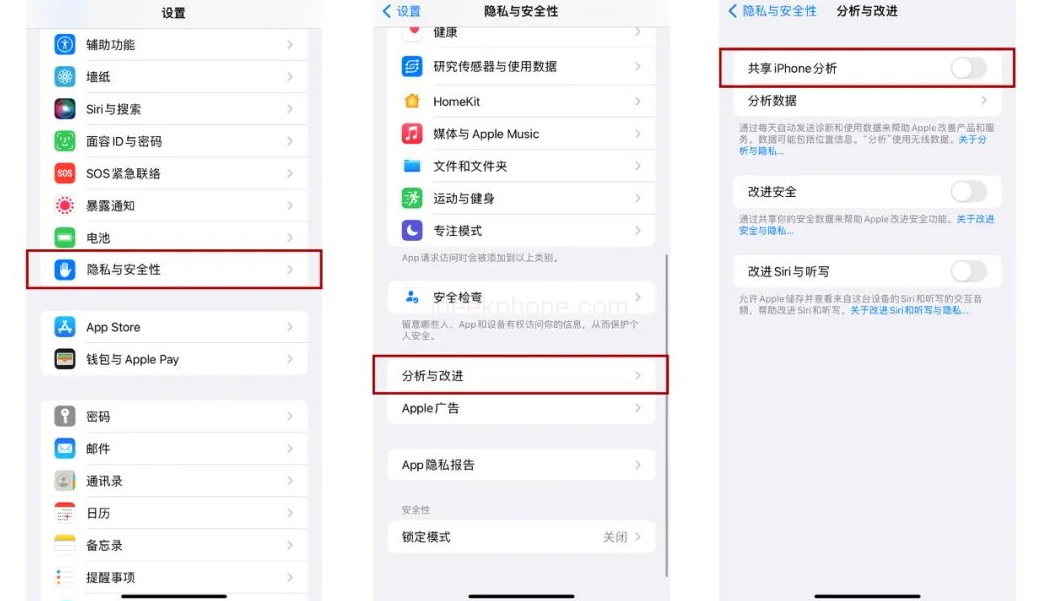
    2. Turn off “Analysis and Improvement” During new device activation, Apple offers the option to enable shared iPhone analysis and improvement to enhance products and services. Enabling this function may increase power consumption since it involves transmitting usage records and data in the background. To disable it, go to [Settings] – [Privacy and Security] – [Analysis and Improvement], and disable “Share iPhone Analysis.”
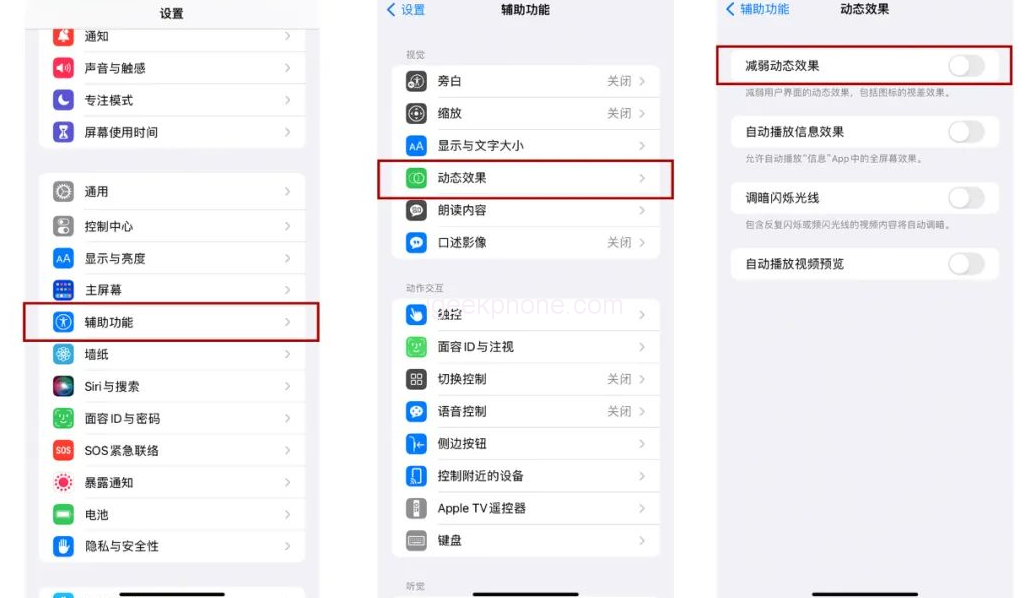
    3. Reduce dynamic effects Apple incorporates dynamic effects like zooming in and out to enhance the visual experience on iPhones. However, for older iPhone models after updating to newer systems, disabling these dynamic effects can effectively reduce power consumption. Access [Settings] – [Accessibility] – [Motion] and enable “Reduce Motion.” It is also recommended to disable “Auto-play Message Effects” and “Auto-play Video Previews.”

    By implementing these techniques, you can significantly improve your iPhone Battery Hacks and enhance its power efficiency. Give them a try and enjoy extended usage time on your device!

    Read Also: iPhone 15 series panel order reveals Apple’s secret, and the Pro model will be the main product

    Do not forget to follow us on our Facebook group and page to keep you always aware of the latest advances, News, Updates, review, and giveaway on smartphones, tablets, gadgets, and more from the technology world of the future.

    Share. Facebook Twitter Pinterest LinkedIn Tumblr Email

    Related Posts

    How Orlistat Works to Support Your Weight Loss Journey

    Honor Magic9 Pro Max Launches With ARRI Camera System and Dual 200MP Cameras

    Honor MagicPad 4 Launches With 12.1-Inch 165Hz Display and Snapdragon 8-Series Chip

    Leave A Reply Cancel Reply

    You must be logged in to post a comment.

    voopoopintch
    oxva vprime 2
    nomadz
    • Popular
    • 3D Printer REVIEW
    • XIAOMI
    September 27, 2026

    Vaporesso ARMOUR OCTA Review – Built Like a Tank, Vapes Like a Beast

    September 27, 2026

    VOOPOO ARGUS Multi-Ohm Cartridge Review – One Magic Pod, Three Completely Different Vapes

    September 18, 2026

    OXVA VPRIME 2 vs VPRIME: What’s New in the Latest Version

    July 13, 2026

    OXVA Nexlim 2 Mini Pod Vape Hands on Review

    December 26, 2025

    ACMER ASCARVA 4S: Precision CNC Power for Makers, DIYers & Small Workshops

    June 23, 2024

    ACMER P2 20W Laser Engraver Fixed Focus Engraving: Hands on Review

    May 30, 2024

    xTool F1 Ultra Review: World’s First 20W Fiber & 20W Diode Laser Engraver

    May 30, 2024

    Anycubic Kobra 3 Combo Review: The Multicolor Masterpiece?

    September 23, 2026

    Xiaomi Pad 9 Pro Launches With 12.5-Inch 3.2K 144Hz Display and 11,000mAh Battery

    September 23, 2026

    Xiaomi 18 Pro Max Launches With Snapdragon 8 Elite Extreme Gen 6 and 8500mAh Battery

    September 23, 2026

    Xiaomi 18 Pro Launches With Snapdragon 8 Elite Gen 6 and Rear Display, Starts at 5,999 Yuan

    September 22, 2026

    REDMI Buds 8S Launches With 70% Better Noise Cancellation and 40-Hour Battery Life

    fc 26 coins
    New Arrivals
    • MERRYMI Blade 30000 Disposable Vape MERRYMI Blade 30000 Disposable Vape
    • Dip Devices Dipper Portable Vaporizer Dip Devices Dipper Portable Vaporizer
    • Exxus Vape Mini Plus Vaporizer Exxus Vape Mini Plus Vaporizer
    • JNR Lion King Shisha JNR Lion King Shisha
    • Fumot Eco 4-in-1 80K Disposable Vape Fumot Eco 4-in-1 80K Disposable Vape
    • MERRYMI Blade 30000 Disposable Vape MERRYMI Blade 30000 Disposable Vape
    • Bang Blaze 250K Disposable Vape Bang Blaze 250K Disposable Vape
    • RAZ Vue 70K Halloween Edition Disposable Vape Kit RAZ Vue 70K Halloween Edition Disposable Vape Kit
    • Hellvape Dead Rabbit Pod System Kit Hellvape Dead Rabbit Pod System Kit
    About
  • Igeekphone.com provides the first global tech news and reviews about smartphone, vapes, e-cigar, smart home, 3D printers, e-bike,tablets, RC drones, VR headset, and other accessories. It's the best platform to improve your brand and product.
  • Contact us: info@igeekphone.com
  • Check Our Privacy Policy Here.
  • Note: *Right now we have US editor and EU editors for review, especially for Amazon US and EU.
  • *Shop and Compare Price Here*
  • Facebook
  • Youtube
  • OUR BEST VAPE PARTNERS
  • VAPE ONLINE STORE
  • VAPORESSO
  • VOOPOO
  • OXVA
  • NEXA
  • MASKKING
  • SP2S
  • IPLAY
  • TODOO
  • OTHER BEST PARTNERS
  • SVBONY
  • Chuwi
  • Blackview
  • Fossibot
  • Unihertz
  • Flsun
  • Anycubic
  • Xtool
  • Oukitel
  • Mukkpet Ebike
  • Ugreen
  • Copyright © 2026 igeekphone

    Type above and press Enter to search. Press Esc to cancel.