






Facebook Twitter Instagram
    Trending
    • Joyetech EXCEED Ultra Review: A 12mL Pod System with a Detachable 900mAh Battery
    • VOOPOO ARGUS Z3 Nano Pod System Kit Review: A 41.6g Design with a Switchable Multi-Ohm Pod
    • Suorin MAXO Pod System Kit Review: Understanding Its 12mL E-Liquid Design and Dual-Mesh Technology
    • Juul Labs Updates JUUL2 Starter Kit in the UK with USB-C Charging and Four Pods for £9.99
    • Why a 650mAh Battery Doesn’t Tell the Whole Story About a 50,000-Puff Vape
    • Refillable Vape vs Sealed Disposable: Key Hardware Differences Explained
    • Apple’s First Foldable iPhone Duo Appears on Geekbench With A20 Pro Performance
    • AnTuTu Q3 2026 Android Chipset Report: Xiaomi’s XRing Ranks Third
    Facebook YouTube
    IGeeKphone China Phone, Tablet PC, VR, RC Drone News, Reviews
    • HOME
    • NEWS
      • AI NEWS
    • Black Friday
    • PHONE
      • Top Phones For Your First Choice
      • Phone Comparison
      • Xiaomi
      • Blackview
      • Doogee
      • Black Shark
      • Geekbuying
      • Banggood
      • TEMU
      • TikTok
      • Aliexpress
      • Walmart
      • MercadoLibre
      • Lazada
    • TOP VAPE Awards for 2026
    • VAPES
      • E-CIGAR Upcoming
      • Vape News
      • Vape Deals
      • Vape Comparison
      • Vape Guide
      • VAPE LAWS
      • Giveaway
    • BEST VAPE
      • Best Vape Stores
      • Best Starter Vape Kits
      • Best Vapes for Beginners
      • Best Disposable Vapes
      • Best Pod Systems
      • Best Pod Mod Vapes
      • Best Mods
      • Best Nicotine Pouches
      • Best Clearomizers/Tanks
      • Best E-Liquid
      • Best EGO/Pens
      • Best Vapes for Nic Salt E-Juice
      • Best Vapes to Quit Smoking
      • RDA vs. RDTA vs. RTA
    • Best Vape Brand 2026
      • VAPORESSO
      • VOOPOO
      • OXVA
      • NEXA BAR
      • MASKKING VAPE
      • SP2S
      • IPLAY
      • TODOO
      • MRFOG
      • LOSTVAPE
      • VEIIK
    • REVIEW
      • E-cigar Review
      • Phones
      • Tablet PC
      • TV Box
      • RC Drone
      • Wearables
      • Camera
      • Accessories
      • VR Headset
    • MORE
      • TABLET
        • Chuwi
        • INNOCN
        • Teclast
        • Top Tablet for Your First Choice
        • Tablet/Laptop Comparison
      • RC DRONE
      • CAMERA
      • WEARABLES
        • OneOdio
        • BlitzWolf
        • Top Smartwatch for First Choice
      • 3D PRINTER
        • 3D Printer Review
        • Anycubic
        • FLSUN
        • Xtool
        • LONGER
        • Top 3D printer to Choose First
      • POWER STATION
        • Oukitel
        • FOSSIBOT
      • GAMING
        • Top Gaming Products
      • E-BIKE
        • Samebike
        • Happyrun
        • ENGWE
      • SMART HOME
      • TV BOX
      • ACCESSORIES
      • VR HEADSET
      • CLOTHES
      • AUTO CAR
    • DEAL
    • Shop
    IGeeKphone China Phone, Tablet PC, VR, RC Drone News, Reviews
    You are at:Home»Guide»Forgot Your iPad Lock Screen Password? Here’s How to Reset It
    Guide

    Forgot Your iPad Lock Screen Password? Here’s How to Reset It

    HabibBy HabibJuly 31, 2024
    Facebook Twitter Pinterest LinkedIn Tumblr Email

    Encountering problems with the iPad lock screen can be frustrating, such as forgetting the password, repeatedly entering incorrect passwords, or accidental input by children resulting in messages like “iPad is disabled to connect to iTunes” or “iPad unavailable.” However, there are ways to overcome these challenges without compromising data privacy.

    Utilize the “Find” Feature to Erase iPad.
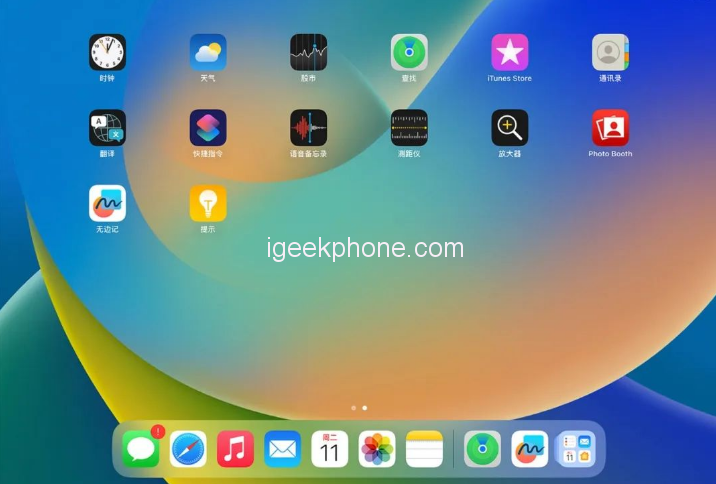
    If you’ve forgotten your iPad password, don’t panic. Log in to your Apple ID on the official website or through other Apple “Find” apps. After logging in, use the “Find” function to locate your device on the map and select “erase this device” to wipe all data, including the lock screen password. Be cautious, though, as this method may have risks associated with activating the iPad afterward.

    Professional Lock Screen Removal Tool

    Regardless of the type of password (4-digit, 6-digit, alphanumeric, fingerprint, or face ID), a powerful Apple screen unlock tool by Niu Xuechang can help you. Follow these steps:

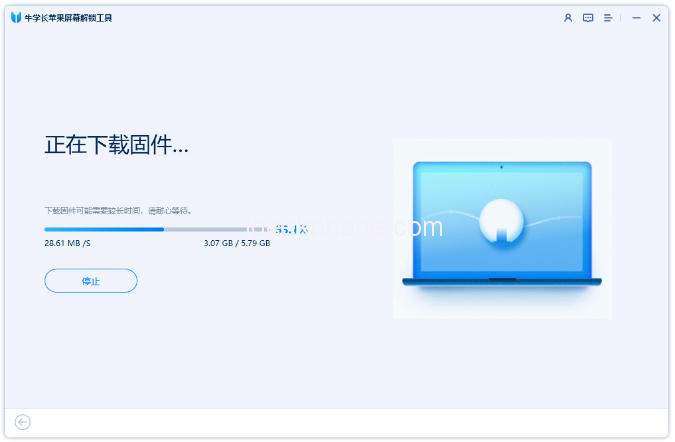
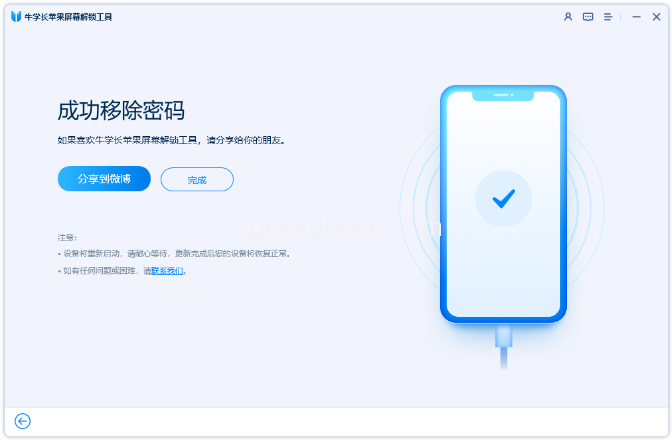
    Download and install the screen unlock device on your computer.
    Connect your iPad to the computer using a data cable.
    Click on “Remove iOS device screen password” on the software interface and carefully follow the prompts, entering recovery mode or DFU mode.

    The software will recognize your iPad; download the required firmware and proceed to “Start Unlocking.”
    After successfully removing the lock screen password, you can set a new one with a fingerprint lock or face ID.

    • Be cautious during the process and avoid disconnecting the device prematurely.
    • Unlocking via iTunes “Restore”:

    If you prefer using iTunes, follow these steps:

    Download and install the latest version of iTunes on your computer and connect your iPad via a data cable.
    Put the iPad into recovery mode manually.
    In the pop-up option box, select “Restore” to revert the device to factory settings.
    Follow the software prompts and wait for the firmware package to download.
    The “recovery” process will begin automatically, and your iPad will be unlocked. once completed
    Remember that all data on your device will be wiped during this process, but if you’ve backed up your data on iTunes or iCloud previously, you can restore it after unlocking.

    By applying these three methods, you can effectively remove the lock screen issues on your iPad and regain access to your device without compromising data security.

    Read Also: Dealing with Carbon Buildup in Heating Wire: A Comprehensive Guide

    Do not forget to follow us on our Facebook group and page to keep you always aware of the latest advances, News, Updates, review, and giveaway on smartphones, tablets, gadgets, and more from the technology world of the future.

    Share. Facebook Twitter Pinterest LinkedIn Tumblr Email

    Related Posts

    Apple’s First Foldable iPhone Duo Appears on Geekbench With A20 Pro Performance

    AnTuTu Q3 2026 Android Chipset Report: Xiaomi’s XRing Ranks Third

    Huawei Launches 20,000mAh Smart Power Bank With 100W Fast Charging and Offline Finding

    Leave A Reply Cancel Reply

    You must be logged in to post a comment.

    voopoopintch
    oxva vprime 2
    nomadz
    • Popular
    • 3D Printer REVIEW
    • XIAOMI
    October 13, 2026

    OXVA XLIM 4 Vape Hands on Review: Pocket Luxury, Serious Stamina

    October 11, 2026

    MAXRAY RUSH 80K Review – More Than Just a Puff Count: Meet the Disposable That Controls Its Own E-Liquid

    October 1, 2026

    VOOPOO ARGUS Z3 Review – Flip the Pod, Change the Vape! Keep It Simple!

    September 27, 2026

    Vaporesso ARMOUR OCTA Review – Built Like a Tank, Vapes Like a Beast

    December 26, 2025

    ACMER ASCARVA 4S: Precision CNC Power for Makers, DIYers & Small Workshops

    June 23, 2024

    ACMER P2 20W Laser Engraver Fixed Focus Engraving: Hands on Review

    May 30, 2024

    xTool F1 Ultra Review: World’s First 20W Fiber & 20W Diode Laser Engraver

    May 30, 2024

    Anycubic Kobra 3 Combo Review: The Multicolor Masterpiece?

    October 15, 2026

    AnTuTu Q3 2026 Android Chipset Report: Xiaomi’s XRing Ranks Third

    October 14, 2026

    Xiaomi Watch S5 41mm Hands-On: Comfort, Features, and Battery Life

    October 7, 2026

    REDMI Headphones Neo Review: Features, ANC Performance and Battery Life

    October 7, 2026

    Xiaomi 18 Pro Max Transparent Edition Review: 200MP Camera and 8500mAh Battery

    fc 26 coins
    New Arrivals
    • HiTide 150K Disposable HiTide 150K Disposable
    • Joyetech EXCEED Ultra Pod System Kit Joyetech EXCEED Ultra Pod System Kit
    • Voopoo ARGUS Z3 Nano Pod System Kit Voopoo ARGUS Z3 Nano Pod System Kit
    • Suorin Maxo Pod System Kit Suorin Maxo Pod System Kit
    • SP2S Nivon Disposable Vape SP2S Nivon Disposable Vape
    • Beri Cliq Battery Device Beri Cliq Battery Device
    • Exxus Vape Adapt 510 Thread Battery Exxus Vape Adapt 510 Thread Battery
    • L&A Juggernaut 150K Disposable Vape L&A Juggernaut 150K Disposable Vape
    • Dinner Lady LYXA 30K Disposable Vape Dinner Lady LYXA 30K Disposable Vape
    About
  • Igeekphone.com provides the first global tech news and reviews about smartphone, vapes, e-cigar, smart home, 3D printers, e-bike,tablets, RC drones, VR headset, and other accessories. It's the best platform to improve your brand and product.
  • Contact us: info@igeekphone.com
  • Check Our Privacy Policy Here.
  • Note: *Right now we have US editor and EU editors for review, especially for Amazon US and EU.
  • *Shop and Compare Price Here*
  • Facebook
  • Youtube
  • OUR BEST VAPE PARTNERS
  • VAPE ONLINE STORE
  • VAPORESSO
  • VOOPOO
  • OXVA
  • NEXA
  • MASKKING
  • SP2S
  • IPLAY
  • TODOO
  • OTHER BEST PARTNERS
  • SVBONY
  • Chuwi
  • Blackview
  • Fossibot
  • Unihertz
  • Flsun
  • Anycubic
  • Xtool
  • Oukitel
  • Mukkpet Ebike
  • Ugreen
  • Copyright © 2026 igeekphone

    Type above and press Enter to search. Press Esc to cancel.