







Facebook Twitter Instagram
    Trending
    • The Socio-Economic Impact of Casinos: A Comprehensive Analysis
    • How to Send Live Photos by OnePlus Ace 6t?
    • The Future of AI Art: What Lies Ahead for Artists and Creators
    • The Psychology of Gambling: Understanding the Mindset behind Risk-taking and Addiction
    • How to Set up the Dual-Screen Function of Oppo Reno 15 Pro?
    • How to Delete the Default Camera Settings on Huawei Mate 80?
    • Juice Head Flex Freeze Strawberry Banana 50K Disposable Vape Review– Long‑Lasting Flavor & Performance
    • How to Spot a Fake Vaporesso vs. an Authentic One: A Complete Guide
    Facebook YouTube
    Login Register
    IGeeKphone China Phone, Tablet PC, VR, RC Drone News, Reviews
    • HOME
      • NEWS
        • DeepSeek
        • ChatGPT
        • Minecraft
    • Amazon
    • PHONE
      • Top Phones For Your First Choice
      • Phone Comparison
      • Xiaomi
      • Blackview
      • Doogee
      • Black Shark
      • Geekbuying
      • Banggood
      • TEMU
      • TikTok
      • Aliexpress
      • Walmart
      • MercadoLibre
      • Lazada
    • TOP VAPE Awards for 2026
    • VAPES
      • E-CIGAR Upcoming
      • Vape News
      • Vape Deals
      • Vape Comparison
      • Vape Guide
      • Giveaway
    • BEST VAPE
      • Best Vape Stores
      • Best Starter Vape Kits
      • Best Vapes for Beginners
      • Best Disposable Vapes
      • Best Pod Systems
      • Best Pod Mod Vapes
      • Best Mods
      • Best Nicotine Pouches
      • Best Clearomizers/Tanks
      • Best E-Liquid
      • Best EGO/Pens
      • Best Vapes for Nic Salt E-Juice
      • Best Vapes to Quit Smoking
      • RDA vs. RDTA vs. RTA
    • Best Vape Brand 2026
      • VAPORESSO
      • VOOPOO
      • OXVA
      • NEXA BAR
      • ORIONBARTECH
      • MASKKING VAPE
      • MEMERS
      • SP2S
      • JNR
      • TODOO
      • MRFOG
      • VEIIK
    • REVIEW
      • E-cigar Review
      • Phones
      • Tablet PC
      • TV Box
      • RC Drone
      • Wearables
      • Camera
      • Accessories
      • VR Headset
    • MORE
      • TABLET
        • Chuwi
        • INNOCN
        • Teclast
        • Top Tablet for Your First Choice
        • Tablet/Laptop Comparison
      • RC DRONE
      • CAMERA
      • WEARABLES
        • OneOdio
        • BlitzWolf
        • Top Smartwatch for First Choice
      • 3D PRINTER
        • 3D Printer Review
        • Anycubic
        • FLSUN
        • Xtool
        • LONGER
        • Top 3D printer to Choose First
      • POWER STATION
        • Oukitel
        • FOSSIBOT
      • GAMING
        • Top Gaming Products
      • E-BIKE
        • Samebike
        • Happyrun
        • ENGWE
      • SMART HOME
      • TV BOX
      • ACCESSORIES
      • VR HEADSET
      • CLOTHES
      • AUTO CAR
    • DEAL
    • VAPE LAWS
    • Shop
    IGeeKphone China Phone, Tablet PC, VR, RC Drone News, Reviews
    You are at:Home»Guide»A Step-by-Step Guide to Recovering Data from a Corrupted SxS Card
    Guide

    A Step-by-Step Guide to Recovering Data from a Corrupted SxS Card

    HabibBy HabibJanuary 15, 2026
    Facebook Twitter Pinterest LinkedIn Tumblr Email

    Speaking about SxS cards, are you familiar with them? SxS cards boast excellent data transmission capabilities, effectively storing photo and video data. They find their primary application in Sony XDCAM EX cameras.

    During the utilization of SxS card equipment, the potential for data loss, akin to other devices, is an inherent concern. If the lost data holds significant importance, grappling with the query “How can SxS card files be recovered” becomes a paramount challenge. This article aims to highlight the causes of SxS card data loss and offer a comprehensive recovery strategy.

    Frequent Causes of Data Loss on SxS Cards

    Instances leading to data loss from SxS memory cards within your camcorder or any analogous storage device encompass:

    Virus Infestation: Attaching an SxS card to a virus-affected electronic apparatus may culminate in data deletion or concealment.

    Improper Ejection: Extract the SxS cards from the camcorder or computer without adhering to safe ejection protocols.

    Unintentional Deletion: Inadvertently erasing a vital SxS cards file while organizing files.

    Formatting Errors: Mistakenly formatting the card’s content in response to a formatting prompt.

    Physical Damage: Experiencing physical harm, such as breakage, dropping, or extended water exposure.

    Approach 1: Revealing Concealed Data Post-Virus Infection
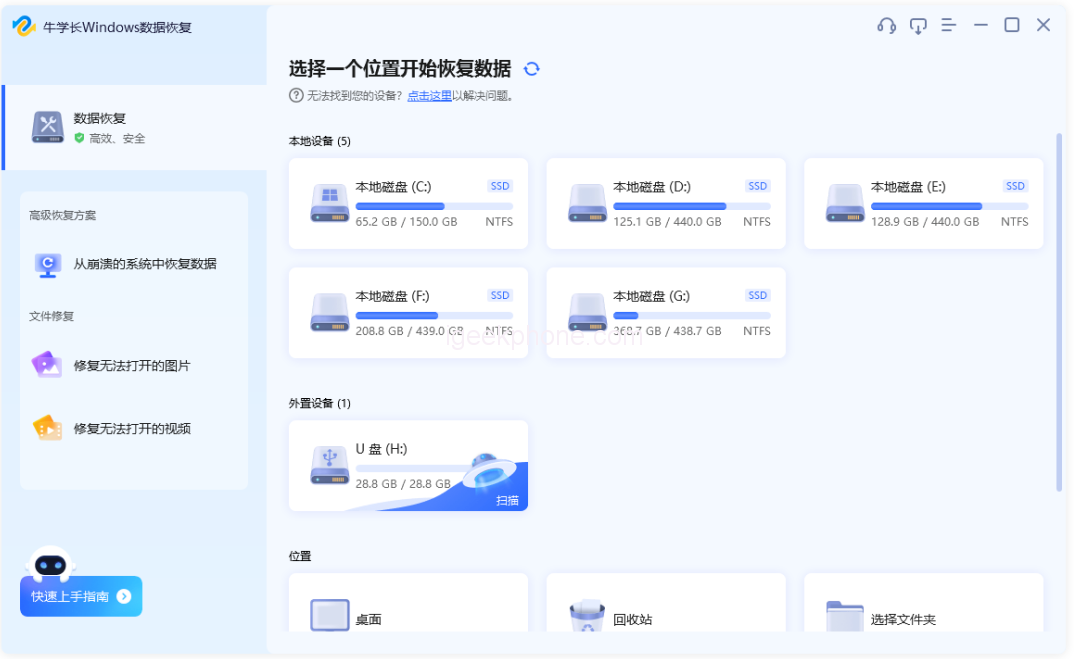
    Failure to access SxS cards data on a computer may stem from virus infiltration. If your computer falls victim to a virus, the files might become obscured following an SxS card connection. To remedy this, follow these steps to unveil hidden data:

    Identify the SxS card’s drive letter within the computer interface, then right-click and select “Open.”
    Click “View” on the menu bar, locate “Hidden Items,” and enable it to display concealed files.

    Approach 2: Employing Proficient SxS Cards Data Retrieval Software
    If recovering hidden files from the SxS card data proves unsuccessful, use specialized SxS card data recovery software. An example is the Niu Xuechang data recovery tool, which is adept at reclaiming lost or deleted files from various storage devices, including SxS cards. This software supports diverse file formats and adeptly addresses data loss scenarios like unintentional deletion, formatting blunders, and virus encroachments.

    Read Also: Unlock Your iPhone Without a Passcode in 5 Easy Steps

    Steps for SxS Card Data Recovery Using Niu Xuechang Software:

    Download and install the Niu Xuechang Windows Data Recovery Tool. Upon launch, the main interface will manifest. Identify the SxS card and the lost files.

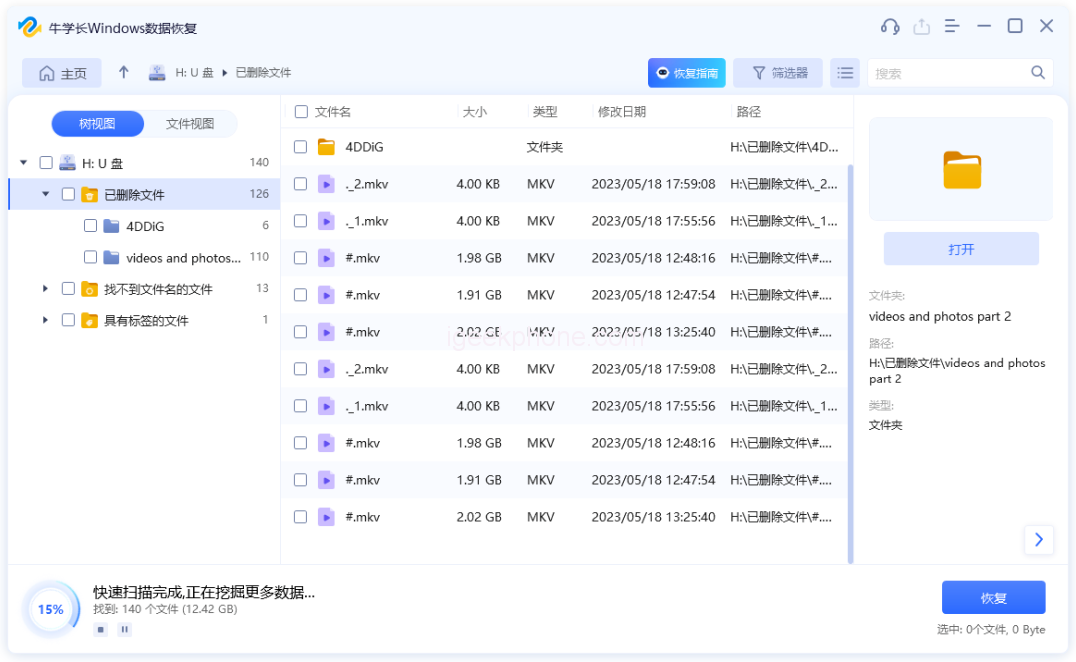
    Initiate scanning and previewing. Opt for the data type to scan, then click “Scan.” The software will comprehensively scan the SxS card.

    Upon scanning completion, the software will present all deleted files within the chosen location. Navigate to “File View” for categorized data display.

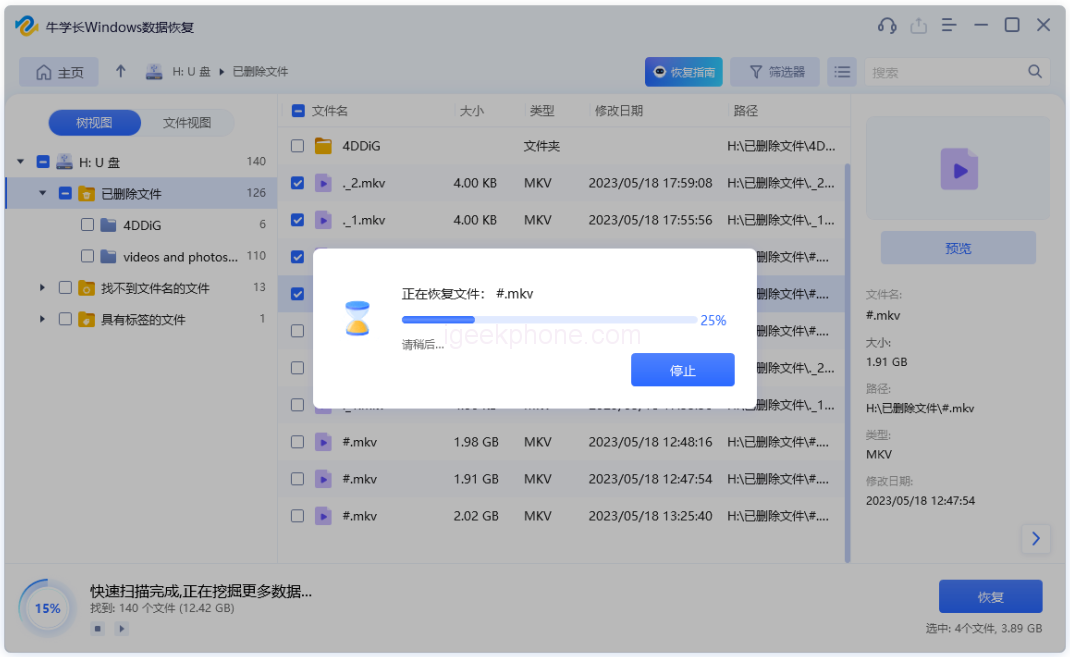
    Retrieve data. Locate the inadvertently deleted files and click “Recover” to salvage the regained data.

    For optimal results with the SxS cards data recovery software, desist from read or write actions post-data loss to prevent overwriting.

    With the two viable methods delineated above, you can opt for the strategy aligning with your specific circumstances for SxS card recovery. If aiming for a secure and efficient recovery solution, Niu Xuechang data recovery software is highly recommended as the prime choice for SxS cards data recovery.

    Do not forget to follow us on our Facebook group and page to keep you always aware of the latest advances, News, Updates, review, and giveaway on smartphones, tablets, gadgets, and more from the technology world of the future.

    Share. Facebook Twitter Pinterest LinkedIn Tumblr Email

    Related Posts

    How to Send Live Photos by OnePlus Ace 6t?

    The Future of AI Art: What Lies Ahead for Artists and Creators

    How to Set up the Dual-Screen Function of Oppo Reno 15 Pro?

    Leave A Reply Cancel Reply

    You must be logged in to post a comment.

    voopoo drag 6
    oxva xlim 3 ultra
    sp2s sen x disposable vape
    jnr 100k
    • Popular
    • 3D Printer REVIEW
    • XIAOMI
    March 5, 2026

    OXVA XLIM PRO 3 vs XLIM Pro 2 DNA: Hands-On Review

    March 5, 2026

    OXVA XLIM PRO 3 vs XLIM GO 2: Hands-On Review

    March 2, 2026

    OXVA XLIM PRO 3 vs XLIM 3 ULTRA: Hands-On Review

    February 23, 2026

    Voopoo DRAG S3 vs DRAG X3 Review – Which One Fits Your Vaping Lifestyle?

    December 26, 2025

    ACMER ASCARVA 4S: Precision CNC Power for Makers, DIYers & Small Workshops

    June 23, 2024

    ACMER P2 20W Laser Engraver Fixed Focus Engraving: Hands on Review

    May 30, 2024

    xTool F1 Ultra Review: World’s First 20W Fiber & 20W Diode Laser Engraver

    May 30, 2024

    Anycubic Kobra 3 Combo Review: The Multicolor Masterpiece?

    March 10, 2026

    Xiaomi 18 Pro Max leaks out: First to Feature Snapdragon 8E6 Pro with a 6.9-inch Large Screen

    March 9, 2026

    Xiaomi Redmi K90 Supreme Edition,New model of Dimensity 9500 from a certain factory has been Exposed

    March 3, 2026

    Starting from 7,999 yuan, Leica Announces that Leica Version of Xiaomi 17 Ultra in Black and Silver will be Available on Official Channels

    March 3, 2026

    Xiaomi Releases the second phase recruitment announcement for the ‘Hyper OS 3 Beta’: ends at 0:00 on March 6th

    fc 26 coins
    New Arrivals
    • Juice Head iFlex Nixodine 50K Disposable Vape Juice Head iFlex Nixodine 50K Disposable Vape
    • MASKKING CAMO Disposable Vape MASKKING CAMO Disposable Vape
    • Pod Salt Air 40K Disposable Vape Pod Salt Air 40K Disposable Vape
    • OXVA Xlim Go Lite Pod System Kit OXVA Xlim Go Lite Pod System Kit
    • OXVA ARTIO 2 Vape OXVA ARTIO 2 Vape
    • Wala Yo 50000 Disposable Vape Wala Yo 50000 Disposable Vape
    • BD Vape Mod Rayden 220 Box Mod BD Vape Mod Rayden 220 Box Mod
    • Airmez Lux 60K Disposable Vape Airmez Lux 60K Disposable Vape
    • YOVO JB50K Nixodine Disposable Vape Kit YOVO JB50K Nixodine Disposable Vape Kit
    About
  • Igeekphone.com provides the first global tech news and reviews about smartphone, vapes, e-cigar, smart home, 3D printers, e-bike,tablets, RC drones, VR headset, and other accessories. It's the best platform to improve your brand and product.
  • Contact us: info@igeekphone.com
  • Check Our Privacy Policy Here.
  • Note: *Right now we have US editor and EU editors for review, especially for Amazon US and EU.
  • *Shop and Compare Price Here*
  • Facebook
  • Youtube
  • OUR BEST VAPE PARTNERS
  • VAPE ONLINE STORE
  • HAYATI PRO MAX PLUS
  • VAPORESSO
  • VOOPOO
  • OXVA
  • NEXA
  • MASKKING
  • LOSTVAPE ORIONBAR
  • MEMERS
  • TODOO
  • SP2S
  • JNR
  • VEIIK
  • OTHER BEST PARTNERS
  • SVBONY
  • Chuwi
  • Blackview
  • Fossibot
  • Unihertz
  • Flsun
  • Anycubic
  • Xtool
  • Oukitel
  • Mukkpet Ebike
  • Ugreen
  • Copyright © 2026 igeekphone

    Type above and press Enter to search. Press Esc to cancel.