







Facebook Twitter Instagram
    Trending
    • Is it Possible that Vaping Reduces Blood Pressure?
    • 2026 iPhone Guide: How to Set Custom Ringtones on iPhone
    • How to Find a Cell Phone Store That Is Right for You
    • Xiaomi’s first over-ear headphones made their debut! With a mirror-like body and transparent sound-emitting balls, the design is truly unique.
    • Crucial website services that companies should prioritize investing in
    • A Step-by-Step Guide to Repairing Corrupted Video Files
    • Apple iPhone 18 Pro / Max makes another big announcement: It features “Dark Cherry” color, and the rear camera layout remains unchanged.
    • iQOO Pad6 Pro tablet has officially announced support for 13 native 4K gaming experiences, with the highest support being 4K ultra-resolution
    Facebook YouTube
    IGeeKphone China Phone, Tablet PC, VR, RC Drone News, Reviews
    • HOME
      • NEWS
        • DeepSeek
        • ChatGPT
        • Minecraft
    • Amazon
    • PHONE
      • Top Phones For Your First Choice
      • Phone Comparison
      • Xiaomi
      • Blackview
      • Doogee
      • Black Shark
      • Geekbuying
      • Banggood
      • TEMU
      • TikTok
      • Aliexpress
      • Walmart
      • MercadoLibre
      • Lazada
    • TOP VAPE Awards for 2026
    • VAPES
      • E-CIGAR Upcoming
      • Vape News
      • Vape Deals
      • Vape Comparison
      • Vape Guide
      • Giveaway
    • BEST VAPE
      • Best Vape Stores
      • Best Starter Vape Kits
      • Best Vapes for Beginners
      • Best Disposable Vapes
      • Best Pod Systems
      • Best Pod Mod Vapes
      • Best Mods
      • Best Nicotine Pouches
      • Best Clearomizers/Tanks
      • Best E-Liquid
      • Best EGO/Pens
      • Best Vapes for Nic Salt E-Juice
      • Best Vapes to Quit Smoking
      • RDA vs. RDTA vs. RTA
    • Best Vape Brand 2026
      • VAPORESSO
      • VOOPOO
      • OXVA
      • NEXA BAR
      • MASKKING VAPE
      • SP2S
      • IPLAY
      • TODOO
      • MRFOG
      • LOSTVAPE
      • VEIIK
    • REVIEW
      • E-cigar Review
      • Phones
      • Tablet PC
      • TV Box
      • RC Drone
      • Wearables
      • Camera
      • Accessories
      • VR Headset
    • MORE
      • TABLET
        • Chuwi
        • INNOCN
        • Teclast
        • Top Tablet for Your First Choice
        • Tablet/Laptop Comparison
      • RC DRONE
      • CAMERA
      • WEARABLES
        • OneOdio
        • BlitzWolf
        • Top Smartwatch for First Choice
      • 3D PRINTER
        • 3D Printer Review
        • Anycubic
        • FLSUN
        • Xtool
        • LONGER
        • Top 3D printer to Choose First
      • POWER STATION
        • Oukitel
        • FOSSIBOT
      • GAMING
        • Top Gaming Products
      • E-BIKE
        • Samebike
        • Happyrun
        • ENGWE
      • SMART HOME
      • TV BOX
      • ACCESSORIES
      • VR HEADSET
      • CLOTHES
      • AUTO CAR
    • DEAL
    • VAPE LAWS
    • Shop
    IGeeKphone China Phone, Tablet PC, VR, RC Drone News, Reviews
    You are at:Home»Guide»A Step-by-Step Guide to Recovering Data from a Corrupted SxS Card
    Guide

    A Step-by-Step Guide to Recovering Data from a Corrupted SxS Card

    HabibBy HabibJanuary 15, 2026
    Facebook Twitter Pinterest LinkedIn Tumblr Email

    Speaking about SxS cards, are you familiar with them? SxS cards boast excellent data transmission capabilities, effectively storing photo and video data. They find their primary application in Sony XDCAM EX cameras.

    During the utilization of SxS card equipment, the potential for data loss, akin to other devices, is an inherent concern. If the lost data holds significant importance, grappling with the query “How can SxS card files be recovered” becomes a paramount challenge. This article aims to highlight the causes of SxS card data loss and offer a comprehensive recovery strategy.

    Frequent Causes of Data Loss on SxS Cards

    Instances leading to data loss from SxS memory cards within your camcorder or any analogous storage device encompass:

    Virus Infestation: Attaching an SxS card to a virus-affected electronic apparatus may culminate in data deletion or concealment.

    Improper Ejection: Extract the SxS cards from the camcorder or computer without adhering to safe ejection protocols.

    Unintentional Deletion: Inadvertently erasing a vital SxS cards file while organizing files.

    Formatting Errors: Mistakenly formatting the card’s content in response to a formatting prompt.

    Physical Damage: Experiencing physical harm, such as breakage, dropping, or extended water exposure.

    Approach 1: Revealing Concealed Data Post-Virus Infection
    Failure to access SxS cards data on a computer may stem from virus infiltration. If your computer falls victim to a virus, the files might become obscured following an SxS card connection. To remedy this, follow these steps to unveil hidden data:

    Identify the SxS card’s drive letter within the computer interface, then right-click and select “Open.”
    Click “View” on the menu bar, locate “Hidden Items,” and enable it to display concealed files.

    Approach 2: Employing Proficient SxS Cards Data Retrieval Software
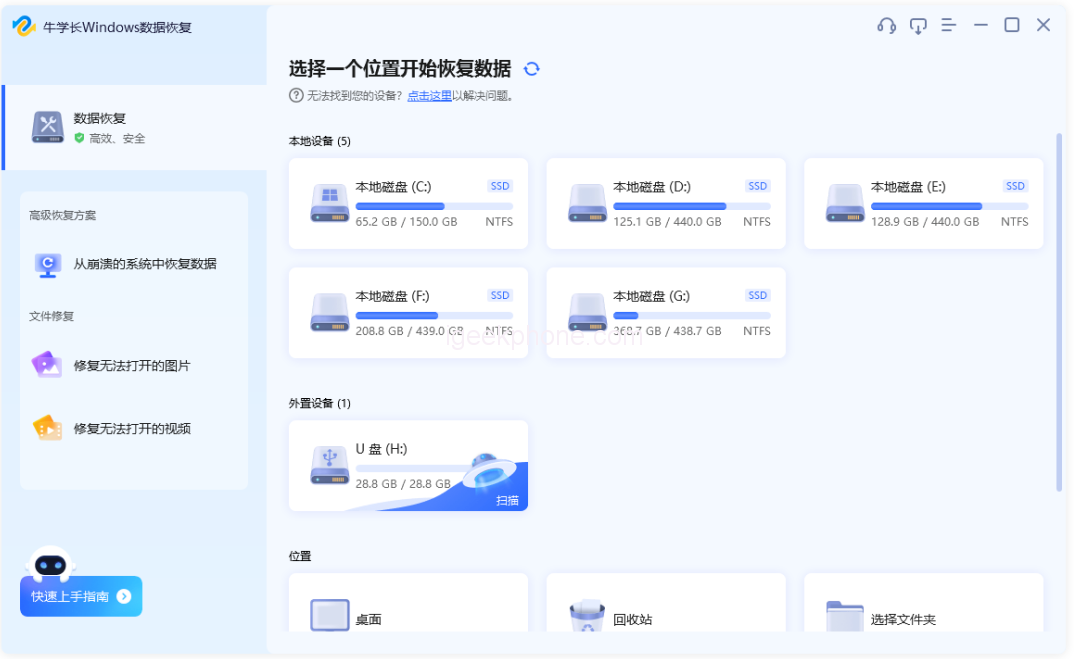
    If recovering hidden files from the SxS card data proves unsuccessful, use specialized SxS card data recovery software. An example is the Niu Xuechang data recovery tool, which is adept at reclaiming lost or deleted files from various storage devices, including SxS cards. This software supports diverse file formats and adeptly addresses data loss scenarios like unintentional deletion, formatting blunders, and virus encroachments.

    Read Also: Unlock Your iPhone Without a Passcode in 5 Easy Steps

    Steps for SxS Card Data Recovery Using Niu Xuechang Software:

    Download and install the Niu Xuechang Windows Data Recovery Tool. Upon launch, the main interface will manifest. Identify the SxS card and the lost files.

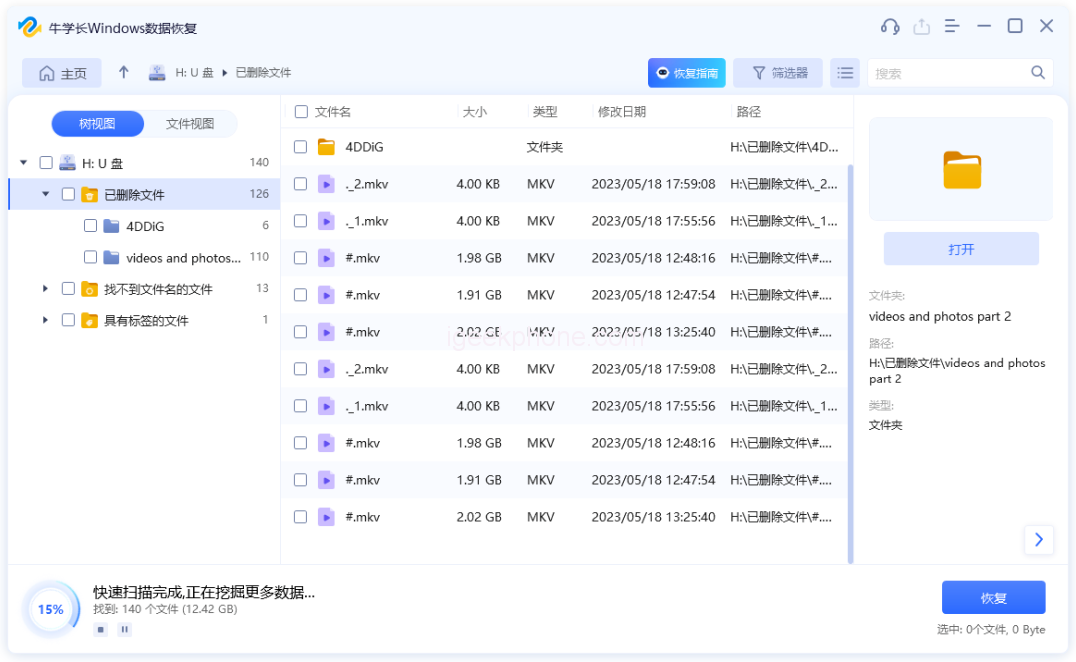
    Initiate scanning and previewing. Opt for the data type to scan, then click “Scan.” The software will comprehensively scan the SxS card.

    Upon scanning completion, the software will present all deleted files within the chosen location. Navigate to “File View” for categorized data display.

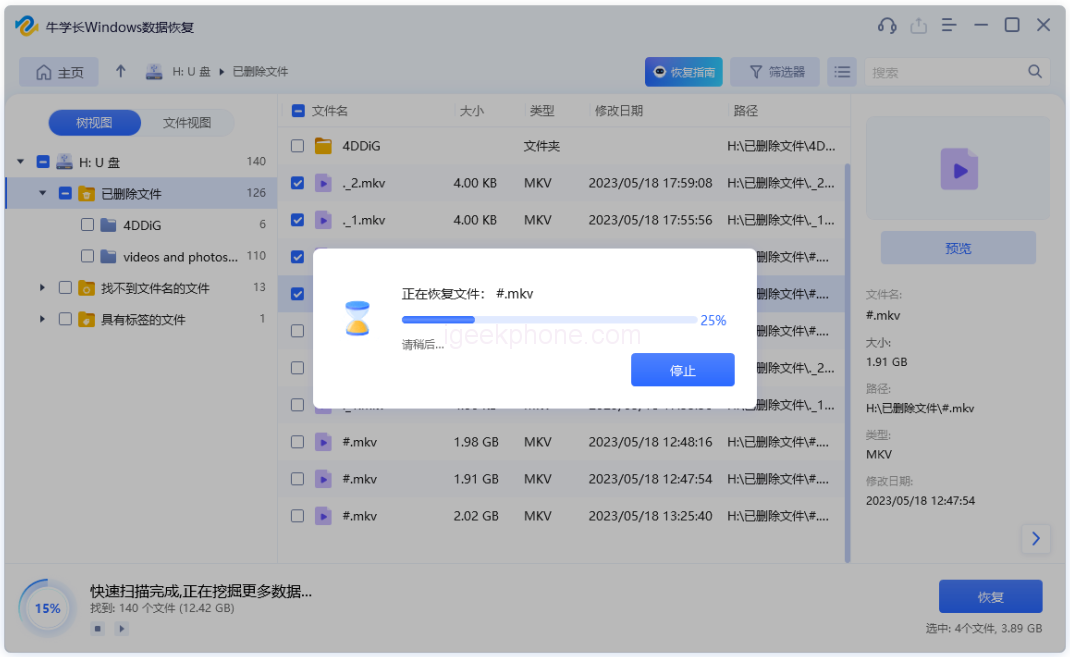
    Retrieve data. Locate the inadvertently deleted files and click “Recover” to salvage the regained data.

    For optimal results with the SxS cards data recovery software, desist from read or write actions post-data loss to prevent overwriting.

    With the two viable methods delineated above, you can opt for the strategy aligning with your specific circumstances for SxS card recovery. If aiming for a secure and efficient recovery solution, Niu Xuechang data recovery software is highly recommended as the prime choice for SxS cards data recovery.

    Do not forget to follow us on our Facebook group and page to keep you always aware of the latest advances, News, Updates, review, and giveaway on smartphones, tablets, gadgets, and more from the technology world of the future.

    Share. Facebook Twitter Pinterest LinkedIn Tumblr Email

    Related Posts

    2026 iPhone Guide: How to Set Custom Ringtones on iPhone

    Crucial website services that companies should prioritize investing in

    A Step-by-Step Guide to Repairing Corrupted Video Files

    Leave A Reply Cancel Reply

    You must be logged in to post a comment.

    voopoo drag 6
    oxva xlim 3 ultra
    sp2s sen x disposable vape
    • Popular
    • 3D Printer REVIEW
    • XIAOMI
    May 7, 2026

    OXVA Xlim Go Lite Review: Compact, Powerful, and Beginner-Friendly

    April 18, 2026

    VOOPOO DRAG 6 Hands on Review: Vape Beast with Smart Power & Premium Control

    April 8, 2026

    OXVA NeXLIM vs XLIM Pro 2 Pod Hands-On Review (2026)

    March 16, 2026

    OXVA Slimstick VS OXVA Slimstick X Vape Hands-on Review

    December 26, 2025

    ACMER ASCARVA 4S: Precision CNC Power for Makers, DIYers & Small Workshops

    June 23, 2024

    ACMER P2 20W Laser Engraver Fixed Focus Engraving: Hands on Review

    May 30, 2024

    xTool F1 Ultra Review: World’s First 20W Fiber & 20W Diode Laser Engraver

    May 30, 2024

    Anycubic Kobra 3 Combo Review: The Multicolor Masterpiece?

    May 14, 2026

    Xiaomi’s first over-ear headphones made their debut! With a mirror-like body and transparent sound-emitting balls, the design is truly unique.

    May 13, 2026

    The Full-Screen Appearance Picture of Xiaomi 17 Max has been Released: a 6.9-inch Large Straight Screen

    May 13, 2026

    Xiaomi Band 10 Pro officially Released This Month: 9.7mm thick, 21.6g weight, aluminum body

    May 9, 2026

    Xiaomi 18 is launched! Hyper OS 4 is here: Completely Removes MIUI Code and undergoes a Complete Transformation at the Core Level

    fc 26 coins
    New Arrivals
    • Lost Mary MT35000 Turbo Carnival Edition Disposable Vape Lost Mary MT35000 Turbo Carnival Edition Disposable Vape
    • RAZ Vue 70K Disposable Vape Kit RAZ Vue 70K Disposable Vape Kit
    • Remit Popmist 60K Nicotine Free Disposable Vape Remit Popmist 60K Nicotine Free Disposable Vape
    • Realme C100i Realme C100i
    • Dovpo Flipside Squonk Mod Dovpo Flipside Squonk Mod
    • OnePlus Nord CE6 Lite OnePlus Nord CE6 Lite
    • Huawei nova 15 Max Huawei nova 15 Max
    • Vivo X500e Vivo X500e
    • Huawei MatePad Pro Max Huawei MatePad Pro Max
    About
  • Igeekphone.com provides the first global tech news and reviews about smartphone, vapes, e-cigar, smart home, 3D printers, e-bike,tablets, RC drones, VR headset, and other accessories. It's the best platform to improve your brand and product.
  • Contact us: info@igeekphone.com
  • Check Our Privacy Policy Here.
  • Note: *Right now we have US editor and EU editors for review, especially for Amazon US and EU.
  • *Shop and Compare Price Here*
  • Facebook
  • Youtube
  • OUR BEST VAPE PARTNERS
  • VAPE ONLINE STORE
  • HAYATI PRO MAX PLUS
  • VAPORESSO
  • VOOPOO
  • OXVA
  • NEXA
  • MASKKING
  • SP2S
  • IPLAY
  • TODOO
  • OTHER BEST PARTNERS
  • SVBONY
  • Chuwi
  • Blackview
  • Fossibot
  • Unihertz
  • Flsun
  • Anycubic
  • Xtool
  • Oukitel
  • Mukkpet Ebike
  • Ugreen
  • Copyright © 2026 igeekphone

    Type above and press Enter to search. Press Esc to cancel.