






Facebook Twitter Instagram
    Trending
    • OPPO K15 Pro series of mobile phones are Released: equipped with MediaTek 8500 SUPER / 9500s chips, starting from 2999 yuan.
    • QCY Buds ANC TWS Earbuds Review: The Ultimate in Adaptive Noise Cancellation and Wireless Freedom
    • Mould King 13171 Technical Car Review: The Ultimate Remote-Control F1 Racing Car Building Kit
    • EDIFIER X Clip AI Translation Earbuds Review: The Future of Multilingual Communication
    • VB801 Wireless Baby Monitor Review: The Ultimate Solution for Monitoring Your Baby’s Safety and Comfort
    • Vape Airflow Made Simple: How to Find Your Ideal Pull?
    • iJoy XP50000 Disposable Vape Review– Long‑Lasting Performance With Powerful Features
    • OXBAR ROVOTA DTL 40K Disposable Vape Review-Long-Lasting Power Meets Deep DTL Flavor
    Facebook YouTube
    IGeeKphone China Phone, Tablet PC, VR, RC Drone News, Reviews
    • HOME
      • NEWS
        • DeepSeek
        • ChatGPT
        • Minecraft
    • Amazon
    • PHONE
      • Top Phones For Your First Choice
      • Phone Comparison
      • Xiaomi
      • Blackview
      • Doogee
      • Black Shark
      • Geekbuying
      • Banggood
      • TEMU
      • TikTok
      • Aliexpress
      • Walmart
      • MercadoLibre
      • Lazada
    • TOP VAPE Awards for 2026
    • VAPES
      • E-CIGAR Upcoming
      • Vape News
      • Vape Deals
      • Vape Comparison
      • Vape Guide
      • Giveaway
    • BEST VAPE
      • Best Vape Stores
      • Best Starter Vape Kits
      • Best Vapes for Beginners
      • Best Disposable Vapes
      • Best Pod Systems
      • Best Pod Mod Vapes
      • Best Mods
      • Best Nicotine Pouches
      • Best Clearomizers/Tanks
      • Best E-Liquid
      • Best EGO/Pens
      • Best Vapes for Nic Salt E-Juice
      • Best Vapes to Quit Smoking
      • RDA vs. RDTA vs. RTA
    • Best Vape Brand 2026
      • VAPORESSO
      • VOOPOO
      • OXVA
      • NEXA BAR
      • ORIONBARTECH
      • MASKKING VAPE
      • MEMERS
      • SP2S
      • TODOO
      • MRFOG
      • VEIIK
    • REVIEW
      • E-cigar Review
      • Phones
      • Tablet PC
      • TV Box
      • RC Drone
      • Wearables
      • Camera
      • Accessories
      • VR Headset
    • MORE
      • TABLET
        • Chuwi
        • INNOCN
        • Teclast
        • Top Tablet for Your First Choice
        • Tablet/Laptop Comparison
      • RC DRONE
      • CAMERA
      • WEARABLES
        • OneOdio
        • BlitzWolf
        • Top Smartwatch for First Choice
      • 3D PRINTER
        • 3D Printer Review
        • Anycubic
        • FLSUN
        • Xtool
        • LONGER
        • Top 3D printer to Choose First
      • POWER STATION
        • Oukitel
        • FOSSIBOT
      • GAMING
        • Top Gaming Products
      • E-BIKE
        • Samebike
        • Happyrun
        • ENGWE
      • SMART HOME
      • TV BOX
      • ACCESSORIES
      • VR HEADSET
      • CLOTHES
      • AUTO CAR
    • DEAL
    • VAPE LAWS
    • Shop
    IGeeKphone China Phone, Tablet PC, VR, RC Drone News, Reviews
    You are at:Home»Guide»How to Troubleshoot iPhone Personal Hotspot Issues
    Guide

    How to Troubleshoot iPhone Personal Hotspot Issues

    HabibBy HabibFebruary 20, 2026
    Facebook Twitter Pinterest LinkedIn Tumblr Email

    The Personal Hotspot feature transforms our iPhone into a Wi-Fi hotspot, enabling it to share its Internet connection with nearby devices. Generally, you can use the personal hotspot when it’s turned on, but some users discover that their iPhone’s personal hotspot disappears after system upgrades or jailbreaking.

    If the Personal Hotspot on your iPhone goes missing, consider the following steps to fix the issue:
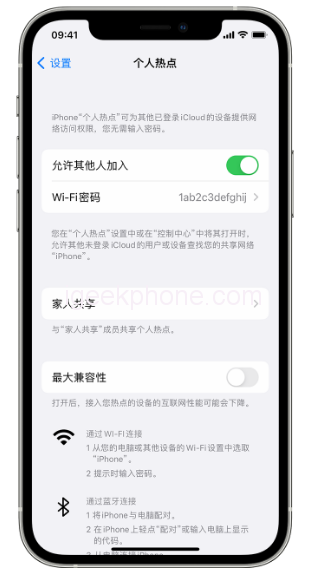
    Firstly, attempt to turn cellular data on and off. Resetting the cellular data connection might restore the vanished hotspot.

    Next, check the personal hotspot settings. Sometimes, even if the Personal Hotspot isn’t visible in the Settings app, it might be accessible elsewhere. Open Settings, go to Cellular > Personal Hotspot, toggle the switch to On (green), and return to the main settings screen. If you spot Personal Hotspot under Cellular, the problem is resolved.

    Restart your iPhone. This basic troubleshooting step may not guarantee a solution, but it’s a straightforward action to take.

    Update the operator settings. Occasionally, carriers release updated settings that can lead to the loss of the Personal Hotspot. Consider updating to the latest settings.

    Delete the APN certificate. If you have any Access Point Name (APN) certificates installed for specific carriers, removing them might resolve the issue. Head to “Settings” > “General” and delete the configuration file if present.

    Try resetting network settings. Loss of Personal Hotspot might stem from incorrect network settings. Navigate to Settings > General > Transfer or Restore iPhone > Restore > Reset Network Settings.

    After performing a reset, you may need to re-enter your Wi-Fi password or reconnect your Bluetooth devices.

    If the personal hotspot function remains nonfunctional, consider repairing the iOS system. A malfunction might be due to an iOS error. Professional tools like Niu Xuechang Apple mobile phone repair tool can address more than 150 iOS system problems. Follow these steps:
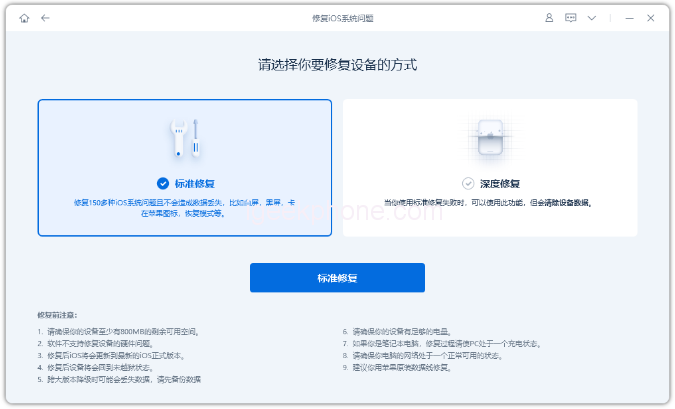
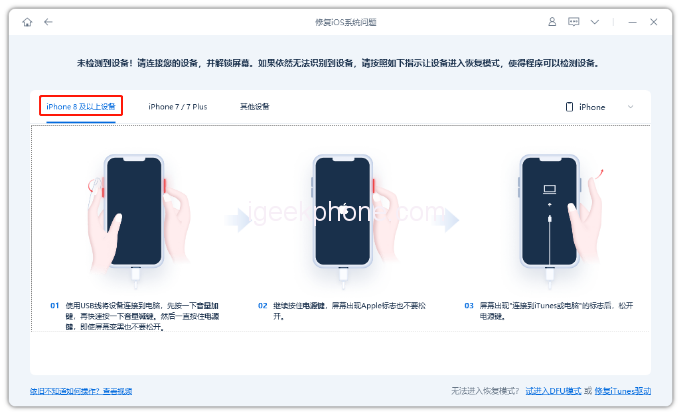
    • Launch Niu Xuechang’s tool, connect the iPhone to your computer, and click “Fix iOS System Problems.”
    • Opt for “Standard Repair” or “Deep Repair” (data loss) after connecting.
    • Follow the prompts to enter recovery or DFU mode, then download and install the firmware.
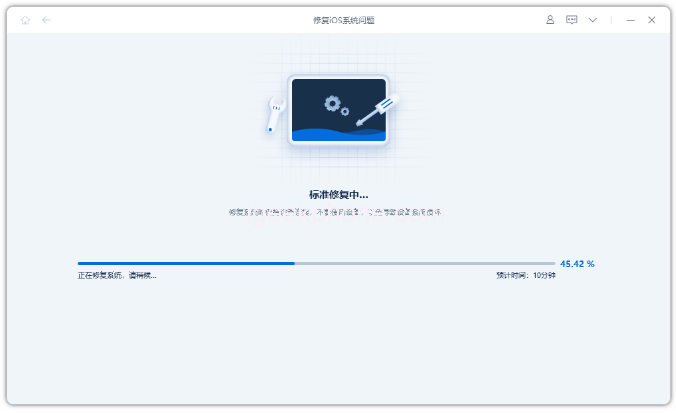
    • The repair process takes around 10 minutes. Wait for the “repair complete” message.

    If all else fails, seek assistance from official experts at the nearest Apple Retail Store.

    Read Also: Xiaomi 13 Ultra VS Honor Magic5 Pro Quick Comparison Review

    Do not forget to follow us on our Facebook group and page to keep you always aware of the latest advances, News, Updates, review, and giveaway on smartphones, tablets, gadgets, and more from the technology world of the future.

    Share. Facebook Twitter Pinterest LinkedIn Tumblr Email

    Related Posts

    OPPO K15 Pro series of mobile phones are Released: equipped with MediaTek 8500 SUPER / 9500s chips, starting from 2999 yuan.

    How to Enter BIOS on a Computer (2026 Universal Key Operation Guide)?

    Fastest Electric Bikes in 2026: Speed, Safety & What to Look For

    Leave A Reply Cancel Reply

    You must be logged in to post a comment.

    voopoo drag 6
    oxva xlim 3 ultra
    sp2s sen x disposable vape
    • Popular
    • 3D Printer REVIEW
    • XIAOMI
    March 16, 2026

    OXVA Slimstick VS OXVA Slimstick X Vape Hands-on Review

    March 5, 2026

    OXVA XLIM PRO 3 vs XLIM Pro 2 DNA: Hands-On Review

    March 5, 2026

    OXVA XLIM PRO 3 vs XLIM GO 2: Hands-On Review

    March 2, 2026

    OXVA XLIM PRO 3 vs XLIM 3 ULTRA: Hands-On Review

    December 26, 2025

    ACMER ASCARVA 4S: Precision CNC Power for Makers, DIYers & Small Workshops

    June 23, 2024

    ACMER P2 20W Laser Engraver Fixed Focus Engraving: Hands on Review

    May 30, 2024

    xTool F1 Ultra Review: World’s First 20W Fiber & 20W Diode Laser Engraver

    May 30, 2024

    Anycubic Kobra 3 Combo Review: The Multicolor Masterpiece?

    March 29, 2026

    Xiaomi Watch S5 Review: 316L Stainless Steel, Ultra-Long Battery Life

    March 26, 2026

    The Telephoto Lens of Xiaomi 18 Ultra has Undergone a Comprehensive Upgrade: with an Ultra-Large Sensor, LOFIC Technology

    March 26, 2026

    Xiaomi Redmi Pad 2 Pro 5G Edition is available for purchase: Supports 5G all-network and China Unicom eSIM, 8G + 256G priced at 2599 yuan.

    March 26, 2026

    Xiaomi MIUI has officially ceased updates: The last two devices have stopped receiving support. This article reviews the 12-year 14-version history.

    fc 26 coins
    New Arrivals
    • iJOY XP50000 Zero Nicotine Disposable Vape iJOY XP50000 Zero Nicotine Disposable Vape
    • OXBAR ROVOTA DTL 40K Disposable Vape OXBAR ROVOTA DTL 40K Disposable Vape
    • Pachamama 75K Disposable Vape Pachamama 75K Disposable Vape
    • Pillow Talk 50K Patriotic Edition Disposable Vape Pillow Talk 50K Patriotic Edition Disposable Vape
    • Realme P5 5G Realme P5 5G
    • Realme P5 Power Realme P5 Power
    • Umidigi G100 Pro Smartphone Umidigi G100 Pro Smartphone
    • Oppo K14 Oppo K14
    • Geekvape Kloud Refillable Disposable Vape Kit Geekvape Kloud Refillable Disposable Vape Kit
    About
  • Igeekphone.com provides the first global tech news and reviews about smartphone, vapes, e-cigar, smart home, 3D printers, e-bike,tablets, RC drones, VR headset, and other accessories. It's the best platform to improve your brand and product.
  • Contact us: info@igeekphone.com
  • Check Our Privacy Policy Here.
  • Note: *Right now we have US editor and EU editors for review, especially for Amazon US and EU.
  • *Shop and Compare Price Here*
  • Facebook
  • Youtube
  • OUR BEST VAPE PARTNERS
  • VAPE ONLINE STORE
  • HAYATI PRO MAX PLUS
  • VAPORESSO
  • VOOPOO
  • OXVA
  • NEXA
  • MASKKING
  • TODOO
  • SP2S
  • VEIIK
  • OTHER BEST PARTNERS
  • SVBONY
  • Chuwi
  • Blackview
  • Fossibot
  • Unihertz
  • Flsun
  • Anycubic
  • Xtool
  • Oukitel
  • Mukkpet Ebike
  • Ugreen
  • Copyright © 2026 igeekphone

    Type above and press Enter to search. Press Esc to cancel.