






Facebook Twitter Instagram
    Trending
    • SVBONY TransAir4 Flash Sale Drops to Just $109.99
    • IVG SAVR 3000 Puffs Disposable Pod Vape Kit Review at £2.49-A Long‑Lasting, Rechargeable Vaping Solution
    • SriHome SH070 IP Camera Review: A Comprehensive Look at Performance and Features
    • List The Best Employee Monitoring Software of 2025
    • DTG9 Smartwatch Review: A Comprehensive Smart Companion for Fitness and Everyday Use
    • Why does the newly bought computer become more and more sluggish the more it is used?
    • How to Fix Laptop Charging Issue: Step-by-Step Guide
    • What are the merits and demerits of bitcoin you can check?
    Facebook YouTube
    IGeeKphone China Phone, Tablet PC, VR, RC Drone News, Reviews
    • HOME
      • NEWS
        • DeepSeek
        • ChatGPT
        • Minecraft
    • Amazon
    • PHONE
      • Top Phones For Your First Choice
      • Phone Comparison
      • Xiaomi
      • Blackview
      • Doogee
      • Black Shark
      • Geekbuying
      • Banggood
      • TEMU
      • TikTok
      • Aliexpress
      • Walmart
      • MercadoLibre
      • Lazada
    • TOP VAPE Awards for 2026
    • VAPES
      • E-CIGAR Upcoming
      • Vape News
      • Vape Deals
      • Vape Comparison
      • Vape Guide
      • Giveaway
    • BEST VAPE
      • Best Vape Stores
      • Best Starter Vape Kits
      • Best Vapes for Beginners
      • Best Disposable Vapes
      • Best Pod Systems
      • Best Pod Mod Vapes
      • Best Mods
      • Best Nicotine Pouches
      • Best Clearomizers/Tanks
      • Best E-Liquid
      • Best EGO/Pens
      • Best Vapes for Nic Salt E-Juice
      • Best Vapes to Quit Smoking
      • RDA vs. RDTA vs. RTA
    • Best Vape Brand 2026
      • VAPORESSO
      • VOOPOO
      • OXVA
      • NEXA BAR
      • MASKKING VAPE
      • SP2S
      • IPLAY
      • TODOO
      • MRFOG
      • LOSTVAPE
      • VEIIK
    • REVIEW
      • E-cigar Review
      • Phones
      • Tablet PC
      • TV Box
      • RC Drone
      • Wearables
      • Camera
      • Accessories
      • VR Headset
    • MORE
      • TABLET
        • Chuwi
        • INNOCN
        • Teclast
        • Top Tablet for Your First Choice
        • Tablet/Laptop Comparison
      • RC DRONE
      • CAMERA
      • WEARABLES
        • OneOdio
        • BlitzWolf
        • Top Smartwatch for First Choice
      • 3D PRINTER
        • 3D Printer Review
        • Anycubic
        • FLSUN
        • Xtool
        • LONGER
        • Top 3D printer to Choose First
      • POWER STATION
        • Oukitel
        • FOSSIBOT
      • GAMING
        • Top Gaming Products
      • E-BIKE
        • Samebike
        • Happyrun
        • ENGWE
      • SMART HOME
      • TV BOX
      • ACCESSORIES
      • VR HEADSET
      • CLOTHES
      • AUTO CAR
    • DEAL
    • VAPE LAWS
    • Shop
    IGeeKphone China Phone, Tablet PC, VR, RC Drone News, Reviews
    You are at:Home»Guide»How to Troubleshoot iPhone Personal Hotspot Issues
    Guide

    How to Troubleshoot iPhone Personal Hotspot Issues

    HabibBy HabibApril 25, 2026
    Facebook Twitter Pinterest LinkedIn Tumblr Email

    The Personal Hotspot feature transforms our iPhone into a Wi-Fi hotspot, enabling it to share its Internet connection with nearby devices. Generally, you can use the personal hotspot when it’s turned on, but some users discover that their iPhone’s personal hotspot disappears after system upgrades or jailbreaking.

    If the Personal Hotspot on your iPhone goes missing, consider the following steps to fix the issue:
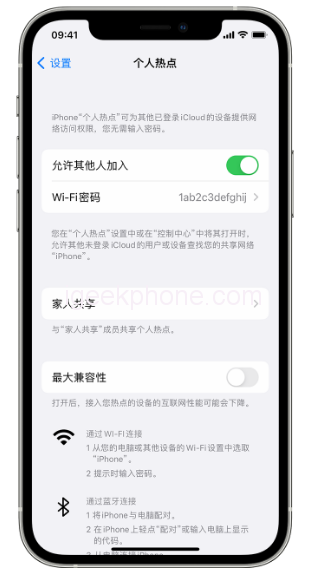
    Firstly, attempt to turn cellular data on and off. Resetting the cellular data connection might restore the vanished hotspot.

    Next, check the personal hotspot settings. Sometimes, even if the Personal Hotspot isn’t visible in the Settings app, it might be accessible elsewhere. Open Settings, go to Cellular > Personal Hotspot, toggle the switch to On (green), and return to the main settings screen. If you spot Personal Hotspot under Cellular, the problem is resolved.

    Restart your iPhone. This basic troubleshooting step may not guarantee a solution, but it’s a straightforward action to take.

    Update the operator settings. Occasionally, carriers release updated settings that can lead to the loss of the Personal Hotspot. Consider updating to the latest settings.

    Delete the APN certificate. If you have any Access Point Name (APN) certificates installed for specific carriers, removing them might resolve the issue. Head to “Settings” > “General” and delete the configuration file if present.

    Try resetting network settings. Loss of Personal Hotspot might stem from incorrect network settings. Navigate to Settings > General > Transfer or Restore iPhone > Restore > Reset Network Settings.

    After performing a reset, you may need to re-enter your Wi-Fi password or reconnect your Bluetooth devices.

    If the personal hotspot function remains nonfunctional, consider repairing the iOS system. A malfunction might be due to an iOS error. Professional tools like Niu Xuechang Apple mobile phone repair tool can address more than 150 iOS system problems. Follow these steps:
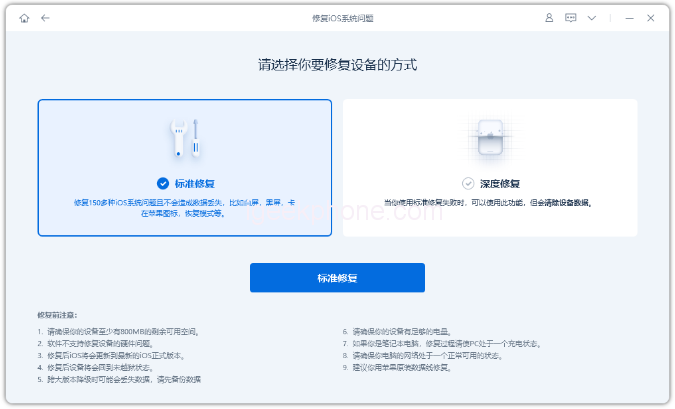
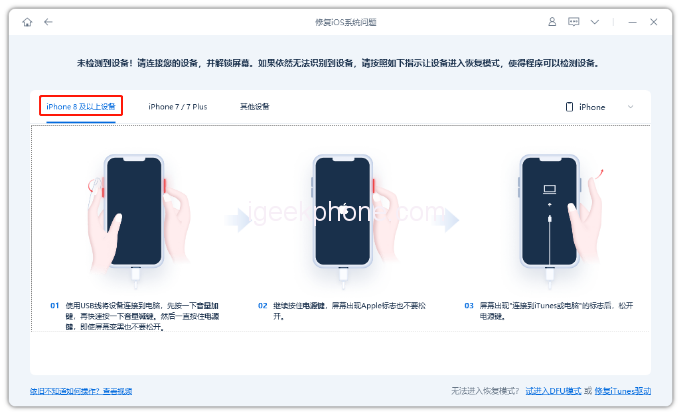

    • Launch Niu Xuechang’s tool, connect the iPhone to your computer, and click “Fix iOS System Problems.”
    • Opt for “Standard Repair” or “Deep Repair” (data loss) after connecting.
    • Follow the prompts to enter recovery or DFU mode, then download and install the firmware.
    • The repair process takes around 10 minutes. Wait for the “repair complete” message.

    If all else fails, seek assistance from official experts at the nearest Apple Retail Store.

    Read Also: Xiaomi 13 Ultra VS Honor Magic5 Pro Quick Comparison Review

    Do not forget to follow us on our Facebook group and page to keep you always aware of the latest advances, News, Updates, review, and giveaway on smartphones, tablets, gadgets, and more from the technology world of the future.

    Share. Facebook Twitter Pinterest LinkedIn Tumblr Email

    Related Posts

    List The Best Employee Monitoring Software of 2025

    Why does the newly bought computer become more and more sluggish the more it is used?

    How to Fix Laptop Charging Issue: Step-by-Step Guide

    Leave A Reply Cancel Reply

    You must be logged in to post a comment.

    voopoo drag 6
    oxva xlim 3 ultra
    sp2s sen x disposable vape
    • Popular
    • 3D Printer REVIEW
    • XIAOMI
    May 17, 2026

    iPlay Nova 45K Review – High Puff Performance with a Futuristic Twist

    May 17, 2026

    Vaporesso XROS 6 & XROS 6 Mini Review – The Evolution of Portable Vaping

    May 7, 2026

    OXVA Xlim Go Lite Review: Compact, Powerful, and Beginner-Friendly

    April 18, 2026

    VOOPOO DRAG 6 Hands on Review: Vape Beast with Smart Power & Premium Control

    December 26, 2025

    ACMER ASCARVA 4S: Precision CNC Power for Makers, DIYers & Small Workshops

    June 23, 2024

    ACMER P2 20W Laser Engraver Fixed Focus Engraving: Hands on Review

    May 30, 2024

    xTool F1 Ultra Review: World’s First 20W Fiber & 20W Diode Laser Engraver

    May 30, 2024

    Anycubic Kobra 3 Combo Review: The Multicolor Masterpiece?

    May 23, 2026

    Xiaomi Speaker Pro 50W Speaker Review: Available on Banggood

    May 21, 2026

    Xiaomi 17 Max Smartphone Released: 8000mAh battery, 20-megapixel Leica main camera

    May 20, 2026

    The Benchmark scores of Xiaomi 17 Max phone have been revealed: Qualcomm’s 5th-Generation Snapdragon 8 Supreme Edition Chip

    May 19, 2026

    Xiaomi 17 Max smartphone is the first to feature a 8000mAh Jinshajiang battery. The official long video endurance test shows that it can last for over 33 hours.

    fc 26 coins
    New Arrivals
    • Vaporock X1 Pod System Kit Vaporock X1 Pod System Kit
    • Aspire Cyber G Slim Aspire Cyber G Slim
    • Aspire Loomix Pod Vape Kit Aspire Loomix Pod Vape Kit
    • Geek Bar Pulse X 2 50K Disposable Geek Bar Pulse X 2 50K Disposable
    • VOOPOO Drag H40 Pro VOOPOO Drag H40 Pro
    • DOOGEE Tab E3 Max Tablet PC DOOGEE Tab E3 Max Tablet PC
    • DOOGEE V Max 2 Pro Rugged Phone DOOGEE V Max 2 Pro Rugged Phone
    • Realme P5 Pro Realme P5 Pro
    • Innokin Coolfire Z Air Pod Mod Kit Innokin Coolfire Z Air Pod Mod Kit
    About
  • Igeekphone.com provides the first global tech news and reviews about smartphone, vapes, e-cigar, smart home, 3D printers, e-bike,tablets, RC drones, VR headset, and other accessories. It's the best platform to improve your brand and product.
  • Contact us: info@igeekphone.com
  • Check Our Privacy Policy Here.
  • Note: *Right now we have US editor and EU editors for review, especially for Amazon US and EU.
  • *Shop and Compare Price Here*
  • Facebook
  • Youtube
  • OUR BEST VAPE PARTNERS
  • VAPE ONLINE STORE
  • HAYATI PRO MAX PLUS
  • VAPORESSO
  • VOOPOO
  • OXVA
  • NEXA
  • MASKKING
  • SP2S
  • IPLAY
  • TODOO
  • OTHER BEST PARTNERS
  • SVBONY
  • Chuwi
  • Blackview
  • Fossibot
  • Unihertz
  • Flsun
  • Anycubic
  • Xtool
  • Oukitel
  • Mukkpet Ebike
  • Ugreen
  • Copyright © 2026 igeekphone

    Type above and press Enter to search. Press Esc to cancel.