







Facebook Twitter Instagram
    Trending
    • The 2026 World Cup Will Be the Biggest Test Yet for Official Betting Data
    • The world’s first robot phone, Robot Phone, launched in the third quarter
    • Xiaomi 17 Max smartphone is the first to feature a 8000mAh Jinshajiang battery. The official long video endurance test shows that it can last for over 33 hours.
    • An Informational Overview of Sub‑Ohm Vape Tanks (Including Devices Like the Z MAX) at £19.99
    • Hayati Pro Ultra Plus Shisha 30K Review at £9.99: A New Era for Shisha-Style Vaping
    • Maskking CAMO: How Modular Magnetic Design Redefines Everyday Vape Convenience
    • Discovering Hidden Gems: The Unexpected Benefits of Independent Living for Seniors
    • How to Evaluate an NFT Project for high growth rate
    Facebook YouTube
    IGeeKphone China Phone, Tablet PC, VR, RC Drone News, Reviews
    • HOME
      • NEWS
        • DeepSeek
        • ChatGPT
        • Minecraft
    • Amazon
    • PHONE
      • Top Phones For Your First Choice
      • Phone Comparison
      • Xiaomi
      • Blackview
      • Doogee
      • Black Shark
      • Geekbuying
      • Banggood
      • TEMU
      • TikTok
      • Aliexpress
      • Walmart
      • MercadoLibre
      • Lazada
    • TOP VAPE Awards for 2026
    • VAPES
      • E-CIGAR Upcoming
      • Vape News
      • Vape Deals
      • Vape Comparison
      • Vape Guide
      • Giveaway
    • BEST VAPE
      • Best Vape Stores
      • Best Starter Vape Kits
      • Best Vapes for Beginners
      • Best Disposable Vapes
      • Best Pod Systems
      • Best Pod Mod Vapes
      • Best Mods
      • Best Nicotine Pouches
      • Best Clearomizers/Tanks
      • Best E-Liquid
      • Best EGO/Pens
      • Best Vapes for Nic Salt E-Juice
      • Best Vapes to Quit Smoking
      • RDA vs. RDTA vs. RTA
    • Best Vape Brand 2026
      • VAPORESSO
      • VOOPOO
      • OXVA
      • NEXA BAR
      • MASKKING VAPE
      • SP2S
      • IPLAY
      • TODOO
      • MRFOG
      • LOSTVAPE
      • VEIIK
    • REVIEW
      • E-cigar Review
      • Phones
      • Tablet PC
      • TV Box
      • RC Drone
      • Wearables
      • Camera
      • Accessories
      • VR Headset
    • MORE
      • TABLET
        • Chuwi
        • INNOCN
        • Teclast
        • Top Tablet for Your First Choice
        • Tablet/Laptop Comparison
      • RC DRONE
      • CAMERA
      • WEARABLES
        • OneOdio
        • BlitzWolf
        • Top Smartwatch for First Choice
      • 3D PRINTER
        • 3D Printer Review
        • Anycubic
        • FLSUN
        • Xtool
        • LONGER
        • Top 3D printer to Choose First
      • POWER STATION
        • Oukitel
        • FOSSIBOT
      • GAMING
        • Top Gaming Products
      • E-BIKE
        • Samebike
        • Happyrun
        • ENGWE
      • SMART HOME
      • TV BOX
      • ACCESSORIES
      • VR HEADSET
      • CLOTHES
      • AUTO CAR
    • DEAL
    • VAPE LAWS
    • Shop
    IGeeKphone China Phone, Tablet PC, VR, RC Drone News, Reviews
    You are at:Home»Guide»Mastering the Art of Video Trimming on iPhone: A Comprehensive Guide
    Guide

    Mastering the Art of Video Trimming on iPhone: A Comprehensive Guide

    Brady CottonBy Brady CottonApril 1, 2026
    Facebook Twitter Pinterest LinkedIn Tumblr Email

    In the era of social media and digital storytelling, the ability to trim videos on your iPhone has become an essential skill. Whether you want to share a memorable moment, create engaging content, or simply save storage space, knowing how to trim a video can make your iPhone experience even more versatile and enjoyable.

    Why Do You Need to Trim a Video on iPhone?

    Before delving into the how-to, let’s explore the reasons why trimming videos on your iPhone can be beneficial. First and foremost, video trimming allows you to remove unnecessary content, focusing on the essence of your footage. This not only helps convey your message more efficiently but also saves storage space on your device. Additionally, social media platforms often have specific duration limits for videos, making trimming an essential step before sharing your content with the world. Of course, even if, for some reason, you trimmed your video, you can still use the tools to merge the clips. There are many solutions for how to combine videos on iPhone.

    How to Trim A Video on iPhone Via Settings

    Fortunately, Apple provides a built-in solution for trimming videos on your iPhone through the Settings app. Here’s a step-by-step guide.

    Step 1. Open the Photos app

    Locate and open the Photos app on your iPhone.

    Step 2. Select the video

    Find the video you want to trim in your Camera Roll or Albums.

    Step 3. Tap Edit

    Once you’ve selected the video, tap the Edit button in the top-right corner.

    Step 4. Adjust the handles

    You’ll see handles at the beginning and end of the video timeline. Drag these handles to set the desired start and end points.

    Step 5. Preview and save

    Preview your trimmed video by tapping Play and make additional adjustments if needed. Once satisfied, tap Done to save your changes.

    How to Trim A Video on iPhone Via Third-Party Apps

    For more advanced video editing capabilities, third-party apps offer a range of features beyond the native settings. In the next section, we will introduce you to a few quite useful video editing tools and give you a brief introduction to them. You can read on and choose a tool that really suits your needs. They are trusted by people all over the world and are quite simple to use.

    • iMovie

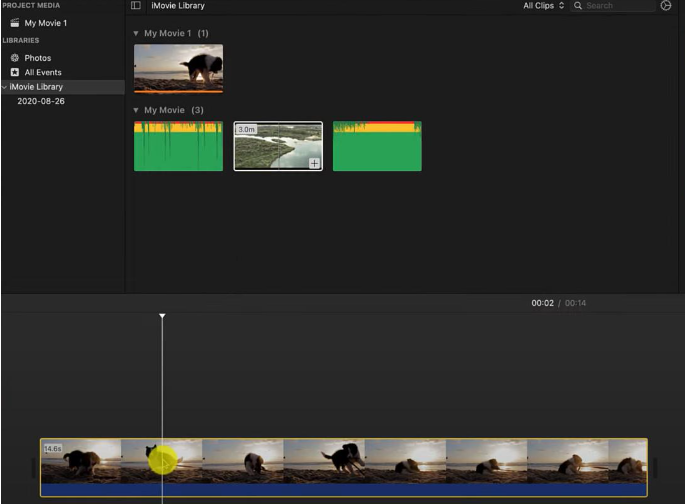
    iMovie is a powerful video editing app developed by Apple. This tool provides a user-friendly interface along with a variety of editing features, including video trimming. It always comes with many Apple devices, and if not, it can be downloaded for free from the App Store.
    • InShot

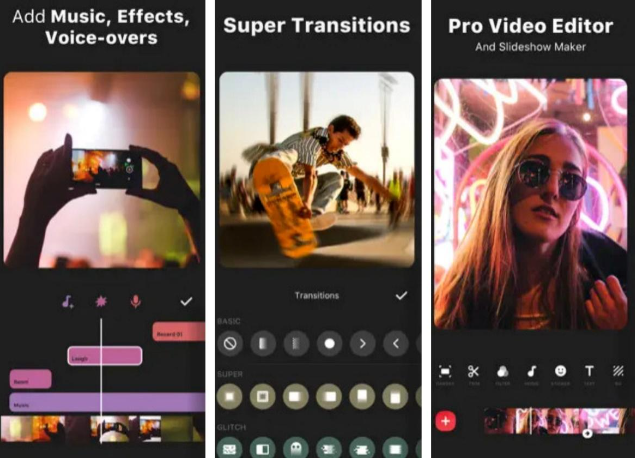
    InShot is a popular video editing app that includes features like trimming, cutting, and merging videos. It also offers filters, effects, and the ability to add music. InShot is available for free with in-app purchases.
    • VideoGrade

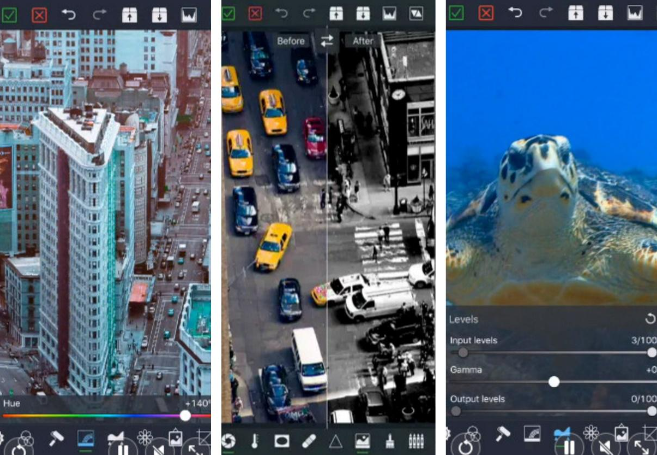
    While VideoGrade is primarily known for its color-grading capabilities, it also provides basic video editing functions, including trimming. It’s a useful app for users who want to enhance the colors of their videos while also making simple edits. It may not be as feature-rich as some other video editors, but it’s user-friendly.
    • Clips

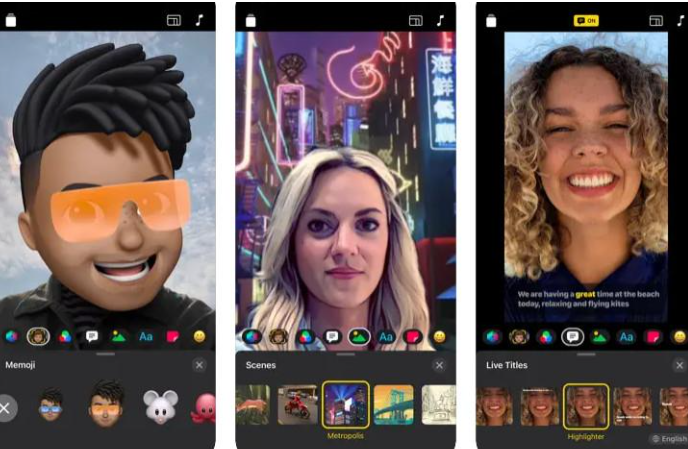
    Clips is another app developed by Apple that focuses on quick and fun video creation. It allows you to trim and edit your videos easily, and it also includes features like adding animated captions and stickers. Clips are available for free on the App Store.
    • Filmmaker Pro

    Filmmaker Pro is a comprehensive video editing app that includes advanced features along with basic trimming and cutting. It provides tools for adding transitions, effects, and text to your videos. The app is 100% free to download, with in-app purchases for additional features.
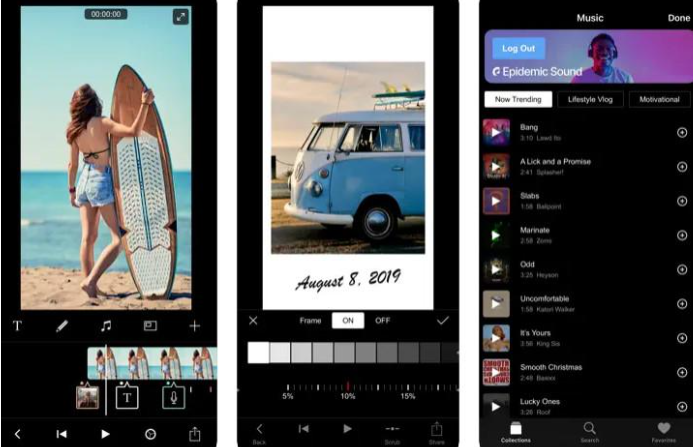
    Tips: How to Use iMovie

    One popular app for this purpose is iMovie. Here’s a brief guide. Follow our detailed step-by-step guide, and we are sure you can complete the process without any problems.

    Step 1. Download iMovie

    If you don’t have iMovie installed, download it from the App Store.

    Step 2. Open iMovie

    Open the iMovie program on your device and create a new project.

    Step 3. Import your video

    Tap the + icon to import the video you want to trim.

    Step 4. Trim the video

    In the timeline, drag the edges of your video clip so that you can set the start and end points.

    Step 5. Preview and export

    Preview your edited video, make any necessary adjustments, and then tap Done. Finally, export the trimmed video to your Camera Roll.

    Conclusion

    Whether you choose to use the native settings or explore third-party apps, trimming videos on your iPhone opens up a world of possibilities for creativity and efficiency. As you become adept at this skill, you’ll find yourself effortlessly crafting and sharing compelling stories with your audience. So, go ahead, trim away, and let your videos shine in the digital realm.

    Share. Facebook Twitter Pinterest LinkedIn Tumblr Email

    Related Posts

    Discovering Hidden Gems: The Unexpected Benefits of Independent Living for Seniors

    How to Evaluate an NFT Project for high growth rate

    5 Gaming Room Design Tips

    Leave A Reply Cancel Reply

    You must be logged in to post a comment.

    voopoo drag 6
    oxva xlim 3 ultra
    sp2s sen x disposable vape
    • Popular
    • 3D Printer REVIEW
    • XIAOMI
    May 17, 2026

    iPlay Nova 45K Review – High Puff Performance with a Futuristic Twist

    May 17, 2026

    Vaporesso XROS 6 & XROS 6 Mini Review – The Evolution of Portable Vaping

    May 7, 2026

    OXVA Xlim Go Lite Review: Compact, Powerful, and Beginner-Friendly

    April 18, 2026

    VOOPOO DRAG 6 Hands on Review: Vape Beast with Smart Power & Premium Control

    December 26, 2025

    ACMER ASCARVA 4S: Precision CNC Power for Makers, DIYers & Small Workshops

    June 23, 2024

    ACMER P2 20W Laser Engraver Fixed Focus Engraving: Hands on Review

    May 30, 2024

    xTool F1 Ultra Review: World’s First 20W Fiber & 20W Diode Laser Engraver

    May 30, 2024

    Anycubic Kobra 3 Combo Review: The Multicolor Masterpiece?

    May 19, 2026

    Xiaomi 17 Max smartphone is the first to feature a 8000mAh Jinshajiang battery. The official long video endurance test shows that it can last for over 33 hours.

    May 19, 2026

    REDMI K100 specifications leaked: Snapdragon 8E5 + 200 million pixels – the most powerful monster of the K series

    May 18, 2026

    Pre-release information for Xiaomi 17T series: Kirin chip + Leica photography

    May 18, 2026

    Details of Xiaomi 17 Air have Emerged: Snapdragon 8E5+200 million Pixels. The Ultra-thin Flagship Dream has Shattered

    fc 26 coins
    New Arrivals
    • DOOGEE Tab E3 Max Tablet PC DOOGEE Tab E3 Max Tablet PC
    • DOOGEE V Max 2 Pro Rugged Phone DOOGEE V Max 2 Pro Rugged Phone
    • Realme P5 Pro Realme P5 Pro
    • Innokin Coolfire Z Air Pod Mod Kit Innokin Coolfire Z Air Pod Mod Kit
    • L&A Click Pro 80K Nixodine Disposable Vape Kit L&A Click Pro 80K Nixodine Disposable Vape Kit
    • Xiaomi 17 Max Xiaomi 17 Max
    • Geek Bar Burj 80K Disposable Vape Geek Bar Burj 80K Disposable Vape
    • Hellvape Vsee Neo Pod System Kit Hellvape Vsee Neo Pod System Kit
    • Lost Mary MT35000 Turbo Carnival Edition Disposable Vape Lost Mary MT35000 Turbo Carnival Edition Disposable Vape
    About
  • Igeekphone.com provides the first global tech news and reviews about smartphone, vapes, e-cigar, smart home, 3D printers, e-bike,tablets, RC drones, VR headset, and other accessories. It's the best platform to improve your brand and product.
  • Contact us: info@igeekphone.com
  • Check Our Privacy Policy Here.
  • Note: *Right now we have US editor and EU editors for review, especially for Amazon US and EU.
  • *Shop and Compare Price Here*
  • Facebook
  • Youtube
  • OUR BEST VAPE PARTNERS
  • VAPE ONLINE STORE
  • HAYATI PRO MAX PLUS
  • VAPORESSO
  • VOOPOO
  • OXVA
  • NEXA
  • MASKKING
  • SP2S
  • IPLAY
  • TODOO
  • OTHER BEST PARTNERS
  • SVBONY
  • Chuwi
  • Blackview
  • Fossibot
  • Unihertz
  • Flsun
  • Anycubic
  • Xtool
  • Oukitel
  • Mukkpet Ebike
  • Ugreen
  • Copyright © 2026 igeekphone

    Type above and press Enter to search. Press Esc to cancel.