







Facebook Twitter Instagram
    Trending
    • Vidda C5 Pro Review: A 4K Projector for Home Cinema and Gaming
    • iBUYPOWER AI Halo Mini PC Debuts With Ryzen AI Max+ PRO 495
    • Honor WIN 2 Gaming Phones and Tablet Expected to Debut in October
    • UK Cryptocurrency Adoption Grows as More Britons Invest in Digital Assets
    • Redmi Phone Storage Full? How to Safely Remove Junk Files
    • C48Pro Smartwatch: What Can You Do on a 2.01-Inch Screen?
    • JNR Bykux 59K vs JNR Lion King Shisha 65K Review: Key Differences Explained
    • Maskking Malux 50K Screen Guide: Understanding Battery and E-Liquid Indicators
    Facebook YouTube
    IGeeKphone China Phone, Tablet PC, VR, RC Drone News, Reviews
    • HOME
    • BREAKING NEWS
      • AI NEWS
    • Amazon
    • PHONE
      • Top Phones For Your First Choice
      • Phone Comparison
      • Xiaomi
      • Blackview
      • Doogee
      • Black Shark
      • Geekbuying
      • Banggood
      • TEMU
      • TikTok
      • Aliexpress
      • Walmart
      • MercadoLibre
      • Lazada
    • TOP VAPE Awards for 2026
    • VAPES
      • E-CIGAR Upcoming
      • Vape News
      • Vape Deals
      • Vape Comparison
      • Vape Guide
      • VAPE LAWS
      • Giveaway
    • BEST VAPE
      • Best Vape Stores
      • Best Starter Vape Kits
      • Best Vapes for Beginners
      • Best Disposable Vapes
      • Best Pod Systems
      • Best Pod Mod Vapes
      • Best Mods
      • Best Nicotine Pouches
      • Best Clearomizers/Tanks
      • Best E-Liquid
      • Best EGO/Pens
      • Best Vapes for Nic Salt E-Juice
      • Best Vapes to Quit Smoking
      • RDA vs. RDTA vs. RTA
    • Best Vape Brand 2026
      • VAPORESSO
      • VOOPOO
      • OXVA
      • NEXA BAR
      • MASKKING VAPE
      • SP2S
      • IPLAY
      • TODOO
      • MRFOG
      • LOSTVAPE
      • VEIIK
    • REVIEW
      • E-cigar Review
      • Phones
      • Tablet PC
      • TV Box
      • RC Drone
      • Wearables
      • Camera
      • Accessories
      • VR Headset
    • MORE
      • TABLET
        • Chuwi
        • INNOCN
        • Teclast
        • Top Tablet for Your First Choice
        • Tablet/Laptop Comparison
      • RC DRONE
      • CAMERA
      • WEARABLES
        • OneOdio
        • BlitzWolf
        • Top Smartwatch for First Choice
      • 3D PRINTER
        • 3D Printer Review
        • Anycubic
        • FLSUN
        • Xtool
        • LONGER
        • Top 3D printer to Choose First
      • POWER STATION
        • Oukitel
        • FOSSIBOT
      • GAMING
        • Top Gaming Products
      • E-BIKE
        • Samebike
        • Happyrun
        • ENGWE
      • SMART HOME
      • TV BOX
      • ACCESSORIES
      • VR HEADSET
      • CLOTHES
      • AUTO CAR
    • DEAL
    • Shop
    IGeeKphone China Phone, Tablet PC, VR, RC Drone News, Reviews
    You are at:Home»Guide»Mastering the Art of Video Trimming on iPhone: A Comprehensive Guide
    Guide

    Mastering the Art of Video Trimming on iPhone: A Comprehensive Guide

    Brady CottonBy Brady CottonJune 5, 2026
    Facebook Twitter Pinterest LinkedIn Tumblr Email

    In the era of social media and digital storytelling, the ability to trim videos on your iPhone has become an essential skill. Whether you want to share a memorable moment, create engaging content, or simply save storage space, knowing how to trim a video can make your iPhone experience even more versatile and enjoyable.

    Why Do You Need to Trim a Video on iPhone?

    Before delving into the how-to, let’s explore the reasons why trimming videos on your iPhone can be beneficial. First and foremost, video trimming allows you to remove unnecessary content, focusing on the essence of your footage. This not only helps convey your message more efficiently but also saves storage space on your device. Additionally, social media platforms often have specific duration limits for videos, making trimming an essential step before sharing your content with the world. Of course, even if, for some reason, you trimmed your video, you can still use the tools to merge the clips. There are many solutions for how to combine videos on iPhone.

    How to Trim A Video on iPhone Via Settings

    Fortunately, Apple provides a built-in solution for trimming videos on your iPhone through the Settings app. Here’s a step-by-step guide.

    Step 1. Open the Photos app

    Locate and open the Photos app on your iPhone.

    Step 2. Select the video

    Find the video you want to trim in your Camera Roll or Albums.

    Step 3. Tap Edit

    Once you’ve selected the video, tap the Edit button in the top-right corner.

    Step 4. Adjust the handles

    You’ll see handles at the beginning and end of the video timeline. Drag these handles to set the desired start and end points.

    Step 5. Preview and save

    Preview your trimmed video by tapping Play and make additional adjustments if needed. Once satisfied, tap Done to save your changes.

    How to Trim A Video on iPhone Via Third-Party Apps

    For more advanced video editing capabilities, third-party apps offer a range of features beyond the native settings. In the next section, we will introduce you to a few quite useful video editing tools and give you a brief introduction to them. You can read on and choose a tool that really suits your needs. They are trusted by people all over the world and are quite simple to use.

    • iMovie

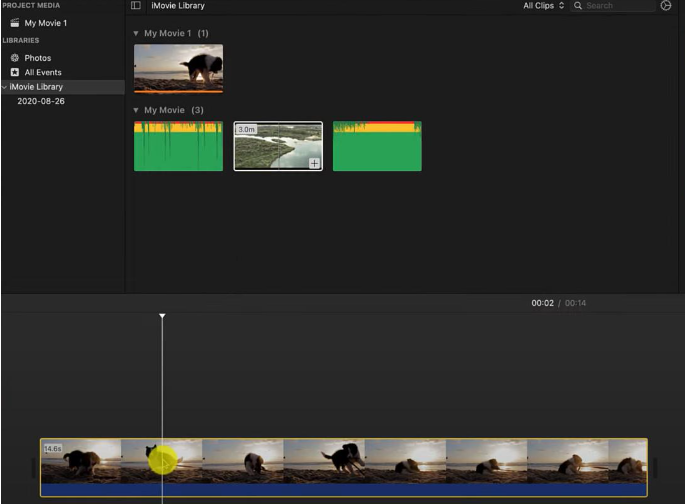
    iMovie is a powerful video editing app developed by Apple. This tool provides a user-friendly interface along with a variety of editing features, including video trimming. It always comes with many Apple devices, and if not, it can be downloaded for free from the App Store.
    • InShot

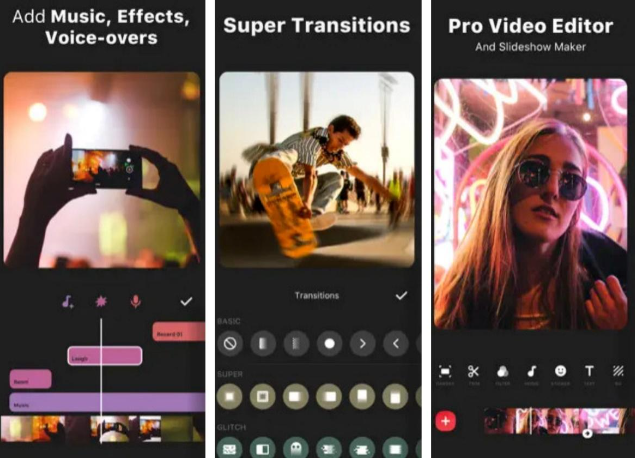
    InShot is a popular video editing app that includes features like trimming, cutting, and merging videos. It also offers filters, effects, and the ability to add music. InShot is available for free with in-app purchases.
    • VideoGrade

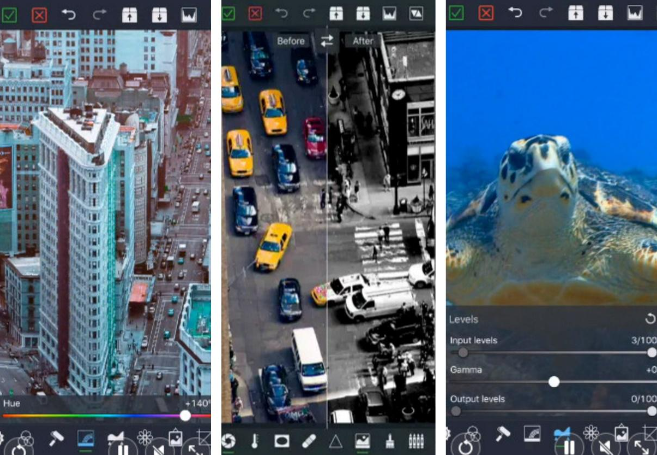
    While VideoGrade is primarily known for its color-grading capabilities, it also provides basic video editing functions, including trimming. It’s a useful app for users who want to enhance the colors of their videos while also making simple edits. It may not be as feature-rich as some other video editors, but it’s user-friendly.
    • Clips

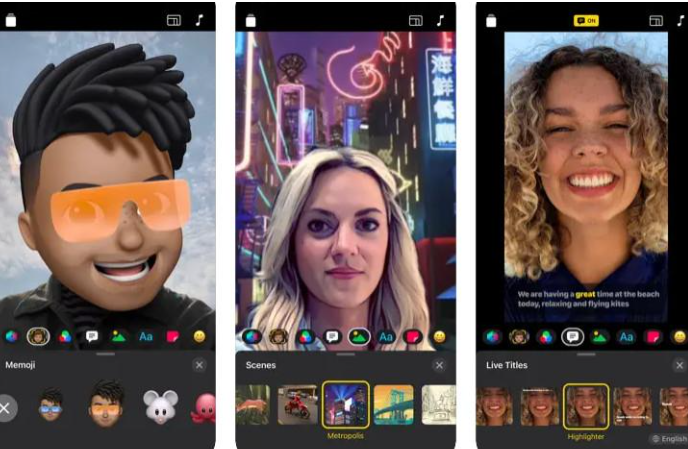
    Clips is another app developed by Apple that focuses on quick and fun video creation. It allows you to trim and edit your videos easily, and it also includes features like adding animated captions and stickers. Clips are available for free on the App Store.
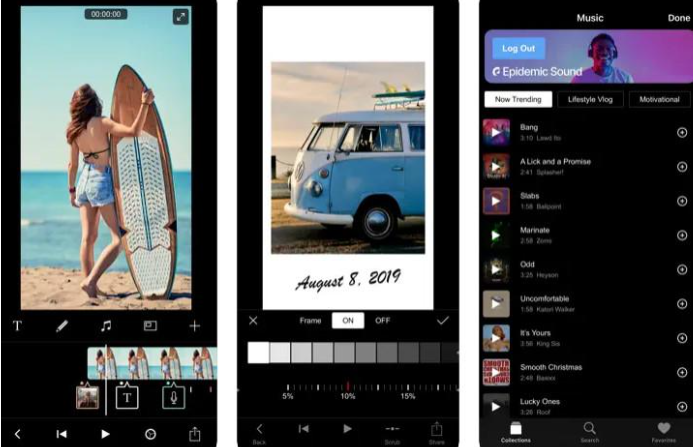
    • Filmmaker Pro

    Filmmaker Pro is a comprehensive video editing app that includes advanced features along with basic trimming and cutting. It provides tools for adding transitions, effects, and text to your videos. The app is 100% free to download, with in-app purchases for additional features.
    Tips: How to Use iMovie

    One popular app for this purpose is iMovie. Here’s a brief guide. Follow our detailed step-by-step guide, and we are sure you can complete the process without any problems.

    Step 1. Download iMovie

    If you don’t have iMovie installed, download it from the App Store.

    Step 2. Open iMovie

    Open the iMovie program on your device and create a new project.

    Step 3. Import your video

    Tap the + icon to import the video you want to trim.

    Step 4. Trim the video

    In the timeline, drag the edges of your video clip so that you can set the start and end points.

    Step 5. Preview and export

    Preview your edited video, make any necessary adjustments, and then tap Done. Finally, export the trimmed video to your Camera Roll.

    Conclusion

    Whether you choose to use the native settings or explore third-party apps, trimming videos on your iPhone opens up a world of possibilities for creativity and efficiency. As you become adept at this skill, you’ll find yourself effortlessly crafting and sharing compelling stories with your audience. So, go ahead, trim away, and let your videos shine in the digital realm.

    Share. Facebook Twitter Pinterest LinkedIn Tumblr Email

    Related Posts

    UK Cryptocurrency Adoption Grows as More Britons Invest in Digital Assets

    Redmi Phone Storage Full? How to Safely Remove Junk Files

    5 Best Online Video Editing Tools for Smartphone Creators in 2026

    Leave A Reply Cancel Reply

    You must be logged in to post a comment.

    voopoopintch
    oxva vprime 2
    nomadz
    • Popular
    • 3D Printer REVIEW
    • XIAOMI
    October 1, 2026

    VOOPOO ARGUS Z3 Review – Flip the Pod, Change the Vape! Keep It Simple!

    September 27, 2026

    Vaporesso ARMOUR OCTA Review – Built Like a Tank, Vapes Like a Beast

    September 27, 2026

    VOOPOO ARGUS Multi-Ohm Cartridge Review – One Magic Pod, Three Completely Different Vapes

    September 18, 2026

    OXVA VPRIME 2 vs VPRIME: What’s New in the Latest Version

    December 26, 2025

    ACMER ASCARVA 4S: Precision CNC Power for Makers, DIYers & Small Workshops

    June 23, 2024

    ACMER P2 20W Laser Engraver Fixed Focus Engraving: Hands on Review

    May 30, 2024

    xTool F1 Ultra Review: World’s First 20W Fiber & 20W Diode Laser Engraver

    May 30, 2024

    Anycubic Kobra 3 Combo Review: The Multicolor Masterpiece?

    October 7, 2026

    REDMI Headphones Neo Review: Features, ANC Performance and Battery Life

    October 7, 2026

    Xiaomi 18 Pro Max Transparent Edition Review: 200MP Camera and 8500mAh Battery

    September 30, 2026

    Xiaomi Door and Window Sensor 3 Launches With Tunnel Magnetoresistance Sensor and 3-Year Battery

    September 23, 2026

    Xiaomi Pad 9 Pro Launches With 12.5-Inch 3.2K 144Hz Display and 11,000mAh Battery

    fc 26 coins
    New Arrivals
    • SP2S Senx Air Disposable Vape SP2S Senx Air Disposable Vape
    • Geek Bar Pulse 2 25K Halloween Edition Disposable Vape Geek Bar Pulse 2 25K Halloween Edition Disposable Vape
    • RAZ RYL Vue 70K Disposable Pod RAZ RYL Vue 70K Disposable Pod
    • Uwell Caliburn G5 Vision Pod System Kit Uwell Caliburn G5 Vision Pod System Kit
    • Vaporesso Armour GS2 Pod System Kit 80W Vaporesso Armour GS2 Pod System Kit 80W
    • iJOY XP100K Zero Nicotine Refillable Disposable Vape Kit iJOY XP100K Zero Nicotine Refillable Disposable Vape Kit
    • JNR PowerMate Pro JNR PowerMate Pro
    • MAXRAY RUSH 80K Disposable Vape MAXRAY RUSH 80K Disposable Vape
    • MERRYMI Blade 30000 Disposable Vape MERRYMI Blade 30000 Disposable Vape
    About
  • Igeekphone.com provides the first global tech news and reviews about smartphone, vapes, e-cigar, smart home, 3D printers, e-bike,tablets, RC drones, VR headset, and other accessories. It's the best platform to improve your brand and product.
  • Contact us: info@igeekphone.com
  • Check Our Privacy Policy Here.
  • Note: *Right now we have US editor and EU editors for review, especially for Amazon US and EU.
  • *Shop and Compare Price Here*
  • Facebook
  • Youtube
  • OUR BEST VAPE PARTNERS
  • VAPE ONLINE STORE
  • VAPORESSO
  • VOOPOO
  • OXVA
  • NEXA
  • MASKKING
  • SP2S
  • IPLAY
  • TODOO
  • OTHER BEST PARTNERS
  • SVBONY
  • Chuwi
  • Blackview
  • Fossibot
  • Unihertz
  • Flsun
  • Anycubic
  • Xtool
  • Oukitel
  • Mukkpet Ebike
  • Ugreen
  • Copyright © 2026 igeekphone

    Type above and press Enter to search. Press Esc to cancel.