







Facebook Twitter Instagram
    Trending
    • Srihome SH028 8MP 4K Outdoor Security Camera Review: High-Definition, Smart Security for Your Home
    • ICEBOMB 18K Disposable Vape Review: A Game-Changer in the World of Disposable Vapes
    • WHICH DIET DOES NOT WORK
    • Will JNR Falcon X vs MASKKING Roki X: Which 18K Puff Vape Stands Out?
    • Affordable Servers for Capture the Flag Events
    • How to Evaluate an NFT Project for high growth rate
    • The reason to Choose Biamp Systems for the Best AV Solutions?
    • SJCAM SJ6 Ultra Action Camera Review: Capture Your Adventures in Stunning 4K
    Facebook YouTube
    Login Register
    IGeeKphone China Phone, Tablet PC, VR, RC Drone News, Reviews
    • HOME
      • NEWS
        • DeepSeek
        • ChatGPT
        • Minecraft
    • Amazon
    • PHONE
      • Top Phones For Your First Choice
      • Phone Comparison
      • Xiaomi
      • Blackview
      • Doogee
      • Black Shark
      • Geekbuying
      • Banggood
      • TEMU
      • TikTok
      • Aliexpress
      • Walmart
      • MercadoLibre
      • Lazada
    • TOP VAPE Awards for 2026
    • VAPES
      • E-CIGAR Upcoming
      • Vape News
      • Vape Deals
      • Vape Comparison
      • Vape Guide
      • Giveaway
    • BEST VAPE
      • Best Vape Stores
      • Best Starter Vape Kits
      • Best Vapes for Beginners
      • Best Disposable Vapes
      • Best Pod Systems
      • Best Pod Mod Vapes
      • Best Mods
      • Best Nicotine Pouches
      • Best Clearomizers/Tanks
      • Best E-Liquid
      • Best EGO/Pens
      • Best Vapes for Nic Salt E-Juice
      • Best Vapes to Quit Smoking
      • RDA vs. RDTA vs. RTA
    • Best Vape Brand 2026
      • VAPORESSO
      • VOOPOO
      • OXVA
      • NEXA BAR
      • ORIONBARTECH
      • MASKKING VAPE
      • MEMERS
      • SP2S
      • JNR
      • TODOO
      • MRFOG
      • VEIIK
    • REVIEW
      • E-cigar Review
      • Phones
      • Tablet PC
      • TV Box
      • RC Drone
      • Wearables
      • Camera
      • Accessories
      • VR Headset
    • MORE
      • TABLET
        • Chuwi
        • INNOCN
        • Teclast
        • Top Tablet for Your First Choice
        • Tablet/Laptop Comparison
      • RC DRONE
      • CAMERA
      • WEARABLES
        • OneOdio
        • BlitzWolf
        • Top Smartwatch for First Choice
      • 3D PRINTER
        • 3D Printer Review
        • Anycubic
        • FLSUN
        • Xtool
        • LONGER
        • Top 3D printer to Choose First
      • POWER STATION
        • Oukitel
        • FOSSIBOT
      • GAMING
        • Top Gaming Products
      • E-BIKE
        • Samebike
        • Happyrun
        • ENGWE
      • SMART HOME
      • TV BOX
      • ACCESSORIES
      • VR HEADSET
      • CLOTHES
      • AUTO CAR
    • DEAL
    • VAPE LAWS
    • Shop
    IGeeKphone China Phone, Tablet PC, VR, RC Drone News, Reviews
    You are at:Home»Guide»How to Set up the Hidden Dangerous Functions of the Phone?
    Guide

    How to Set up the Hidden Dangerous Functions of the Phone?

    Brady CottonBy Brady CottonFebruary 24, 2026
    Facebook Twitter Pinterest LinkedIn Tumblr Email

    In the digital age, smartphones have become an integral part of our daily lives. However, with the continuous development of technology, while providing convenient services, smart phones also hide some Settings that may threaten users’ privacy and security. Today, as a tech blogger, I’m going to expose some of the most dangerous Settings on your phone and show you how to turn them off to make your phone more secure.

    First, turn off the intelligent recommendation service to protect privacy
    First, we need to open the “Settings” option of the phone and click on the “Privacy” or “Security and Privacy” option. Here you will find a feature called “Smart Recommendation Service”. This feature provides personalized recommendations to users by collecting their personal information and usage habits. However, it also means that your privacy may be disclosed to third parties. Therefore, in order to protect personal privacy, we recommend that you turn off this feature.
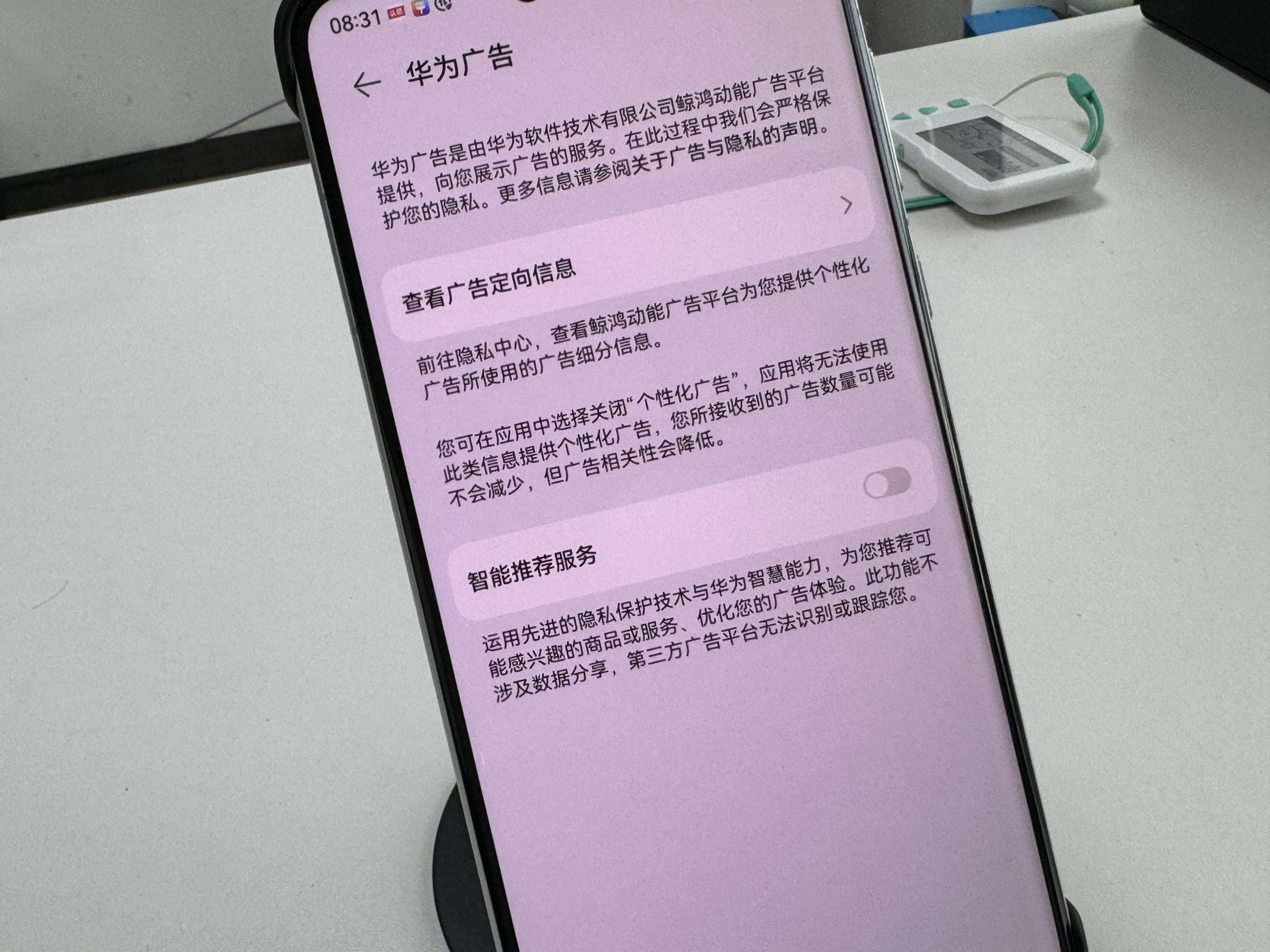
    How to turn off: In the “Privacy” or “Security and Privacy” option, find the “Intelligent recommendation Service” or similar name option, click to enter and choose to turn off.

    2. Launch a user experience improvement plan and reject data collection
    Next, we go to the “Settings” option again and click on “System and Update”. Here, you’ll find an option called “Join the User Experience Improvement Program.” The program aims to collect usage data from users and use it to improve products and services. However, this can also lead to your usage habits being exposed to developers or third parties. Therefore, in order to protect your data security, it is recommended that you opt out of this program.
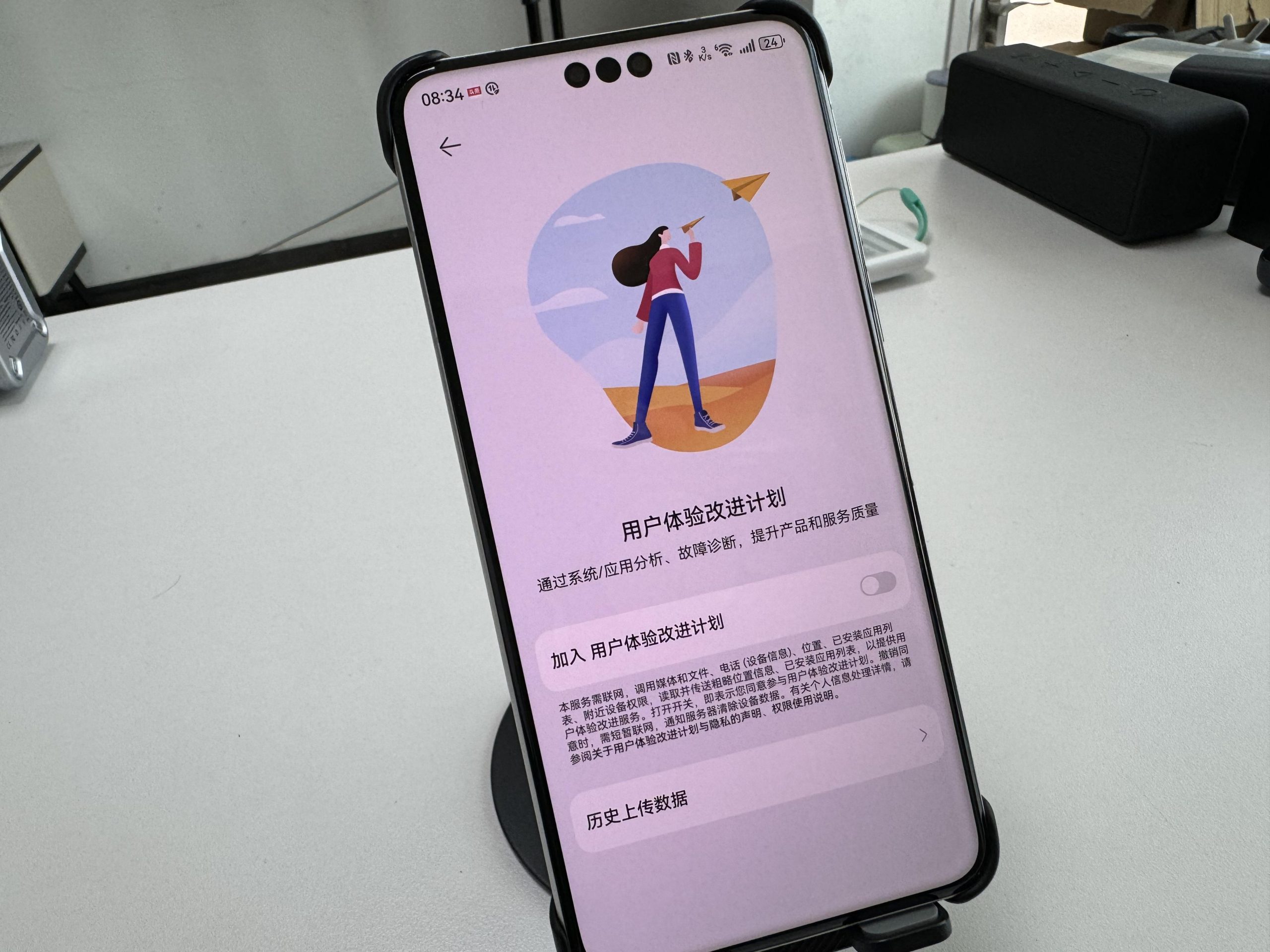
    Exit method: In the “System and Update” option, find the “Join the user experience Improvement program” or similar name option, click to enter and choose to exit.

    3. Turn off browser personalized ads to reduce advertising harassment
    In addition to the above two Settings, personalized advertising in the browser is also a potential security concern. These ads, which are often pushed based on a user’s browsing history and interests, not only affect the user’s browsing experience, but may also cause users to click on malicious links or download virus software. Therefore, it is also very necessary to turn off the browser’s personalized advertising function.
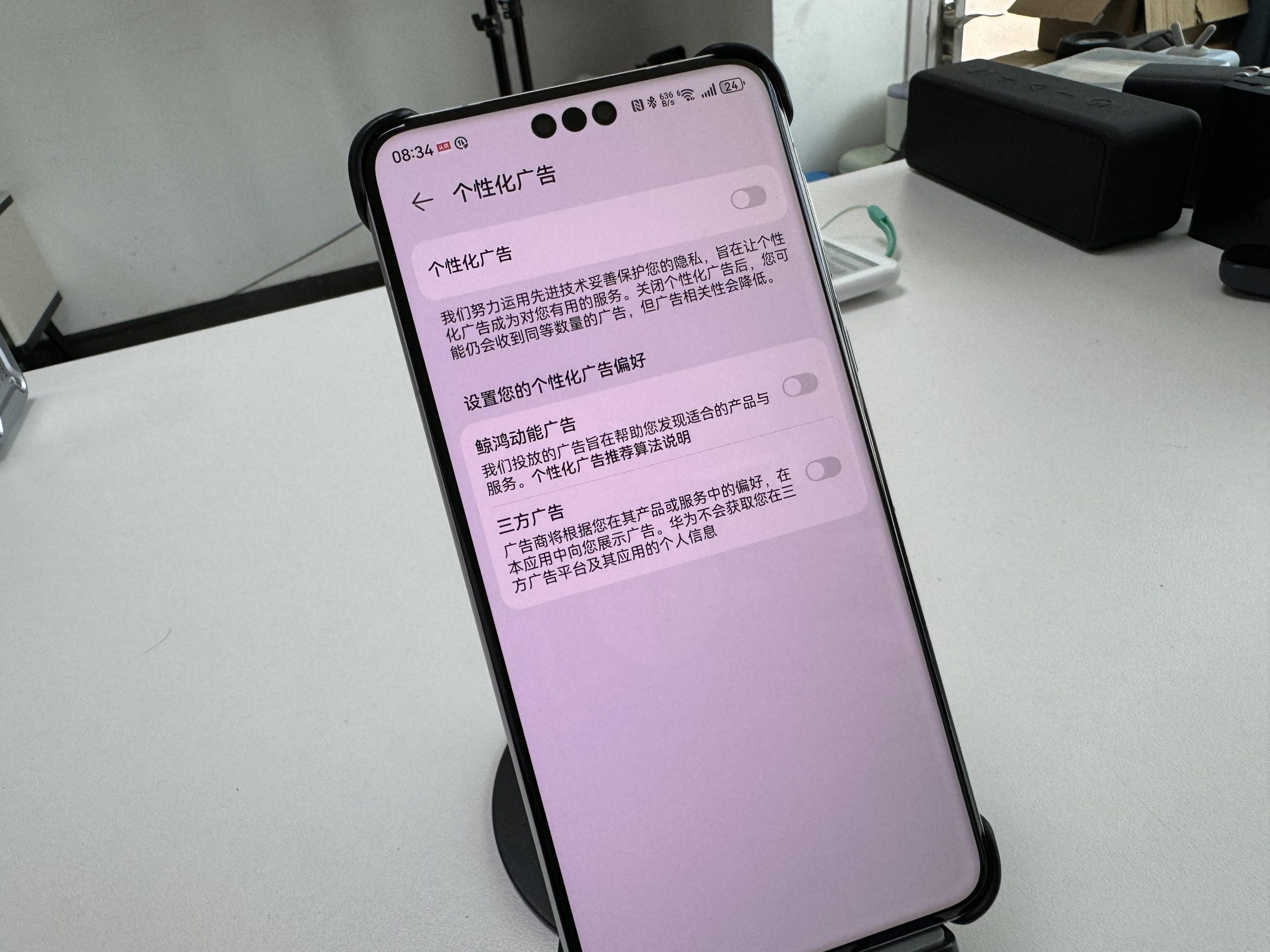
    How to close: Open your Huawei browser, go to the “Settings” option, and find the “Privacy” or “Advertising and Privacy” option. Here, you’ll see an option to “personalize ads” or something like that, and then click on it and choose to turn it off.

    Iv. Summary and Suggestions
    By turning off the above three Settings, we can effectively protect our privacy and data security. However, this does not mean that we can completely let down our guard. When using smart phones, we also need to pay attention to the following points:

    Do not download and install applications from unknown sources to avoid being attacked by malware.

    Regularly clean the cache and junk files in the mobile phone to avoid personal privacy disclosure.

    Share personal information and photos to social media platforms carefully to avoid being exploited by criminals.

    Protecting personal privacy and data security is the responsibility of each of us. Only by raising vigilance and strengthening prevention can we make our digital life better and more secure.

    Share. Facebook Twitter Pinterest LinkedIn Tumblr Email

    Related Posts

    Affordable Servers for Capture the Flag Events

    How to Evaluate an NFT Project for high growth rate

    The reason to Choose Biamp Systems for the Best AV Solutions?

    Leave A Reply Cancel Reply

    You must be logged in to post a comment.

    voopoo drag 6
    oxva xlim 3 ultra
    sp2s sen x disposable vape
    jnr 100k
    • Popular
    • 3D Printer REVIEW
    • XIAOMI
    March 5, 2026

    OXVA XLIM PRO 3 vs XLIM Pro 2 DNA: Hands-On Review

    March 5, 2026

    OXVA XLIM PRO 3 vs XLIM GO 2: Hands-On Review

    March 2, 2026

    OXVA XLIM PRO 3 vs XLIM 3 ULTRA: Hands-On Review

    February 23, 2026

    Voopoo DRAG S3 vs DRAG X3 Review – Which One Fits Your Vaping Lifestyle?

    December 26, 2025

    ACMER ASCARVA 4S: Precision CNC Power for Makers, DIYers & Small Workshops

    June 23, 2024

    ACMER P2 20W Laser Engraver Fixed Focus Engraving: Hands on Review

    May 30, 2024

    xTool F1 Ultra Review: World’s First 20W Fiber & 20W Diode Laser Engraver

    May 30, 2024

    Anycubic Kobra 3 Combo Review: The Multicolor Masterpiece?

    March 13, 2026

    Xiaomi Watch S5 has been officially announced to be released this month! It features a new integrated bezel design and offers an impressive 21-day battery life

    March 13, 2026

    Xiaomi Notebook Pro 14 is equipped with a 72Wh large battery: it comes with a standard 100W nitrogen-gallium adapter

    March 12, 2026

    The three color options for Xiaomi Notebook Pro 14 have been announced: white, elegant gray, and soft mist blue.

    March 10, 2026

    Xiaomi 18 Pro Max leaks out: First to Feature Snapdragon 8E6 Pro with a 6.9-inch Large Screen

    fc 26 coins
    New Arrivals
    • ICEBOMB 18K Disposable Vape ICEBOMB 18K Disposable Vape
    • Juice Head iFlex Nixodine 50K Disposable Vape Juice Head iFlex Nixodine 50K Disposable Vape
    • MASKKING CAMO Disposable Vape MASKKING CAMO Disposable Vape
    • Pod Salt Air 40K Disposable Vape Pod Salt Air 40K Disposable Vape
    • OXVA Xlim Go Lite Pod System Kit OXVA Xlim Go Lite Pod System Kit
    • OXVA ARTIO 2 Vape OXVA ARTIO 2 Vape
    • Wala Yo 50000 Disposable Vape Wala Yo 50000 Disposable Vape
    • BD Vape Mod Rayden 220 Box Mod BD Vape Mod Rayden 220 Box Mod
    • Airmez Lux 60K Disposable Vape Airmez Lux 60K Disposable Vape
    About
  • Igeekphone.com provides the first global tech news and reviews about smartphone, vapes, e-cigar, smart home, 3D printers, e-bike,tablets, RC drones, VR headset, and other accessories. It's the best platform to improve your brand and product.
  • Contact us: info@igeekphone.com
  • Check Our Privacy Policy Here.
  • Note: *Right now we have US editor and EU editors for review, especially for Amazon US and EU.
  • *Shop and Compare Price Here*
  • Facebook
  • Youtube
  • OUR BEST VAPE PARTNERS
  • VAPE ONLINE STORE
  • HAYATI PRO MAX PLUS
  • VAPORESSO
  • VOOPOO
  • OXVA
  • NEXA
  • MASKKING
  • LOSTVAPE ORIONBAR
  • MEMERS
  • TODOO
  • SP2S
  • JNR
  • VEIIK
  • OTHER BEST PARTNERS
  • SVBONY
  • Chuwi
  • Blackview
  • Fossibot
  • Unihertz
  • Flsun
  • Anycubic
  • Xtool
  • Oukitel
  • Mukkpet Ebike
  • Ugreen
  • Copyright © 2026 igeekphone

    Type above and press Enter to search. Press Esc to cancel.