







Facebook Twitter Instagram
    Trending
    • Honor MagicOS 11 Rumored to Introduce Advanced YOYO AI Assistant and Android’s Most Sophisticated Liquid Glass UI
    • Samsung Galaxy Watch 9 and Galaxy Watch Ultra 2 Prices Leak Ahead of Launch
    • Insta360 GO Ultra Action Camera Review: Tiny 4K Powerhouse for Creators and Adventurers
    • JJRC Q243 RTR 2.4G 4WD RC Car Review: Amphibious Stunt Truck for Land and Water Adventures
    • iScooter F2 Electric Scooter Review: An Affordable Urban Commuter with 500W Power
    • Cybertake S2 Pro Portable Camping Air Conditioner Review: Powerful 5,100 BTU Cooling for Outdoor Adventures
    • Double the capacity! The Apple M7 Ultra can support up to 1.5TB of memory, far exceeding the previous generation M5 Ultra.
    • Acer Sospiro A15 Released: Same back screen design as Xiaomi 17 Pro, using ZTE Ascend T615 chip
    Facebook YouTube
    IGeeKphone China Phone, Tablet PC, VR, RC Drone News, Reviews
    • HOME
    • BREAKING NEWS
      • AI NEWS
    • Amazon
    • PHONE
      • Top Phones For Your First Choice
      • Phone Comparison
      • Xiaomi
      • Blackview
      • Doogee
      • Black Shark
      • Geekbuying
      • Banggood
      • TEMU
      • TikTok
      • Aliexpress
      • Walmart
      • MercadoLibre
      • Lazada
    • TOP VAPE Awards for 2026
    • VAPES
      • E-CIGAR Upcoming
      • Vape News
      • Vape Deals
      • Vape Comparison
      • Vape Guide
      • VAPE LAWS
      • Giveaway
    • BEST VAPE
      • Best Vape Stores
      • Best Starter Vape Kits
      • Best Vapes for Beginners
      • Best Disposable Vapes
      • Best Pod Systems
      • Best Pod Mod Vapes
      • Best Mods
      • Best Nicotine Pouches
      • Best Clearomizers/Tanks
      • Best E-Liquid
      • Best EGO/Pens
      • Best Vapes for Nic Salt E-Juice
      • Best Vapes to Quit Smoking
      • RDA vs. RDTA vs. RTA
    • Best Vape Brand 2026
      • VAPORESSO
      • VOOPOO
      • OXVA
      • NEXA BAR
      • MASKKING VAPE
      • SP2S
      • IPLAY
      • TODOO
      • MRFOG
      • LOSTVAPE
      • VEIIK
    • REVIEW
      • E-cigar Review
      • Phones
      • Tablet PC
      • TV Box
      • RC Drone
      • Wearables
      • Camera
      • Accessories
      • VR Headset
    • MORE
      • TABLET
        • Chuwi
        • INNOCN
        • Teclast
        • Top Tablet for Your First Choice
        • Tablet/Laptop Comparison
      • RC DRONE
      • CAMERA
      • WEARABLES
        • OneOdio
        • BlitzWolf
        • Top Smartwatch for First Choice
      • 3D PRINTER
        • 3D Printer Review
        • Anycubic
        • FLSUN
        • Xtool
        • LONGER
        • Top 3D printer to Choose First
      • POWER STATION
        • Oukitel
        • FOSSIBOT
      • GAMING
        • Top Gaming Products
      • E-BIKE
        • Samebike
        • Happyrun
        • ENGWE
      • SMART HOME
      • TV BOX
      • ACCESSORIES
      • VR HEADSET
      • CLOTHES
      • AUTO CAR
    • DEAL
    • Shop
    IGeeKphone China Phone, Tablet PC, VR, RC Drone News, Reviews
    You are at:Home»Guide»How to Set up the Hidden Dangerous Functions of the Phone?
    Guide

    How to Set up the Hidden Dangerous Functions of the Phone?

    Brady CottonBy Brady CottonApril 29, 2026
    Facebook Twitter Pinterest LinkedIn Tumblr Email

    In the digital age, smartphones have become an integral part of our daily lives. However, with the continuous development of technology, while providing convenient services, smart phones also hide some Settings that may threaten users’ privacy and security. Today, as a tech blogger, I’m going to expose some of the most dangerous Settings on your phone and show you how to turn them off to make your phone more secure.

    First, turn off the intelligent recommendation service to protect privacy
    First, we need to open the “Settings” option of the phone and click on the “Privacy” or “Security and Privacy” option. Here you will find a feature called “Smart Recommendation Service”. This feature provides personalized recommendations to users by collecting their personal information and usage habits. However, it also means that your privacy may be disclosed to third parties. Therefore, in order to protect personal privacy, we recommend that you turn off this feature.
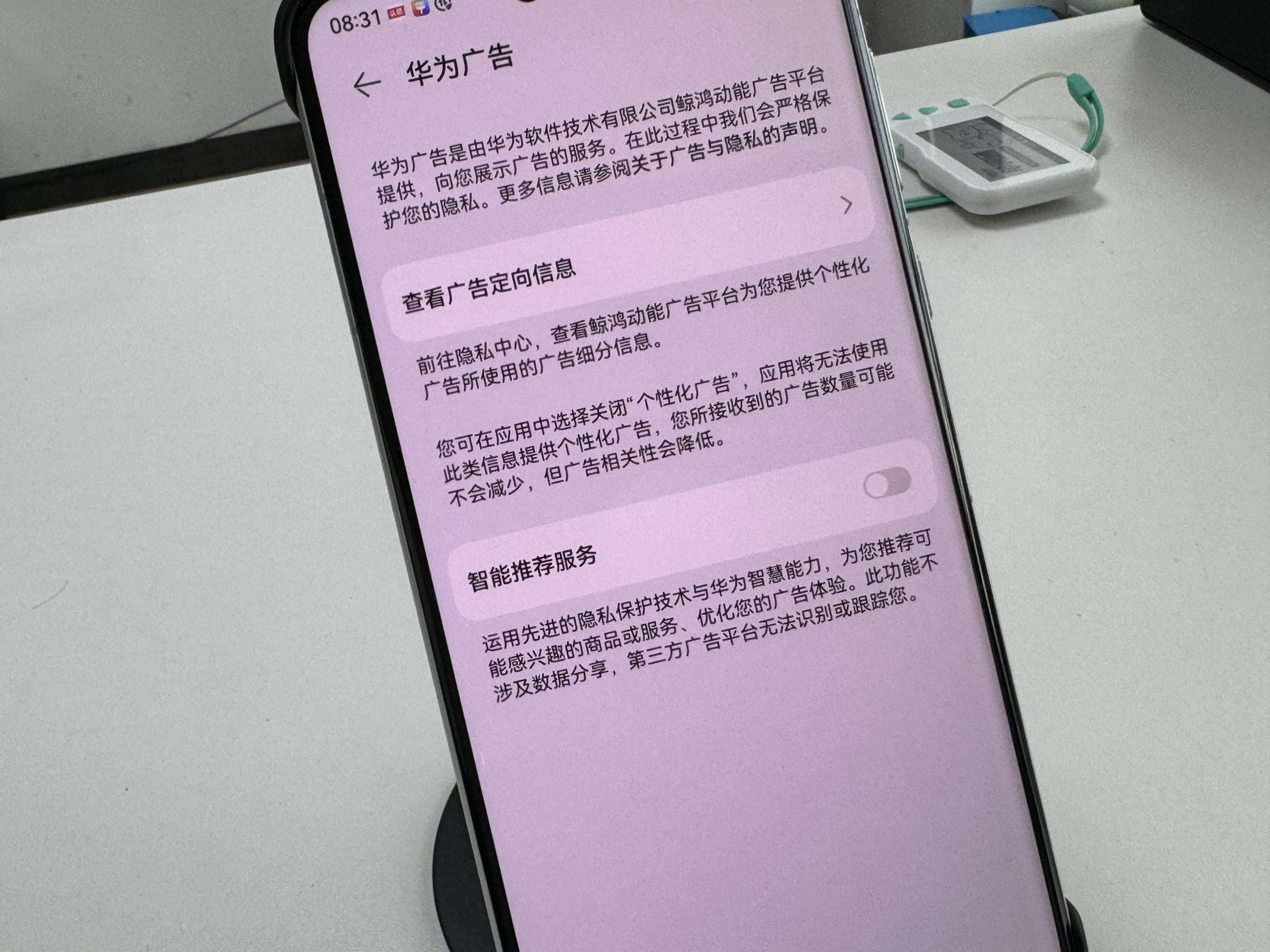
    How to turn off: In the “Privacy” or “Security and Privacy” option, find the “Intelligent recommendation Service” or similar name option, click to enter and choose to turn off.

    2. Launch a user experience improvement plan and reject data collection
    Next, we go to the “Settings” option again and click on “System and Update”. Here, you’ll find an option called “Join the User Experience Improvement Program.” The program aims to collect usage data from users and use it to improve products and services. However, this can also lead to your usage habits being exposed to developers or third parties. Therefore, in order to protect your data security, it is recommended that you opt out of this program.
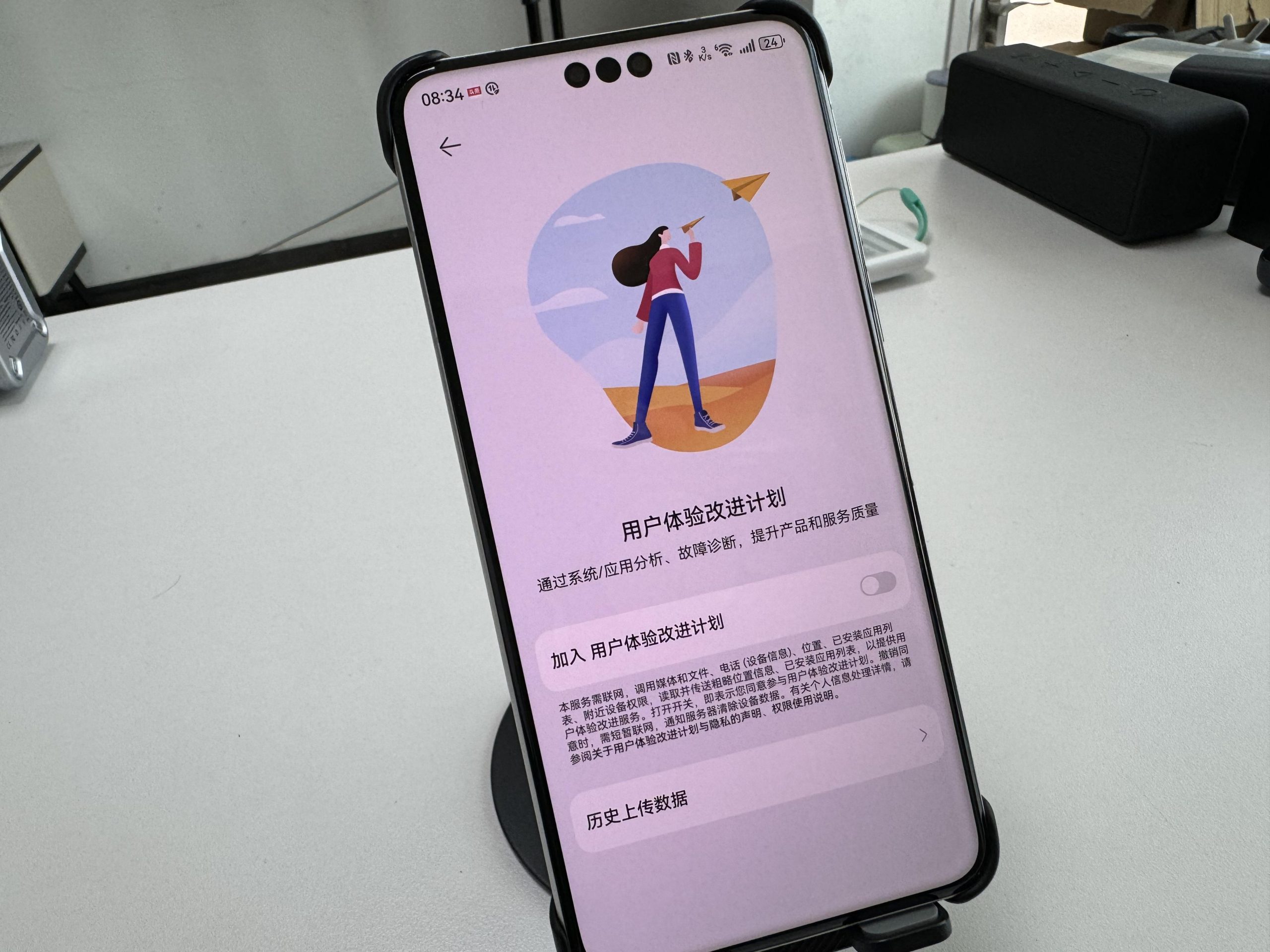
    Exit method: In the “System and Update” option, find the “Join the user experience Improvement program” or similar name option, click to enter and choose to exit.

    3. Turn off browser personalized ads to reduce advertising harassment
    In addition to the above two Settings, personalized advertising in the browser is also a potential security concern. These ads, which are often pushed based on a user’s browsing history and interests, not only affect the user’s browsing experience, but may also cause users to click on malicious links or download virus software. Therefore, it is also very necessary to turn off the browser’s personalized advertising function.
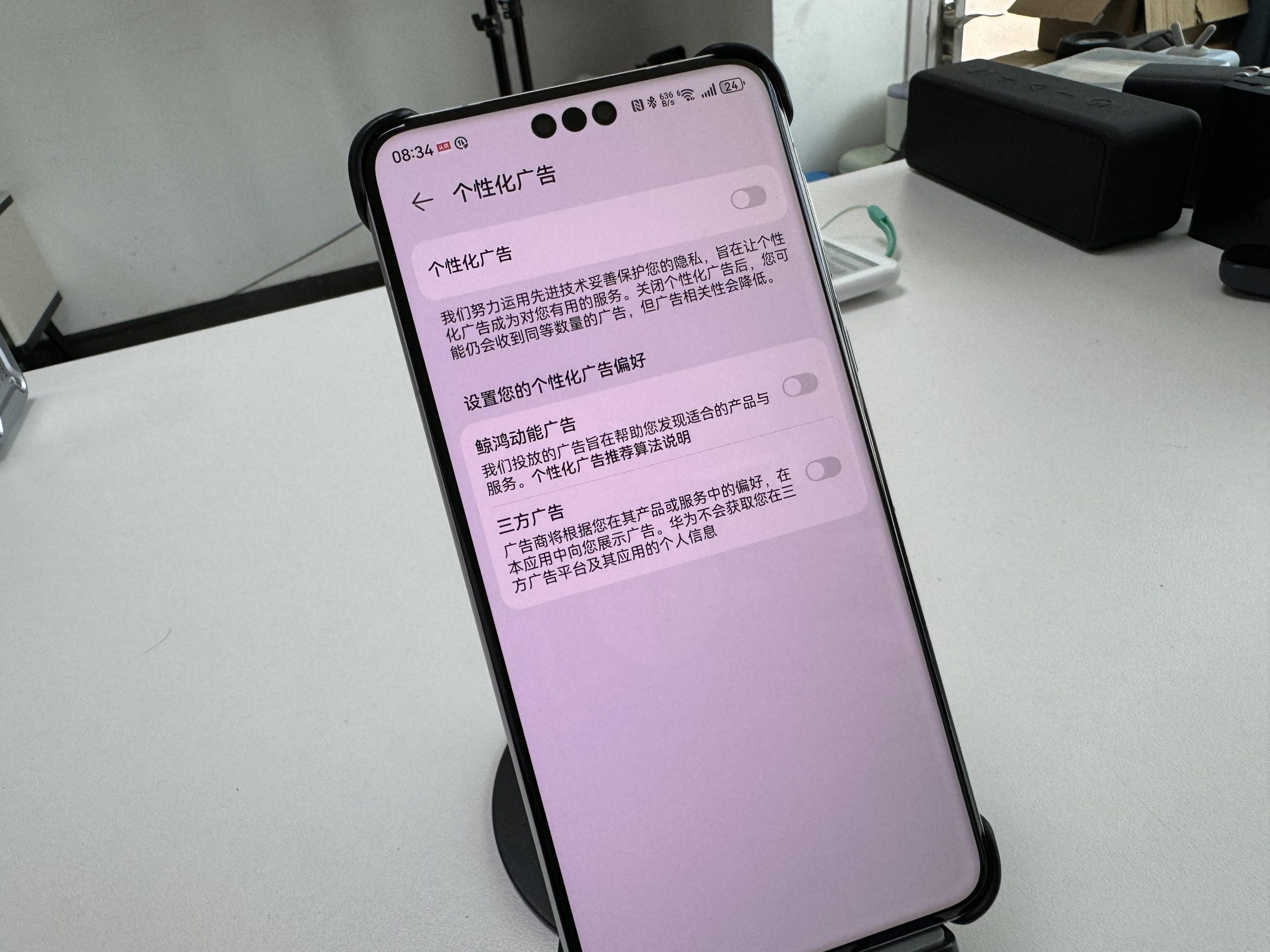
    How to close: Open your Huawei browser, go to the “Settings” option, and find the “Privacy” or “Advertising and Privacy” option. Here, you’ll see an option to “personalize ads” or something like that, and then click on it and choose to turn it off.

    Iv. Summary and Suggestions
    By turning off the above three Settings, we can effectively protect our privacy and data security. However, this does not mean that we can completely let down our guard. When using smart phones, we also need to pay attention to the following points:

    Do not download and install applications from unknown sources to avoid being attacked by malware.

    Regularly clean the cache and junk files in the mobile phone to avoid personal privacy disclosure.

    Share personal information and photos to social media platforms carefully to avoid being exploited by criminals.

    Protecting personal privacy and data security is the responsibility of each of us. Only by raising vigilance and strengthening prevention can we make our digital life better and more secure.

    Share. Facebook Twitter Pinterest LinkedIn Tumblr Email

    Related Posts

    Honor MagicOS 11 Rumored to Introduce Advanced YOYO AI Assistant and Android’s Most Sophisticated Liquid Glass UI

    Samsung Galaxy Watch 9 and Galaxy Watch Ultra 2 Prices Leak Ahead of Launch

    Double the capacity! The Apple M7 Ultra can support up to 1.5TB of memory, far exceeding the previous generation M5 Ultra.

    Leave A Reply Cancel Reply

    You must be logged in to post a comment.

    voopoopintch
    oxva nexlim 2
    sp2s sen x disposable vape
    • Popular
    • 3D Printer REVIEW
    • XIAOMI
    June 21, 2026

    iPlay LUMO 8K Review – A Compact Prefilled Pod Kit with Big Flavor and Everyday Convenience

    June 21, 2026

    iPlay HOOLA 150K Review – A Cloud-Chasing Giant with Music, Modes & Massive Longevity

    June 21, 2026

    Vaporesso VIBE SE 2 Review – Simple on the Outside, Surprisingly Smart on the Inside

    June 21, 2026

    VOOPOO DRAG H40 Pro Review – The Return of the Pocket Powerhouse

    December 26, 2025

    ACMER ASCARVA 4S: Precision CNC Power for Makers, DIYers & Small Workshops

    June 23, 2024

    ACMER P2 20W Laser Engraver Fixed Focus Engraving: Hands on Review

    May 30, 2024

    xTool F1 Ultra Review: World’s First 20W Fiber & 20W Diode Laser Engraver

    May 30, 2024

    Anycubic Kobra 3 Combo Review: The Multicolor Masterpiece?

    July 13, 2026

    Xiaomi Mijia Display Wall Lamp 2 has been launched on the crowdfunding page at 259 yuan

    July 12, 2026

    The Core Specifications of Redmi Note 17 series have been Announced

    July 11, 2026

    Xiaomi Redmi Note 17 Series Specifications Leak Ahead of July 14 Launch: Snapdragon 4 Gen 4, Up to 9,000mAh Battery

    July 10, 2026

    Xiaomi Band 11 Series Certified Ahead of Launch, Retains 233mAh Battery Capacity

    fc 26 coins
    New Arrivals
    • Veev One Plus Pod System Kit Veev One Plus Pod System Kit
    • Xiaomi 18T Xiaomi 18T
    • Xiaomi 18T Pro Xiaomi 18T Pro
    • Huawei Mate 80 Air Huawei Mate 80 Air
    • Xiaomi Poco F9 Ultra Xiaomi Poco F9 Ultra
    • JNR Falcon Mini 20K Puffs Refillable Vape Kit JNR Falcon Mini 20K Puffs Refillable Vape Kit
    • Hyrise Hybrid Vaporizer Kit Hyrise Hybrid Vaporizer Kit
    • Hyrise Hydden 510 Thread Battery 1000mAh Hyrise Hydden 510 Thread Battery 1000mAh
    • Smoant Flex Neo Pod System Kit Smoant Flex Neo Pod System Kit
    About
  • Igeekphone.com provides the first global tech news and reviews about smartphone, vapes, e-cigar, smart home, 3D printers, e-bike,tablets, RC drones, VR headset, and other accessories. It's the best platform to improve your brand and product.
  • Contact us: info@igeekphone.com
  • Check Our Privacy Policy Here.
  • Note: *Right now we have US editor and EU editors for review, especially for Amazon US and EU.
  • *Shop and Compare Price Here*
  • Facebook
  • Youtube
  • OUR BEST VAPE PARTNERS
  • VAPE ONLINE STORE
  • HAYATI PRO MAX PLUS
  • VAPORESSO
  • VOOPOO
  • OXVA
  • NEXA
  • MASKKING
  • SP2S
  • IPLAY
  • TODOO
  • OTHER BEST PARTNERS
  • SVBONY
  • Chuwi
  • Blackview
  • Fossibot
  • Unihertz
  • Flsun
  • Anycubic
  • Xtool
  • Oukitel
  • Mukkpet Ebike
  • Ugreen
  • Copyright © 2026 igeekphone

    Type above and press Enter to search. Press Esc to cancel.