







Facebook Twitter Instagram
    Trending
    • PeakBar H2O 40K Disposable Vape Review-Massive 40,000 Puff Count & Water Shisha Style
    • Lyco Mini Box 50K By SMOK Nixotine Edition Review: A Compact, High-Powered Vaping Experience
    • ESCAM QFS71 4G LTE Solar Security Camera Review – Wireless Outdoor Surveillance Without Wi-Fi
    • AULA F2088Air Tri-Mode Mechanical Keyboard at $52.99: A Comprehensive Review
    • Wltoys 6407 Tiny FPV RC Car Flash Sale: Grab For Just $56.99 on Banggood!
    • Srihome SH028 8MP 4K Outdoor Security Camera Review: High-Definition, Smart Security for Your Home
    • OXVA Slim Stick X Vape Review: Compact Power and Style in One Vape
    • Hstar R12-01Q F150 1/12 Scale 4WD RC Crawler Truck Review-Rugged Power With Real-World Style
    Facebook YouTube
    Login Register
    IGeeKphone China Phone, Tablet PC, VR, RC Drone News, Reviews
    • HOME
      • NEWS
        • DeepSeek
        • ChatGPT
        • Minecraft
    • Amazon
    • NEW YEAR
    • PHONE
      • Top Phones For Your First Choice
      • Phone Comparison
      • Xiaomi
      • Blackview
      • Doogee
      • Black Shark
      • Geekbuying
      • Banggood
      • TEMU
      • TikTok
      • Aliexpress
      • Walmart
      • MercadoLibre
      • Lazada
    • TOP VAPE Awards for 2026
    • VAPES
      • E-CIGAR Upcoming
      • Vape News
      • Vape Deals
      • Vape Comparison
      • Vape Guide
      • Giveaway
    • BEST VAPE
      • Best Vape Stores
      • Best Starter Vape Kits
      • Best Vapes for Beginners
      • Best Disposable Vapes
      • Best Pod Systems
      • Best Pod Mod Vapes
      • Best Mods
      • Best Nicotine Pouches
      • Best Clearomizers/Tanks
      • Best E-Liquid
      • Best EGO/Pens
      • Best Vapes for Nic Salt E-Juice
      • Best Vapes to Quit Smoking
      • RDA vs. RDTA vs. RTA
    • Best Vape Brand 2026
      • VAPORESSO
      • VOOPOO
      • OXVA
      • NEXA BAR
      • ORIONBARTECH
      • MASKKING VAPE
      • MEMERS
      • SP2S
      • JNR
      • TODOO
      • MRFOG
      • VEIIK
    • REVIEW
      • E-cigar Review
      • Phones
      • Tablet PC
      • TV Box
      • RC Drone
      • Wearables
      • Camera
      • Accessories
      • VR Headset
    • MORE
      • TABLET
        • Chuwi
        • INNOCN
        • Teclast
        • Top Tablet for Your First Choice
        • Tablet/Laptop Comparison
      • RC DRONE
      • CAMERA
      • WEARABLES
        • OneOdio
        • BlitzWolf
        • Top Smartwatch for First Choice
      • 3D PRINTER
        • 3D Printer Review
        • Anycubic
        • FLSUN
        • Xtool
        • LONGER
        • Top 3D printer to Choose First
      • POWER STATION
        • Oukitel
        • FOSSIBOT
      • GAMING
        • Top Gaming Products
      • E-BIKE
        • Samebike
        • Happyrun
        • ENGWE
      • SMART HOME
      • TV BOX
      • ACCESSORIES
      • VR HEADSET
      • CLOTHES
      • AUTO CAR
    • DEAL
    • Shop
    IGeeKphone China Phone, Tablet PC, VR, RC Drone News, Reviews
    You are at:Home»Guide»How do I import my phone contacts to a new phone?
    Guide

    How do I import my phone contacts to a new phone?

    Brady CottonBy Brady CottonJuly 21, 2024
    Facebook Twitter Pinterest LinkedIn Tumblr Email

    Replacing a new mobile phone is a very happy thing, but because the old mobile phone has been used for a long time, many important data are stored in the old mobile phone, such as contacts, photos, text messages and so on. How does this data get imported into a new phone? Photos are relatively simple, backed up directly to the cloud. So, how do I import the contacts of my iPhone (ios 13.5) into my new phone? We will introduce you to the following methods.

    How do I import my phone contacts to a new phone

    Scenario 1: The iPhone address book is imported into a new iPhone

    Step 1: On an old iPhone, go to [Settings] and click [Account and Password].

    Step 2: Click on iCloud

    Step 3: Enable the data synchronization option
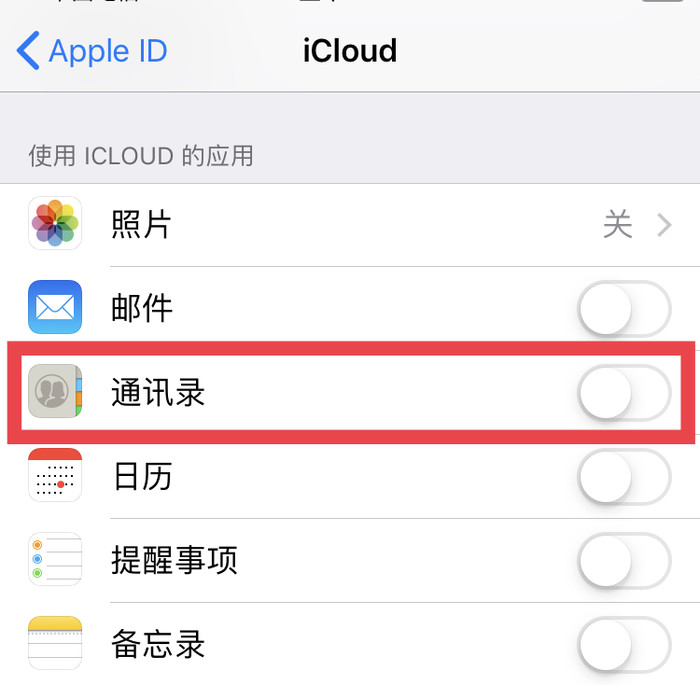
    Step 4: Log in to the same Apple ID in the new iPhone

    Step 5: On a new iPhone, go to [Settings] and click [Account and Password].

    Step 6: Click [iCloud] to turn on the sync option. This syncs the data from the old phone to the new one.

    Scenario 2: iPhone contacts are imported into a new Android phone.

    Step 1: First go to the desktop of your iphone, find [Settings], and tap to enter.

    Step 2: In the Settings drop-down menu find [icloud]option, enter.

    Step 3: Turn on the Contacts switch in icloud. This step is used to synchronize contacts to icloud.
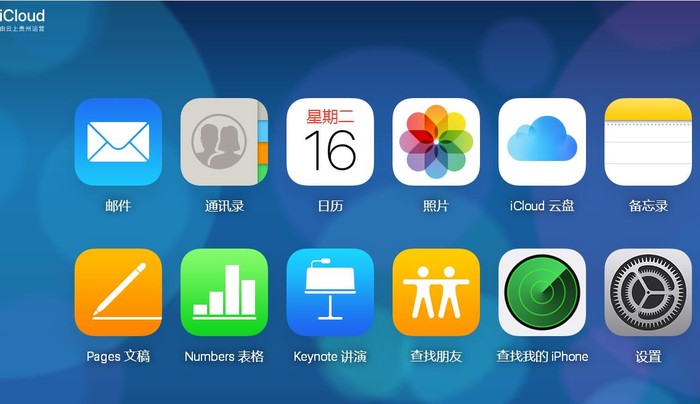
    Step 4: Open a browser on your computer and type in the icloud URL, as shown in the picture. Enter your apple account and password on the login screen.

    Step 5: After successful login, you will see the “Address book” option, click to enter.

    Step 6: Find the setting button in the lower left corner of the address book interface. After clicking the button, the operation menu will pop up. Select [Export Vcard], as shown in the picture, and save it to the desktop.

    Step 7: Transfer the files to the root directory of the android phone through the data cable, and then open the phone’s address book and click Import.

    The above is about how to import the address book of the Apple phone into the new phone in the relevant steps, I hope to help you.

    Share. Facebook Twitter Pinterest LinkedIn Tumblr Email

    Related Posts

    EA FC 26: 4 Best Goalkeepers to Build Your Ultimate Squad

    How Digital Asset Management Software Can Transform Your Workflow

    How to Turn an Iphone into a New Phone

    Leave A Reply Cancel Reply

    You must be logged in to post a comment.

    voopoo Cyph NAVI kit
    oxva xlim 3 ultra
    sp2s sen x disposable vape
    jnr 100k
    • Popular
    • 3D Printer REVIEW
    • XIAOMI
    February 8, 2026

    VOOPOO VMATE i2 vs i3: Hands-On Comparison Review

    February 2, 2026

    Voopoo Drag X3 vs Drag X2: Hands-On Comparison Review

    January 21, 2026

    VOOPOO ARGUS P3 VS ARGUS P2: Which Square Pod Suits You?

    January 21, 2026

    VOOPOO Drag X3 vs VOOPOO Drag X2: Hands-On Comparison

    December 26, 2025

    ACMER ASCARVA 4S: Precision CNC Power for Makers, DIYers & Small Workshops

    June 23, 2024

    ACMER P2 20W Laser Engraver Fixed Focus Engraving: Hands on Review

    May 30, 2024

    xTool F1 Ultra Review: World’s First 20W Fiber & 20W Diode Laser Engraver

    May 30, 2024

    Anycubic Kobra 3 Combo Review: The Multicolor Masterpiece?

    February 21, 2026

    The global launch event for Xiaomi 17 series is scheduled for February 28th in Barcelona

    February 21, 2026

    The Largest Battery Phone in Xiaomi History! Xiaomi 17 Max is Equipped with an 8000mAh Battery

    February 21, 2026

    The Entry-level 4G model of Xiaomi, REDMI A7, has Passed overseas Certification

    February 21, 2026

    The Appearance of Xiaomi POCO X8 Pro series of mobile phones has been Revealed

    fc 26 coins
    New Arrivals
    • RAZ RX50K Batch Edition Disposable Vape RAZ RX50K Batch Edition Disposable Vape
    • Olit Hookalit Mega 200K Disposable Olit Hookalit Mega 200K Disposable
    • VOOPOO Drag 6 Vape Mod Kit VOOPOO Drag 6 Vape Mod Kit
    • Geek Bar CLR 50K Disposable Vape Geek Bar CLR 50K Disposable Vape
    • Redmi Turbo 5 Max Redmi Turbo 5 Max
    • OnePlus Turbo 7 OnePlus Turbo 7
    • Doogee S300 Ultra Doogee S300 Ultra
    • iQOO 15R iQOO 15R
    • VOOPOO NAVI X Cyph 80K Disposable Vape Kit VOOPOO NAVI X Cyph 80K Disposable Vape Kit
    About
  • Igeekphone.com provides the first global tech news and reviews about smartphone, vapes, e-cigar, smart home, 3D printers, e-bike,tablets, RC drones, VR headset, and other accessories. It's the best platform to improve your brand and product.
  • Contact us: info@igeekphone.com
  • Check Our Privacy Policy Here.
  • Note: *Right now we have US editor and EU editors for review, especially for Amazon US and EU.
  • *Shop and Compare Price Here*
  • Facebook
  • Youtube
  • OUR BEST VAPE PARTNERS
  • VAPE ONLINE STORE
  • HAYATI PRO MAX PLUS
  • VAPORESSO
  • VOOPOO
  • OXVA
  • NEXA
  • MASKKING
  • LOSTVAPE ORIONBAR
  • MEMERS
  • TODOO
  • SP2S
  • JNR
  • VEIIK
  • OTHER BEST PARTNERS
  • SVBONY
  • Chuwi
  • Blackview
  • Fossibot
  • Unihertz
  • Flsun
  • Anycubic
  • Xtool
  • Oukitel
  • Mukkpet Ebike
  • Ugreen
  • Copyright © 2026 igeekphone

    Type above and press Enter to search. Press Esc to cancel.