







Facebook Twitter Instagram
    Trending
    • IPLAY OOKA 150K Disposable Vape Review: A Flavor-Powered Marathon of Vaping
    • IPLAY LUMO 8K Prefilled Pod Kit Review: Bridging Convenience and Performance
    • JNR Falcon-X⁺ 28K: The Christmas Countdown Deal: Precision, Power & Pure Convenience
    • How to Keep Your Rummy Skills Sharp
    • Uwell Caliburn G5 Lite SE Pod System Kit Review: Premium Simplicity Refined
    • Uwell Caliburn G5 Lite KOKO Pod System Kit Review: Compact Power, Uncompromised Flavor
    • Uwell Caliburn G5 Lite Pod System Kit Review: Refined Simplicity, Unmatched Flavor
    • Quantum AI App, Useful or Not?
    Facebook YouTube
    Login Register
    IGeeKphone China Phone, Tablet PC, VR, RC Drone News, Reviews
    • HOME
      • NEWS
        • DeepSeek
        • ChatGPT
        • Minecraft
    • Amazon
    • CHRISTMAS
    • PHONE
      • Top Phones For Your First Choice
      • Phone Comparison
      • Xiaomi
      • Blackview
      • Unihertz
      • Doogee
      • Black Shark
      • Geekbuying
      • Banggood
      • TEMU
      • TikTok
      • Aliexpress
      • Walmart
      • Newegg
      • MercadoLibre
      • Lazada
    • TOP VAPE Awards for 2025
    • VAPES
      • E-CIGAR Upcoming
      • Vape News
      • Vape Market Trend
      • Vape Deals
      • Expo News
      • Vape Comparison
      • Vape Guide
        • Guide For Beginners
        • Guide for Best Users
      • Giveaway
    • BEST VAPE
      • Best Vape Stores
      • Best Starter Vape Kits
      • Best Vapes for Beginners
      • Best Disposable Vapes
      • Best Pod Systems
      • Best Pod Mod Vapes
      • Best Mods
      • Best Nicotine Pouches
      • Best Clearomizers/Tanks
      • Best E-Liquid
      • Best EGO/Pens
      • Best Vapes for Nic Salt E-Juice
      • Best Vapes to Quit Smoking
      • RDA vs. RDTA vs. RTA
    • Best Vape Brand 2025
      • VAPORESSO
      • VOOPOO
      • OXVA
      • NEXA BAR
      • ORIONBARTECH
      • MASKKING VAPE
      • VEIIK
      • MEMERS
      • SP2S
      • JNR
      • TODOO
      • MRFOG
    • REVIEW
      • E-cigar Review
      • Phones
      • Tablet PC
      • TV Box
      • RC Drone
      • Wearables
      • Camera
      • Accessories
      • VR Headset
    • MORE
      • 3D PRINTER
        • 3D Printer Review
        • Anycubic
        • FLSUN
        • Xtool
        • LONGER
        • Top 3D printer to Choose First
      • TREND
      • CLOTHES
      • AUTO CAR
      • POWER STATION
        • Oukitel
        • FOSSIBOT
      • GAMING
        • Top Gaming Products
      • E-BIKE
        • Samebike
        • Happyrun
        • ENGWE
      • TABLET
        • Chuwi
        • INNOCN
        • Teclast
        • Top Tablet for Your First Choice
        • Tablet/Laptop Comparison
      • WEARABLES
        • OneOdio
        • BlitzWolf
        • Top Smartwatch for First Choice
      • SMART HOME
      • TV BOX
        • Chuwi mini pc
        • Beelink
        • GMKTEC
        • MOREFINE
      • RC DRONE
        • DJI
        • MJX
        • JJRC
        • Hubsan
        • Top RC Drone
      • CAMERA
        • Gopro
        • Insta360
        • Andoer
      • ACCESSORIES
      • VR HEADSET
      • ROM
        • SAMSUNG
        • XIAOMI
        • ASUS
        • MEIZU
        • LENOVO
        • HUAWEI
        • ONEPLUS
        • ZTE
        • UMIDIGI
        • DOOGEE
        • HOMTOM
        • ELEPHONE
        • ULEFONE
        • BLACKVIEW
        • VERNEE
        • LEAGOO
        • CHUWI
        • TECLAST
        • PIPO
        • TV BOX ROM
    • DEAL
    • Shop
    IGeeKphone China Phone, Tablet PC, VR, RC Drone News, Reviews
    You are at:Home»Amazon»The Hotel Operator’s Guide: How to Use a Ticketing System on Your Two-Way Radio in 5 Simple Steps
    Amazon

    The Hotel Operator’s Guide: How to Use a Ticketing System on Your Two-Way Radio in 5 Simple Steps

    Brady CottonBy Brady CottonNovember 8, 2025
    Facebook Twitter Pinterest LinkedIn Tumblr Email

    From Radio Chatter to Actionable Tasks

    Imagine a hotel where a maintenance request doesn’t vanish into the static of a busy radio channel. Imagine a world where a housekeeping priority is assigned, accepted, and confirmed without a single confusing “copy that.” This isn’t a vision of the future; it’s the practical reality for hotels that have mastered the operational workflow of a Ticketing System integrated directly into their two-way radios.

    This guide breaks down exactly how this system functions in a live hotel environment. We’ll walk through the seamless, step-by-step process that transforms a guest’s need into a tracked, managed, and closed-loop task, ensuring nothing is lost in translation and everything is accounted for.

    The 5-Step Operational Workflow of a Radio Ticketing System

    The power of this system lies in its structured, intuitive workflow. Let’s follow a common scenario—a guest reporting a malfunctioning air conditioning unit—from start to finish.

    Scenario: A guest calls the front desk to report that the AC in Room 318 is not cooling.

    Step 1: Create & Assign — The Digital Ticket
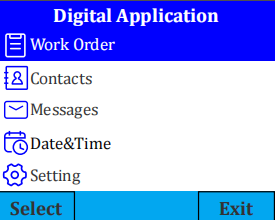
    Action: The front desk agent, who operates a device with administrator or assigned ticketing permissions, creates a new ticket. This can be done either through the connected Ticketing management software on a PC or directly on the authorized radio itself by pressing the programmable P1 key to access the Ticketing interface.

    Process: They navigate to Ticketing > Send Function > New Task and fill in the key fields:

    Task Title: AC Repair – Room 318

    Description: Guest reports no cold air. Unit is unresponsive to thermostat controls.

    Assigned To: (Selects the specific engineer or group from the pre-configured Contacts list)

    Due Time: Sets a completion deadline.

    The Shift: The request is transformed from a potential voice broadcast into a structured, digital ticket with clear accountability and context.

    Step 2: Receive & Notify — The Unmissable Alert
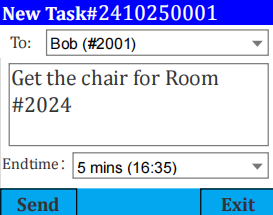
    Action: The assigned engineer’s MateTalk C3 radio immediately displays a clear notification on its 1.77-inch LCD screen, indicating a new ticket has been received.

    Process: The technician can read the full ticket details directly on the radio screen, including the room number, specific issue, and assignee. This eliminates the guesswork and incomplete information common in voice-only communication.

    The Shift: Staff are notified with detailed, written instructions that do not require interrupting their current task to ask for repeated information.

    Step 3: Accept & Execute — The One-Button Accountability
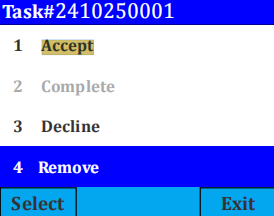
    Action: The engineer opens the ticket from the Ticketing > Receive Function menu. After reviewing the details, they press the Menu key to access the action menu and select “Accept”.

    Process: This action updates the ticket’s status to “Accepted,” sending a digital confirmation back to the management system. The front desk agent sees the update and can confidently inform the guest that help is officially on the way.

    The Shift: This creates instant accountability. Management knows exactly who is handling the task, and the employee has formally taken ownership.

    Step 4: Update & Complete — Real-Time Status Change

    Action: After fixing the AC unit in Room 318, the engineer updates the ticket status directly from their radio to reflect completion.

    Process: With the ticket open, they press the Menu key and select “Complete” from the action menu. This action finalizes the task status.

    The Shift: The system enables proactive status updates, providing transparency and marking a clear step toward job closure without requiring a separate voice call.
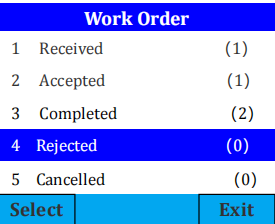
    Step 5: Close & Confirm — The Verifiable Digital Record

    Action: The ticket is now listed under the “Completed” status in the system. The front desk or management has a verifiable record that the job was accepted and finished.

    Process: The entire process—from creation and assignment to acceptance and completion—is logged in the system. This provides a clear data trail for operational reporting, efficiency analysis, and quality assurance. Individual tickets can be cleared using the “Remove” function, or all data can be wiped via the “Clear All” option.

    The Shift: The process achieves verifiable closure with a digital audit trail, eliminating uncertainty and providing valuable operational insight.

    Why the Hardware is Your Foundation

    A ticketing system is only as reliable as the device it runs on. In a demanding hotel environment, this means:

    A Clear Screen: A large, bright LCD (like the 1.77-inch display on the MateTalk C3) is non-negotiable for reading ticket details at a glance.

    All-Day Power: A robust 2200mAh battery ensures the device stays online through an entire shift, so a critical ticket is never missed due to a dead radio.

    Full Property Coverage: With 5W power and repeater support, these digital tickets can be received from the basement to the penthouse, ensuring the system works everywhere your staff does.

    Conclusion: Mastering a New Workflow

    Implementing a ticketing system on your two-way radios is more than a tech upgrade—it’s an operational philosophy. It replaces reactive chaos with proactive, managed workflows. By following this clear, five-step process, hotel teams can transition from merely communicating to delivering accountable, efficient, and guest-centric service.

    The result is not just a quieter radio channel, but a more competent, coordinated, and data-driven operation.

    Share. Facebook Twitter Pinterest LinkedIn Tumblr Email

    Related Posts

    S818 RTR RC Car Review: Your Pocket-Sized Portal to High-Speed Drifting Thrills

    LENOVO TA410 Review: The Game-Changing Sports Earphones with Bluetooth 5.4 & Ultra-Low Latency

    Voice-Activated Walkie Talkies: 4 Key Work Environments Where They Solve Real Pain Points

    Leave A Reply Cancel Reply

    You must be logged in to post a comment.

    voopoo drag s3
    oxva xlim go 2
    sp2s sen x disposable vape
    jnr 100k
    • Popular
    • 3D Printer REVIEW
    • XIAOMI
    November 23, 2025

    VOOPOO DRAG X3 – Big Battery, Smart Tech, Pod-Mod Powerhouse (Review)

    November 23, 2025

    VOOPOO VINCI S: Pocket-Power Pod with a 2,000 mAh Heart — Big Battery, Simple Use (Review)

    November 19, 2025

    OXVA XLIM PRO 3 Pod Vape Quick Hands-on Review (Video Test Included)

    November 19, 2025

    OXVA XLIM 3 Ultra Pod Vape: Hands-on Review (Video Test Included)

    June 23, 2024

    ACMER P2 20W Laser Engraver Fixed Focus Engraving: Hands on Review

    May 30, 2024

    xTool F1 Ultra Review: World’s First 20W Fiber & 20W Diode Laser Engraver

    May 30, 2024

    Anycubic Kobra 3 Combo Review: The Multicolor Masterpiece?

    May 15, 2024

    SCULPFUN SF-A9 40W Laser Engraver Cutting Machine: Hands On Review

    December 2, 2025

    Xiaomi REDMI Turbo5 Pro phone will be launched before the Spring Festival, equipped with the only flagship chip in its class

    December 2, 2025

    Xiaomi has Released REDMI TV X55/65/75 2026: Mini LED starts at only 2,499 yuan

    November 28, 2025

    The Exclusive Camera Handle of Xiaomi 17 Ultra has passed the 3C certification and can be used as a power bank

    November 27, 2025

    Code name “Nezha” : Xiaomi 17 Ultra phone exposed, with a triple rear camera setup

    fc 26 coins
    New Arrivals
    • IPLAY OOKA150k Disposable vape IPLAY OOKA150k Disposable vape
    • IPLAY LUMO 8K Puffs 2+10ml Prefilled Pod Kit IPLAY LUMO 8K Puffs 2+10ml Prefilled Pod Kit
    • Uwell Caliburn G5 Lite SE Pod System Kit Uwell Caliburn G5 Lite SE Pod System Kit
    • Uwell Caliburn G5 Lite KOKO Pod System Kit Uwell Caliburn G5 Lite KOKO Pod System Kit
    • Uwell Caliburn G5 Lite Pod System Kit Uwell Caliburn G5 Lite Pod System Kit
    • Freeton Trimax 60k Disposable Vape Freeton Trimax 60k Disposable Vape
    • Smoant Pasito 3 Vape Smoant Pasito 3 Vape
    • Yocan Flat 2.0 series Yocan Flat 2.0 series
    • Snowplus Swift Pod Vape Snowplus Swift Pod Vape
    About
  • Igeekphone.com provides the first global tech news and reviews about smartphone, vapes, e-cigar, smart home, 3D printers, e-bike,tablets, RC drones, VR headset, and other accessories. It's the best platform to improve your brand and product.
  • Contact us: info@igeekphone.com
  • Check Our Privacy Policy Here.
  • Note: *Right now we have US editor and EU editors for review, especially for Amazon US and EU.
  • *Shop and Compare Price Here*
  • Facebook
  • Youtube
  • OUR BEST VAPE PARTNERS
  • VAPE ONLINE STORE
  • HAYATI PRO MAX PLUS
  • VAPORESSO
  • VOOPOO
  • OXVA
  • NEXA
  • MASKKING
  • LOSTVAPE ORIONBAR
  • VEIIK
  • MEMERS
  • TODOO
  • SP2S
  • JNR
  • OTHER BEST PARTNERS
  • SVBONY
  • Chuwi
  • Blackview
  • Fossibot
  • Unihertz
  • Flsun
  • Anycubic
  • Xtool
  • Oukitel
  • Mukkpet Ebike
  • Ugreen
  • Copyright © 2025 igeekphone

    Type above and press Enter to search. Press Esc to cancel.