










Igeekphone News, December 5th: According to the technology media Android Authority, Google introduced a brand-new Material 3 Expressive design language in the Android 16 QPR1 system today. Google has brought a brand-new UI to interfaces such as the notification center, Settings App, and lock screen. However, due to the long history of Android, Google has not yet adopted a new design language for many details.
It is reported that Google has upgraded the design language of the APK installer in the latest Android 16 QPR2 system. The new installer no longer places the App name and icon at the top of the pop-up window, but moves them to the main area of the pop-up window. The original top bar now displays the current operation status in large characters, such as “Install this app?” “Installation in progress…” “Installation completed”, etc.
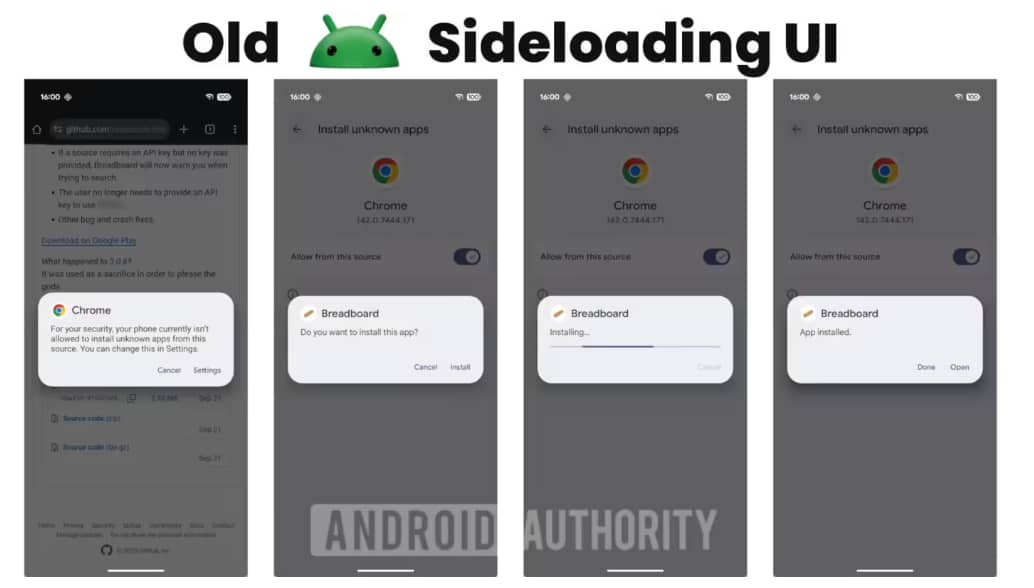
It is worth noting that the operation buttons of the new installer also follow the design specifications of Material 3. Operations indicating affirmation (such as confirming installation, opening, etc.) are all highlighted, while operations indicating denial (such as canceling, etc.) are designed in light colors. Compared with the old installer that only used text buttons, it is more aesthetically pleasing and the distinction between primary and secondary is clearer.
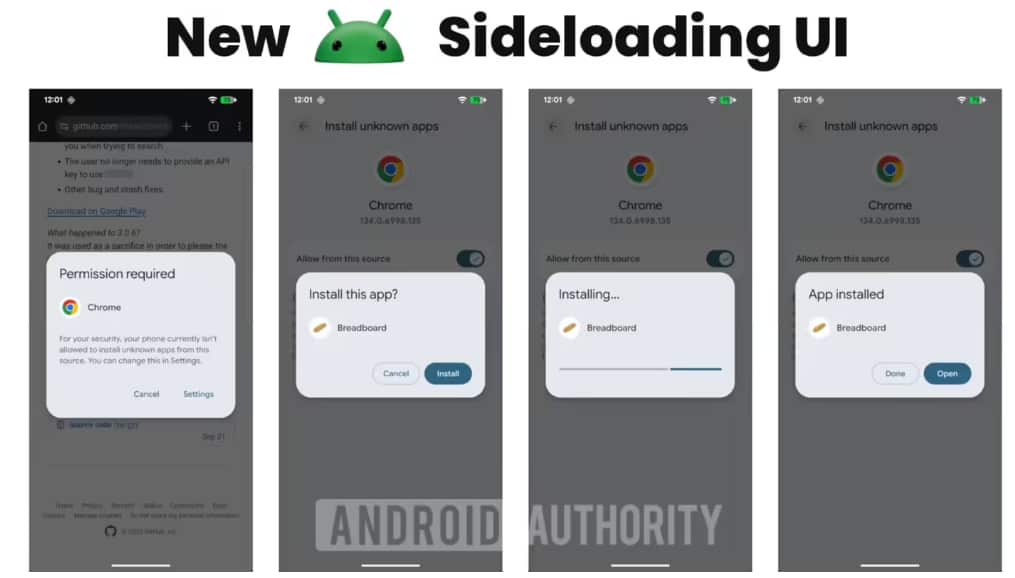
Regrettably, Google did not add the Material 3 design language to the pop-up window of “Allow XXX app to install APK”, so the overall impression of the complete installation process is not very uniform. It is believed that this is just a momentary oversight by Google, and future updates may unify it.