Facebook Twitter Instagram
    Trending
    • Altria has Expanded the on! PLUS Nicotine Pouches to all Retail Channels across the United States, Covering 6 different Products
    • Why Does Your Computer Have a Black Screen? 5 Effective Solutions to Fix It
    • Samsung Galaxy Z Fold8 foldable phone unveiled: 6.5-inch external screen / 8-inch internal screen, 20-megapixel main camera, up to 16GB + 1TB
    • Unlock Precision & Creativity with the LONGER Ray5 miniS Laser Engraver: A Comprehensive Review
    • AULA King68 Mechanical Keyboard Review: A High-Performance Gaming Keyboard with Hot-Swappable Keys and RGB Lighting
    • Edifier Auro Clip AI Earbuds Review at $75.99: The Ultimate TWS Bluetooth Earphones for Sports and Deep Bass
    • TG294 Portable Speaker Review at $19.99: The Ultimate Wireless Bluetooth Speaker for Deep Bass and Versatile Playback
    • Exploring the KFPLAN KF34 1/43 2.4G Mini RC Car: A Perfect Introduction to Drift RC Racing
    Facebook YouTube
    IGeeKphone China Phone, Tablet PC, VR, RC Drone News, Reviews
    • HOME
      • NEWS
        • DeepSeek
        • ChatGPT
        • Minecraft
    • Amazon
    • PHONE
      • Top Phones For Your First Choice
      • Phone Comparison
      • Xiaomi
      • Blackview
      • Doogee
      • Black Shark
      • Geekbuying
      • Banggood
      • TEMU
      • TikTok
      • Aliexpress
      • Walmart
      • MercadoLibre
      • Lazada
    • TOP VAPE Awards for 2026
    • VAPES
      • E-CIGAR Upcoming
      • Vape News
      • Vape Deals
      • Vape Comparison
      • Vape Guide
      • Giveaway
    • BEST VAPE
      • Best Vape Stores
      • Best Starter Vape Kits
      • Best Vapes for Beginners
      • Best Disposable Vapes
      • Best Pod Systems
      • Best Pod Mod Vapes
      • Best Mods
      • Best Nicotine Pouches
      • Best Clearomizers/Tanks
      • Best E-Liquid
      • Best EGO/Pens
      • Best Vapes for Nic Salt E-Juice
      • Best Vapes to Quit Smoking
      • RDA vs. RDTA vs. RTA
    • Best Vape Brand 2026
      • VAPORESSO
      • VOOPOO
      • OXVA
      • NEXA BAR
      • ORIONBARTECH
      • MASKKING VAPE
      • MEMERS
      • SP2S
      • TODOO
      • MRFOG
      • VEIIK
    • REVIEW
      • E-cigar Review
      • Phones
      • Tablet PC
      • TV Box
      • RC Drone
      • Wearables
      • Camera
      • Accessories
      • VR Headset
    • MORE
      • TABLET
        • Chuwi
        • INNOCN
        • Teclast
        • Top Tablet for Your First Choice
        • Tablet/Laptop Comparison
      • RC DRONE
      • CAMERA
      • WEARABLES
        • OneOdio
        • BlitzWolf
        • Top Smartwatch for First Choice
      • 3D PRINTER
        • 3D Printer Review
        • Anycubic
        • FLSUN
        • Xtool
        • LONGER
        • Top 3D printer to Choose First
      • POWER STATION
        • Oukitel
        • FOSSIBOT
      • GAMING
        • Top Gaming Products
      • E-BIKE
        • Samebike
        • Happyrun
        • ENGWE
      • SMART HOME
      • TV BOX
      • ACCESSORIES
      • VR HEADSET
      • CLOTHES
      • AUTO CAR
    • DEAL
    • VAPE LAWS
    • Shop
    IGeeKphone China Phone, Tablet PC, VR, RC Drone News, Reviews
    You are at:Home»Guide»Why Does Your Computer Have a Black Screen? 5 Effective Solutions to Fix It
    Guide

    Why Does Your Computer Have a Black Screen? 5 Effective Solutions to Fix It

    Brady CottonBy Brady CottonMarch 24, 2026
    Facebook Twitter Pinterest LinkedIn Tumblr Email

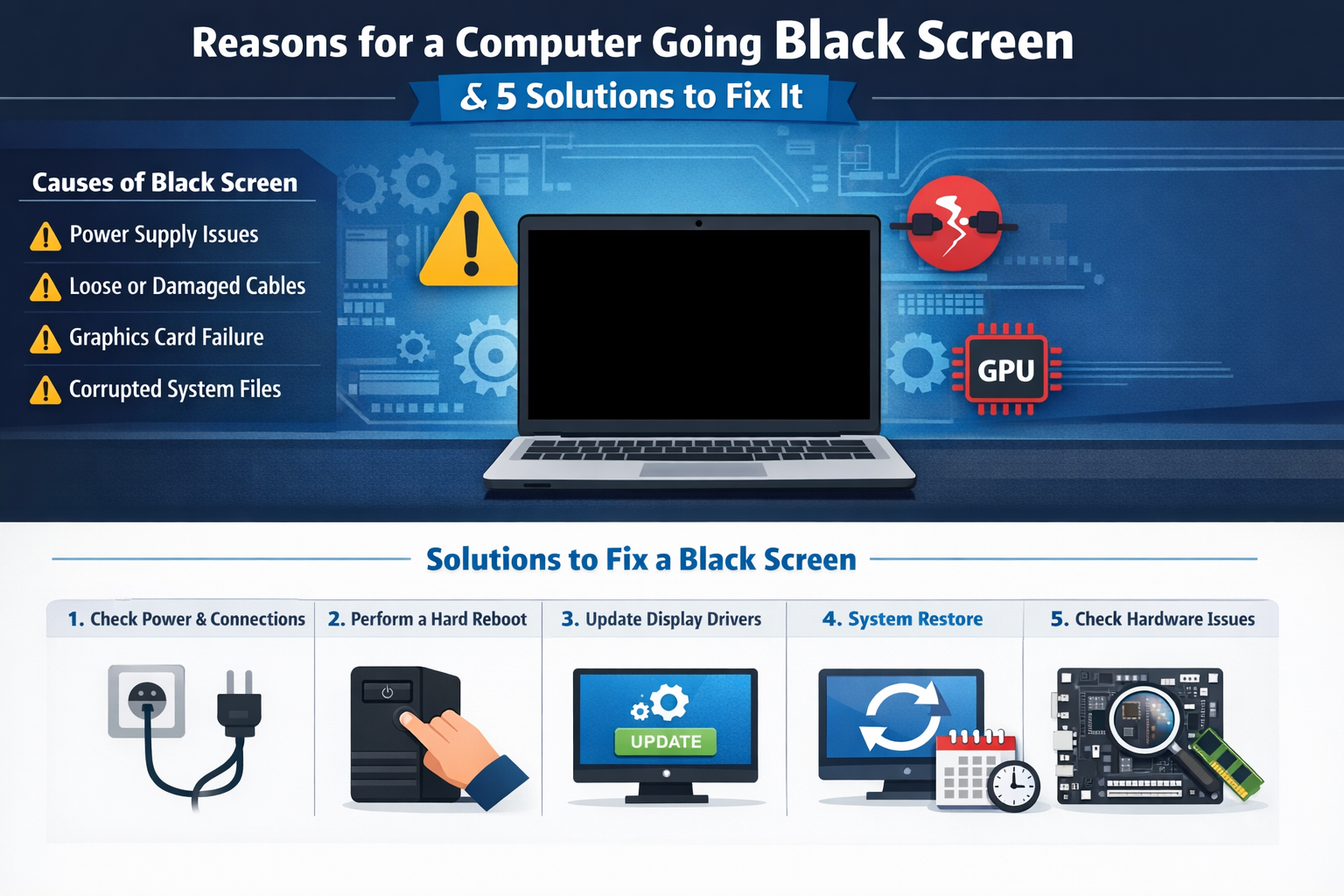
    A black screen can be one of the most frustrating issues for computer users. Whether you’re trying to power up your device or it suddenly goes blank during use, a black screen can prevent you from accessing your files and applications. In this article, we’ll explore the common reasons behind a black screen and provide 5 effective solutions to fix it.

    Common Causes of a Black Screen on Your Computer

    Before diving into solutions, it’s important to understand why your computer screen might turn black. Here are the most common causes of a black screen:

    1. Power Supply Issues

    One of the primary reasons for a computer to experience a black screen is power failure. If the computer is not receiving sufficient power, the screen will remain black.

    2. Loose or Damaged Cables

    Loose or disconnected cables, especially between your computer and monitor, are a frequent culprit. A cable issue may result in the display not receiving any signal.

    3. Graphics Card Failure

    A malfunctioning or improperly seated graphics card (GPU) can cause your computer to display a black screen. This is more likely to occur when your computer is running graphics-intensive programs or games.

    4. Corrupted Operating System Files

    Corrupted system files can prevent your operating system from booting properly, resulting in a black screen. This may occur after an incomplete OS update or an issue with system recovery.

    5. Faulty Display Drivers

    Outdated or corrupted display drivers can cause issues with screen rendering, which may lead to a black screen on startup or during use.

    6. Hardware Malfunctions

    A malfunctioning motherboard, RAM, or hard drive could also cause a black screen. These hardware failures typically require professional repair.

    5 Solutions to Fix a Black Screen on Your Computer

    If you’ve encountered a black screen, don’t panic. Here are 5 effective solutions to help you fix the issue and get your computer up and running again.

    Solution 1: Check the Power Source and Connections

    Before assuming a deeper issue, make sure your power cables are plugged in correctly and your device is receiving power.

    • For laptops: Make sure the battery is charged or the charger is connected properly.
    • For desktops: Ensure that all cables are tightly connected between your computer and monitor, including the power cable, HDMI, or VGA cables.

    Once everything is plugged in properly, restart your computer to see if the screen comes back on.

    Solution 2: Perform a Hard Reboot

    Sometimes, a simple hard reboot can resolve a black screen issue. Here’s how to do it:

    1. Hold down the power button for about 10-15 seconds until the computer completely shuts down.
    2. After the system powers off, release the power button.
    3. Press the power button again to restart your computer.

    This will clear temporary glitches or minor software conflicts that may be causing the black screen.

    Solution 3: Update or Reinstall Display Drivers

    If your screen remains black after the system boots, outdated or corrupt display drivers might be the issue. You can try booting into Safe Mode and updating or reinstalling your drivers.

    1. Boot into Safe Mode: Restart your computer and press F8 (or Shift + F8 on some systems) before the operating system loads to access Advanced Boot Options.
    2. Once in Safe Mode, open Device Manager and navigate to Display Adapters.
    3. Right-click on your display adapter and select Update Driver. If no updates are available, you can also Uninstall the Driver and restart your computer to allow Windows to reinstall it automatically.

    Solution 4: Perform a System Restore

    If the issue appeared after a recent update or installation, System Restore can help. It allows you to revert your computer’s settings back to a time when it was functioning correctly.

    1. Restart your computer and press F8 (or Shift + F8) to access Advanced Boot Options.
    2. Select Repair Your Computer and choose System Restore from the options.
    3. Select a restore point from before the issue began and follow the on-screen instructions to restore your system.

    Note: Make sure to back up any important files if possible, as system restores can undo recent changes and affect new files.

    Solution 5: Check for Hardware Failures

    If none of the above solutions work, there may be a deeper issue with your computer’s hardware. Common hardware issues causing black screens include:

    • Loose graphics card or a failing GPU.
    • Faulty RAM or other components like the motherboard or hard drive.
    • Damaged monitor or display cable.

    Try the following:

    1. Test the monitor: Connect your computer to a different monitor to check if the issue is with the screen itself.
    2. Reseat the GPU: If you have a desktop computer, turn off the system and reseat your graphics card. Make sure it’s properly inserted into the PCIe slot.
    3. Test the RAM: Swap out or reseat your RAM modules to check if they are functioning correctly.

    If these steps don’t resolve the issue, you may need to consult a professional technician to diagnose and fix the hardware problem.

    Conclusion: Preventing Black Screen Issues

    Experiencing a black screen on your computer can be alarming, but understanding the causes and solutions can help you quickly get back to work. By checking power connections, updating drivers, and performing system restores, you can usually resolve the issue on your own.

    For ongoing maintenance, make sure to:

    • Keep your operating system and drivers up to date.
    • Regularly back up your files to avoid data loss in case of hardware failure.
    • Use reliable surge protectors to prevent power-related issues.

    By following these steps, you’ll reduce the likelihood of encountering black screen issues and ensure your computer runs smoothly.

    Share. Facebook Twitter Pinterest LinkedIn Tumblr Email

    Related Posts

    Top Open Eyes App Picks: AI Photo Enhancers for Perfect Portraits

    The Evolution of Security: Technology’s Impact on Modern Locks, Keys, and Security Systems

    Enhancing Home Efficiency with Dumbwaiter Lifts

    Leave A Reply Cancel Reply

    You must be logged in to post a comment.

    voopoo drag 6
    oxva xlim 3 ultra
    sp2s sen x disposable vape
    • Popular
    • 3D Printer REVIEW
    • XIAOMI
    March 16, 2026

    OXVA Slimstick VS OXVA Slimstick X Vape Hands-on Review

    March 5, 2026

    OXVA XLIM PRO 3 vs XLIM Pro 2 DNA: Hands-On Review

    March 5, 2026

    OXVA XLIM PRO 3 vs XLIM GO 2: Hands-On Review

    March 2, 2026

    OXVA XLIM PRO 3 vs XLIM 3 ULTRA: Hands-On Review

    December 26, 2025

    ACMER ASCARVA 4S: Precision CNC Power for Makers, DIYers & Small Workshops

    June 23, 2024

    ACMER P2 20W Laser Engraver Fixed Focus Engraving: Hands on Review

    May 30, 2024

    xTool F1 Ultra Review: World’s First 20W Fiber & 20W Diode Laser Engraver

    May 30, 2024

    Anycubic Kobra 3 Combo Review: The Multicolor Masterpiece?

    March 23, 2026

    Xiaomi Mijia Children’s Electric Toothbrush Pro is Available: Color screen Animation Guides Proper Brushing at 329 yuan

    March 16, 2026

    Co-released with SU7! Xiaomi Notebook Pro 14 and Xiaomi Smart Watch S5 are scheduled to be launched on March 19th.

    March 16, 2026

    Xiaomi 18 Camera System is like a burst of toothpaste! The standard version now features a telephoto lens, directly catching up with the Pro model

    March 16, 2026

    Xiaomi Notebook Pro 14 is Scheduled to be Released on March 19th: 50W long-lasting performance release, dual fans and three air channels for cooling.

    fc 26 coins
    New Arrivals
    • iPhone 17E iPhone 17E
    • Realme P4 Lite Realme P4 Lite
    • Bloow Bubble 65K Nixodine Disposable Vape Bloow Bubble 65K Nixodine Disposable Vape
    • Beri Cliq 50K Disposable Vape Kit Beri Cliq 50K Disposable Vape Kit
    • Joyetech eRoll Slim Pro Vape Pen Kit Joyetech eRoll Slim Pro Vape Pen Kit
    • OXBAR GOSLIM 26K Disposable Vape OXBAR GOSLIM 26K Disposable Vape
    • Realme Narzo Power Realme Narzo Power
    • Xiaomi Poco X8 Pro Xiaomi Poco X8 Pro
    • Xiaomi Poco X8 Pro Max Xiaomi Poco X8 Pro Max
    About
  • Igeekphone.com provides the first global tech news and reviews about smartphone, vapes, e-cigar, smart home, 3D printers, e-bike,tablets, RC drones, VR headset, and other accessories. It's the best platform to improve your brand and product.
  • Contact us: info@igeekphone.com
  • Check Our Privacy Policy Here.
  • Note: *Right now we have US editor and EU editors for review, especially for Amazon US and EU.
  • *Shop and Compare Price Here*
  • Facebook
  • Youtube
  • OUR BEST VAPE PARTNERS
  • VAPE ONLINE STORE
  • HAYATI PRO MAX PLUS
  • VAPORESSO
  • VOOPOO
  • OXVA
  • NEXA
  • MASKKING
  • TODOO
  • SP2S
  • VEIIK
  • OTHER BEST PARTNERS
  • SVBONY
  • Chuwi
  • Blackview
  • Fossibot
  • Unihertz
  • Flsun
  • Anycubic
  • Xtool
  • Oukitel
  • Mukkpet Ebike
  • Ugreen
  • Copyright © 2026 igeekphone

    Type above and press Enter to search. Press Esc to cancel.