







Facebook Twitter Instagram
    Trending
    • France has officially banned products like ZYN nicotine pouches, and violations can result in a maximum prison sentence of five years.
    • The Case for Apple iPhone 18 Pro has been exposed again
    • How to Check the Activation Lock Status of iPhone 17?
    • Huawei Mate 90 to Debut Kirin 2026 Chip: Performance Far Exceeds Expectations
    • Rendering Images of Xiaomi 17T/Pro Phone have been Released Again
    • It is reported that Xiaomi will release REDMI Turbo 5/REDMI 17 5G mobile phone in India on June 18th.
    • NH66-139 3-In-1 RC Engineering Truck Review–Features, Performance, and Realistic Construction Action
    • ASUS Adol J15 OWS Headset Review: Open-Ear Audio for Everyday Freedom
    Facebook YouTube
    IGeeKphone China Phone, Tablet PC, VR, RC Drone News, Reviews
    • HOME
      • NEWS
        • DeepSeek
        • ChatGPT
        • Minecraft
    • Amazon
    • PHONE
      • Top Phones For Your First Choice
      • Phone Comparison
      • Xiaomi
      • Blackview
      • Doogee
      • Black Shark
      • Geekbuying
      • Banggood
      • TEMU
      • TikTok
      • Aliexpress
      • Walmart
      • MercadoLibre
      • Lazada
    • TOP VAPE Awards for 2026
    • VAPES
      • E-CIGAR Upcoming
      • Vape News
      • Vape Deals
      • Vape Comparison
      • Vape Guide
      • Giveaway
    • BEST VAPE
      • Best Vape Stores
      • Best Starter Vape Kits
      • Best Vapes for Beginners
      • Best Disposable Vapes
      • Best Pod Systems
      • Best Pod Mod Vapes
      • Best Mods
      • Best Nicotine Pouches
      • Best Clearomizers/Tanks
      • Best E-Liquid
      • Best EGO/Pens
      • Best Vapes for Nic Salt E-Juice
      • Best Vapes to Quit Smoking
      • RDA vs. RDTA vs. RTA
    • Best Vape Brand 2026
      • VAPORESSO
      • VOOPOO
      • OXVA
      • NEXA BAR
      • MASKKING VAPE
      • SP2S
      • IPLAY
      • TODOO
      • MRFOG
      • LOSTVAPE
      • VEIIK
    • REVIEW
      • E-cigar Review
      • Phones
      • Tablet PC
      • TV Box
      • RC Drone
      • Wearables
      • Camera
      • Accessories
      • VR Headset
    • MORE
      • TABLET
        • Chuwi
        • INNOCN
        • Teclast
        • Top Tablet for Your First Choice
        • Tablet/Laptop Comparison
      • RC DRONE
      • CAMERA
      • WEARABLES
        • OneOdio
        • BlitzWolf
        • Top Smartwatch for First Choice
      • 3D PRINTER
        • 3D Printer Review
        • Anycubic
        • FLSUN
        • Xtool
        • LONGER
        • Top 3D printer to Choose First
      • POWER STATION
        • Oukitel
        • FOSSIBOT
      • GAMING
        • Top Gaming Products
      • E-BIKE
        • Samebike
        • Happyrun
        • ENGWE
      • SMART HOME
      • TV BOX
      • ACCESSORIES
      • VR HEADSET
      • CLOTHES
      • AUTO CAR
    • DEAL
    • VAPE LAWS
    • Shop
    IGeeKphone China Phone, Tablet PC, VR, RC Drone News, Reviews
    You are at:Home»Guide»How to Check the Activation Lock Status of iPhone 17?
    Guide

    How to Check the Activation Lock Status of iPhone 17?

    Brady CottonBy Brady CottonMay 26, 2026
    Facebook Twitter Pinterest LinkedIn Tumblr Email

    Activation Lock is one of Apple’s most important security features, designed to protect iPhones from unauthorized use if they are lost or stolen. If you’re buying a used iPhone 17, selling your own device, or troubleshooting an Apple ID issue, checking the Activation Lock status is essential.

    This guide explains how to verify whether Activation Lock is enabled on the iPhone 17 and what to do if the device is still linked to another Apple account.

    What Is Activation Lock?

    Activation Lock is automatically enabled when the Find My feature is turned on for an iPhone. Once activated, the device becomes linked to the owner’s Apple ID.

    This means:

    • Nobody can erase or reactivate the device without the original Apple ID credentials
    • Lost or stolen iPhones become harder to resell
    • Personal data remains protected

    On the Apple iPhone 17, Activation Lock works the same way as on previous iPhone generations through Apple’s Find My ecosystem.

    Why Checking Activation Lock Matters

    Before purchasing a second-hand iPhone 17, you should always confirm that Activation Lock has been removed.

    If Activation Lock is still active:

    • You may be unable to set up the phone
    • The device could be locked to the previous owner
    • Some carriers or repair services may refuse support
    • The iPhone may have been lost or stolen

    Checking the lock status protects you from buying a device you cannot use.

    Method 1: Check During Device Setup

    The easiest way to verify Activation Lock is during the setup process.

    Steps:

    1. Turn on the iPhone 17
    2. Follow the initial setup instructions
    3. Watch for the Activation Lock screen

    If the phone asks for:

    • The previous owner’s Apple ID
    • Their password

    then Activation Lock is still enabled.

    A clean device should proceed directly to the Home Screen or allow you to create/sign in with your own Apple ID.

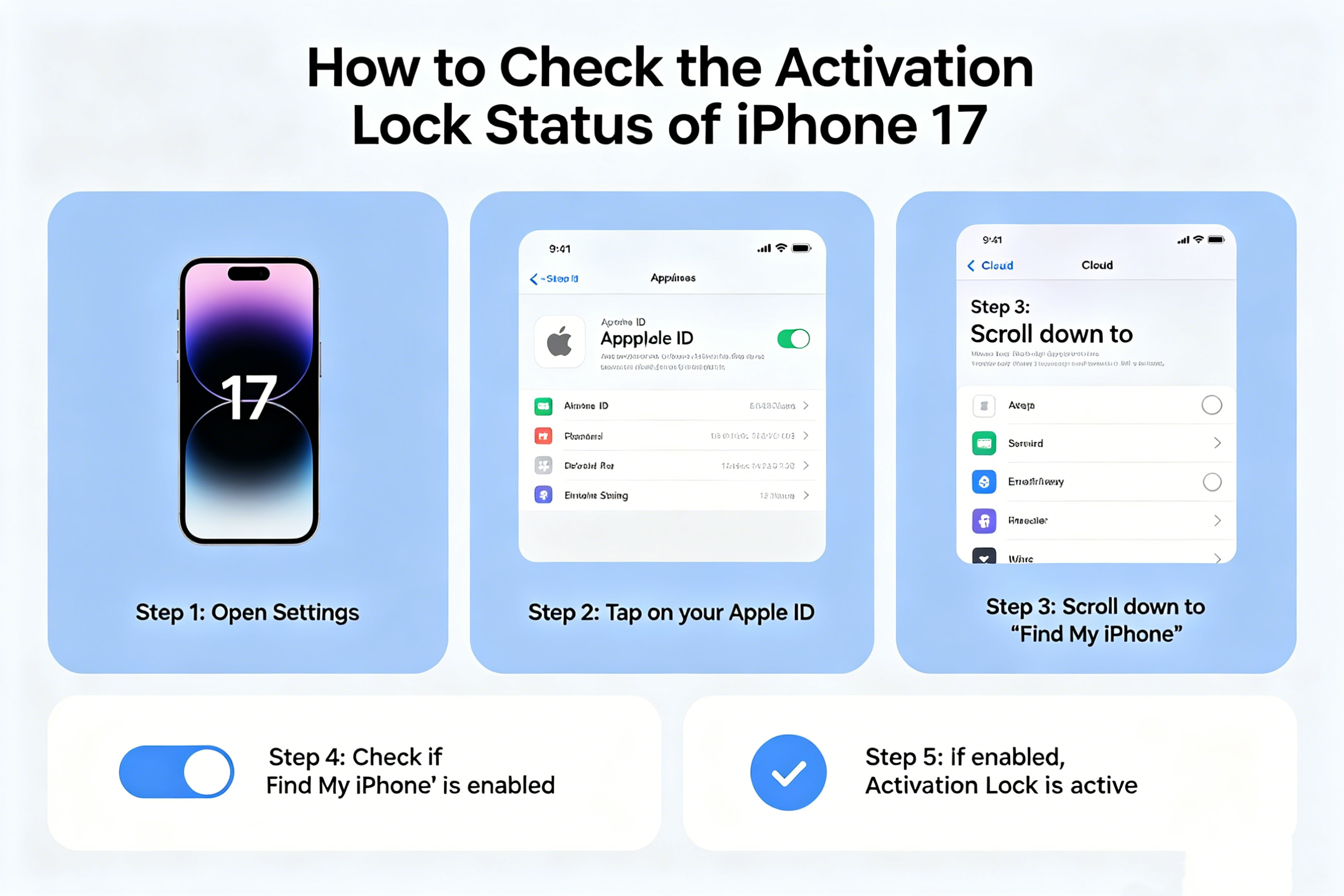
    Method 2: Check in Settings

    If the iPhone is already unlocked and accessible:

    Steps:

    1. Open Settings
    2. Tap the Apple ID banner at the top
    3. Select Find My
    4. Tap Find My iPhone

    If Find My iPhone is enabled, Activation Lock is also enabled.

    You can also check whether the current owner has signed out of their Apple ID completely.

    Method 3: Verify Through Reset

    Another reliable method is performing a factory reset.

    Steps:

    1. Go to Settings
    2. Tap General
    3. Select Transfer or Reset iPhone
    4. Tap Erase All Content and Settings

    During the reset process:

    • If the system requests the owner’s Apple ID password, Activation Lock is active
    • If the reset completes without credential verification, the device is likely ready for a new owner

    Always get permission before resetting a device.

    How Sellers Should Remove Activation Lock

    If you are selling an iPhone 17, remove Activation Lock before handing over the device.

    Steps:

    1. Open Settings
    2. Tap your Apple ID
    3. Select Find My
    4. Turn off Find My iPhone
    5. Enter your Apple ID password
    6. Erase the device completely

    This removes the device from your Apple account and allows the next owner to activate it normally.

    Can You Check Activation Lock Online?

    Apple previously offered a public Activation Lock status webpage, but the company discontinued the tool years ago.

    Currently, the safest methods are:

    • Checking directly on the device
    • Verifying setup access
    • Confirming Apple ID removal in Settings

    Be cautious of third-party “Activation Lock check” websites because many are unreliable or request sensitive information.

    What to Do If the iPhone 17 Is Locked

    If you encounter an Activation Locked iPhone 17:

    • Contact the previous owner
    • Ask them to remove the device from their Apple ID remotely through Apple iCloud
    • Request original proof of purchase if needed

    Without the original owner’s credentials, Apple generally will not unlock the device unless valid ownership documentation is provided.

    Final Thoughts

    Checking the Activation Lock status of an iPhone 17 is a critical step when buying, selling, or resetting the device. Activation Lock protects user data and discourages theft, but it can also create problems if ownership has not been properly transferred.

    Before completing any purchase, always verify:

    • The device can be activated normally
    • No Apple ID remains attached
    • Find My iPhone has been disabled

    A few minutes of checking can help you avoid major issues later.

    Share. Facebook Twitter Pinterest LinkedIn Tumblr Email

    Related Posts

    Building Stronger Teams: Management Training Topics for Optimal Performance

    Importance of Sound Masking Devices in Commercial Environments

    Optimizing Customer Advocacy: The Role of Software in Modern Business

    Leave A Reply Cancel Reply

    You must be logged in to post a comment.

    voopoo G4 Mini
    oxva xlim 3 ultra
    sp2s sen x disposable vape
    • Popular
    • 3D Printer REVIEW
    • XIAOMI
    May 17, 2026

    iPlay Nova 45K Review – High Puff Performance with a Futuristic Twist

    May 17, 2026

    Vaporesso XROS 6 & XROS 6 Mini Review – The Evolution of Portable Vaping

    May 7, 2026

    OXVA Xlim Go Lite Review: Compact, Powerful, and Beginner-Friendly

    April 18, 2026

    VOOPOO DRAG 6 Hands on Review: Vape Beast with Smart Power & Premium Control

    December 26, 2025

    ACMER ASCARVA 4S: Precision CNC Power for Makers, DIYers & Small Workshops

    June 23, 2024

    ACMER P2 20W Laser Engraver Fixed Focus Engraving: Hands on Review

    May 30, 2024

    xTool F1 Ultra Review: World’s First 20W Fiber & 20W Diode Laser Engraver

    May 30, 2024

    Anycubic Kobra 3 Combo Review: The Multicolor Masterpiece?

    May 26, 2026

    Rendering Images of Xiaomi 17T/Pro Phone have been Released Again

    May 23, 2026

    Xiaomi Speaker Pro 50W Speaker Review: Available on Banggood

    May 21, 2026

    Xiaomi 17 Max Smartphone Released: 8000mAh battery, 20-megapixel Leica main camera

    May 20, 2026

    The Benchmark scores of Xiaomi 17 Max phone have been revealed: Qualcomm’s 5th-Generation Snapdragon 8 Supreme Edition Chip

    fc 26 coins
    New Arrivals
    • Airmez Fox 8in1 160K Disposable Kit Airmez Fox 8in1 160K Disposable Kit
    • Vaporock X1 Pod System Kit Vaporock X1 Pod System Kit
    • Aspire Cyber G Slim Aspire Cyber G Slim
    • Aspire Loomix Pod Vape Kit Aspire Loomix Pod Vape Kit
    • Geek Bar Pulse X 2 50K Disposable Geek Bar Pulse X 2 50K Disposable
    • VOOPOO Drag H40 Pro VOOPOO Drag H40 Pro
    • DOOGEE Tab E3 Max Tablet PC DOOGEE Tab E3 Max Tablet PC
    • DOOGEE V Max 2 Pro Rugged Phone DOOGEE V Max 2 Pro Rugged Phone
    • Realme P5 Pro Realme P5 Pro
    About
  • Igeekphone.com provides the first global tech news and reviews about smartphone, vapes, e-cigar, smart home, 3D printers, e-bike,tablets, RC drones, VR headset, and other accessories. It's the best platform to improve your brand and product.
  • Contact us: info@igeekphone.com
  • Check Our Privacy Policy Here.
  • Note: *Right now we have US editor and EU editors for review, especially for Amazon US and EU.
  • *Shop and Compare Price Here*
  • Facebook
  • Youtube
  • OUR BEST VAPE PARTNERS
  • VAPE ONLINE STORE
  • HAYATI PRO MAX PLUS
  • VAPORESSO
  • VOOPOO
  • OXVA
  • NEXA
  • MASKKING
  • SP2S
  • IPLAY
  • TODOO
  • OTHER BEST PARTNERS
  • SVBONY
  • Chuwi
  • Blackview
  • Fossibot
  • Unihertz
  • Flsun
  • Anycubic
  • Xtool
  • Oukitel
  • Mukkpet Ebike
  • Ugreen
  • Copyright © 2026 igeekphone

    Type above and press Enter to search. Press Esc to cancel.