






Facebook Twitter Instagram
    Trending
    • TiMi Shisha 150K Review: What to Know About This High-Puff Hookah-Style Vape
    • VOOPOO ARGUS G4 Troubleshooting Guide: Pod Recognition, Resistance Switching, and Common Errors
    • SMOK Sinch Mini Pod System Kit Review: 4ml Pod, 1000mAh Battery and Dual Modes
    • UGOOS SK3 Android TV Box Review: RK3588S2-DV, 8K Video, Dolby Vision and 8GB RAM
    • VOOPOO NAVI Pod System Kit Review: 1500mAh Battery, 10ml Pod and Dual Power Modes
    • NEXA Ultra 3 Review: 35mL Crystal Tank, Dual-Coil Design, and Juicy Guard Technology
    • JNR AlienPro Shisha Review: Understanding the 80K-Puff Design and Adjustable Airflow
    • PA14 RTR 1/16 4WD RC Rock Crawler Review: Metal Chassis, Proportional Control and LED Lights
    Facebook YouTube
    IGeeKphone China Phone, Tablet PC, VR, RC Drone News, Reviews
    • HOME
    • NEWS
      • AI NEWS
    • Black Friday
    • PHONE
      • Top Phones For Your First Choice
      • Phone Comparison
      • Xiaomi
      • Blackview
      • Doogee
      • Black Shark
      • Geekbuying
      • Banggood
      • TEMU
      • TikTok
      • Aliexpress
      • Walmart
      • Lazada
    • TOP VAPE Awards for 2026
    • VAPES
      • E-CIGAR Upcoming
      • Vape News
      • Vape Deals
      • Vape Comparison
      • Vape Guide
      • VAPE LAWS
      • Giveaway
    • BEST VAPE
      • Best Vape Stores
      • Best Starter Vape Kits
      • Best Vapes for Beginners
      • Best Disposable Vapes
      • Best Pod Systems
      • Best Pod Mod Vapes
      • Best Mods
      • Best Nicotine Pouches
      • Best Clearomizers/Tanks
      • Best E-Liquid
      • Best EGO/Pens
      • Best Vapes for Nic Salt E-Juice
      • Best Vapes to Quit Smoking
      • RDA vs. RDTA vs. RTA
    • Best Vape Brand 2026
      • VAPORESSO
      • VOOPOO
      • OXVA
      • NEXA BAR
      • MASKKING VAPE
      • SP2S
      • IPLAY
      • TODOO
      • MRFOG
      • LOSTVAPE
      • VEIIK
    • REVIEW
      • E-cigar Review
      • Phones
      • Tablet PC
      • TV Box
      • RC Drone
      • Wearables
      • Camera
      • Accessories
      • VR Headset
    • MORE
      • TABLET
        • Chuwi
        • INNOCN
        • Teclast
        • Top Tablet for Your First Choice
        • Tablet/Laptop Comparison
      • RC DRONE
      • CAMERA
      • WEARABLES
        • OneOdio
        • BlitzWolf
        • Top Smartwatch for First Choice
      • 3D PRINTER
        • 3D Printer Review
        • Anycubic
        • FLSUN
        • Xtool
        • LONGER
        • Top 3D printer to Choose First
      • POWER STATION
        • Oukitel
        • FOSSIBOT
      • GAMING
        • Top Gaming Products
      • E-BIKE
        • Samebike
        • Happyrun
        • ENGWE
      • SMART HOME
      • TV BOX
      • ACCESSORIES
      • VR HEADSET
      • CLOTHES
      • AUTO CAR
    • DEAL
    • Shop
    IGeeKphone China Phone, Tablet PC, VR, RC Drone News, Reviews
    You are at:Home»Amazon»Say Goodbye to “Programming Nightmares”: 30-Second Phone Programming Makes EZTALK 5 Simple
    Amazon

    Say Goodbye to “Programming Nightmares”: 30-Second Phone Programming Makes EZTALK 5 Simple

    Brady CottonBy Brady CottonJune 8, 2026
    Facebook Twitter Pinterest LinkedIn Tumblr Email

    If you’ve ever used a traditional two-way radio, you’ve probably experienced this scene:

    Before departure, a group of people crouch in a parking lot. Each person holds a radio, a data cable, and a laptop. Someone is installing drivers. Someone is searching for software. Someone is flipping through a manual. Someone yells, “What’s the squelch tone on this channel again?”

    Half an hour later, still not done.

    This isn’t a joke. It’s a real experience for countless outdoor enthusiasts. The “programming” process of traditional radios has always been one of the biggest pain points in the outdoor experience.

    This article tells you: How phone programming makes a radio as simple as a Bluetooth headphone.

    Traditional Programming: An Overlooked “Outdoor Killer”

    Many families don’t use two-way radios not because they don’t need them, but because they’re too much hassle.

    The programming process for traditional radios is a nightmare for ordinary users:

    You need specialized equipment. You need a computer and a proprietary programming cable. Lose it? Can’t buy a replacement. Forget to bring it? Everyone goes silent.

    You need to install drivers and software. Every radio model has its own programming software. Finding the right version, installing drivers, configuring ports — this step alone turns off most people.

    The parameters are complicated. Frequency, squelch tone, bandwidth, power, scan lists — a pile of technical jargon.

    The whole team needs to be synced. It’s not enough to program just one radio. You have to program everyone’s radios with the same settings. One by one, connected to a computer, repeating the process over and over.

    The result: Many people buy radios, program them once, and never touch them again. Want to change channels? Too much trouble. Want to add a new teammate? Too much trouble.

    The communication tool becomes a barrier to communication.

    RETEVIS EZTALK Series: A Family of Products Built for the Outdoors

    Now that we’ve covered the pain points, let’s look at the product family that solves them.

    RETEVIS, a Chinese brand founded in 2010, has spent 15 years establishing itself in five distinct areas: commercial, industrial, extreme outdoor, general outdoor, and HAM (amateur radio). With stable performance and exceptional value for money, it has built a deep reputation in overseas markets.

    The EZTALK series, designed for general outdoor users, is RETEVIS’s important recent initiative. The name itself is a declaration: EZ = Easy, TALK = Communication — simple communication. From the EZTALK 2S for skiing to the EZTALK 4S for water sports to the comprehensive EZTALK 5, this series covers almost every outdoor scenario: mountaineering, trekking, camping, skiing, water sports, and more. In RETEVIS’s words: Comprehensive outdoor activity coverage, no blind spots.

    The EZTALK 5, as the GMRS product in the series, features 5 watts of transmit power and dual-satellite positioning. But what excites ordinary users the most is what lies behind that “EZ” — ultra-simple operation.

    EZTALK 5’s Solution: 30-Second Phone Programming

    The EZTALK 5 supports Bluetooth app programming. All you need is a smartphone and an app called RETEVIS App.

    No computer. No data cable. No driver installation. No manual.
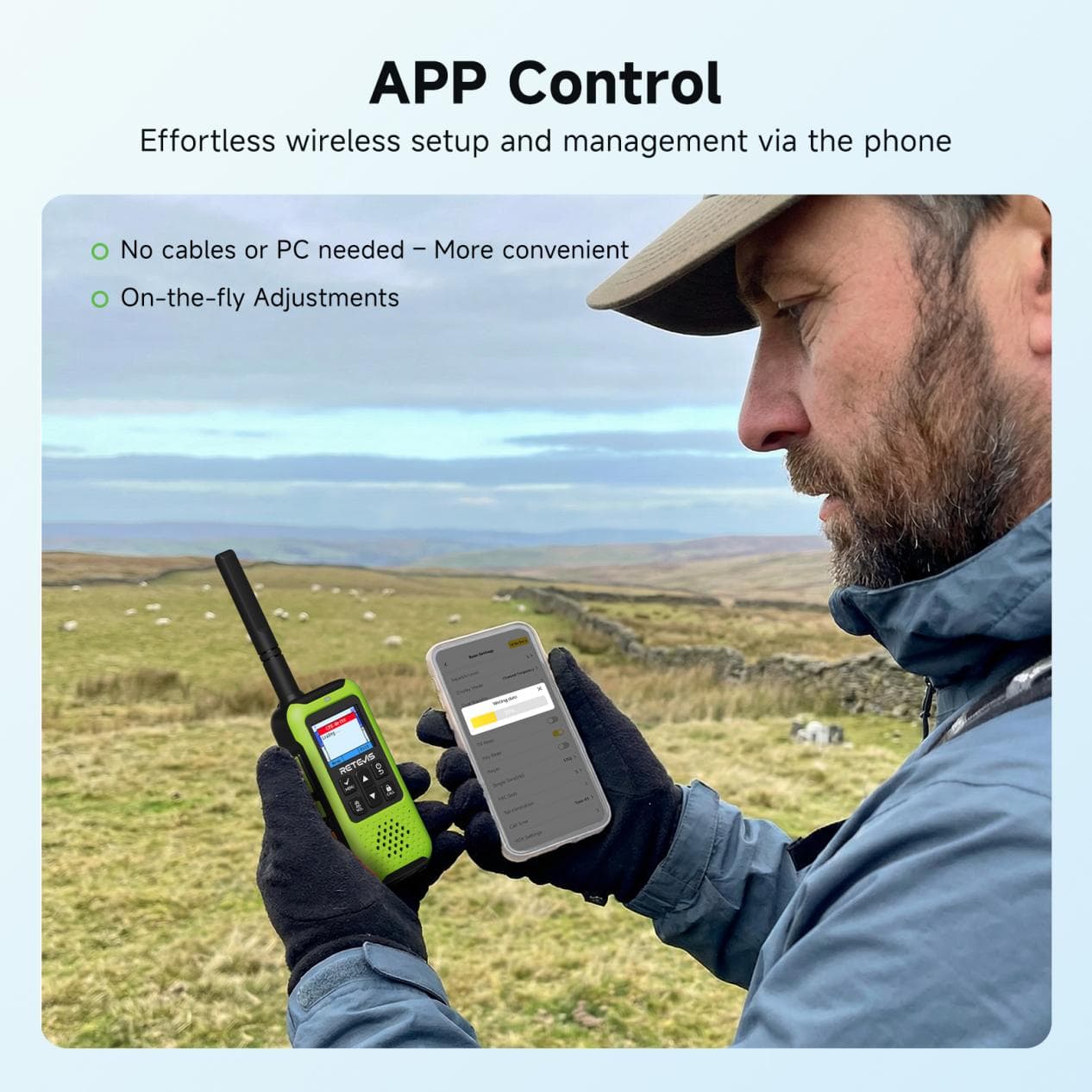
    Steps:

    Turn on Bluetooth on the EZTALK 5

    Open RETEVIS App on your phone and connect to the device

    Select channel, power, and other parameters in the app — or just use a preset outdoor mode

    Tap “Write” — done

    With practice, it takes 30 seconds. Without practice, two minutes at most.

    No need to understand technical parameters. The options in the app are plain language: “Which channel do you want?” “Turn on GPS?” — just choose.

    No need to program each device individually. After programming one radio, use one-button cloning to sync settings to other devices. The whole team is synced in one minute.
    What Real Problems Does Phone Programming Solve?

    No more crouching in parking lots before departure. Program at home, in the car, or even after arriving at camp. 30 seconds and done.

    Adding someone new is no longer awkward. A friend joins mid-trip? Open RETEVIS App, tap “clone,” and the new device is synced instantly.

    Switching scenarios doesn’t require relearning. Hiking, camping, skiing — save different configurations for different scenarios. At the trailhead, tap once, write, and you’re ready.

    Kids and seniors can use it too. You program it for them. All they need to know is press PTT to talk.

    More Than Just Programming: What Else RETEVIS App Can Do

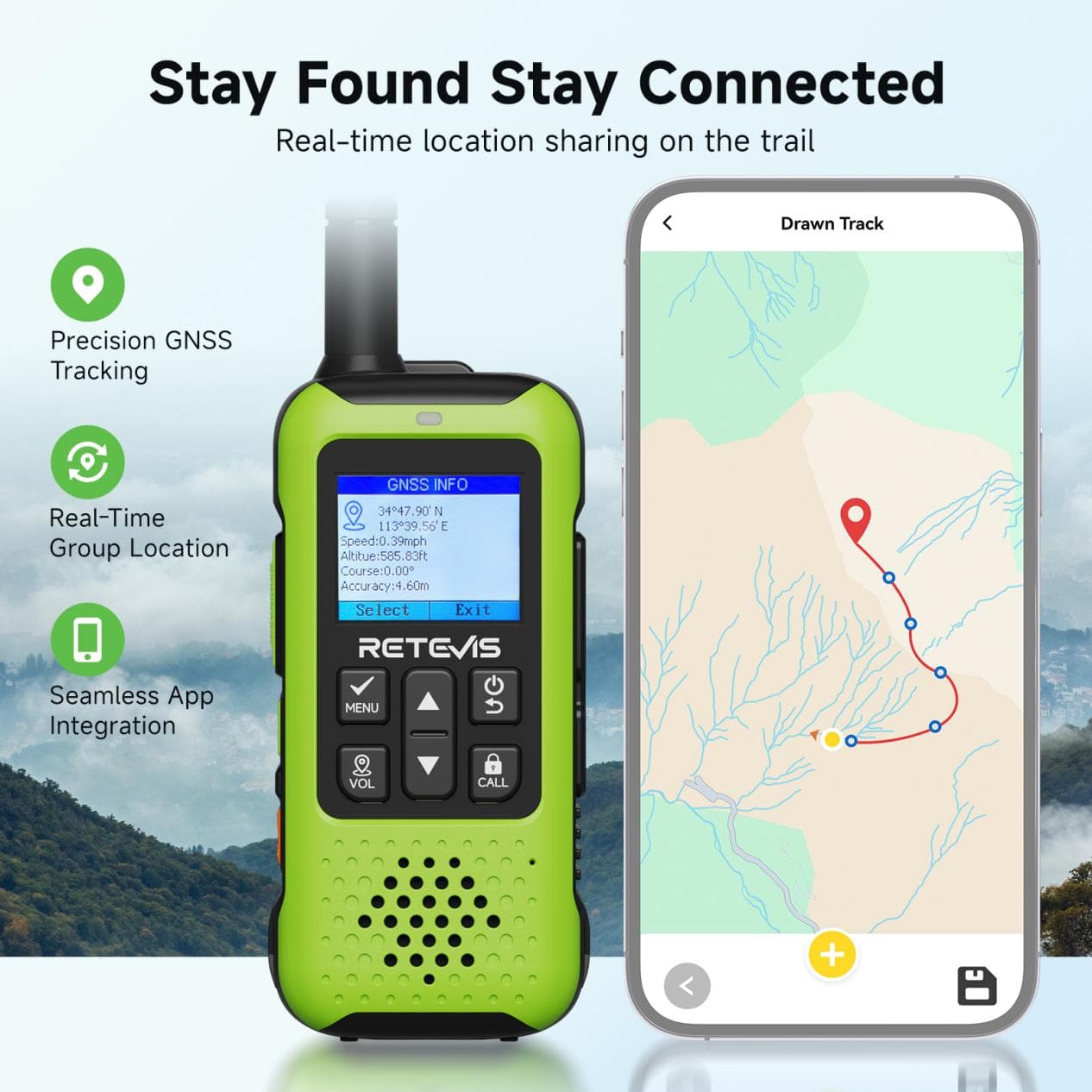
    See teammates’ locations in real time. On the app’s map, every teammate’s location is visible at a glance.

    Set up an electronic fence. Draw a safe zone on the map. If someone walks outside it, your phone gets an instant alert.

    Remote monitoring. Check each radio’s battery level and signal strength.

    Firmware updates. No computer needed. Update directly through the app.

    Summary: Let Communication Be Communication

    The essence of a two-way radio is communication. But the complexity of traditional radios has turned communication itself into an obstacle.

    The EZTALK 5‘s phone programming, through the RETEVIS App, compresses setup time from half an hour to 30 seconds and lowers the technical barrier to “just use it.”

    It makes radios simple. So simple that you can focus on the trail ahead, the scenery around you, and the companions beside you — not the device in your hand.

    Outdoor time is too precious to waste fiddling with tools.

    Mountains, meadows, streams, oceans — safety should have no blind spots.

    Share. Facebook Twitter Pinterest LinkedIn Tumblr Email

    Related Posts

    UGOOS SK3 Android TV Box Review: RK3588S2-DV, 8K Video, Dolby Vision and 8GB RAM

    PA14 RTR 1/16 4WD RC Rock Crawler Review: Metal Chassis, Proportional Control and LED Lights

    Flydigi BS3 Pro Laptop Cooling Pad Review: 4000RPM Pressure Airflow for Gaming Laptops

    Leave A Reply Cancel Reply

    You must be logged in to post a comment.

    voopoopintch
    oxva vprime 2
    • Popular
    • 3D Printer REVIEW
    • XIAOMI
    October 24, 2026

    OXVA Vprime 2 Unboxing Review: Performance, Test, Battery

    October 13, 2026

    OXVA XLIM 4 Vape Hands on Review: Pocket Luxury, Serious Stamina

    October 11, 2026

    MAXRAY RUSH 80K Review – More Than Just a Puff Count: Meet the Disposable That Controls Its Own E-Liquid

    October 1, 2026

    VOOPOO ARGUS Z3 Review – Flip the Pod, Change the Vape! Keep It Simple!

    December 26, 2025

    ACMER ASCARVA 4S: Precision CNC Power for Makers, DIYers & Small Workshops

    June 23, 2024

    ACMER P2 20W Laser Engraver Fixed Focus Engraving: Hands on Review

    May 30, 2024

    xTool F1 Ultra Review: World’s First 20W Fiber & 20W Diode Laser Engraver

    May 30, 2024

    Anycubic Kobra 3 Combo Review: The Multicolor Masterpiece?

    November 5, 2026

    Xiaomi’s New Smartphones Pass SRRC Certification Ahead of Early 2027 Launch

    November 4, 2026

    Xiaomi Smart Door Lock 5 Launches with Quieter Automatic Lock Body and Emergency Unlock Button

    November 3, 2026

    REDMI M100 Pro Debuts at 2,499 Yuan With Dimensity 7300-Ultra and Long Battery Life

    November 2, 2026

    Xiaomi 18 Pro Series Set for Global Launch in November, Lu Weibing Confirms

    fc 26 coins
    New Arrivals
    • JNR Alien Mega VAPE JNR Alien Mega VAPE
    • VOOPOO Drag 6 External Edition Kit VOOPOO Drag 6 External Edition Kit
    • Keystone Keyplay Lite 12K Disposable Vape Keystone Keyplay Lite 12K Disposable Vape
    • Mosmo Sultan 80K Shisha Disposable Vape Mosmo Sultan 80K Shisha Disposable Vape
    • Bang King Ice Cool 60K Disposable Vape Bang King Ice Cool 60K Disposable Vape
    • Timi Shisha 150K Disposable Hookah Vape Timi Shisha 150K Disposable Hookah Vape
    • SMOK Sinch Mini Pod System Kit SMOK Sinch Mini Pod System Kit
    • Joyetech eGo AIO C Pod System Kit Joyetech eGo AIO C Pod System Kit
    • Crossbar 20K Disposable Vape Crossbar 20K Disposable Vape
    About
  • Igeekphone.com provides the first global tech news and reviews about smartphone, vapes, e-cigar, smart home, 3D printers, e-bike,tablets, RC drones, VR headset, and other accessories. It's the best platform to improve your brand and product.
  • Contact us: info@igeekphone.com
  • Check Our Privacy Policy Here.
  • Note: *Right now we have US editor and EU editors for review, especially for Amazon US and EU.
  • *Shop and Compare Price Here*
  • Facebook
  • Youtube
  • OUR BEST VAPE PARTNERS
  • VAPE ONLINE STORE
  • VAPORESSO
  • VOOPOO
  • OXVA
  • NEXA
  • MASKKING
  • SP2S
  • IPLAY
  • TODOO
  • OTHER BEST PARTNERS
  • SVBONY
  • Chuwi
  • Blackview
  • Fossibot
  • Unihertz
  • Flsun
  • Anycubic
  • Xtool
  • Oukitel
  • Mukkpet Ebike
  • Ugreen
  • Copyright © 2026 igeekphone

    Type above and press Enter to search. Press Esc to cancel.