







Facebook Twitter Instagram
    Trending
    • Vuse Alto adjusts retail prices in the US, BAT strengthens its closed-loop e-cigarette strategy
    • What to Do If Your iPhone with White Casing Cannot Be Turned On?
    • The Biggest weakness of iPhone Air 2 has been addressed: upgraded dual cameras and 2nm chips
    • The Wallpaper for Samsung Galaxy S26 FE phone has been revealed, and it is expected to use a display panel from BOE (Beijing Optronics).
    • Vivo X Fold 6 folding phone is getting pre-released: featuring a 7000mAh large battery and dual-level waterproofing (IPX8 + IPX9)
    • Xiaomi’s first large-screen foldable flagship device, MIX Fold 5, has been Approved for Network Use
    • ALLPOWERS VOLIX P300 Portable Power Station Review– Compact LiFePO₄ Backup Power for Everyday Use
    • Z66 Sea Land Air RC Airplane Review – 3-in-1 Beginner-Friendly Flying Glider
    Facebook YouTube
    IGeeKphone China Phone, Tablet PC, VR, RC Drone News, Reviews
    • HOME
      • NEWS
        • DeepSeek
        • ChatGPT
        • Minecraft
    • Amazon
    • PHONE
      • Top Phones For Your First Choice
      • Phone Comparison
      • Xiaomi
      • Blackview
      • Doogee
      • Black Shark
      • Geekbuying
      • Banggood
      • TEMU
      • TikTok
      • Aliexpress
      • Walmart
      • MercadoLibre
      • Lazada
    • TOP VAPE Awards for 2026
    • VAPES
      • E-CIGAR Upcoming
      • Vape News
      • Vape Deals
      • Vape Comparison
      • Vape Guide
      • Giveaway
    • BEST VAPE
      • Best Vape Stores
      • Best Starter Vape Kits
      • Best Vapes for Beginners
      • Best Disposable Vapes
      • Best Pod Systems
      • Best Pod Mod Vapes
      • Best Mods
      • Best Nicotine Pouches
      • Best Clearomizers/Tanks
      • Best E-Liquid
      • Best EGO/Pens
      • Best Vapes for Nic Salt E-Juice
      • Best Vapes to Quit Smoking
      • RDA vs. RDTA vs. RTA
    • Best Vape Brand 2026
      • VAPORESSO
      • VOOPOO
      • OXVA
      • NEXA BAR
      • MASKKING VAPE
      • SP2S
      • IPLAY
      • TODOO
      • MRFOG
      • LOSTVAPE
      • VEIIK
    • REVIEW
      • E-cigar Review
      • Phones
      • Tablet PC
      • TV Box
      • RC Drone
      • Wearables
      • Camera
      • Accessories
      • VR Headset
    • MORE
      • TABLET
        • Chuwi
        • INNOCN
        • Teclast
        • Top Tablet for Your First Choice
        • Tablet/Laptop Comparison
      • RC DRONE
      • CAMERA
      • WEARABLES
        • OneOdio
        • BlitzWolf
        • Top Smartwatch for First Choice
      • 3D PRINTER
        • 3D Printer Review
        • Anycubic
        • FLSUN
        • Xtool
        • LONGER
        • Top 3D printer to Choose First
      • POWER STATION
        • Oukitel
        • FOSSIBOT
      • GAMING
        • Top Gaming Products
      • E-BIKE
        • Samebike
        • Happyrun
        • ENGWE
      • SMART HOME
      • TV BOX
      • ACCESSORIES
      • VR HEADSET
      • CLOTHES
      • AUTO CAR
    • DEAL
    • VAPE LAWS
    • Shop
    IGeeKphone China Phone, Tablet PC, VR, RC Drone News, Reviews
    You are at:Home»Guide»What to Do If Your iPhone with White Casing Cannot Be Turned On?
    Guide

    What to Do If Your iPhone with White Casing Cannot Be Turned On?

    Brady CottonBy Brady CottonJune 18, 2026
    Facebook Twitter Pinterest LinkedIn Tumblr Email

    If your iPhone won’t power on, it can feel like a serious hardware failure—but in many cases, the issue is actually caused by battery drain, software crash, or charging problems rather than permanent damage. The white casing doesn’t affect functionality, but it can make it harder to notice subtle damage like dirt buildup around ports or buttons.

    Here’s a clear step-by-step guide to help you diagnose and fix the problem.
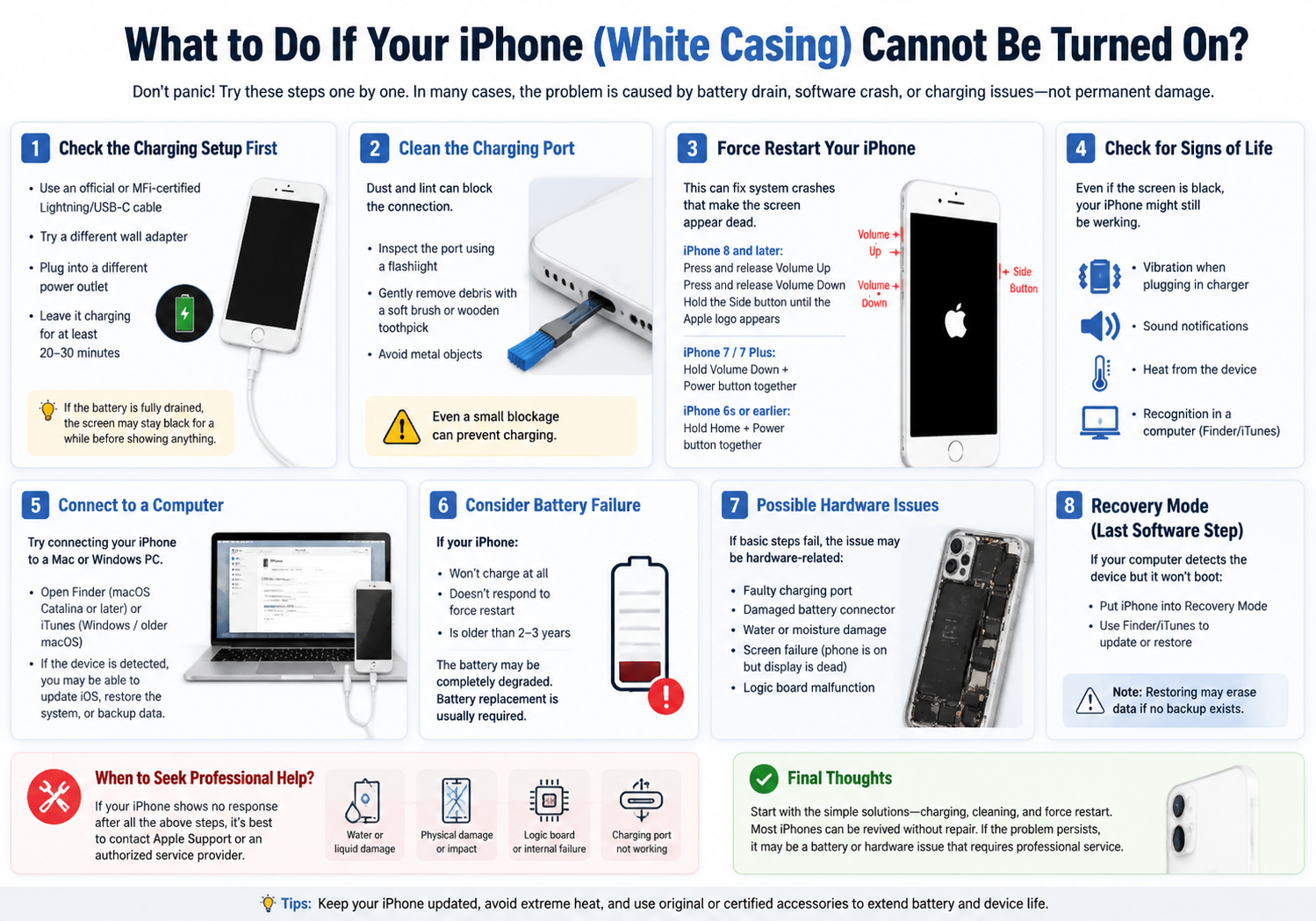
    1. Check the Charging Setup First

    The most common reason an iPhone won’t turn on is simply no power.

    Try the following:

    • Use an official or MFi-certified Lightning/USB-C cable
    • Try a different wall adapter
    • Plug into a different power outlet
    • Leave it charging for at least 20–30 minutes

    If the battery was fully drained, the screen may stay black for a while before showing anything.

    2. Clean the Charging Port (Important for White Phones Too)

    Dust and lint often accumulate in the charging port, especially if the phone is carried in pockets or bags.

    • Inspect the Lightning/USB-C port using a flashlight
    • Gently remove debris using a soft brush or wooden toothpick
    • Avoid metal objects (they can damage connectors)

    Even a small blockage can prevent charging entirely.

    3. Force Restart Your iPhone

    If the screen is black but the phone is actually on, a force restart can fix it.

    For iPhone 8 and later:

    • Press and release Volume Up
    • Press and release Volume Down
    • Hold the Side button until Apple logo appears

    For iPhone 7 / 7 Plus:

    • Hold Volume Down + Power button together

    For iPhone 6s or earlier:

    • Hold Home + Power button together

    This can resolve system crashes that make the screen appear dead.

    4. Check for Signs of Life

    Even if the screen is black, your iPhone might still be working.

    Look for:

    • Vibration when plugging in charger
    • Sound notifications
    • Heat from the device
    • Recognition in a computer (Finder/iTunes)

    If any of these happen, the issue is likely display-related, not power-related.

    5. Connect to a Computer

    Try connecting your iPhone to a Mac or Windows PC:

    • Open Finder (macOS Catalina or later)
    • Or iTunes (Windows / older macOS)

    If the device is detected, you may be able to:

    • Update iOS
    • Restore system software
    • Backup data

    This is especially useful if the phone is stuck in a boot loop or frozen state.

    6. Consider Battery Failure

    If your iPhone:

    • Won’t charge at all
    • Doesn’t respond to force restart
    • Is older than 2–3 years

    The battery may be completely degraded.

    In this case, replacement is usually required. Lithium batteries naturally lose capacity over time.

    7. Possible Hardware Issues

    If basic steps fail, the issue may be hardware-related:

    • Faulty charging port
    • Damaged battery connector
    • Water or moisture damage
    • Screen failure (phone is on but display is dead)
    • Logic board malfunction

    White-colored iPhones can sometimes show discoloration or micro-cracks more visibly, which may indicate prior impact damage.

    8. Recovery Mode (Last Software Step)

    If your computer detects the device but it won’t boot:

    • Put iPhone into Recovery Mode
    • Use Finder/iTunes to update or restore

    Note: Restoring may erase data if no backup exists.

    Final Thoughts

    If your iPhone with a white casing won’t turn on, start with the basics: charging, port cleaning, and force restart. Most of the time, the issue is temporary and fixable without repair.

    However, if the device shows no response at all after multiple attempts, it’s likely a battery or hardware failure, and professional repair will be needed.

    Share. Facebook Twitter Pinterest LinkedIn Tumblr Email

    Related Posts

    Understanding of the Android application components

    How to Partition a Portable Hard Drive: A Step-by-Step Guide

    How Technology Can Help You Write Better Essays

    Leave A Reply Cancel Reply

    You must be logged in to post a comment.

    voopoopintch
    oxva xlim go lite
    sp2s sen x disposable vape
    • Popular
    • 3D Printer REVIEW
    • XIAOMI
    June 17, 2026

    Nexa Ultra II vs Nexa Ultra 50K Disposable Vape Hands on Review

    June 17, 2026

    OXVA XLIM GO LITE VS OXVA XLIM GO 2 Vape Hands on Review

    June 13, 2026

    Vaporesso LUXE X3 & LUXE Q3 Review. Two Paths to Exceptional Flavor

    June 6, 2026

    VOOPOO ARGUS G4 & ARGUS G4 Mini Review – Smart Flavor Meets Everyday Simplicity

    December 26, 2025

    ACMER ASCARVA 4S: Precision CNC Power for Makers, DIYers & Small Workshops

    June 23, 2024

    ACMER P2 20W Laser Engraver Fixed Focus Engraving: Hands on Review

    May 30, 2024

    xTool F1 Ultra Review: World’s First 20W Fiber & 20W Diode Laser Engraver

    May 30, 2024

    Anycubic Kobra 3 Combo Review: The Multicolor Masterpiece?

    June 18, 2026

    Xiaomi’s first large-screen foldable flagship device, MIX Fold 5, has been Approved for Network Use

    June 17, 2026

    Xiaomi’s first large-screen foldable flagship device, MIX Fold 5, has been approved for network use: The first version features the self-developed chip by Xianji O3.

    June 12, 2026

    When will Redmi K40 be Released?

    June 10, 2026

    Xiaomi Hyper OS 3 Second Batch Beta Version Begins Recruitment: Covering Five Models Including Redmi K80 and Xiaomi MIX Flip2

    fc 26 coins
    New Arrivals
    • Xiaomi 19 Xiaomi 19
    • Xiaomi 19 Pro Xiaomi 19 Pro
    • JNR Zpluse 42K+ Puffs Top-Fill Replaceable and Refillable Vape Kit JNR Zpluse 42K+ Puffs Top-Fill Replaceable and Refillable Vape Kit
    • Lost Vape Ursa Nano S 3 Pod System Kit Lost Vape Ursa Nano S 3 Pod System Kit
    • Honor Power 3 Honor Power 3
    • Redmi Note 17 Pro Plus Global Redmi Note 17 Pro Plus Global
    • Yocan Black Pocket Concentrate Vaporizer Yocan Black Pocket Concentrate Vaporizer
    • Loon Air Plus 6000 Disposable Loon Air Plus 6000 Disposable
    • Mia Iconiq 70K Disposable Vape Mia Iconiq 70K Disposable Vape
    About
  • Igeekphone.com provides the first global tech news and reviews about smartphone, vapes, e-cigar, smart home, 3D printers, e-bike,tablets, RC drones, VR headset, and other accessories. It's the best platform to improve your brand and product.
  • Contact us: info@igeekphone.com
  • Check Our Privacy Policy Here.
  • Note: *Right now we have US editor and EU editors for review, especially for Amazon US and EU.
  • *Shop and Compare Price Here*
  • Facebook
  • Youtube
  • OUR BEST VAPE PARTNERS
  • VAPE ONLINE STORE
  • HAYATI PRO MAX PLUS
  • VAPORESSO
  • VOOPOO
  • OXVA
  • NEXA
  • MASKKING
  • SP2S
  • IPLAY
  • TODOO
  • OTHER BEST PARTNERS
  • SVBONY
  • Chuwi
  • Blackview
  • Fossibot
  • Unihertz
  • Flsun
  • Anycubic
  • Xtool
  • Oukitel
  • Mukkpet Ebike
  • Ugreen
  • Copyright © 2026 igeekphone

    Type above and press Enter to search. Press Esc to cancel.