









Google has officially started rolling out Android 17 QPR2 to eligible Pixel smartphones and tablets, bringing a substantial collection of interface improvements, smarter notification controls, enhanced privacy options, and system optimizations.
Google’s latest quarterly release builds on the improvements introduced in the Android 17 QPR1 stable update.
Announced on November 10, the stable release arrived approximately one month ahead of the originally expected quarterly schedule. It also incorporates the November 2026 Pixel Feature Drop and the latest monthly security patches, making this a more comprehensive update than a typical maintenance release.
Beyond introducing new customization options, Android 17 QPR2 focuses on giving users greater control over how their devices display information, handle notifications, and process sensitive data.
Android 17 QPR2 Brings More Flexible Interface Customization
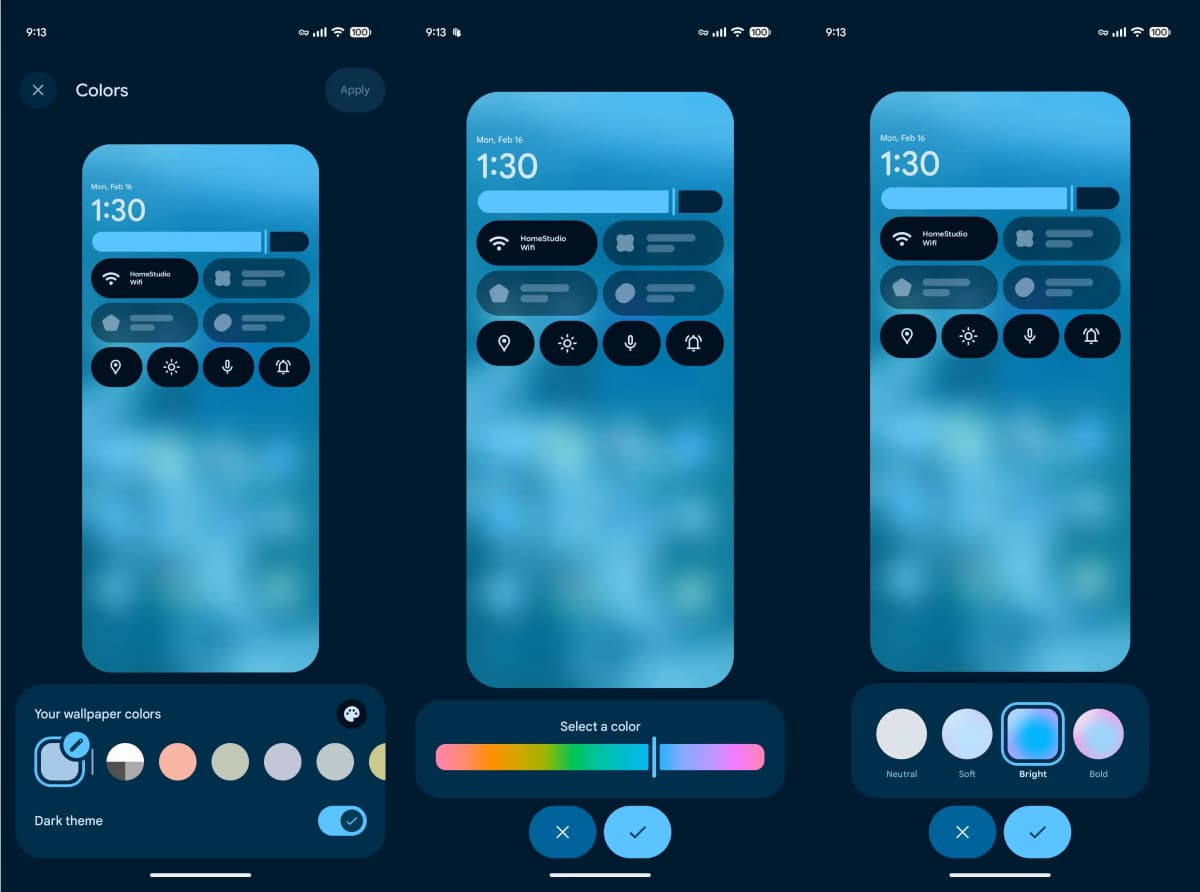
One of the most noticeable changes involves the home screen and system appearance. Google has redesigned the long-press menu on the home screen and expanded the customization options available through the Wallpaper & Style settings.
Users can now adjust the system accent color with a dedicated color-selection slider instead of relying entirely on predefined choices. The update also introduces four visual theme styles:
-
Neutral: A restrained appearance with softer colors.
-
Soft: A more subtle color presentation.
-
Bright: More noticeable color accents.
-
Bold: Stronger and more expressive interface colors.
These additions make it easier to personalize the Android interface without installing third-party launchers or theme applications.
Google has also expanded status bar customization. Under Settings and System, Pixel owners can choose whether to display every notification icon, show only priority notifications, or hide notification icons completely.
Additional controls allow users to manage the visibility of system indicators, including silent mode, vibration, and battery percentage. This is particularly useful for people who prefer a cleaner status bar with fewer visual distractions.
Quick Settings and Battery Management Get an Update
Android 17 QPR2 introduces two additional Quick Settings controls: Audio Streams and Voice Broadcast. These shortcuts provide more convenient access to relevant audio and communication functions.
Google has also refined the battery icon. It now displays an outlined appearance when the device is charging or operating in Battery Saver mode, making the current power state easier to recognize.
Another practical adjustment concerns battery settings. Previously separate battery-related options are now consolidated under a unified Battery & Charging menu.
The expanded agent capabilities also build on Android 17’s new features and Gemini Intelligence.
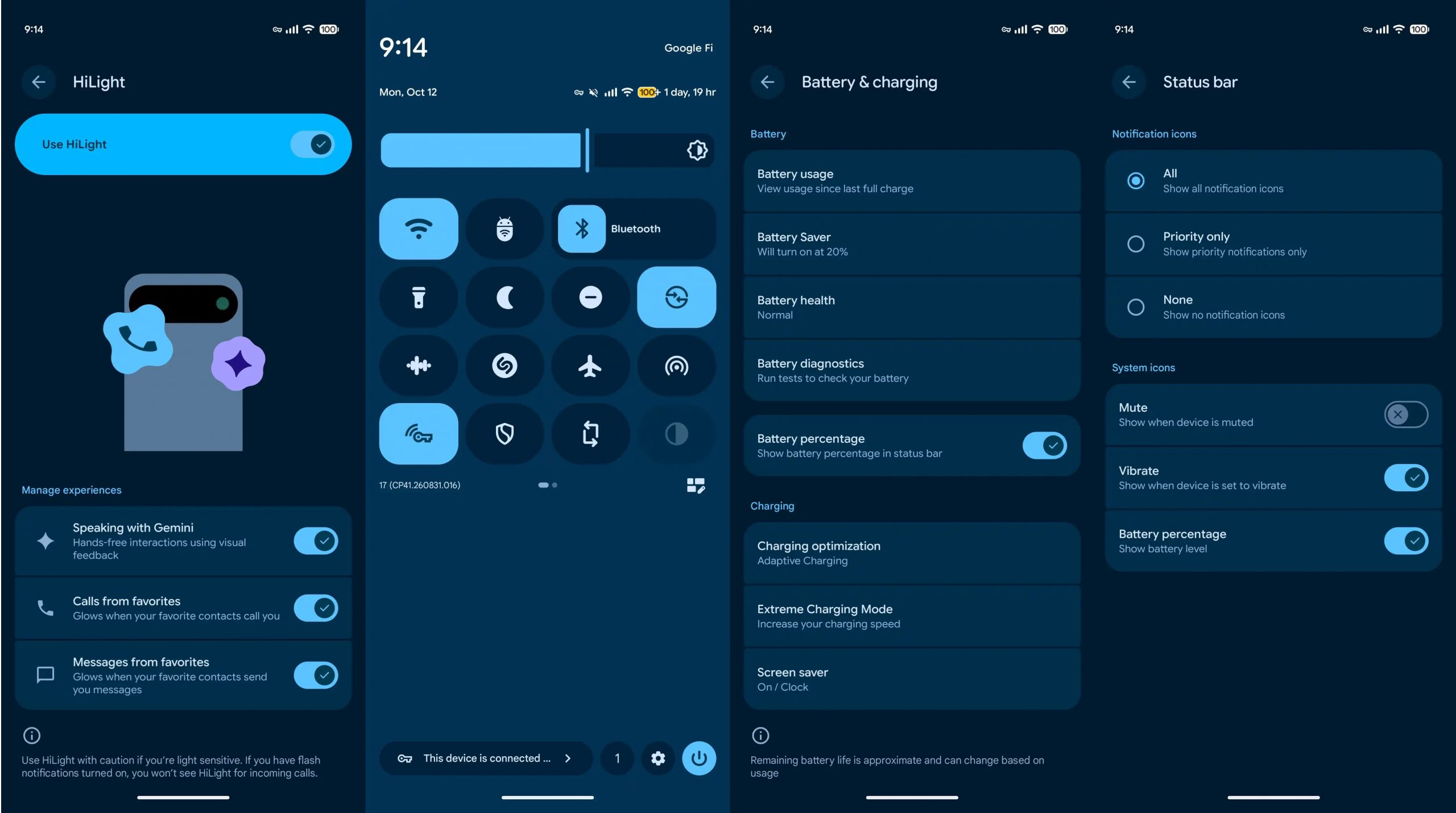
This reorganized layout should make everyday power management more straightforward, particularly for users who frequently switch between charging configurations and battery-saving features.
Smarter Notifications and New Privacy Controls
Notification management is another major focus of this release.
Google has brought several intelligent notification tools together within the notification settings interface. Notification Summaries, Notification Organizer, and Notification Cooldown are now grouped into a more centralized management experience.
These features are designed to help users deal with growing numbers of incoming alerts. Instead of treating every notification equally, the system provides additional ways to organize information and reduce unnecessary interruptions.
Android 17 QPR2 also introduces the Agents Dashboard, accessible through the Security & Privacy settings. It gives users a dedicated place to review controls associated with Android’s agent-based capabilities.
Another important addition is the ability to inspect Private Compute Core logs.
Private Compute Core is Google’s isolated processing environment, originally introduced in 2021. It handles selected intelligent Android features locally on the device, including Now Playing, Smart Reply, Live Translate, Live Caption, and spam detection in Google Messages.
With QPR2, users can review related processing logs, offering greater visibility into how these on-device intelligent services operate.
This is a meaningful privacy improvement as Android continues to introduce more AI-powered capabilities.
Pixel 11 Pro Series Gets Enhanced HiLight Notifications
Google is also expanding the HiLight experience on the Pixel 11 Pro, Pixel 11 Pro XL, and Pixel 11 Pro Fold.
Previously, the feature primarily used lighting effects on the back of the phone to indicate incoming calls and Gemini activity. Following the November update, it can also provide visual alerts for messages from important contacts.
When users place their phones face down, the rear lighting system flashes twice if a message arrives from a contact marked as a favorite.
This approach provides a discreet notification method without requiring users to turn over their phones or constantly check the display.
It could be particularly useful during meetings, conversations, or other situations where keeping the screen out of sight is preferable.
November Pixel Feature Drop Expands Gemini and Pixel Search
Alongside Android 17 QPR2, Google has announced several additional features through its November 2026 Pixel Feature Drop.
One of the highlights is Gemini Intelligence, which brings more advanced agent-based capabilities to supported Pixel devices. The Pixel 10 family is set to receive expanded functionality that allows Gemini to handle tasks involving multiple steps rather than responding only to individual commands.
Google is also improving Rambler voice input, introducing more personalized widgets, and expanding Pixel Search.
Pixel Search is particularly noteworthy because Google is extending its availability to the Pixel 6 and newer devices. This gives owners of older supported Pixel phones access to an expanded search experience without requiring an upgrade to the latest hardware generation.
Google Fixes 33 Pixel Issues in the November Update
Beyond the new features, Android 17 QPR2 includes 33 documented fixes addressing problems across Google’s Pixel lineup.
The fixes cover a broad range of components, including applications, audio, battery and charging, Bluetooth, cameras, network connectivity, display rendering, graphics, system performance, sensors, phone functionality, and the user interface.
Several improvements address everyday problems that could affect normal device operation.
For example, Google has fixed situations where:
-
The virtual keyboard failed to appear in certain applications.
-
Media volume unexpectedly increased.
-
A Pixel device incorrectly displayed a charging status without being connected to a charger.
-
Bluetooth connections became unstable.
-
Scrolling animations experienced occasional stuttering.
-
The notification shade failed to open through the downward swipe gesture.
-
Photos taken with certain Pixel 11 models were not saved correctly.
Although these fixes may not be immediately noticeable to every user, they should contribute to a more consistent experience across supported devices.
November 2026 Android Security Patches Address Hundreds of Vulnerabilities
Security is another important part of the release.
Google’s November 2026 Android security bulletin contains two patch levels addressing vulnerabilities across the Android platform.
| Security patch level | Reported fixes |
|---|---|
| November 1, 2026 | 135 issues |
| November 5, 2026 | 97 issues |
| Additional Pixel-specific security fixes | 166 issues |
The vulnerabilities include issues rated high and critical in severity. Google’s Pixel-specific security advisory also documents additional device-related fixes.
For Pixel owners, installing the update is therefore important not only for accessing the latest features but also for improving device security.
Which Pixel Devices Can Install Android 17 QPR2?
Google’s stable Android 17 QPR2 rollout covers a wide range of Pixel hardware, including:
-
Pixel 6a and Pixel 7 series
-
Pixel 8 series
-
Pixel 9 series
-
Pixel 10 series
-
Pixel 11 series
-
Pixel Fold
-
Pixel Tablet
Availability may vary depending on the specific device and regional rollout schedule.
To check for the update, Pixel users can follow these steps:
-
Open Settings.
-
Select System.
-
Tap System Update.
-
Check for available updates and follow the installation instructions.
Users who previously participated in the Android 17 QPR2 Beta program can also move to the stable release through a smaller update package, where offered.
Google will continue operating its Android Beta Program, with additional Quarterly Platform Release and Pixel Feature Drop testing planned for future releases.
Final Thoughts
Android 17 QPR2 is more than a routine Pixel security update. Its combination of improved notification management, expanded privacy visibility, flexible interface customization, Gemini enhancements, and 33 documented bug fixes makes it a substantial upgrade.
The most interesting changes are not necessarily the visual additions. Features such as Private Compute Core log access, the Agents Dashboard, and more configurable notification controls demonstrate Google’s growing emphasis on transparency and user control as AI becomes increasingly integrated into Android.
For existing Pixel owners, this release is worth installing once it becomes available for their devices.