





Facebook Twitter Instagram
    Trending
    • Responsible Gaming on Mobile: Setting Limits and Staying in Control
    • iJOY Venus 25K Disposable Vape Review-Long-Lasting Power Meets Premium Features
    • Our Favourite Roulette Game Variations You can check
    • Let’s Try Best Online Player at the Minimum (Low) Deposit Casinos
    • The reason to Choose Biamp Systems for the Best AV Solutions?
    • Cardinal will Launch Two Open-type Vape Devices Globally in the First Quarter of 2026
    • Solving Vape Leaks: A Permanent Prevention Guide
    • Essential Vape Maintenance: A Step-by-Step Cleaning Guide
    Facebook YouTube
    Login Register
    IGeeKphone China Phone, Tablet PC, VR, RC Drone News, Reviews
    • HOME
      • NEWS
        • DeepSeek
        • ChatGPT
        • Minecraft
    • Amazon
    • NEW YEAR
    • PHONE
      • Top Phones For Your First Choice
      • Phone Comparison
      • Xiaomi
      • Blackview
      • Doogee
      • Black Shark
      • Geekbuying
      • Banggood
      • TEMU
      • TikTok
      • Aliexpress
      • Walmart
      • MercadoLibre
      • Lazada
    • TOP VAPE Awards for 2026
    • VAPES
      • E-CIGAR Upcoming
      • Vape News
      • Vape Deals
      • Vape Comparison
      • Vape Guide
      • Giveaway
    • BEST VAPE
      • Best Vape Stores
      • Best Starter Vape Kits
      • Best Vapes for Beginners
      • Best Disposable Vapes
      • Best Pod Systems
      • Best Pod Mod Vapes
      • Best Mods
      • Best Nicotine Pouches
      • Best Clearomizers/Tanks
      • Best E-Liquid
      • Best EGO/Pens
      • Best Vapes for Nic Salt E-Juice
      • Best Vapes to Quit Smoking
      • RDA vs. RDTA vs. RTA
    • Best Vape Brand 2026
      • VAPORESSO
      • VOOPOO
      • OXVA
      • NEXA BAR
      • ORIONBARTECH
      • MASKKING VAPE
      • MEMERS
      • SP2S
      • JNR
      • TODOO
      • MRFOG
      • VEIIK
    • REVIEW
      • E-cigar Review
      • Phones
      • Tablet PC
      • TV Box
      • RC Drone
      • Wearables
      • Camera
      • Accessories
      • VR Headset
    • MORE
      • TABLET
        • Chuwi
        • INNOCN
        • Teclast
        • Top Tablet for Your First Choice
        • Tablet/Laptop Comparison
      • RC DRONE
      • CAMERA
      • WEARABLES
        • OneOdio
        • BlitzWolf
        • Top Smartwatch for First Choice
      • 3D PRINTER
        • 3D Printer Review
        • Anycubic
        • FLSUN
        • Xtool
        • LONGER
        • Top 3D printer to Choose First
      • POWER STATION
        • Oukitel
        • FOSSIBOT
      • GAMING
        • Top Gaming Products
      • E-BIKE
        • Samebike
        • Happyrun
        • ENGWE
      • SMART HOME
      • TV BOX
      • ACCESSORIES
      • VR HEADSET
      • CLOTHES
      • AUTO CAR
    • DEAL
    • Shop
    IGeeKphone China Phone, Tablet PC, VR, RC Drone News, Reviews
    You are at:Home»Apple»Apple Vision Pro Hands-on Experience: Worth the Hype?
    Apple

    Apple Vision Pro Hands-on Experience: Worth the Hype?

    Habib QaziBy Habib QaziMarch 14, 2024
    Facebook Twitter Pinterest LinkedIn Tumblr Email

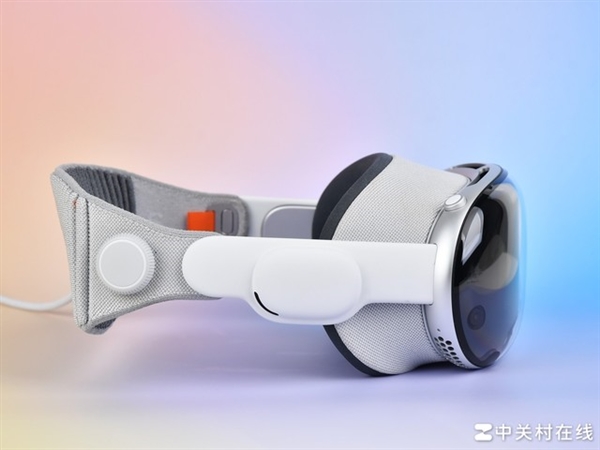
    We recently had the chance to try out the highly anticipated cyber product, Apple Vision Pro. Although touted as groundbreaking, our experience revealed it’s still a work in progress, suitable for average consumers.Apple Vision Pro
    Now, let’s delve into our firsthand encounter with this potentially revolutionary device.

    Appearance
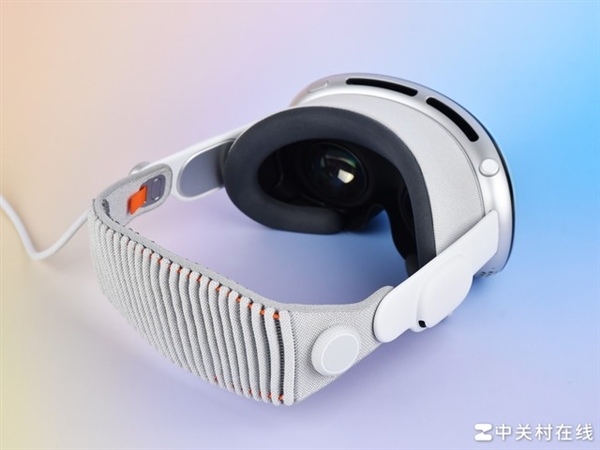
    Upon unboxing the Vision Pro, it’s evident that it follows Apple’s iconic design language, using their favored materials like glass, aluminum, and fabric.

    The eyecup of Vision Pro attaches magnetically for easy replacement. However, the connection isn’t very secure; if you only hold the eyecup, the main body might detach, risking a fall.
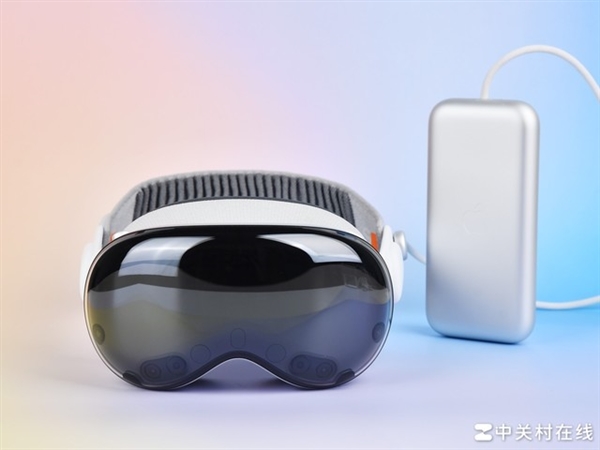
    The power interface of Vision Pro resembles a knob structure, requiring alignment and rotation for installation, similar to a camera’s bayonet mount. The power cord features the same braided material as the iPhone 15 series.

    Vision Pro’s straps feature a unique elasticity adjustment mechanism, eliminating the need for length adjustments. Simply turning the knob adjusts the strap tightness, enhancing the user experience.
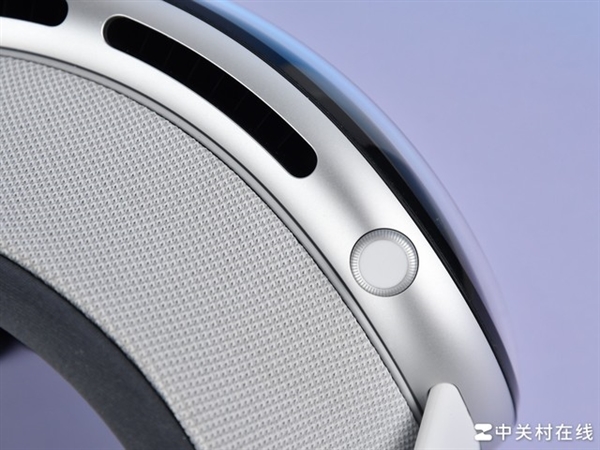
    The front of Vision Pro sports a familiar curved glass covering, concealing the facial display OLED screen and camera underneath.
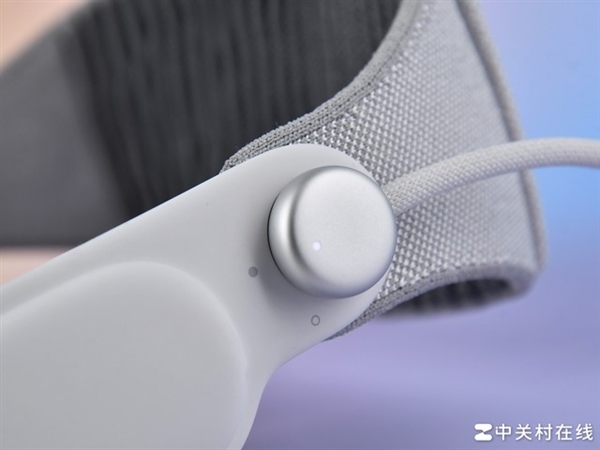
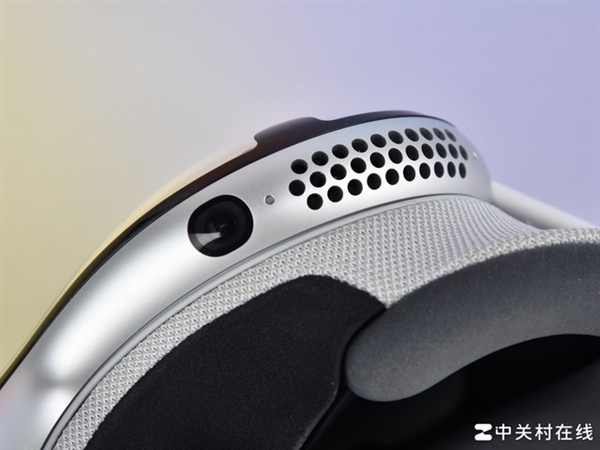
    Directly atop the Vision Pro body, there’s a conspicuous fan opening without any dust protection, raising concerns about long-term dust accumulation. Additionally, underneath the device, there’s a camera and an air outlet.

    Vision Pro Experience Analysis

    Upon wearing Vision Pro, beyond the initial activation steps, users can simply put it on and utilize it without further actions. However, there are some exceptions. For instance, if you lend your Vision Pro to someone else, it automatically adjusts to their interpupillary distance, necessitating recalibration upon re-wearing it. Moreover, if you opt for a password over eye recognition, you’ll still need to input the password to access the virtual world.

    Transitioning to its functionality, Vision Pro operates seamlessly without requiring manual spatial scanning or safety boundary setup. These tasks are handled automatically. For instance, in color penetration mode, users experience clear vision without the need for safety boundaries.

    In immersive mode, the system alerts users to nearby obstacles and releases the immersive mode when someone or something approaches.

    Starting with Apple’s Vision Pro
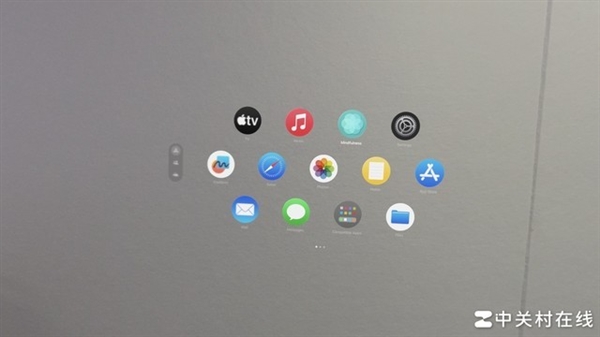
    A major advantage of Vision Pro lies in its exceptional display quality, ranking at the top among current head-mounted all-in-one devices. The color-through feature offers significant advantages, despite minor noise and limited POV viewing angles.

    Though the field of view is small and there’s a slight periscope effect, these issues have minimal impact in practical use. The color penetration delay is low, providing a reliable spatial sense, and enabling normal phone and computer usage while wearing it.

    However, there are shortcomings. Reading text in the real world through Vision Pro can be challenging, with letters like ‘l’ and ‘i’ indistinguishable. Additionally, the color-through images appear darker and grayer compared to reality.

    The core innovation of Vision Pro lies in its gaze and gesture interaction. While this interaction logic effectively facilitates virtual interaction without a controller, there are some drawbacks.

    Alignment issues and misjudgments occur with eye control, particularly when buttons are close together or viewed from low angles.

    Gestures, particularly pinching, offer an impressive initial experience with a wide recognition range, but misjudgments arise when fingers are close together, triggering unintended actions.

    APP Experience
    Let’s delve into the application aspect now. Vision Pro boasts several native applications, each one remarkable. People often quip that they “match my vision of the future.”

    With its immersive display and spatial computing, Vision Pro delivers a gaming experience close to reality. Unlike previous XR products, Vision Pro’s display and gesture recognition are more natural, aligning with human intuition.

    In gaming, players can directly use their hands, departing from traditional controllers. While current XR games showcase Vision Pro’s capabilities, there’s a shortage of truly engaging content.

    Additionally, Vision Pro supports native XR applications, offering an exceptional user experience. In terms of audio and video, Vision Pro excels. Users can enjoy high-quality VR content from Apple and Disney, and store 2D videos for playback.
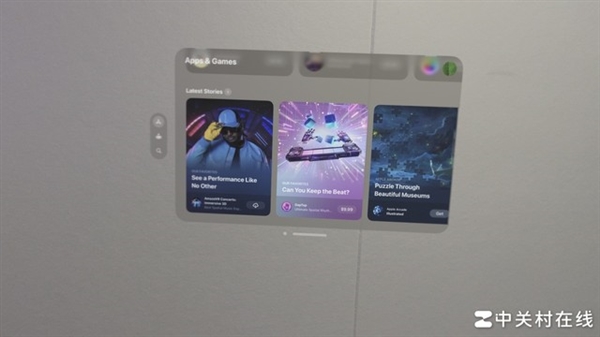
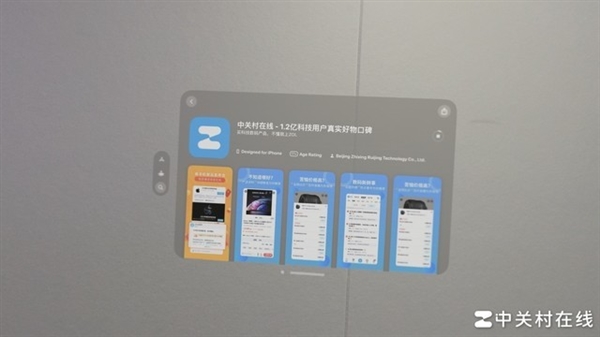
    Moreover, Vision Pro taps into the iOS app ecosystem. For instance, the ZOL APP can be downloaded from the app store. Notably, in Vision Pro, interaction varies based on window proximity: distant windows require eye control, while closer ones allow familiar gestures.

    Spatial video on Vision Pro offers a near-real scene experience, truly magical. However, it’s essential to note that Vision Pro is highly personalized. Sharing experiences is challenging due to individual eye conditions, requiring calibration for smooth usage.

    Verdict

    Vision Pro is expected to replace products like the iPad and Mac in future development, but it won’t replace smartphones. Transitioning to the product experience, Apple Vision Pro boasts a high degree of completion and is user-friendly out of the box, with minimal learning costs. As the premier product in the current head-mounted all-in-one category, Vision Pro excels. However, in terms of actual user experience, it suffers from a significant lack of content. Despite its native content, Vision Pro’s usage experience is limited, particularly in comparison to mobile phones.

    Read Also: Vivo X Fold3 Vision: The world’s first Snapdragon 8 Gen3 folding screen

    Share. Facebook Twitter Pinterest LinkedIn Tumblr Email

    Related Posts

    The First Desktop Charging Station from Xiaomi is Released: Total Power of 2500W, Integrating Eight Ports at 249 Yuan

    Meizu Flyme AIOS 2nd version for the end of the year has been officially announced

    Dual launches: Xiaomi REDMI Turbo 5 Large Capacity New Model has been Approved for Network Use

    Leave A Reply Cancel Reply

    You must be logged in to post a comment.

    voopoo drag s3
    oxva xlim 3 ultra
    sp2s sen x disposable vape
    jnr 100k
    • Popular
    • 3D Printer REVIEW
    • XIAOMI
    December 26, 2025

    VOOPOO ARGUS P3: The Touchscreen Pod That Feels Like a Mini Mod (Review)

    December 26, 2025

    Vaporesso XROS 5 Nano: Touchscreen Control Meets True Nano Portability (Review)

    December 9, 2025

    OXVA Xlim Go vs. OXVA Xlim Go 2: Hands-On Review

    December 9, 2025

    OXVA XLIM PRO 3 VS XLIM PRO 2 Review: Hands-on Comparison

    December 26, 2025

    ACMER ASCARVA 4S: Precision CNC Power for Makers, DIYers & Small Workshops

    June 23, 2024

    ACMER P2 20W Laser Engraver Fixed Focus Engraving: Hands on Review

    May 30, 2024

    xTool F1 Ultra Review: World’s First 20W Fiber & 20W Diode Laser Engraver

    May 30, 2024

    Anycubic Kobra 3 Combo Review: The Multicolor Masterpiece?

    December 31, 2025

    Dual launches: Xiaomi REDMI Turbo 5 Large Capacity New Model has been Approved for Network Use

    December 30, 2025

    REDMI Note 15 Pro+ Spring Festival Edition in mocha brown is announced

    December 29, 2025

    Xiaomi MIX 5 is here! A truly all-screen return: Supports under-screen 3D face recognition

    December 29, 2025

    Xiaomi Mijia Air Purifier 6 Pro Released: Upgraded to dual chips and dual architectures, with a composite purification matrix

    fc 26 coins
    New Arrivals
    • iJOY Venus 25K Disposable Vape iJOY Venus 25K Disposable Vape
    • Uwell Zetta Pod System Kit Uwell Zetta Pod System Kit
    • SKE V-BOT 40K DISPOSABLE SKE V-BOT 40K DISPOSABLE
    • Pillow Talk FC40000 Flavor Control Pillow Talk FC40000 Flavor Control
    • Huawei Nova 15 Pro Huawei Nova 15 Pro
    • Airis PureFlow Switch 50K Power Rescue Edition Airis PureFlow Switch 50K Power Rescue Edition
    • Huawei Nova 15 Ultra Huawei Nova 15 Ultra
    • Huawei MatePad 11.5 2026 Huawei MatePad 11.5 2026
    • Chuwi CoreBook Air Plus Laptop Chuwi CoreBook Air Plus Laptop
    About
  • Igeekphone.com provides the first global tech news and reviews about smartphone, vapes, e-cigar, smart home, 3D printers, e-bike,tablets, RC drones, VR headset, and other accessories. It's the best platform to improve your brand and product.
  • Contact us: info@igeekphone.com
  • Check Our Privacy Policy Here.
  • Note: *Right now we have US editor and EU editors for review, especially for Amazon US and EU.
  • *Shop and Compare Price Here*
  • Facebook
  • Youtube
  • OUR BEST VAPE PARTNERS
  • VAPE ONLINE STORE
  • HAYATI PRO MAX PLUS
  • VAPORESSO
  • VOOPOO
  • OXVA
  • NEXA
  • MASKKING
  • LOSTVAPE ORIONBAR
  • MEMERS
  • TODOO
  • SP2S
  • JNR
  • VEIIK
  • OTHER BEST PARTNERS
  • SVBONY
  • Chuwi
  • Blackview
  • Fossibot
  • Unihertz
  • Flsun
  • Anycubic
  • Xtool
  • Oukitel
  • Mukkpet Ebike
  • Ugreen
  • Copyright © 2025 igeekphone

    Type above and press Enter to search. Press Esc to cancel.