




Facebook Twitter Instagram
    Trending
    • Fumo Japan has added “Electric Purple” color to the IQOS ILUMA i series and will expand it to convenience store channels starting from February
    • How to Set the Time to 24 Hours on Redmi K90 Pro Max Smartphone?
    • Samsung Galaxy Buds4 Pro Preview: New peach color catches the eye, and supports reverse pairing of the earphone case with mobile devices
    • iQOO 15 Ultra has been Officially Announced to Feature a 2K Samsung QFeng Screen: its Peak Brightness has been pushed up to 8000 Nits
    • NQD M646 RC Car Review: A Miniature Racer with Big Features
    • V45 1.46-Inch HD Screen Smart Watch Review at $29.99: A Stylish and Functional Wearable for Everyday Health and Fitness
    • Blackview OSCAL MARINE 3 AI Smartphone Review: Rugged Power Meets Cutting-Edge Technology
    • XKJ K22 MAX RC Quadcopter Review at $48.99: A Blend of Innovation and Fun
    Facebook YouTube
    Login Register
    IGeeKphone China Phone, Tablet PC, VR, RC Drone News, Reviews
    • HOME
      • NEWS
        • DeepSeek
        • ChatGPT
        • Minecraft
    • Amazon
    • NEW YEAR
    • PHONE
      • Top Phones For Your First Choice
      • Phone Comparison
      • Xiaomi
      • Blackview
      • Doogee
      • Black Shark
      • Geekbuying
      • Banggood
      • TEMU
      • TikTok
      • Aliexpress
      • Walmart
      • MercadoLibre
      • Lazada
    • TOP VAPE Awards for 2026
    • VAPES
      • E-CIGAR Upcoming
      • Vape News
      • Vape Deals
      • Vape Comparison
      • Vape Guide
      • Giveaway
    • BEST VAPE
      • Best Vape Stores
      • Best Starter Vape Kits
      • Best Vapes for Beginners
      • Best Disposable Vapes
      • Best Pod Systems
      • Best Pod Mod Vapes
      • Best Mods
      • Best Nicotine Pouches
      • Best Clearomizers/Tanks
      • Best E-Liquid
      • Best EGO/Pens
      • Best Vapes for Nic Salt E-Juice
      • Best Vapes to Quit Smoking
      • RDA vs. RDTA vs. RTA
    • Best Vape Brand 2026
      • VAPORESSO
      • VOOPOO
      • OXVA
      • NEXA BAR
      • ORIONBARTECH
      • MASKKING VAPE
      • MEMERS
      • SP2S
      • JNR
      • TODOO
      • MRFOG
      • VEIIK
    • REVIEW
      • E-cigar Review
      • Phones
      • Tablet PC
      • TV Box
      • RC Drone
      • Wearables
      • Camera
      • Accessories
      • VR Headset
    • MORE
      • TABLET
        • Chuwi
        • INNOCN
        • Teclast
        • Top Tablet for Your First Choice
        • Tablet/Laptop Comparison
      • RC DRONE
      • CAMERA
      • WEARABLES
        • OneOdio
        • BlitzWolf
        • Top Smartwatch for First Choice
      • 3D PRINTER
        • 3D Printer Review
        • Anycubic
        • FLSUN
        • Xtool
        • LONGER
        • Top 3D printer to Choose First
      • POWER STATION
        • Oukitel
        • FOSSIBOT
      • GAMING
        • Top Gaming Products
      • E-BIKE
        • Samebike
        • Happyrun
        • ENGWE
      • SMART HOME
      • TV BOX
      • ACCESSORIES
      • VR HEADSET
      • CLOTHES
      • AUTO CAR
    • DEAL
    • Shop
    IGeeKphone China Phone, Tablet PC, VR, RC Drone News, Reviews
    You are at:Home»Guide»Boost Your iPhone Performance with These Simple Steps
    Guide

    Boost Your iPhone Performance with These Simple Steps

    HabibBy HabibJuly 10, 2023
    Facebook Twitter Pinterest LinkedIn Tumblr Email

    If your iPhone exhibits slow performance, freezing, or other issues over time, you can address and troubleshoot these problems by following the information below.

    Check the network status. 

    To ensure optimal app performance, it’s crucial to have a stable network connection. You may encounter sluggish app behavior if you experience a poor network signal. For instance, when you’re in a moving vehicle, your device continually reconnects to new cell towers, which can also result in reduced performance.

    Even if your device displays a good cellular signal, you may need to wait, attempt again from a different location, or utilize available Wi-Fi networks to improve connectivity.

    Close unresponsive apps
    When an app freezes or becomes unresponsive, you can resolve the issue by force-closing it and reopening it.

    On iPhone X or later models or iPad, swipe up from the bottom of the screen and pause in the center of the screen. Double-click the Home button for iPhone 8 or earlier to view your recent apps. Locate the problematic app, swipe up to close it, and then relaunch it.

    If a particular app consistently experiences abnormal problems like freezing, consider updating it to the latest version.

    Ensure sufficient storage space.
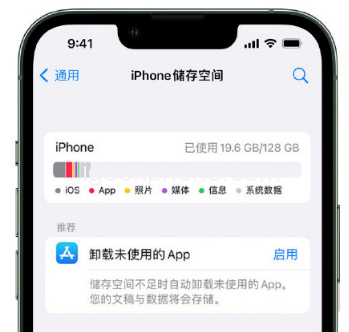
    To maintain optimal performance, checking your device’s storage capacity regularly is essential. You can do this by navigating to “Settings” – “General” – “iPhone Storage.” Having at least 1GB of free space is recommended for optimal performance. If your available storage consistently falls below 1GB, your device may slow down as iOS or iPadOS continuously manages storage to accommodate additional content.

    Use Niu Xuechang’s Apple data management tool to back up your data selectively. This tool allows you to back up videos, music, contacts, text messages, applications, and other data to your computer, freeing up storage space on your iPhone.

    Avoid extreme temperatures

    Extreme temperatures can affect your device’s performance. Suppose your device becomes excessively hot due to external conditions (e.g., being left in a hot car or exposed to direct sunlight for a prolonged period). In that case, the system will adjust its performance accordingly. To regulate the temperature, move your device to a more fantastic location.

    Similarly, frigid temperatures can also cause your device to slow down. If your device exhibits slow performance after exposure to a cold environment, relocate it to a warmer place.

    Monitor battery health

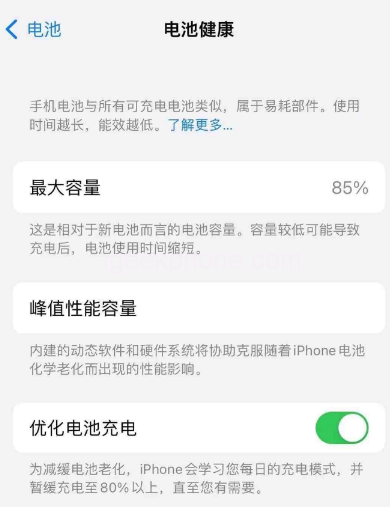
    Over time, the rechargeable batteries in all iPhone and iPad models degrade, resulting in decreased capacity and peak performance. You can check your battery health by navigating to “Settings” – “Battery” and tapping on “Battery Health.” If the maximum battery capacity falls below 80%, it’s advisable to consider replacing it for an improved experience.

    Conclusion of Improve iPhone Performance

    By following the steps above, you can effectively address performance issues on your iPhone, ensuring optimal functionality and a smoother user experience.

    Read Also: iPhone 15 Pro latest rendering: similar far peak blue color, titanium frame.

    Do not forget to follow us on our Facebook group and page to keep you always aware of the latest advances, News, Updates, review, and giveaway on smartphones, tablets, gadgets, and more from the technology world of the future.

    Share. Facebook Twitter Pinterest LinkedIn Tumblr Email

    Related Posts

    How to Set the Time to 24 Hours on Redmi K90 Pro Max Smartphone?

    Samsung Galaxy Buds4 Pro Preview: New peach color catches the eye, and supports reverse pairing of the earphone case with mobile devices

    iQOO 15 Ultra has been Officially Announced to Feature a 2K Samsung QFeng Screen: its Peak Brightness has been pushed up to 8000 Nits

    Leave A Reply Cancel Reply

    You must be logged in to post a comment.

    voopoo drag s3
    oxva xlim 3 ultra
    sp2s sen x disposable vape
    jnr 100k
    • Popular
    • 3D Printer REVIEW
    • XIAOMI
    January 21, 2026

    VOOPOO ARGUS P3 VS ARGUS P2: Which Square Pod Suits You?

    January 21, 2026

    VOOPOO Drag X3 vs VOOPOO Drag X2: Hands-On Comparison

    January 1, 2026

    VOOPOO ARGUS P3: The Touchscreen Pod That Feels Like a Mini Mod (Review)

    December 26, 2025

    Vaporesso XROS 5 Nano: Touchscreen Control Meets True Nano Portability (Review)

    December 26, 2025

    ACMER ASCARVA 4S: Precision CNC Power for Makers, DIYers & Small Workshops

    June 23, 2024

    ACMER P2 20W Laser Engraver Fixed Focus Engraving: Hands on Review

    May 30, 2024

    xTool F1 Ultra Review: World’s First 20W Fiber & 20W Diode Laser Engraver

    May 30, 2024

    Anycubic Kobra 3 Combo Review: The Multicolor Masterpiece?

    January 29, 2026

    Xiaomi Launches REDMI Monitor G25 with 200Hz High Refresh Rate for Just 609 Yuan

    January 29, 2026

    The Specifications of the Strongest Flagship Model of Redmi, Redmi K100 Pro Max, have been Released

    January 28, 2026

    Xiaomi’s First Outdoor 4G Camera is Released: Free data, no Speed Limit. One Unit is Equivalent to two at 379 yuan

    January 28, 2026

    Xiaomi Redmi Turbo 5 Smartphone has been officially Announced to be Equipped with MediaTek 8500-Ultra Processor

    fc 26 coins
    New Arrivals
    • Airis Neo P40K Disposable Vape Airis Neo P40K Disposable Vape
    • Maskking Extre 100K Disposable Vape Maskking Extre 100K Disposable Vape
    • SMOK Volle Pod System Kit SMOK Volle Pod System Kit
    • Lost Vape Astara Pod System Kit Lost Vape Astara Pod System Kit
    • SALT BAE 50 40K DISPOSABLE SALT BAE 50 40K DISPOSABLE
    • CRAVE X ULTRA SLIM 40K DISPOSABLE CRAVE X ULTRA SLIM 40K DISPOSABLE
    • AVOTX SPACE 3 40K DISPOSABLE AVOTX SPACE 3 40K DISPOSABLE
    • ARRO Infiniti 40K Nicotine Free Disposable Vape ARRO Infiniti 40K Nicotine Free Disposable Vape
    • GRANDFADDA 3000 DISPOSABLE E-CIGAR GRANDFADDA 3000 DISPOSABLE E-CIGAR
    About
  • Igeekphone.com provides the first global tech news and reviews about smartphone, vapes, e-cigar, smart home, 3D printers, e-bike,tablets, RC drones, VR headset, and other accessories. It's the best platform to improve your brand and product.
  • Contact us: info@igeekphone.com
  • Check Our Privacy Policy Here.
  • Note: *Right now we have US editor and EU editors for review, especially for Amazon US and EU.
  • *Shop and Compare Price Here*
  • Facebook
  • Youtube
  • OUR BEST VAPE PARTNERS
  • VAPE ONLINE STORE
  • HAYATI PRO MAX PLUS
  • VAPORESSO
  • VOOPOO
  • OXVA
  • NEXA
  • MASKKING
  • LOSTVAPE ORIONBAR
  • MEMERS
  • TODOO
  • SP2S
  • JNR
  • VEIIK
  • OTHER BEST PARTNERS
  • SVBONY
  • Chuwi
  • Blackview
  • Fossibot
  • Unihertz
  • Flsun
  • Anycubic
  • Xtool
  • Oukitel
  • Mukkpet Ebike
  • Ugreen
  • Copyright © 2026 igeekphone

    Type above and press Enter to search. Press Esc to cancel.