




Facebook Twitter Instagram
    Trending
    • SJCAM SJ6 Ultra Action Camera Review: Capture Your Adventures in Stunning 4K
    • BlitzWill BWL-FL6 36W Smart RGB Floor Lamp Review: A Game-Changer for Home Lighting
    • M003 Smart Childhood Watch Review: A Fun and Functional Watch for Kids
    • QUNT BK20 Electric Bike Review-Affordable Power & Range: Ideal for Urban Commuters and Weekend Adventurers
    • SVBONY SVN O1 Wireless Omni Microphone | 5-Step Pairing Tutorial
    • Gold Bar Max 50K Nixodine Disposable Vape Review: A Premium Vaping Experience with Long-Lasting Satisfaction
    • YOVO JB50K Nixodine Disposable Vape Kit Review: A Premium, Long-Lasting Vaping Experience
    • ZLL SG110PRO RTR 1/10 Scale 4WD High-Speed Off-Road RC Car Review: Thrilling Performance and Durability
    Facebook YouTube
    Login Register
    IGeeKphone China Phone, Tablet PC, VR, RC Drone News, Reviews
    • HOME
      • NEWS
        • DeepSeek
        • ChatGPT
        • Minecraft
    • Amazon
    • PHONE
      • Top Phones For Your First Choice
      • Phone Comparison
      • Xiaomi
      • Blackview
      • Doogee
      • Black Shark
      • Geekbuying
      • Banggood
      • TEMU
      • TikTok
      • Aliexpress
      • Walmart
      • MercadoLibre
      • Lazada
    • TOP VAPE Awards for 2026
    • VAPES
      • E-CIGAR Upcoming
      • Vape News
      • Vape Deals
      • Vape Comparison
      • Vape Guide
      • Giveaway
    • BEST VAPE
      • Best Vape Stores
      • Best Starter Vape Kits
      • Best Vapes for Beginners
      • Best Disposable Vapes
      • Best Pod Systems
      • Best Pod Mod Vapes
      • Best Mods
      • Best Nicotine Pouches
      • Best Clearomizers/Tanks
      • Best E-Liquid
      • Best EGO/Pens
      • Best Vapes for Nic Salt E-Juice
      • Best Vapes to Quit Smoking
      • RDA vs. RDTA vs. RTA
    • Best Vape Brand 2026
      • VAPORESSO
      • VOOPOO
      • OXVA
      • NEXA BAR
      • ORIONBARTECH
      • MASKKING VAPE
      • MEMERS
      • SP2S
      • JNR
      • TODOO
      • MRFOG
      • VEIIK
    • REVIEW
      • E-cigar Review
      • Phones
      • Tablet PC
      • TV Box
      • RC Drone
      • Wearables
      • Camera
      • Accessories
      • VR Headset
    • MORE
      • TABLET
        • Chuwi
        • INNOCN
        • Teclast
        • Top Tablet for Your First Choice
        • Tablet/Laptop Comparison
      • RC DRONE
      • CAMERA
      • WEARABLES
        • OneOdio
        • BlitzWolf
        • Top Smartwatch for First Choice
      • 3D PRINTER
        • 3D Printer Review
        • Anycubic
        • FLSUN
        • Xtool
        • LONGER
        • Top 3D printer to Choose First
      • POWER STATION
        • Oukitel
        • FOSSIBOT
      • GAMING
        • Top Gaming Products
      • E-BIKE
        • Samebike
        • Happyrun
        • ENGWE
      • SMART HOME
      • TV BOX
      • ACCESSORIES
      • VR HEADSET
      • CLOTHES
      • AUTO CAR
    • DEAL
    • VAPE LAWS
    • Shop
    IGeeKphone China Phone, Tablet PC, VR, RC Drone News, Reviews
    You are at:Home»Guide»[Fixed]- How to Recover Deleted Photos on Your PC?
    Guide

    [Fixed]- How to Recover Deleted Photos on Your PC?

    Brady CottonBy Brady CottonAugust 11, 2022
    Facebook Twitter Pinterest LinkedIn Tumblr Email

    Suppose you are a devoted photographer with photographs accumulated over several years in your storage device. The loss of these photos is a blow to the precious memories you’ve captured, whether you spill coffee over your device or it met a malware attack. The ways in which your digital photos get deleted are numerous. A reliable photo recovery software will always come in handy when you worry about how to recover permanently deleted pictures. Today, we will introduce Wondershare Recoverit and how it works to recover precious pictures you lost or delete accidently, like your wedding photos.

    Overview of Recoverit 

    Recoverit is developed by Wondershare, a reputable software provider with a wide range of utilities. As a professional data recovery tool, Recoverit intends to assist users in recovering countless lost files (audios, movies, documents, emails, and more) from 2000+ storage devices, such as PCs, hard drives, and USB flash drives, and other storage media.

    Has been highly recommended by experts in the market, Recoverit Photo Recovery aids in avoiding data loss using cutting-edge technology, presenting the best recovery rate for recovering 1000+ file formats.
    Meanwhile, Recoverit enables you to recover your data from all types of data loss situations, such as emptying recycle bin, an accidentally deleted file, disc formatting, partition loss, corruption of an external device, virus attack, system crash, bootable issues, and more.

    Step by Step Guide on Recovering Deleted Photos with Recoverit

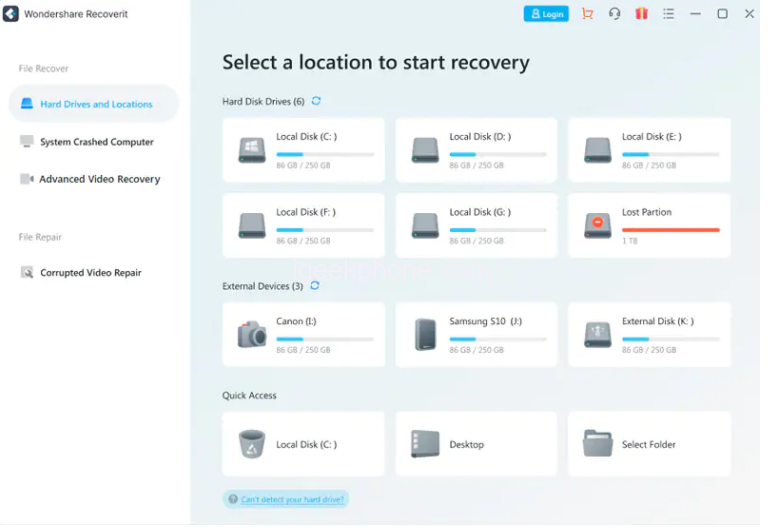
    Step 1: Download and install Recoverit on your computer. Then launch the program and choose the drive or location containing the missing data.
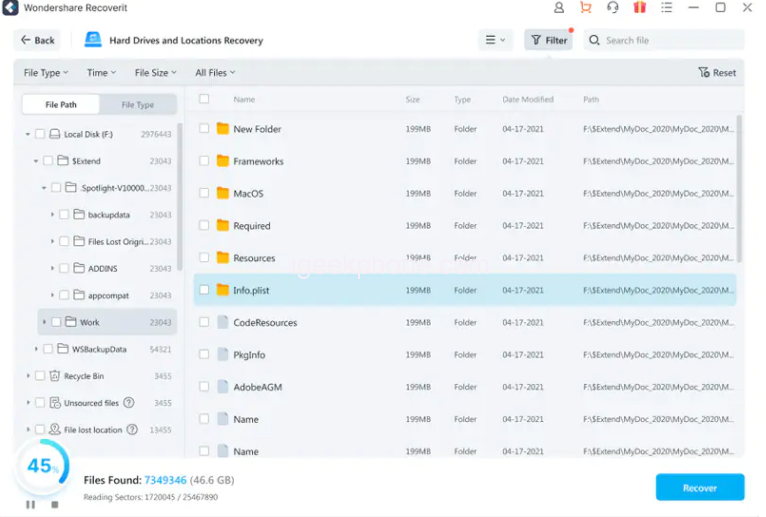
    Step 2: Scan the location automatically. You can check the scanning results at any time during the scanning. You may use filtering options to preview the files you’re looking for while you wait for the scan to find the file.
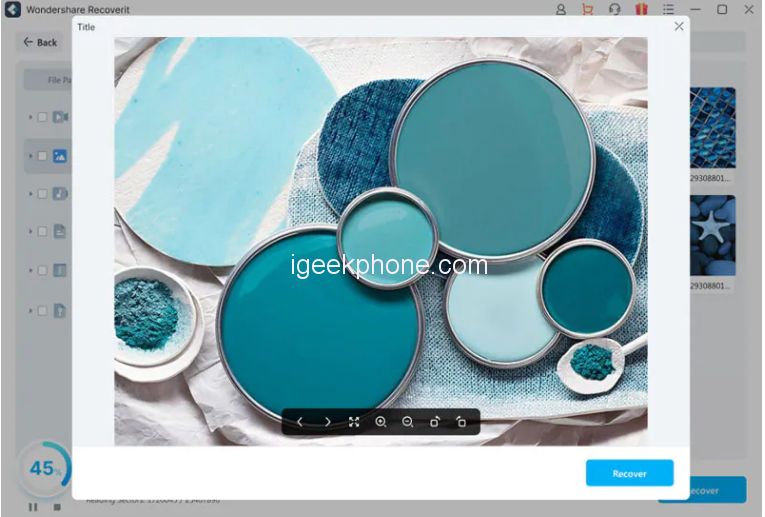
    Step 3: Finally, select the files you wish to recover and click Recover when the scan is finished.
    Availability and Plans

    Recoverit is compatible with Mac OS 10.2 to 12 and Windows XP to version 11. The free trial version allows you to recover limited files.

    When it comes to price, Recoverit keeps things less complicated than others. Three paid options are available to you: Essential, Standard, and Premium, each with gradually increasing features.

    You can choose a monthly, annual, or one-time charge for lifetime service. You get “Deep scan” and file preview features from Essential and a further advantage of customer service availability around-the-clock.

    If your machine dies and the OS won’t start, Standard Plan lets you build a bootable disc or USB flash drive to help you recover your data.

    Advanced video recovery, damaged video restoration, scanning, and merging are just a few of the top-notch capabilities that Premium offers. You can save a lot of money by opting for the yearly plan or the one-time fee for a lifetime.

    Pros and Cons of Recoverit

    Recoverit has a great selection of new features. New user interface groups the video recovery tools under their tab. Also, it is speedier and can combine several corrupted video fragments. Every connected device, including those that don’t appear in the file explorer, is available for selection on the Hard Drives and Locations tab. You can also restore a wrecked computer and access lost data using the System Crashed Computer tab.

    Pros:

    • Intuitive interface: With Recoverit’s simple and user-friendly interface, you can easily recover your pictures without hassle since all the information you require is in front of you.
    • Supports 1000+ file formats, such as files, videos, photos, audio, emails, etc.
    • Advanced Video Recovery: This feature is designed specifically for missing video files. You can recover Ultra HD, 4K, and 8K videos.
    • Corrupted Video Repair: Enables you to collect fragmented and damaged videos and repair them.

    Cons:

    • Hard disc reading and writing speeds will be slower for large size files.
    • Unpaid Version has Recovery Limit: The free Basic plan can only be used to recover files up to 100MB

    Conclusion

    Recoverit Data Recovery protects your work and critical data from any unforeseen events. It serves five million clients and has been retrieving important data and information since 2003. Its 24/7 free tech support ensures that consumers receive adequate care and offers a 100% secure virus-free guarantee. Get your memories secured with Recoverit.

    Share. Facebook Twitter Pinterest LinkedIn Tumblr Email

    Related Posts

    How Smart Tech Is Changing the Way Roofers Work on Your Home

    How Charge Capture Software Improves Accuracy and Efficiency in Healthcare

    Which is better, a laptop or a desktop computer? Computer purchase guide

    Leave A Reply Cancel Reply

    You must be logged in to post a comment.

    voopoo drag 6
    oxva xlim 3 ultra
    sp2s sen x disposable vape
    jnr 100k
    • Popular
    • 3D Printer REVIEW
    • XIAOMI
    March 5, 2026

    OXVA XLIM PRO 3 vs XLIM Pro 2 DNA: Hands-On Review

    March 5, 2026

    OXVA XLIM PRO 3 vs XLIM GO 2: Hands-On Review

    March 2, 2026

    OXVA XLIM PRO 3 vs XLIM 3 ULTRA: Hands-On Review

    February 23, 2026

    Voopoo DRAG S3 vs DRAG X3 Review – Which One Fits Your Vaping Lifestyle?

    December 26, 2025

    ACMER ASCARVA 4S: Precision CNC Power for Makers, DIYers & Small Workshops

    June 23, 2024

    ACMER P2 20W Laser Engraver Fixed Focus Engraving: Hands on Review

    May 30, 2024

    xTool F1 Ultra Review: World’s First 20W Fiber & 20W Diode Laser Engraver

    May 30, 2024

    Anycubic Kobra 3 Combo Review: The Multicolor Masterpiece?

    March 3, 2026

    Starting from 7,999 yuan, Leica Announces that Leica Version of Xiaomi 17 Ultra in Black and Silver will be Available on Official Channels

    March 3, 2026

    Xiaomi Releases the second phase recruitment announcement for the ‘Hyper OS 3 Beta’: ends at 0:00 on March 6th

    February 26, 2026

    Xiaomi 17 Ultra mobile phone has received the upgrade to Hyper OS 3.0.15.0

    February 24, 2026

    Xiaomi 17T Series Phones have been Registered: Equipped with MediaTek 8/9 Flagship Platform and Featuring Leica Imaging Technology

    fc 26 coins
    New Arrivals
    • Airmez Lux 60K Disposable Vape Airmez Lux 60K Disposable Vape
    • YOVO JB50K Nixodine Disposable Vape Kit YOVO JB50K Nixodine Disposable Vape Kit
    • Kangvape Sommar Bar 50K Disposable Vape Kangvape Sommar Bar 50K Disposable Vape
    • Lost Mary MT35000 Turbo Nixodine Edition Lost Mary MT35000 Turbo Nixodine Edition
    • Luffbar Cue 60K Disposable Vape Luffbar Cue 60K Disposable Vape
    • Upends UP9 50K Disposable Pod Upends UP9 50K Disposable Pod
    • Gold Bar Max 50K Nixodine Disposable Vape Gold Bar Max 50K Nixodine Disposable Vape
    • Geek Bar Clio X 50K Disposable Vape Kit Geek Bar Clio X 50K Disposable Vape Kit
    • Navabar Zero Nicotine 55K Disposable Vape Navabar Zero Nicotine 55K Disposable Vape
    About
  • Igeekphone.com provides the first global tech news and reviews about smartphone, vapes, e-cigar, smart home, 3D printers, e-bike,tablets, RC drones, VR headset, and other accessories. It's the best platform to improve your brand and product.
  • Contact us: info@igeekphone.com
  • Check Our Privacy Policy Here.
  • Note: *Right now we have US editor and EU editors for review, especially for Amazon US and EU.
  • *Shop and Compare Price Here*
  • Facebook
  • Youtube
  • OUR BEST VAPE PARTNERS
  • VAPE ONLINE STORE
  • HAYATI PRO MAX PLUS
  • VAPORESSO
  • VOOPOO
  • OXVA
  • NEXA
  • MASKKING
  • LOSTVAPE ORIONBAR
  • MEMERS
  • TODOO
  • SP2S
  • JNR
  • VEIIK
  • OTHER BEST PARTNERS
  • SVBONY
  • Chuwi
  • Blackview
  • Fossibot
  • Unihertz
  • Flsun
  • Anycubic
  • Xtool
  • Oukitel
  • Mukkpet Ebike
  • Ugreen
  • Copyright © 2026 igeekphone

    Type above and press Enter to search. Press Esc to cancel.