






Facebook Twitter Instagram
    Trending
    • Redmi A27U Type-C 120Hz 2027 Launches With 4K Display and Apple Color Mode
    • Xiaomi Pad 9 Pro Max Launches With Xuanji O3 Chip and 12,000mAh Battery From 4,299 Yuan
    • Xiaomi 18 Fold Launched With Xuanji O3 Chip, 7.58-Inch Display and 6,000mAh Battery
    • MT200 Smart Watch Review: Display, Calling, Battery Life and Daily Use
    • Top Disposable Vape Wholesale Trends 2026: Why Stock Maskking
    • Nordic Spirit Partners With Co-op Live as UK Nicotine Rules Tighten
    • Fifty Bar Mini Vape: Compact Design, 7mL Capacity and Key Features
    • Bang Blaze 15-in-1 500K: 15 Flavors, 850mAh Battery and Mesh Coil
    Facebook YouTube
    IGeeKphone China Phone, Tablet PC, VR, RC Drone News, Reviews
    • HOME
    • BREAKING NEWS
      • AI NEWS
    • Amazon
    • PHONE
      • Top Phones For Your First Choice
      • Phone Comparison
      • Xiaomi
      • Blackview
      • Doogee
      • Black Shark
      • Geekbuying
      • Banggood
      • TEMU
      • TikTok
      • Aliexpress
      • Walmart
      • MercadoLibre
      • Lazada
    • TOP VAPE Awards for 2026
    • VAPES
      • E-CIGAR Upcoming
      • Vape News
      • Vape Deals
      • Vape Comparison
      • Vape Guide
      • VAPE LAWS
      • Giveaway
    • BEST VAPE
      • Best Vape Stores
      • Best Starter Vape Kits
      • Best Vapes for Beginners
      • Best Disposable Vapes
      • Best Pod Systems
      • Best Pod Mod Vapes
      • Best Mods
      • Best Nicotine Pouches
      • Best Clearomizers/Tanks
      • Best E-Liquid
      • Best EGO/Pens
      • Best Vapes for Nic Salt E-Juice
      • Best Vapes to Quit Smoking
      • RDA vs. RDTA vs. RTA
    • Best Vape Brand 2026
      • VAPORESSO
      • VOOPOO
      • OXVA
      • NEXA BAR
      • MASKKING VAPE
      • SP2S
      • IPLAY
      • TODOO
      • MRFOG
      • LOSTVAPE
      • VEIIK
    • REVIEW
      • E-cigar Review
      • Phones
      • Tablet PC
      • TV Box
      • RC Drone
      • Wearables
      • Camera
      • Accessories
      • VR Headset
    • MORE
      • TABLET
        • Chuwi
        • INNOCN
        • Teclast
        • Top Tablet for Your First Choice
        • Tablet/Laptop Comparison
      • RC DRONE
      • CAMERA
      • WEARABLES
        • OneOdio
        • BlitzWolf
        • Top Smartwatch for First Choice
      • 3D PRINTER
        • 3D Printer Review
        • Anycubic
        • FLSUN
        • Xtool
        • LONGER
        • Top 3D printer to Choose First
      • POWER STATION
        • Oukitel
        • FOSSIBOT
      • GAMING
        • Top Gaming Products
      • E-BIKE
        • Samebike
        • Happyrun
        • ENGWE
      • SMART HOME
      • TV BOX
      • ACCESSORIES
      • VR HEADSET
      • CLOTHES
      • AUTO CAR
    • DEAL
    • Shop
    IGeeKphone China Phone, Tablet PC, VR, RC Drone News, Reviews
    You are at:Home»Amazon»SVBONY SVN O1 Wireless Omni Microphone | 5-Step Pairing Tutorial
    Amazon

    SVBONY SVN O1 Wireless Omni Microphone | 5-Step Pairing Tutorial

    Brady CottonBy Brady CottonMarch 7, 2026
    Facebook Twitter Pinterest LinkedIn Tumblr Email

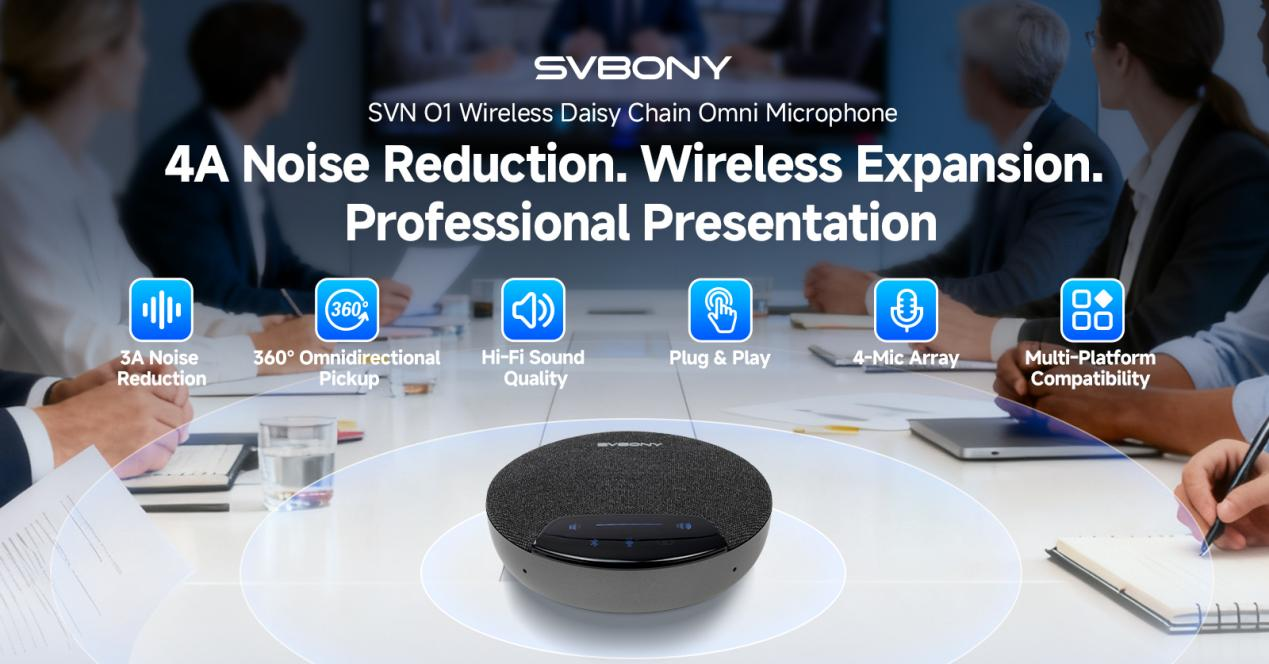
    Hello everyone, and welcome to today’s tutorial! Today, we’ll be introducing the quick pairing method for the SVBONY SVN O1 Wireless Omni Microphone.

    Using the simple “Daisy Chain” mode, you can connect two microphones in seconds, making it ideal for recordings, remote meetings, hybrid work, and small to medium-sized conference rooms. Plus, we’ll show you how to easily access AI transcription.

    Key Features at a Glance

    1. 4-Mic Array for Precise Pickup: Captures clear audio from all directions with enhanced sensitivity, making it an excellent video conferencing microphone for any setup.
    2. 2×4 Wireless Cascade (8 Mics): Supports 20–30 participants, ideal for large meetings and conference rooms. It functions seamlessly as a conference speaker and microphone combo, covering all your audio needs.
    3. AI Noise Reduction + 3A Algorithm: Features AGC for Voice, AEC for Echo, and Reverb Suppression, delivering crystal-clear sound with SNR up to 85dB.

    Preparation

    Before you start, please ensure both SVN O1 microphones are fully charged and you are familiar with the three buttons on the device: BT Key, Mute Key, and Cascade Key.

    Step 1: Power On

    Turn on the power switch for both microphones simultaneously.

    Step 2: Enter Slave Mode

    On one microphone, press and hold the Cascade Key to put it into Slave mode. Wait for the white indicator light to turn off automatically, indicating the slave mode is ready. The other microphone will function as the master by default.

    Step 3: Activate Pairing Mode

    Press and hold the Mute Key on both microphones at the same time. Observe the light next to the Cascade Key; it will turn orange, indicating the device has entered pairing mode.

    Step 4: Reboot the Devices

    After the pairing signal exchange, restart both the master and slave microphones by turning the power off and on again. It is recommended to complete this reboot step within 3 seconds for a more stable pairing.

    Step 5: Complete the Connection

    After both devices have restarted, press and hold the Cascade Key again. Wait for the indicator lights to stabilize; this means the Daisy Chain connection is successful! This setup transforms your device into a powerful meeting room speaker system, perfect for collaborative spaces.

    Bonus: Easily Access AI Transcription

    The SVN O1 also offers smart AI transcription features, making it perfect for professional environments. Here’s how to use it:

    Step 1: Connect your microphone to a computer via USB.

    Step 2: Double-tap the mute button to launch the AI app.

    Step 3: Works with the notta.ai web platform for instant transcription.

    This functionality makes it an ideal choice for anyone searching for meeting speakers for laptop or a reliable usb conference speaker for daily use.

    Advanced Audio Processing

    The SVN O1 is equipped with AI Noise Reduction and a 3A Algorithm that includes:

    • AGC (Automatic Gain Control) for Voice: Maintains consistent volume levels.
    • AEC (Acoustic Echo Cancellation): Eliminates echo for natural conversations.
    • Reverb Suppression: Removes unwanted reverberation.
    • SNR up to 85dB: Ensures crystal-clear sound even in noisy environments.

    Whether you’re in a quiet office or a bustling conference room, the SVN O1 delivers professional-grade audio quality. It truly stands out as a versatile conference microphone and speaker solution for modern workplaces.

    Tips

    It’s best to perform the initial pairing in a quiet environment. If pairing fails, simply repeat Steps 2 through 5. Once successfully connected, the devices will automatically recognize each other when powered on.

    The Daisy Chain feature of SVBONY SVN O1 Wireless Omni Microphone makes using wireless microphones more flexible and efficient, while the AI transcription integration adds a layer of productivity—perfect for today’s hybrid workplace.

    We hope this tutorial helps you get started quickly! If you have any other questions, feel free to leave a comment below.

    Share. Facebook Twitter Pinterest LinkedIn Tumblr Email

    Related Posts

    MT200 Smart Watch Review: Display, Calling, Battery Life and Daily Use

    Zombies Cat B22: Bluetooth 6.0 Open-Ear Earphones with 14mm Drivers

    Imou Ranger Dual Pro 10MP: Dual-Lens 3K Indoor Security Camera with Smart Tracking

    Leave A Reply Cancel Reply

    You must be logged in to post a comment.

    voopoopintch
    oxva nexlim 2
    shopify
    • Popular
    • 3D Printer REVIEW
    • XIAOMI
    July 13, 2026

    OXVA Nexlim 2 Mini Pod Vape Hands on Review

    July 13, 2026

    OXVA Nexlim 2 Pod Vape Hands on Review

    June 21, 2026

    iPlay LUMO 8K Review – A Compact Prefilled Pod Kit with Big Flavor and Everyday Convenience

    June 21, 2026

    iPlay HOOLA 150K Review – A Cloud-Chasing Giant with Music, Modes & Massive Longevity

    December 26, 2025

    ACMER ASCARVA 4S: Precision CNC Power for Makers, DIYers & Small Workshops

    June 23, 2024

    ACMER P2 20W Laser Engraver Fixed Focus Engraving: Hands on Review

    May 30, 2024

    xTool F1 Ultra Review: World’s First 20W Fiber & 20W Diode Laser Engraver

    May 30, 2024

    Anycubic Kobra 3 Combo Review: The Multicolor Masterpiece?

    September 8, 2026

    Xiaomi Pad 9 Pro Max Launches With Xuanji O3 Chip and 12,000mAh Battery From 4,299 Yuan

    September 8, 2026

    Xiaomi 18 Fold Launched With Xuanji O3 Chip, 7.58-Inch Display and 6,000mAh Battery

    September 7, 2026

    Xiaomi 18 Fold Ceramic Edition Unveiled With New Pink Finish and Flagship Specs

    September 5, 2026

    Xiaomi HyperOS 4 Adds Cross-Device Chat Sync for Super XiaoAI

    fc 26 coins
    New Arrivals
    • Xiaomi Pad 9 Pro Max Xiaomi Pad 9 Pro Max
    • Xiaomi 18 Fold Xiaomi 18 Fold
    • Fifty Bar Mini Disposable Vape Fifty Bar Mini Disposable Vape
    • Bang Blaze 15-in-1 500K Disposable Vape Bang Blaze 15-in-1 500K Disposable Vape
    • HQD SNAP 50K Nixodine Disposable Vape Kit HQD SNAP 50K Nixodine Disposable Vape Kit
    • HQD Shisha Solo 50K Disposable Vape HQD Shisha Solo 50K Disposable Vape
    • GEEKPOD 40K Disposable Vape Kit GEEKPOD 40K Disposable Vape Kit
    • Fifty Bar V2 20K Disposable Vape Fifty Bar V2 20K Disposable Vape
    • Eleaf iStick iJust X Starter Kit Eleaf iStick iJust X Starter Kit
    About
  • Igeekphone.com provides the first global tech news and reviews about smartphone, vapes, e-cigar, smart home, 3D printers, e-bike,tablets, RC drones, VR headset, and other accessories. It's the best platform to improve your brand and product.
  • Contact us: info@igeekphone.com
  • Check Our Privacy Policy Here.
  • Note: *Right now we have US editor and EU editors for review, especially for Amazon US and EU.
  • *Shop and Compare Price Here*
  • Facebook
  • Youtube
  • OUR BEST VAPE PARTNERS
  • VAPE ONLINE STORE
  • VAPORESSO
  • VOOPOO
  • OXVA
  • NEXA
  • MASKKING
  • SP2S
  • IPLAY
  • TODOO
  • OTHER BEST PARTNERS
  • SVBONY
  • Chuwi
  • Blackview
  • Fossibot
  • Unihertz
  • Flsun
  • Anycubic
  • Xtool
  • Oukitel
  • Mukkpet Ebike
  • Ugreen
  • Copyright © 2026 igeekphone

    Type above and press Enter to search. Press Esc to cancel.