







Facebook Twitter Instagram
    Trending
    • Insta360 GO Ultra Action Camera Review: Tiny 4K Powerhouse for Creators and Adventurers
    • JJRC Q243 RTR 2.4G 4WD RC Car Review: Amphibious Stunt Truck for Land and Water Adventures
    • iScooter F2 Electric Scooter Review: An Affordable Urban Commuter with 500W Power
    • Cybertake S2 Pro Portable Camping Air Conditioner Review: Powerful 5,100 BTU Cooling for Outdoor Adventures
    • Double the capacity! The Apple M7 Ultra can support up to 1.5TB of memory, far exceeding the previous generation M5 Ultra.
    • Acer Sospiro A15 Released: Same back screen design as Xiaomi 17 Pro, using ZTE Ascend T615 chip
    • Rendering image of the “pine wood color” version of Google Pixel 11 Pro Foldable smartphone has been Released.
    • OpenAI Temporarily Removes 5-Hour Usage Limit for Codex and ChatGPT Work, GPT-5.6 Sol Optimization Planned
    Facebook YouTube
    IGeeKphone China Phone, Tablet PC, VR, RC Drone News, Reviews
    • HOME
    • BREAKING NEWS
      • AI NEWS
    • Amazon
    • PHONE
      • Top Phones For Your First Choice
      • Phone Comparison
      • Xiaomi
      • Blackview
      • Doogee
      • Black Shark
      • Geekbuying
      • Banggood
      • TEMU
      • TikTok
      • Aliexpress
      • Walmart
      • MercadoLibre
      • Lazada
    • TOP VAPE Awards for 2026
    • VAPES
      • E-CIGAR Upcoming
      • Vape News
      • Vape Deals
      • Vape Comparison
      • Vape Guide
      • VAPE LAWS
      • Giveaway
    • BEST VAPE
      • Best Vape Stores
      • Best Starter Vape Kits
      • Best Vapes for Beginners
      • Best Disposable Vapes
      • Best Pod Systems
      • Best Pod Mod Vapes
      • Best Mods
      • Best Nicotine Pouches
      • Best Clearomizers/Tanks
      • Best E-Liquid
      • Best EGO/Pens
      • Best Vapes for Nic Salt E-Juice
      • Best Vapes to Quit Smoking
      • RDA vs. RDTA vs. RTA
    • Best Vape Brand 2026
      • VAPORESSO
      • VOOPOO
      • OXVA
      • NEXA BAR
      • MASKKING VAPE
      • SP2S
      • IPLAY
      • TODOO
      • MRFOG
      • LOSTVAPE
      • VEIIK
    • REVIEW
      • E-cigar Review
      • Phones
      • Tablet PC
      • TV Box
      • RC Drone
      • Wearables
      • Camera
      • Accessories
      • VR Headset
    • MORE
      • TABLET
        • Chuwi
        • INNOCN
        • Teclast
        • Top Tablet for Your First Choice
        • Tablet/Laptop Comparison
      • RC DRONE
      • CAMERA
      • WEARABLES
        • OneOdio
        • BlitzWolf
        • Top Smartwatch for First Choice
      • 3D PRINTER
        • 3D Printer Review
        • Anycubic
        • FLSUN
        • Xtool
        • LONGER
        • Top 3D printer to Choose First
      • POWER STATION
        • Oukitel
        • FOSSIBOT
      • GAMING
        • Top Gaming Products
      • E-BIKE
        • Samebike
        • Happyrun
        • ENGWE
      • SMART HOME
      • TV BOX
      • ACCESSORIES
      • VR HEADSET
      • CLOTHES
      • AUTO CAR
    • DEAL
    • Shop
    IGeeKphone China Phone, Tablet PC, VR, RC Drone News, Reviews
    You are at:Home»Guide»[Fixed]- How to Recover Deleted Photos on Your PC?
    Guide

    [Fixed]- How to Recover Deleted Photos on Your PC?

    Brady CottonBy Brady CottonAugust 11, 2022
    Facebook Twitter Pinterest LinkedIn Tumblr Email

    Suppose you are a devoted photographer with photographs accumulated over several years in your storage device. The loss of these photos is a blow to the precious memories you’ve captured, whether you spill coffee over your device or it met a malware attack. The ways in which your digital photos get deleted are numerous. A reliable photo recovery software will always come in handy when you worry about how to recover permanently deleted pictures. Today, we will introduce Wondershare Recoverit and how it works to recover precious pictures you lost or delete accidently, like your wedding photos.

    Overview of Recoverit 

    Recoverit is developed by Wondershare, a reputable software provider with a wide range of utilities. As a professional data recovery tool, Recoverit intends to assist users in recovering countless lost files (audios, movies, documents, emails, and more) from 2000+ storage devices, such as PCs, hard drives, and USB flash drives, and other storage media.

    Has been highly recommended by experts in the market, Recoverit Photo Recovery aids in avoiding data loss using cutting-edge technology, presenting the best recovery rate for recovering 1000+ file formats.
    Meanwhile, Recoverit enables you to recover your data from all types of data loss situations, such as emptying recycle bin, an accidentally deleted file, disc formatting, partition loss, corruption of an external device, virus attack, system crash, bootable issues, and more.

    Step by Step Guide on Recovering Deleted Photos with Recoverit

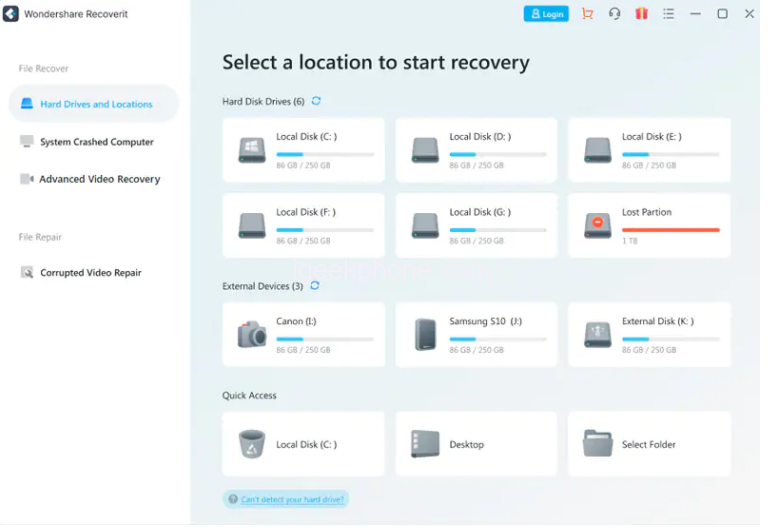
    Step 1: Download and install Recoverit on your computer. Then launch the program and choose the drive or location containing the missing data.
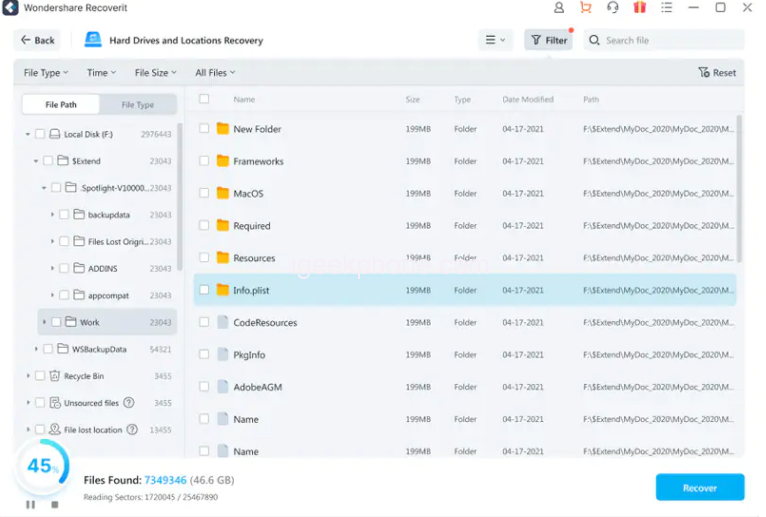
    Step 2: Scan the location automatically. You can check the scanning results at any time during the scanning. You may use filtering options to preview the files you’re looking for while you wait for the scan to find the file.
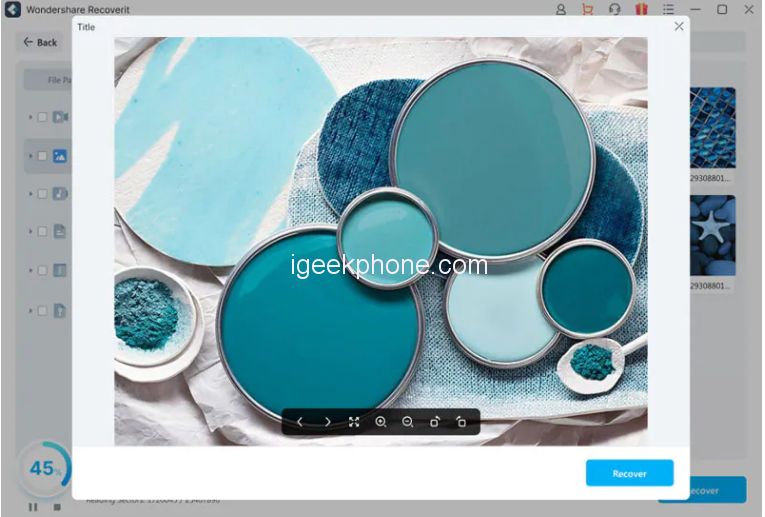
    Step 3: Finally, select the files you wish to recover and click Recover when the scan is finished.
    Availability and Plans

    Recoverit is compatible with Mac OS 10.2 to 12 and Windows XP to version 11. The free trial version allows you to recover limited files.

    When it comes to price, Recoverit keeps things less complicated than others. Three paid options are available to you: Essential, Standard, and Premium, each with gradually increasing features.

    You can choose a monthly, annual, or one-time charge for lifetime service. You get “Deep scan” and file preview features from Essential and a further advantage of customer service availability around-the-clock.

    If your machine dies and the OS won’t start, Standard Plan lets you build a bootable disc or USB flash drive to help you recover your data.

    Advanced video recovery, damaged video restoration, scanning, and merging are just a few of the top-notch capabilities that Premium offers. You can save a lot of money by opting for the yearly plan or the one-time fee for a lifetime.

    Pros and Cons of Recoverit

    Recoverit has a great selection of new features. New user interface groups the video recovery tools under their tab. Also, it is speedier and can combine several corrupted video fragments. Every connected device, including those that don’t appear in the file explorer, is available for selection on the Hard Drives and Locations tab. You can also restore a wrecked computer and access lost data using the System Crashed Computer tab.

    Pros:

    • Intuitive interface: With Recoverit’s simple and user-friendly interface, you can easily recover your pictures without hassle since all the information you require is in front of you.
    • Supports 1000+ file formats, such as files, videos, photos, audio, emails, etc.
    • Advanced Video Recovery: This feature is designed specifically for missing video files. You can recover Ultra HD, 4K, and 8K videos.
    • Corrupted Video Repair: Enables you to collect fragmented and damaged videos and repair them.

    Cons:

    • Hard disc reading and writing speeds will be slower for large size files.
    • Unpaid Version has Recovery Limit: The free Basic plan can only be used to recover files up to 100MB

    Conclusion

    Recoverit Data Recovery protects your work and critical data from any unforeseen events. It serves five million clients and has been retrieving important data and information since 2003. Its 24/7 free tech support ensures that consumers receive adequate care and offers a 100% secure virus-free guarantee. Get your memories secured with Recoverit.

    Share. Facebook Twitter Pinterest LinkedIn Tumblr Email

    Related Posts

    What is Certificate-Based Authentication?

    Why can’t the computer connect to the phone hotspot

    How to Fix the Black Screen Issue on a Lenovo G510 Computer in 5 Simple Steps

    Leave A Reply Cancel Reply

    You must be logged in to post a comment.

    voopoopintch
    oxva nexlim 2
    sp2s sen x disposable vape
    • Popular
    • 3D Printer REVIEW
    • XIAOMI
    June 21, 2026

    iPlay LUMO 8K Review – A Compact Prefilled Pod Kit with Big Flavor and Everyday Convenience

    June 21, 2026

    iPlay HOOLA 150K Review – A Cloud-Chasing Giant with Music, Modes & Massive Longevity

    June 21, 2026

    Vaporesso VIBE SE 2 Review – Simple on the Outside, Surprisingly Smart on the Inside

    June 21, 2026

    VOOPOO DRAG H40 Pro Review – The Return of the Pocket Powerhouse

    December 26, 2025

    ACMER ASCARVA 4S: Precision CNC Power for Makers, DIYers & Small Workshops

    June 23, 2024

    ACMER P2 20W Laser Engraver Fixed Focus Engraving: Hands on Review

    May 30, 2024

    xTool F1 Ultra Review: World’s First 20W Fiber & 20W Diode Laser Engraver

    May 30, 2024

    Anycubic Kobra 3 Combo Review: The Multicolor Masterpiece?

    July 13, 2026

    Xiaomi Mijia Display Wall Lamp 2 has been launched on the crowdfunding page at 259 yuan

    July 12, 2026

    The Core Specifications of Redmi Note 17 series have been Announced

    July 11, 2026

    Xiaomi Redmi Note 17 Series Specifications Leak Ahead of July 14 Launch: Snapdragon 4 Gen 4, Up to 9,000mAh Battery

    July 10, 2026

    Xiaomi Band 11 Series Certified Ahead of Launch, Retains 233mAh Battery Capacity

    fc 26 coins
    New Arrivals
    • Veev One Plus Pod System Kit Veev One Plus Pod System Kit
    • Xiaomi 18T Xiaomi 18T
    • Xiaomi 18T Pro Xiaomi 18T Pro
    • Huawei Mate 80 Air Huawei Mate 80 Air
    • Xiaomi Poco F9 Ultra Xiaomi Poco F9 Ultra
    • JNR Falcon Mini 20K Puffs Refillable Vape Kit JNR Falcon Mini 20K Puffs Refillable Vape Kit
    • Hyrise Hybrid Vaporizer Kit Hyrise Hybrid Vaporizer Kit
    • Hyrise Hydden 510 Thread Battery 1000mAh Hyrise Hydden 510 Thread Battery 1000mAh
    • Smoant Flex Neo Pod System Kit Smoant Flex Neo Pod System Kit
    About
  • Igeekphone.com provides the first global tech news and reviews about smartphone, vapes, e-cigar, smart home, 3D printers, e-bike,tablets, RC drones, VR headset, and other accessories. It's the best platform to improve your brand and product.
  • Contact us: info@igeekphone.com
  • Check Our Privacy Policy Here.
  • Note: *Right now we have US editor and EU editors for review, especially for Amazon US and EU.
  • *Shop and Compare Price Here*
  • Facebook
  • Youtube
  • OUR BEST VAPE PARTNERS
  • VAPE ONLINE STORE
  • HAYATI PRO MAX PLUS
  • VAPORESSO
  • VOOPOO
  • OXVA
  • NEXA
  • MASKKING
  • SP2S
  • IPLAY
  • TODOO
  • OTHER BEST PARTNERS
  • SVBONY
  • Chuwi
  • Blackview
  • Fossibot
  • Unihertz
  • Flsun
  • Anycubic
  • Xtool
  • Oukitel
  • Mukkpet Ebike
  • Ugreen
  • Copyright © 2026 igeekphone

    Type above and press Enter to search. Press Esc to cancel.