







Facebook Twitter Instagram
    Trending
    • YH Toys YH18001 PRO Review: A 70km/h 1/18 Brushless RC Monster Truck Built for Speed and Off-Road Fun
    • Redmi K100 Pro Reportedly Launching Next Month with Snapdragon 8 Elite 5, 200MP Camera, and 185Hz Display
    • Xiaomi’s Next Flagship Clears Certification: In-House Chip, HyperOS 4, and AI Models Expected to Debut Together
    • Xiaomi 18 Pro Series Global Variant Certified: Dual-Screen Flagship Reportedly Set for International Launch
    • Motorola Moto Pad 70 Debuts Ahead of Launch: 12.1-Inch 2.5K Display, Dimensity 6400, and 5G Connectivity
    • International version of Xiaomi 18 Pro smartphone Unveiled: Not launching in the Indian market
    • Samsung Galaxy S27 Pro and S27 Ultra Camera Specs Leak: Sony IMX855 Ultra-Wide Sensor and Upgraded Selfie Camera Tipped
    • Upends UP9 50K VS NEXA Ultra II Quick Comparison Review
    Facebook YouTube
    IGeeKphone China Phone, Tablet PC, VR, RC Drone News, Reviews
    • HOME
    • BREAKING NEWS
      • AI NEWS
    • Amazon
    • PHONE
      • Top Phones For Your First Choice
      • Phone Comparison
      • Xiaomi
      • Blackview
      • Doogee
      • Black Shark
      • Geekbuying
      • Banggood
      • TEMU
      • TikTok
      • Aliexpress
      • Walmart
      • MercadoLibre
      • Lazada
    • TOP VAPE Awards for 2026
    • VAPES
      • E-CIGAR Upcoming
      • Vape News
      • Vape Deals
      • Vape Comparison
      • Vape Guide
      • VAPE LAWS
      • Giveaway
    • BEST VAPE
      • Best Vape Stores
      • Best Starter Vape Kits
      • Best Vapes for Beginners
      • Best Disposable Vapes
      • Best Pod Systems
      • Best Pod Mod Vapes
      • Best Mods
      • Best Nicotine Pouches
      • Best Clearomizers/Tanks
      • Best E-Liquid
      • Best EGO/Pens
      • Best Vapes for Nic Salt E-Juice
      • Best Vapes to Quit Smoking
      • RDA vs. RDTA vs. RTA
    • Best Vape Brand 2026
      • VAPORESSO
      • VOOPOO
      • OXVA
      • NEXA BAR
      • MASKKING VAPE
      • SP2S
      • IPLAY
      • TODOO
      • MRFOG
      • LOSTVAPE
      • VEIIK
    • REVIEW
      • E-cigar Review
      • Phones
      • Tablet PC
      • TV Box
      • RC Drone
      • Wearables
      • Camera
      • Accessories
      • VR Headset
    • MORE
      • TABLET
        • Chuwi
        • INNOCN
        • Teclast
        • Top Tablet for Your First Choice
        • Tablet/Laptop Comparison
      • RC DRONE
      • CAMERA
      • WEARABLES
        • OneOdio
        • BlitzWolf
        • Top Smartwatch for First Choice
      • 3D PRINTER
        • 3D Printer Review
        • Anycubic
        • FLSUN
        • Xtool
        • LONGER
        • Top 3D printer to Choose First
      • POWER STATION
        • Oukitel
        • FOSSIBOT
      • GAMING
        • Top Gaming Products
      • E-BIKE
        • Samebike
        • Happyrun
        • ENGWE
      • SMART HOME
      • TV BOX
      • ACCESSORIES
      • VR HEADSET
      • CLOTHES
      • AUTO CAR
    • DEAL
    • Shop
    IGeeKphone China Phone, Tablet PC, VR, RC Drone News, Reviews
    You are at:Home»Guide»How to Change Apple ID Region on iPhone: Step-by-Step Guide to Switching App Store Country
    Guide

    How to Change Apple ID Region on iPhone: Step-by-Step Guide to Switching App Store Country

    Brady CottonBy Brady CottonMay 27, 2026
    Facebook Twitter Pinterest LinkedIn Tumblr Email

    Many iPhone users want to change their Apple ID region to access apps, games, movies, or services that are unavailable in their current country. Switching to another App Store region can help users download region-exclusive apps, test foreign services, or access different pricing and subscription options.

    This guide explains how to safely change your Apple ID country or region on an iPhone, along with important precautions and troubleshooting tips.

    Why Change Your Apple ID Region?

    Apple’s App Store content varies by country. Some apps and services may only be available in specific regions due to licensing agreements, local laws, or developer restrictions.

    Users commonly switch Apple ID regions to:

    • Download apps unavailable locally
    • Access overseas streaming platforms
    • Install region-exclusive games
    • Use international payment services
    • Test foreign App Store content
    • Access Apple services launched in other countries first

    For example, some AI apps, gaming platforms, or productivity tools may appear earlier in the US App Store than in other regions.

    Important Things to Know Before Switching Regions

    Before changing your Apple ID country or region, Apple recommends checking several account conditions.

    1. Cancel Active Subscriptions

    You must cancel active subscriptions such as:

    • Apple Music
    • Apple TV+
    • iCloud+
    • App subscriptions

    Subscriptions usually need to expire completely before the region can be changed.

    2. Spend Remaining Apple ID Balance

    If your Apple ID still has account balance or gift card credit, you may not be able to switch regions until the balance reaches zero.

    3. Leave Family Sharing

    Users participating in Apple Family Sharing may need to leave the family group before changing regions.

    4. Re-download Some Apps Later

    Certain apps may not exist in the new region’s App Store. Even previously downloaded apps can sometimes become unavailable after switching countries.

    5. Payment Method May Be Required

    Apple often requires a valid payment method issued in the selected country or region. However, some users choose “None” when available for free app downloads.

    Step-by-Step Guide: How to Change Apple ID Region on iPhone

    Step 1: Open Settings

    On your iPhone:

    1. Open Settings
    2. Tap your Apple ID profile at the top

    Step 2: Enter Media & Purchases

    1. Tap Media & Purchases
    2. Select View Account
    3. Authenticate using Face ID, Touch ID, or password

    Step 3: Open Country/Region Settings

    1. Tap Country/Region
    2. Select Change Country or Region

    You will now see a list of available countries and regions.

    Step 4: Choose the New Region

    Select the country you want to switch to, such as:

    • United States
    • Japan
    • United Kingdom
    • South Korea
    • Singapore

    Different regions provide access to different App Store content and services.
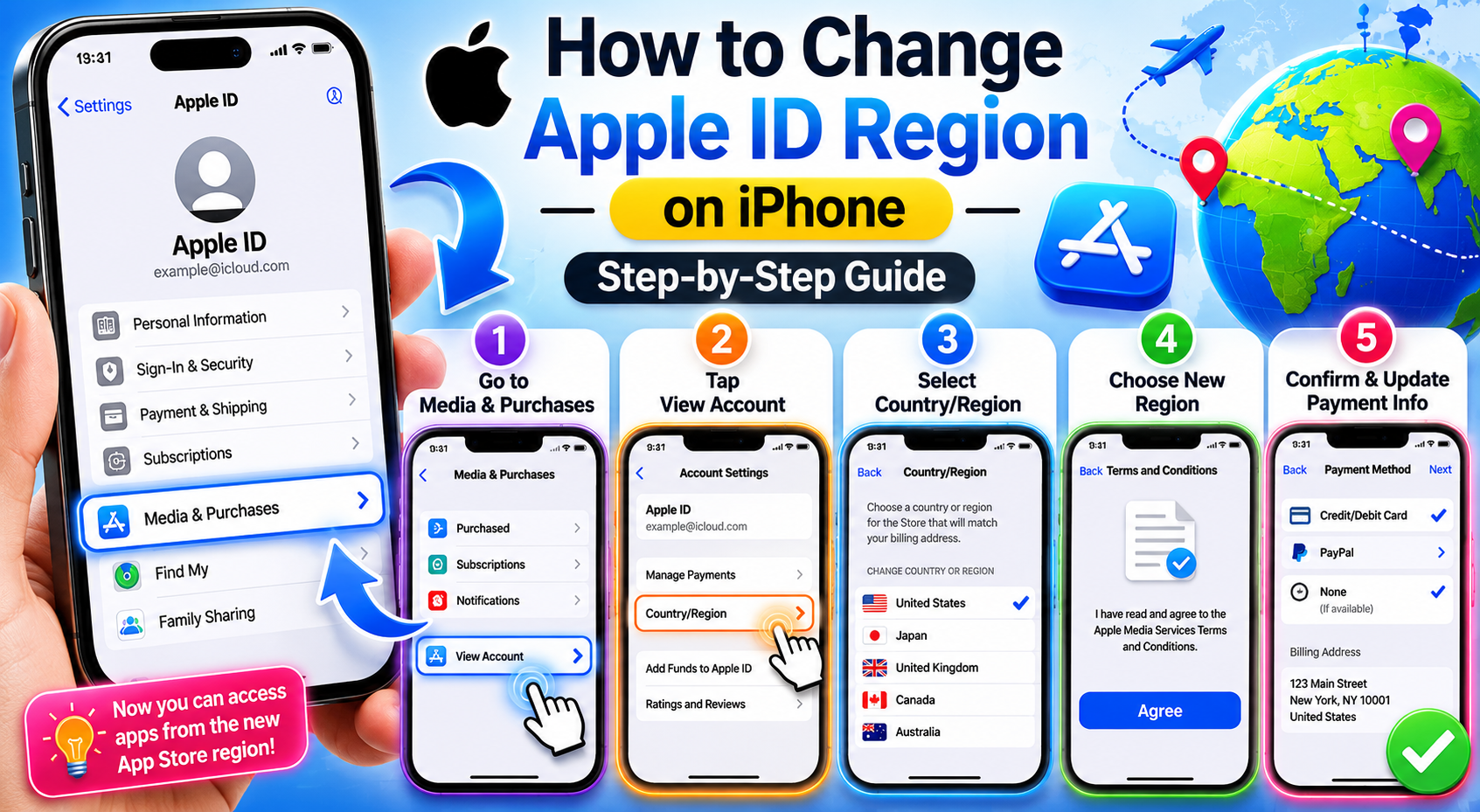
    Step 5: Agree to Apple’s Terms

    Read and accept the Apple Media Services Terms and Conditions for the selected region.

    Step 6: Enter Payment Information

    You may be asked to provide:

    • Payment method
    • Billing address
    • ZIP/postal code
    • Phone number

    If the “None” option appears, you can sometimes skip adding a payment card for free apps.

    Step 7: Complete the Switch

    After verification, your App Store region will update automatically.

    You can now:

    • Open the App Store
    • Search for region-exclusive apps
    • Download foreign App Store content

    How to Switch Between Multiple Apple IDs

    Some users prefer creating a separate foreign Apple ID instead of permanently changing regions.

    This method helps avoid:

    • Subscription conflicts
    • Payment issues
    • App compatibility problems

    Steps to Use Another Apple ID

    1. Open Settings
    2. Tap Media & Purchases
    3. Sign out of the current account
    4. Sign in with another Apple ID from a different region

    This allows quick access to another App Store without changing the primary iCloud account.

    Common Problems and Solutions

    “Cannot Change Region” Error

    Possible causes:

    • Active subscriptions
    • Existing Apple balance
    • Family Sharing membership
    • Pending purchases

    Solution:

    • Cancel subscriptions
    • Spend remaining balance
    • Leave Family Sharing
    • Wait for pending transactions to finish

    Payment Method Rejected

    Some regions require:

    • Local bank cards
    • Region-specific billing addresses

    Possible workaround:

    • Use “None” if available
    • Use gift cards from that region

    Apps Disappear After Switching

    Some apps are restricted by region and may no longer update or appear in your purchase history after changing countries.

    Is Changing Apple ID Region Safe?

    Yes, changing Apple ID regions is officially supported by Apple. However, users should understand the possible effects on:

    • Subscriptions
    • Purchases
    • App availability
    • Payment methods

    Using a secondary foreign Apple ID is often the safest option for users who only need occasional access to another App Store.

    Final Thoughts

    Changing your Apple ID region on an iPhone is a useful way to access international apps, games, and digital services unavailable in your local App Store. Whether you want to explore the US App Store, install Japanese games, or test overseas applications, Apple provides built-in tools for region switching directly in iOS.

    By following the correct steps and understanding the account limitations beforehand, users can safely switch between App Store regions and enjoy a broader range of iPhone apps and content.

    Share. Facebook Twitter Pinterest LinkedIn Tumblr Email

    Related Posts

    What is the best choice: hiring an in-house developer or outsourcing?

    How Drones and Robotics are Streamlining Large-Scale HVAC System Repairs

    Essential Guide to Wood Carving

    Leave A Reply Cancel Reply

    You must be logged in to post a comment.

    voopoopintch
    oxva nexlim 2
    sp2s sen x disposable vape
    • Popular
    • 3D Printer REVIEW
    • XIAOMI
    July 13, 2026

    OXVA Nexlim 2 Mini Pod Vape Hands on Review

    July 13, 2026

    OXVA Nexlim 2 Pod Vape Hands on Review

    June 21, 2026

    iPlay LUMO 8K Review – A Compact Prefilled Pod Kit with Big Flavor and Everyday Convenience

    June 21, 2026

    iPlay HOOLA 150K Review – A Cloud-Chasing Giant with Music, Modes & Massive Longevity

    December 26, 2025

    ACMER ASCARVA 4S: Precision CNC Power for Makers, DIYers & Small Workshops

    June 23, 2024

    ACMER P2 20W Laser Engraver Fixed Focus Engraving: Hands on Review

    May 30, 2024

    xTool F1 Ultra Review: World’s First 20W Fiber & 20W Diode Laser Engraver

    May 30, 2024

    Anycubic Kobra 3 Combo Review: The Multicolor Masterpiece?

    July 25, 2026

    Xiaomi’s Next Flagship Clears Certification: In-House Chip, HyperOS 4, and AI Models Expected to Debut Together

    July 25, 2026

    Xiaomi 18 Pro Series Global Variant Certified: Dual-Screen Flagship Reportedly Set for International Launch

    July 25, 2026

    International version of Xiaomi 18 Pro smartphone Unveiled: Not launching in the Indian market

    July 24, 2026

    Redmi K100 Series International Version Certified: K100 Pro and K100 Pro Max Launching Globally with Snapdragon 8E5 Chip

    fc 26 coins
    New Arrivals
    • Alp Nicotine Pouches Alp Nicotine Pouches
    • American Standard 50K Disposable Kit American Standard 50K Disposable Kit
    • Evol Arc 70K Disposable Kit Evol Arc 70K Disposable Kit
    • Elfbar Elfa Master Luxe Edition Pod System Elfbar Elfa Master Luxe Edition Pod System
    • Bang Legend 5-in-1 120K Disposable Vape Bang Legend 5-in-1 120K Disposable Vape
    • Zumo Ultra Slim 50K Disposable Vape Zumo Ultra Slim 50K Disposable Vape
    • Oppo Reno 17 Pro Oppo Reno 17 Pro
    • Oppo Reno 17 Oppo Reno 17
    • Motorola Moto G Play 2027 Motorola Moto G Play 2027
    About
  • Igeekphone.com provides the first global tech news and reviews about smartphone, vapes, e-cigar, smart home, 3D printers, e-bike,tablets, RC drones, VR headset, and other accessories. It's the best platform to improve your brand and product.
  • Contact us: info@igeekphone.com
  • Check Our Privacy Policy Here.
  • Note: *Right now we have US editor and EU editors for review, especially for Amazon US and EU.
  • *Shop and Compare Price Here*
  • Facebook
  • Youtube
  • *Yahoo Finance is a platform that provides financial news, press releases, market data, and useful tools to help users make informed investment decisions.*

    For inquiries, please contact:
    financeyahoocompany@gmail.com

    OUR BEST VAPE PARTNERS
  • VAPE ONLINE STORE
  • HAYATI PRO MAX PLUS
  • VAPORESSO
  • VOOPOO
  • OXVA
  • NEXA
  • MASKKING
  • SP2S
  • IPLAY
  • TODOO
  • OTHER BEST PARTNERS
  • SVBONY
  • Chuwi
  • Blackview
  • Fossibot
  • Unihertz
  • Flsun
  • Anycubic
  • Xtool
  • Oukitel
  • Mukkpet Ebike
  • Ugreen
  • Copyright © 2026 igeekphone

    Type above and press Enter to search. Press Esc to cancel.