







Facebook Twitter Instagram
    Trending
    • Elf Bar Elfx Mini Review at £6.99-Your Perfect On-the-Go Pod-Effortless Style Meets Signature Flavour
    • Firerose Slidego 40K Disposable Pod Review at £9.99-Endurance Redefined
    • Vivo X200T mobile phone has made its appearance and is expected to represent a Turbo enhanced model
    • Vaporesso XROS 5 Nano Review-Refine the Art of the Vape
    • HiTaste has launched a new tobacco heating device that is compatible with Terea cartridges and supports secondary heating
    • Imperial Tobacco has launched the ZONE nicotine bag in the UK, with concentrations covering the mainstream range of 9 to 12mg
    • The new bagless nicotine pods, NAKD nicotine pods, have been Launched: The innovative “garlic clove-shaped” appearance and structure have attracted attention
    • The Packaging Box of Huawei Mate 80 Pro has been Unveiled: Dual Chips of Kirin 9030 and Kirin 9030 Pro
    Facebook YouTube
    Login Register
    IGeeKphone China Phone, Tablet PC, VR, RC Drone News, Reviews
    • HOME
      • NEWS
        • DeepSeek
        • ChatGPT
        • Minecraft
    • Amazon
    • PHONE
      • Top Phones For Your First Choice
      • Phone Comparison
      • Xiaomi
      • Blackview
      • Unihertz
      • Doogee
      • Black Shark
      • Geekbuying
      • Banggood
      • TEMU
      • TikTok
      • Aliexpress
      • Walmart
      • Newegg
      • MercadoLibre
      • Lazada
    • TOP VAPE Awards for 2025
    • VAPES
      • E-CIGAR Upcoming
      • Vape News
      • Vape Market Trend
      • Vape Deals
      • Expo News
      • Vape Comparison
      • Vape Guide
        • Guide For Beginners
        • Guide for Best Users
      • Giveaway
    • BEST VAPE
      • Best Vape Stores
      • Best Starter Vape Kits
      • Best Vapes for Beginners
      • Best Disposable Vapes
      • Best Pod Systems
      • Best Pod Mod Vapes
      • Best Mods
      • Best Nicotine Pouches
      • Best Clearomizers/Tanks
      • Best E-Liquid
      • Best EGO/Pens
      • Best Vapes for Nic Salt E-Juice
      • Best Vapes to Quit Smoking
      • RDA vs. RDTA vs. RTA
    • Best Vape Brand 2025
      • VAPORESSO
      • VOOPOO
      • OXVA
      • NEXA BAR
      • ORIONBARTECH
      • MASKKING VAPE
      • VEIIK
      • MEMERS
      • SP2S
      • JNR
      • TODOO
      • MRFOG
    • REVIEW
      • E-cigar Review
      • Phones
      • Tablet PC
      • TV Box
      • RC Drone
      • Wearables
      • Camera
      • Accessories
      • VR Headset
    • MORE
      • 3D PRINTER
        • 3D Printer Review
        • Anycubic
        • FLSUN
        • Xtool
        • LONGER
        • Top 3D printer to Choose First
      • TREND
      • CLOTHES
      • AUTO CAR
      • POWER STATION
        • Oukitel
        • FOSSIBOT
      • GAMING
        • Top Gaming Products
      • E-BIKE
        • Samebike
        • Happyrun
        • ENGWE
      • TABLET
        • Chuwi
        • INNOCN
        • Teclast
        • Top Tablet for Your First Choice
        • Tablet/Laptop Comparison
      • WEARABLES
        • OneOdio
        • BlitzWolf
        • Top Smartwatch for First Choice
      • SMART HOME
      • TV BOX
        • Chuwi mini pc
        • Beelink
        • GMKTEC
        • MOREFINE
      • RC DRONE
        • DJI
        • MJX
        • JJRC
        • Hubsan
        • Top RC Drone
      • CAMERA
        • Gopro
        • Insta360
        • Andoer
      • ACCESSORIES
      • VR HEADSET
      • ROM
        • SAMSUNG
        • XIAOMI
        • ASUS
        • MEIZU
        • LENOVO
        • HUAWEI
        • ONEPLUS
        • ZTE
        • UMIDIGI
        • DOOGEE
        • HOMTOM
        • ELEPHONE
        • ULEFONE
        • BLACKVIEW
        • VERNEE
        • LEAGOO
        • CHUWI
        • TECLAST
        • PIPO
        • TV BOX ROM
    • DEAL
    • COUPON
    • Shop
    IGeeKphone China Phone, Tablet PC, VR, RC Drone News, Reviews
    You are at:Home»Guide»How to Save More Memory Space from Your Phone?
    Guide

    How to Save More Memory Space from Your Phone?

    Brady CottonBy Brady CottonMay 30, 2023
    Facebook Twitter Pinterest LinkedIn Tumblr Email

    Do you often find that no matter how expensive our mobile phone is, after a period of time ah, often remind us that the memory space is insufficient, and the slower the use of the more card, that today we will share with you the correct garbage cleaning method, as long as we open the mobile phone inside the automatic garbage cleaning switch, the mobile phone will automatically help us identify garbage files, And automatic cleaning, and after 14 days, will be the garbage thoroughly used to clean, so, we don’t worry about the problem of insufficient memory, but many friends ah did not find, after all, this function is hidden very deep, then igeekphone will give you to share the method, you can like the collection and pay attention to, You can find it quickly when you need it later.
    First of all, we find the mobile phone manager on the phone and open it. After opening it, we can clean up the garbage here, uninstall the software, delete the installation package and so on. But in addition to these general operations, we have to click the gear icon in the upper right corner, and then open the Settings page. Here, we first turn on the intelligent maintenance switch, so that we can automatically obtain the latest application feature data from the cloud to ensure a good application use experience. Second, we need to turn on the automatic garbage file cleaning switch, so that the system will automatically identify the garbage files on the phone, and after 14 days, it will delete them for a long time. Therefore, As long as we turn on these two switches, we won’t have to clean up the garbage every day. Once the garbage is generated by the mobile phone, it will automatically recognize and clean up, so we don’t have to worry about forgetting to clean up the garbage!
    Second, in addition to the automatic cleaning of mobile phone garbage, many friends will also put some useless photos, videos and files on the mobile phone are also removed, so it can also play the role of releasing mobile phone space, but we found no, most of the time, although we delete these files, but the mobile phone space did not increase, how is this?
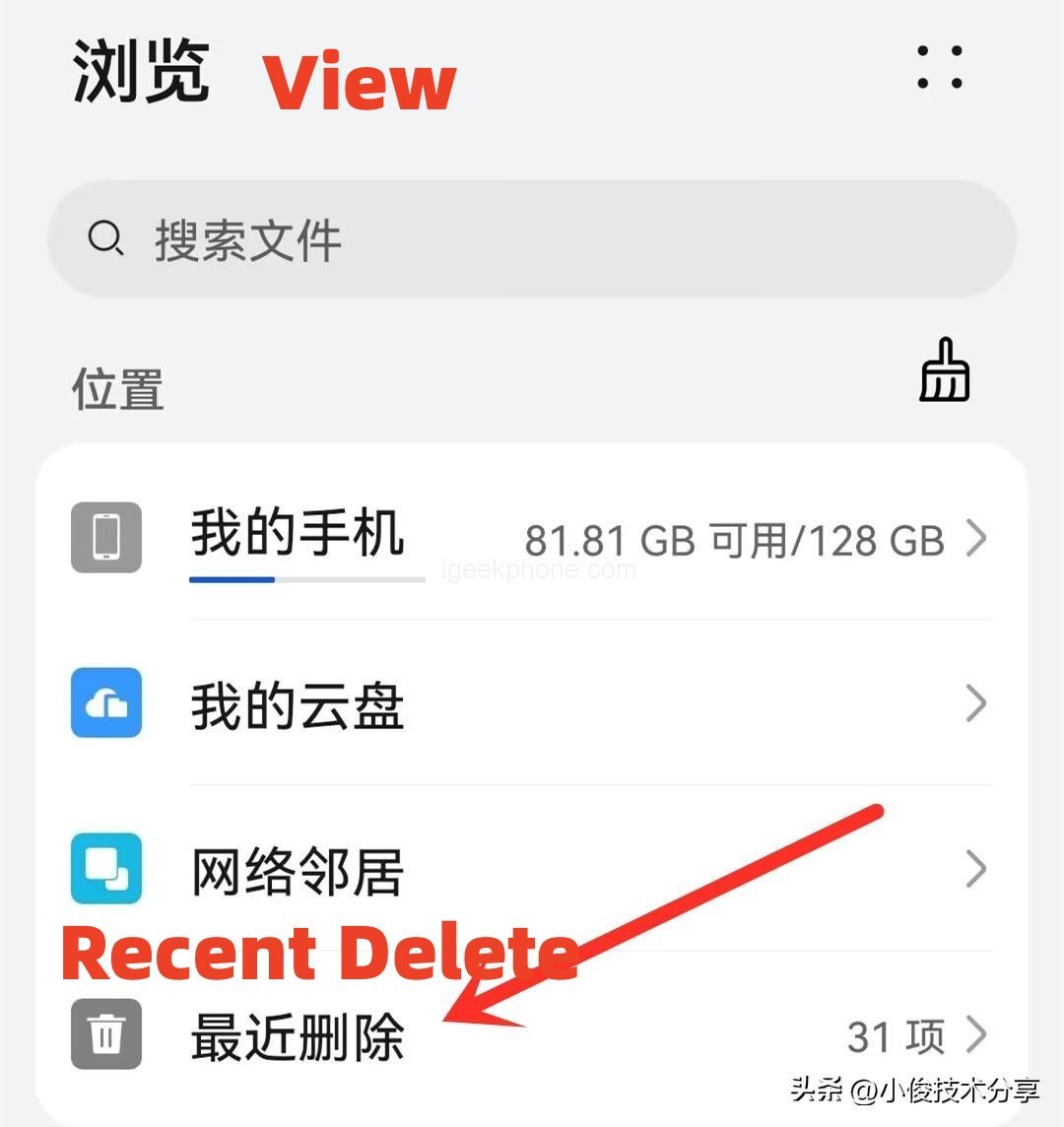
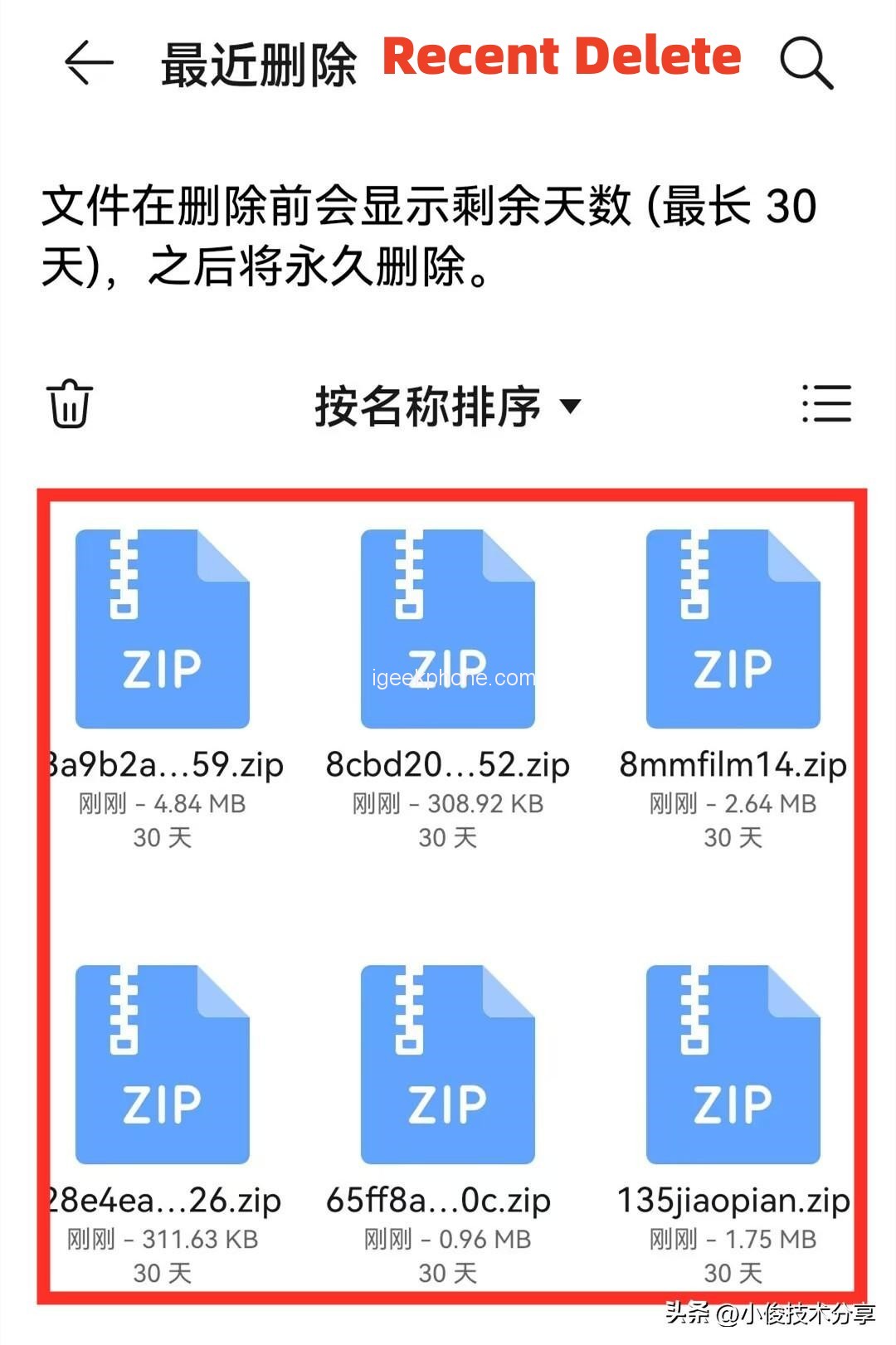
    In fact, the main reason is that after we delete these files, the mobile phone does not directly delete these files, but saved in a transfer station in the mobile phone, some mobile phones called recycle bin, some mobile phones called recently deleted, in fact, it is the same, here are saved files we deleted, and the storage time is 30 days. This means that if we didn’t do manual cleaning, then the files would have to wait 30 days before they could be automatically cleaned in order to free up space on the phone. So here’s the problem. After we deleted the files, the space didn’t increase. So we need to delete all the files here in time, so that we can really free up space on the phone!


    Of course, there is another advantage of this transfer station, that is, if we find that we have deleted files or photos by mistake, we can quickly restore them back as long as we open this recycle bin, and this effective duration is only 30 days, so once we find that photos have been deleted by mistake, we should click “Restore” here in time to retrieve the deleted photos!

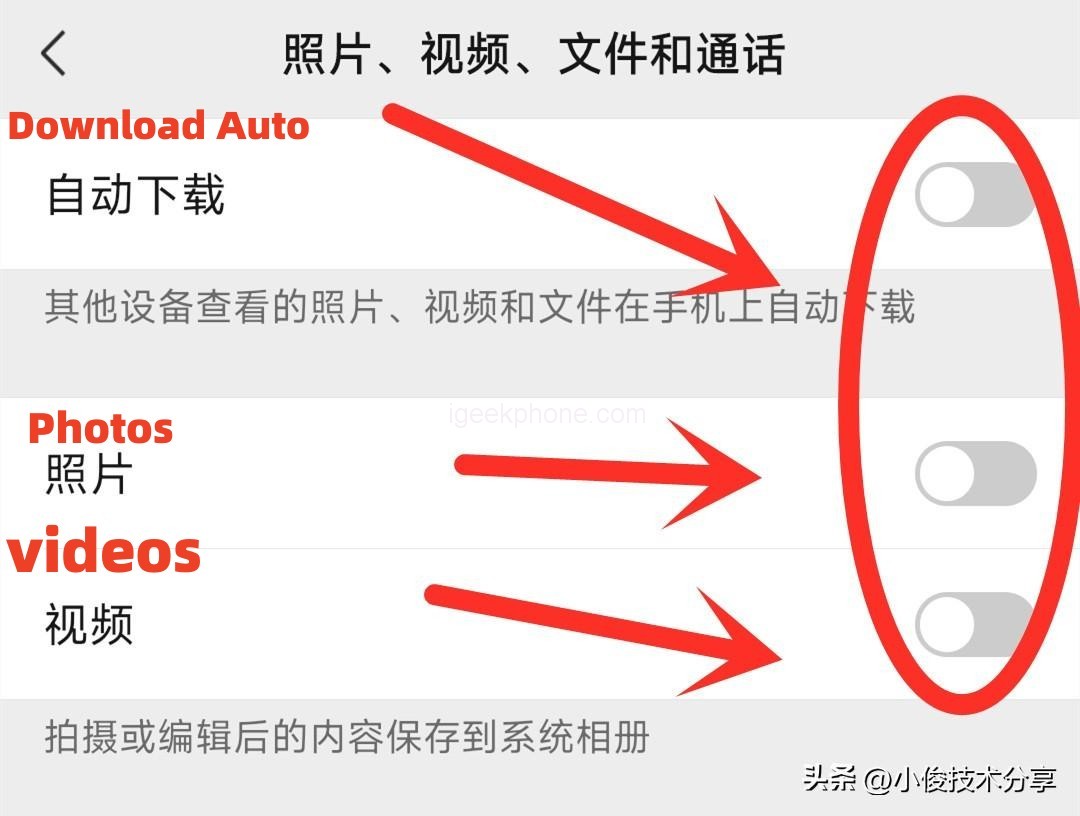
    The third we need to clean up a few Settings inside wechat, otherwise we in the circle of friends or chat with friends, have seen the photos, videos and files and so on it will automatically download and save to the phone above, in this way, over time will cause the phone memory shortage, so we need to turn them off!

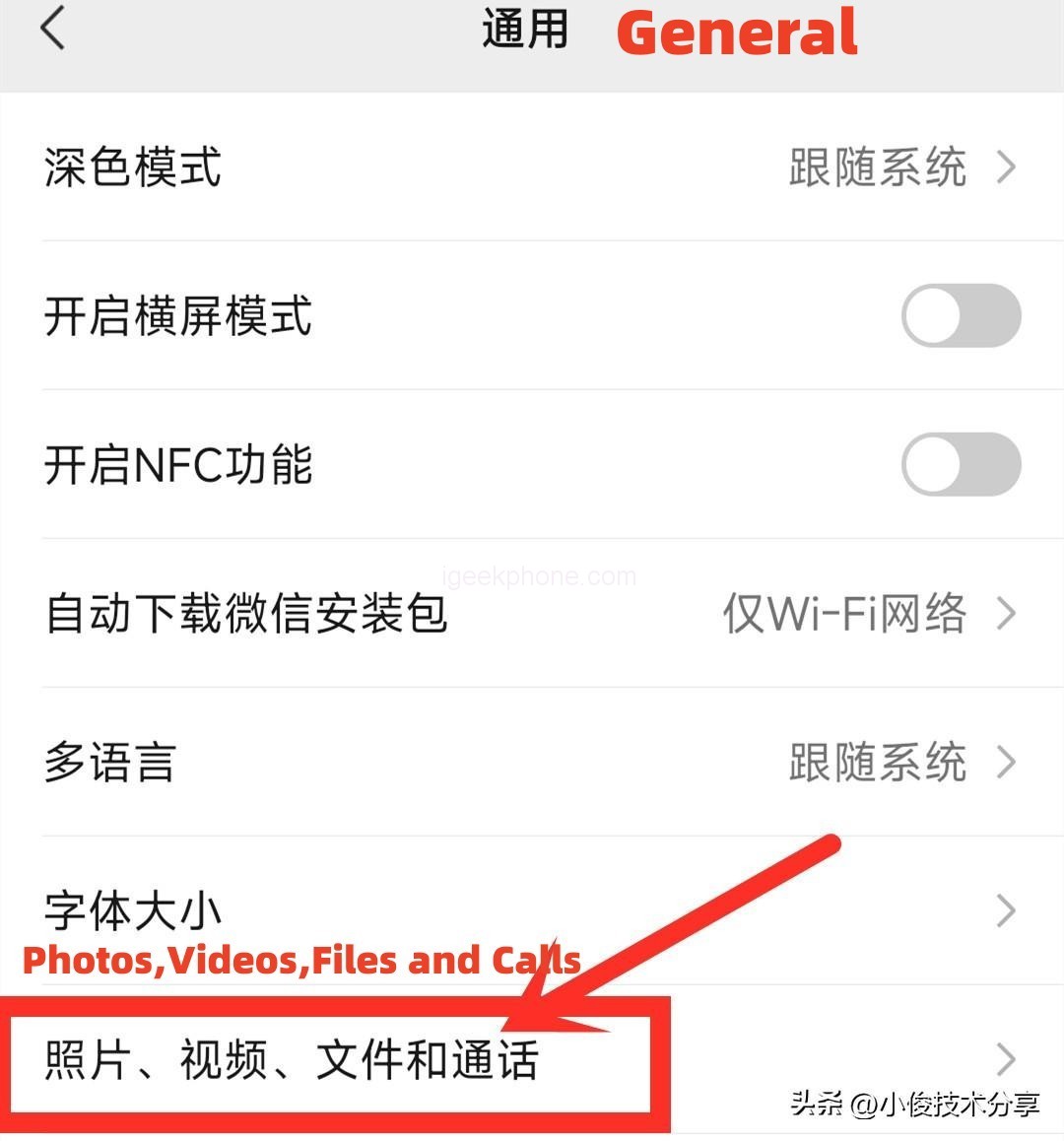
    We open wechat, then find wechat Settings, and then click on General, in general Settings, open the Settings of photos, video files and calls, and turn off the three switches of automatic download, photos and videos. After that, the pictures and videos we have seen in moments and edited in moments, It will not be stored in our mobile phone, thus taking up space on the phone!

    Well, the above is Xiaojun to share how to correctly and thoroughly clean up the mobile phone garbage method, through the 3 Settings, the mobile phone will not appear insufficient space, the more use of the more card, I hope to help you, you learn, you can also share forward to your family and friends, so that you can help more people, let more people know, thank you.

    Share. Facebook Twitter Pinterest LinkedIn Tumblr Email

    Related Posts

    Vivo X200T mobile phone has made its appearance and is expected to represent a Turbo enhanced model

    The Packaging Box of Huawei Mate 80 Pro has been Unveiled: Dual Chips of Kirin 9030 and Kirin 9030 Pro

    Huawei Mate X7 is Equipped with a Brand-New Foldable Xuanwu Architecture

    Leave A Reply Cancel Reply

    You must be logged in to post a comment.

    voopoo drag s3
    oxva xlim go 2
    sp2s ocean disposable vape
    jnr 100k
    • Popular
    • 3D Printer REVIEW
    • XIAOMI
    November 1, 2025

    Voopoo Drag S3: Big Battery, Smart Tech, Pod-Kit Power for Every Day (Review)

    October 26, 2025

    Vaporesso Armour Ultra: The 5500 mAh Rugged Powerhouse That Refuses to Quit (Review)

    October 26, 2025

    NEXA FLEX 40K Hands On Review: The Rechargeable Disposable That Delivers Power, Customization & Longevity

    October 19, 2025

    Vaporesso XROS Pro 2: Big Battery, Light Body, Serious Flavor – The Pod Kit That Holds All Day (Review)

    June 23, 2024

    ACMER P2 20W Laser Engraver Fixed Focus Engraving: Hands on Review

    May 30, 2024

    xTool F1 Ultra Review: World’s First 20W Fiber & 20W Diode Laser Engraver

    May 30, 2024

    Anycubic Kobra 3 Combo Review: The Multicolor Masterpiece?

    May 15, 2024

    SCULPFUN SF-A9 40W Laser Engraver Cutting Machine: Hands On Review

    November 18, 2025

    Xiaomi MIIIW Wireless Keyboard and Mouse Set Flash Sale at $32.99-Deliver Minimalist Performance

    November 13, 2025

    The Third Batch of Official Versions of Xiaomi Hyper OS 3 has been Released

    November 10, 2025

    The Imaging System of Xiaomi 17 Ultra has been Released: a Super Large Sensor Main Camera

    November 6, 2025

    The Entire Series of Xiaomi 17 Ultra Phones have Network Access and Support 100W Flash Charging, UWB, etc

    fc 26 coins
    New Arrivals
    • Vaporesso XROS 5 Nano Pod System Kit Vaporesso XROS 5 Nano Pod System Kit
    • Samsung Galaxy Z TriFold Samsung Galaxy Z TriFold
    • SMOK Arco S1 Pod System Kit SMOK Arco S1 Pod System Kit
    • Hyper Bar BE 70K Disposable Vape Hyper Bar BE 70K Disposable Vape
    • RAZ RX50K Dew Edition Disposable Vape RAZ RX50K Dew Edition Disposable Vape
    • Nexa N30000 Disposable Vape Kit Nexa N30000 Disposable Vape Kit
    • MASKKING Extre 100k Disposable Vape MASKKING Extre 100k Disposable Vape
    • Yocan Iris Wax Vaporizer Yocan Iris Wax Vaporizer
    • Vaporesso Eco Nano Plus Pod System Kit Vaporesso Eco Nano Plus Pod System Kit
    About
  • Igeekphone.com provides the first global tech news and reviews about smartphone, vapes, e-cigar, smart home, 3D printers, e-bike,tablets, RC drones, VR headset, and other accessories. It's the best platform to improve your brand and product.
  • Contact us: info@igeekphone.com
  • Check Our Privacy Policy Here.
  • Note: *Right now we have US editor and EU editors for review, especially for Amazon US and EU.
  • *Shop and Compare Price Here*
  • Facebook
  • Youtube
  • OUR BEST VAPE PARTNERS
  • VAPE ONLINE STORE
  • HAYATI PRO MAX PLUS
  • VAPORESSO
  • VOOPOO
  • OXVA
  • NEXA
  • MASKKING
  • LOSTVAPE ORIONBAR
  • VEIIK
  • MEMERS
  • TODOO
  • SP2S
  • JNR
  • OTHER BEST PARTNERS
  • SVBONY
  • Chuwi
  • Blackview
  • Fossibot
  • Unihertz
  • Flsun
  • Anycubic
  • Xtool
  • Oukitel
  • Mukkpet Ebike
  • Ugreen
  • Copyright © 2025 igeekphone

    Type above and press Enter to search. Press Esc to cancel.