







Facebook Twitter Instagram
    Trending
    • Burmester R6 AI Smart Headset at $15.49: The Perfect Blend of Performance, Comfort, and Innovation
    • M7 Tri-Mode Hollow Gaming Mouse at $20.99: The Ultimate Gaming Companion for Precision and Style
    • 1.44-Inch Screen Digital Voice Recorder at $39.99: The Ultimate Tool for Clear, High-Quality Recordings
    • Zeblaze Q01 AI Sports Camera: Revolutionizing the Way You Capture Adventure
    • SP2S Ocean vs Friobar IC18K: Comparison Review
    • The Impact of Pusoy Dos on Improving Strategic Mindset
    • Prototype of Vivo X300 Max smartphone has been revealed: It is expected to feature Dimensity 9500 chip, a 6.78-inch screen and a 7000mAh battery
    • Vivo Y37+ mobile phone has been listed on the official website: featuring a 6000mAh battery, a MediaTek 6300 processor, 8GB + 256GB storage, and priced at 1599 yuan.
    Facebook YouTube
    Login Register
    IGeeKphone China Phone, Tablet PC, VR, RC Drone News, Reviews
    • HOME
      • NEWS
        • DeepSeek
        • ChatGPT
        • Minecraft
    • Amazon
    • PHONE
      • Top Phones For Your First Choice
      • Phone Comparison
      • Xiaomi
      • Blackview
      • Doogee
      • Black Shark
      • Geekbuying
      • Banggood
      • TEMU
      • TikTok
      • Aliexpress
      • Walmart
      • MercadoLibre
      • Lazada
    • TOP VAPE Awards for 2026
    • VAPES
      • E-CIGAR Upcoming
      • Vape News
      • Vape Deals
      • Vape Comparison
      • Vape Guide
      • Giveaway
    • BEST VAPE
      • Best Vape Stores
      • Best Starter Vape Kits
      • Best Vapes for Beginners
      • Best Disposable Vapes
      • Best Pod Systems
      • Best Pod Mod Vapes
      • Best Mods
      • Best Nicotine Pouches
      • Best Clearomizers/Tanks
      • Best E-Liquid
      • Best EGO/Pens
      • Best Vapes for Nic Salt E-Juice
      • Best Vapes to Quit Smoking
      • RDA vs. RDTA vs. RTA
    • Best Vape Brand 2026
      • VAPORESSO
      • VOOPOO
      • OXVA
      • NEXA BAR
      • ORIONBARTECH
      • MASKKING VAPE
      • MEMERS
      • SP2S
      • JNR
      • TODOO
      • MRFOG
      • VEIIK
    • REVIEW
      • E-cigar Review
      • Phones
      • Tablet PC
      • TV Box
      • RC Drone
      • Wearables
      • Camera
      • Accessories
      • VR Headset
    • MORE
      • TABLET
        • Chuwi
        • INNOCN
        • Teclast
        • Top Tablet for Your First Choice
        • Tablet/Laptop Comparison
      • RC DRONE
      • CAMERA
      • WEARABLES
        • OneOdio
        • BlitzWolf
        • Top Smartwatch for First Choice
      • 3D PRINTER
        • 3D Printer Review
        • Anycubic
        • FLSUN
        • Xtool
        • LONGER
        • Top 3D printer to Choose First
      • POWER STATION
        • Oukitel
        • FOSSIBOT
      • GAMING
        • Top Gaming Products
      • E-BIKE
        • Samebike
        • Happyrun
        • ENGWE
      • SMART HOME
      • TV BOX
      • ACCESSORIES
      • VR HEADSET
      • CLOTHES
      • AUTO CAR
    • DEAL
    • VAPE LAWS
    • Shop
    IGeeKphone China Phone, Tablet PC, VR, RC Drone News, Reviews
    You are at:Home»Guide»How to Set up Apple iPhone ringtone? iPhone14 custom ringtone Tutorial
    Guide

    How to Set up Apple iPhone ringtone? iPhone14 custom ringtone Tutorial

    Brady CottonBy Brady CottonFebruary 23, 2023
    Facebook Twitter Pinterest LinkedIn Tumblr Email

    Do you want a personalized ringtone when you get your iPhone14, iPhone14 Pro, etc.?

    But go to [Settings] – [Sound & Feel] – [Ringtone] on the iPhone14 and find all the ringtones that come with Apple, only to find that the ones that come with Apple are too monotonous?
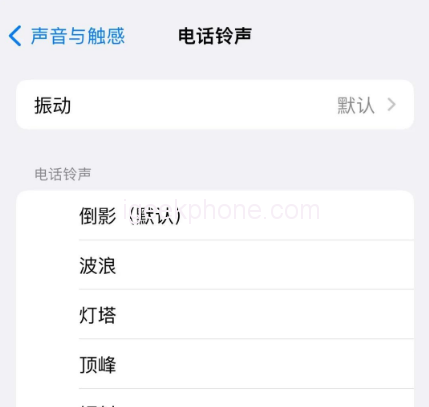
    Want a custom ringtone for your iPhone14?

    iPhone14 ringtone custom operation tutorial is coming, Apple fans hurry to collect it!

    Do not need to use iTunes operation, complete directly on the iPhone14 mobile phone, less than 1 minute, successfully add and change a new ringtone.

    Custom ringtone Settings with the help of APP
    First of all, need to download and install on iPhone14 “ringtone” class App (such as cool dog ringtone), of course, can also be in accordance with their own needs, choose to download other “ringtone” App. The operation is basically the same.

    Second, there’s Apple’s official Library Band App. “Library Band” is Apple’s own APP, and can be searched and installed in the App Store.
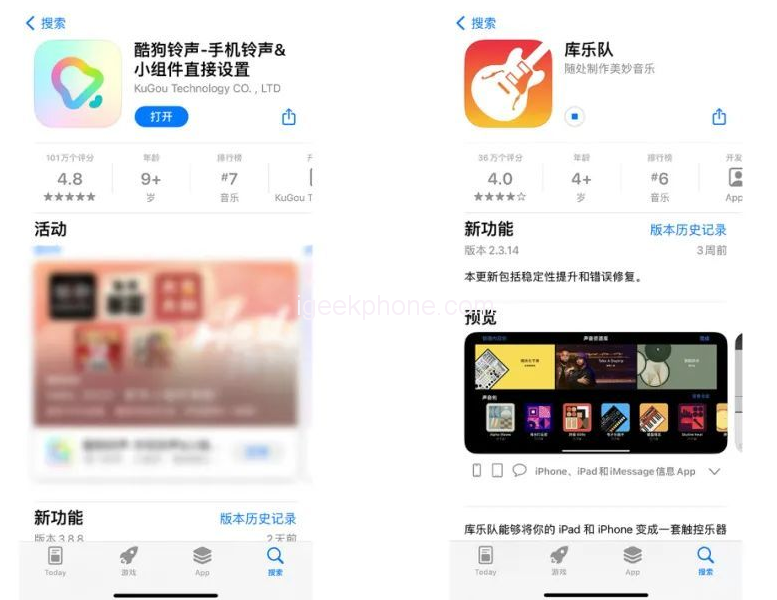
    Let’s focus on Apple’s two limitations on custom ringtone Settings:

    1. The duration of the customized ringtone cannot exceed 30 seconds, and the ringtone must be in.m4r format.

    2. Custom ringtones must be imported into the built-in ringtone library of iPhone before use, that is, the reason to library band APP.

    iPhone14 custom ringtone operation details
    This article takes “Cool dog ringtone” App as an example, iPhone14 custom ringtone operation is as follows:

    Step 1: Open the Kougou ringtone App, select a favorite music ringtone in the APP, click “Set Ringtone”, note that some ringtones may be charged, select some free ringtones.
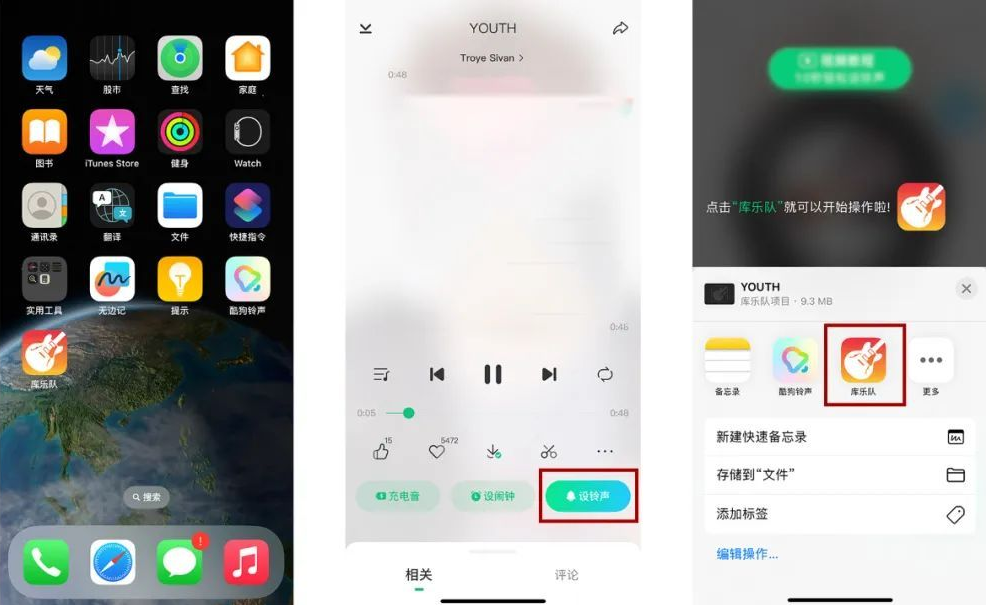
    Click “Set Ringtone” below the ringtone, click “Library Band” in the pop-up option box, and then the ringtone will be turned on in the library band.

    Step 2: When using the library band for the first time, follow the prompts to set up some basic Settings. When the Settings are complete, the function Settings page will be displayed. Then click “Return to My Music” in the top left corner.
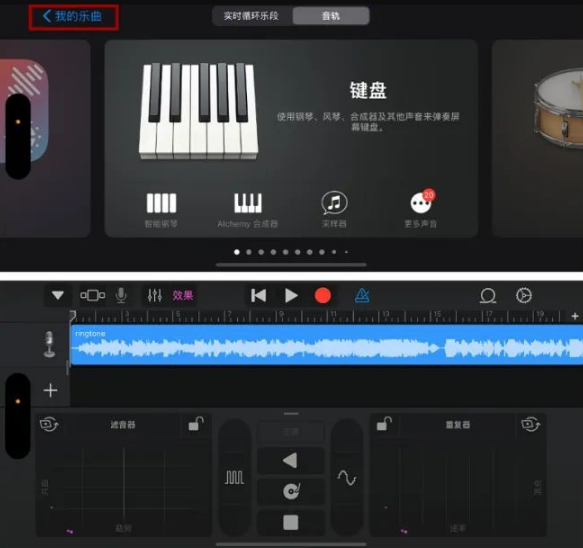
    Because the iPhone ring tone can only be less than 30 seconds, you can click the ring tone first, and here you can cut the ring tone, choose your favorite clip, and adjust other effects.

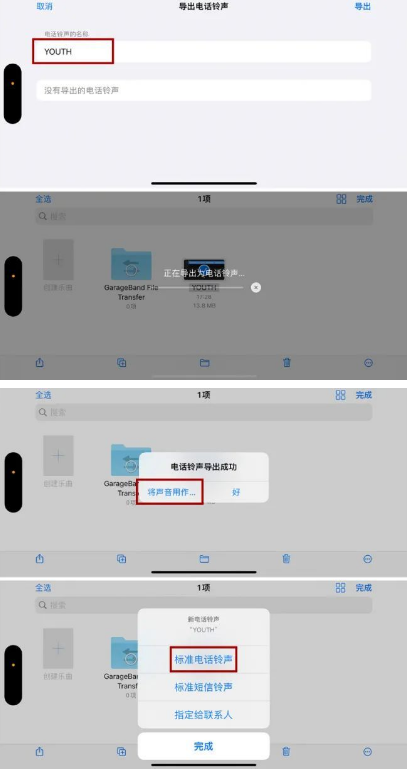
    Step 3: After tailoring the ringtone, open the “Browse” page, click the three-point circle in the upper right corner of the page, click “Select”, and select the ringtone to be set.

    Then click the share icon and click “Ring tone”. There will be a prompt box indicating that the ring tone can only be set for 30 seconds. Click “Continue”. Then we can name the ringtone.

    Step 4: After the name is finished, click Export in the upper right corner to proceed to the next step. In the dialog box indicating that the ringtone is successfully exported, click “Use sound as…”. , you can quickly set the ring tone to Standard, or assign the ring tone to a contact.

    The ringtone is now set for the iPhone14.

    You can also return to [Ring tone] in [Settings] to check, and the customized ringtone will be synchronized here. You can switch to it directly during daily Settings.

    Now, is the ringtone of the iPhone14 series cool? With such a detailed tutorial on customizing ringtones, you can’t get started!
    Share. Facebook Twitter Pinterest LinkedIn Tumblr Email

    Related Posts

    Prototype of Vivo X300 Max smartphone has been revealed: It is expected to feature Dimensity 9500 chip, a 6.78-inch screen and a 7000mAh battery

    Vivo Y37+ mobile phone has been listed on the official website: featuring a 6000mAh battery, a MediaTek 6300 processor, 8GB + 256GB storage, and priced at 1599 yuan.

    Expert Appliance Repair Services for McKinney Families

    Leave A Reply Cancel Reply

    You must be logged in to post a comment.

    voopoo drag 6
    oxva xlim 3 ultra
    sp2s sen x disposable vape
    jnr 100k
    • Popular
    • 3D Printer REVIEW
    • XIAOMI
    March 5, 2026

    OXVA XLIM PRO 3 vs XLIM Pro 2 DNA: Hands-On Review

    March 5, 2026

    OXVA XLIM PRO 3 vs XLIM GO 2: Hands-On Review

    March 2, 2026

    OXVA XLIM PRO 3 vs XLIM 3 ULTRA: Hands-On Review

    February 23, 2026

    Voopoo DRAG S3 vs DRAG X3 Review – Which One Fits Your Vaping Lifestyle?

    December 26, 2025

    ACMER ASCARVA 4S: Precision CNC Power for Makers, DIYers & Small Workshops

    June 23, 2024

    ACMER P2 20W Laser Engraver Fixed Focus Engraving: Hands on Review

    May 30, 2024

    xTool F1 Ultra Review: World’s First 20W Fiber & 20W Diode Laser Engraver

    May 30, 2024

    Anycubic Kobra 3 Combo Review: The Multicolor Masterpiece?

    March 3, 2026

    Starting from 7,999 yuan, Leica Announces that Leica Version of Xiaomi 17 Ultra in Black and Silver will be Available on Official Channels

    March 3, 2026

    Xiaomi Releases the second phase recruitment announcement for the ‘Hyper OS 3 Beta’: ends at 0:00 on March 6th

    February 26, 2026

    Xiaomi 17 Ultra mobile phone has received the upgrade to Hyper OS 3.0.15.0

    February 24, 2026

    Xiaomi 17T Series Phones have been Registered: Equipped with MediaTek 8/9 Flagship Platform and Featuring Leica Imaging Technology

    fc 26 coins
    New Arrivals
    • Airmez Lux 60K Disposable Vape Airmez Lux 60K Disposable Vape
    • YOVO JB50K Nixodine Disposable Vape Kit YOVO JB50K Nixodine Disposable Vape Kit
    • Kangvape Sommar Bar 50K Disposable Vape Kangvape Sommar Bar 50K Disposable Vape
    • Lost Mary MT35000 Turbo Nixodine Edition Lost Mary MT35000 Turbo Nixodine Edition
    • Luffbar Cue 60K Disposable Vape Luffbar Cue 60K Disposable Vape
    • Upends UP9 50K Disposable Pod Upends UP9 50K Disposable Pod
    • Gold Bar Max 50K Nixodine Disposable Vape Gold Bar Max 50K Nixodine Disposable Vape
    • Geek Bar Clio X 50K Disposable Vape Kit Geek Bar Clio X 50K Disposable Vape Kit
    • Navabar Zero Nicotine 55K Disposable Vape Navabar Zero Nicotine 55K Disposable Vape
    About
  • Igeekphone.com provides the first global tech news and reviews about smartphone, vapes, e-cigar, smart home, 3D printers, e-bike,tablets, RC drones, VR headset, and other accessories. It's the best platform to improve your brand and product.
  • Contact us: info@igeekphone.com
  • Check Our Privacy Policy Here.
  • Note: *Right now we have US editor and EU editors for review, especially for Amazon US and EU.
  • *Shop and Compare Price Here*
  • Facebook
  • Youtube
  • OUR BEST VAPE PARTNERS
  • VAPE ONLINE STORE
  • HAYATI PRO MAX PLUS
  • VAPORESSO
  • VOOPOO
  • OXVA
  • NEXA
  • MASKKING
  • LOSTVAPE ORIONBAR
  • MEMERS
  • TODOO
  • SP2S
  • JNR
  • VEIIK
  • OTHER BEST PARTNERS
  • SVBONY
  • Chuwi
  • Blackview
  • Fossibot
  • Unihertz
  • Flsun
  • Anycubic
  • Xtool
  • Oukitel
  • Mukkpet Ebike
  • Ugreen
  • Copyright © 2026 igeekphone

    Type above and press Enter to search. Press Esc to cancel.