







Facebook Twitter Instagram
    Trending
    • How to Turn Off Location Services Permissions for Apps on iPhone
    • Vape Nicotine Levels Explained: How Much Nicotine Is in a Vape?
    • OPPO F35 Pro Could Feature a 10000mAh Battery With Three New Colors
    • Xiaomi Mi Watch S5 41mm Launches This Month With 14-Day Battery Life
    • iQOO 16 Launch Date Confirmed for September 29 With 2K 165Hz Display
    • Xiaomi 18 Pro Series Launch Confirmed for September With Major Upgrades
    • Lenovo Googlebook 15 Specs: 120Hz OLED, Core Ultra 5 325 and 32GB RAM
    • DOJO PUREX 60K Introduces Blast Edition: Five New Flavors for the World’s First INSTA-JUICED™ Vape
    Facebook YouTube
    IGeeKphone China Phone, Tablet PC, VR, RC Drone News, Reviews
    • HOME
    • BREAKING NEWS
      • AI NEWS
    • Amazon
    • PHONE
      • Top Phones For Your First Choice
      • Phone Comparison
      • Xiaomi
      • Blackview
      • Doogee
      • Black Shark
      • Geekbuying
      • Banggood
      • TEMU
      • TikTok
      • Aliexpress
      • Walmart
      • MercadoLibre
      • Lazada
    • TOP VAPE Awards for 2026
    • VAPES
      • E-CIGAR Upcoming
      • Vape News
      • Vape Deals
      • Vape Comparison
      • Vape Guide
      • VAPE LAWS
      • Giveaway
    • BEST VAPE
      • Best Vape Stores
      • Best Starter Vape Kits
      • Best Vapes for Beginners
      • Best Disposable Vapes
      • Best Pod Systems
      • Best Pod Mod Vapes
      • Best Mods
      • Best Nicotine Pouches
      • Best Clearomizers/Tanks
      • Best E-Liquid
      • Best EGO/Pens
      • Best Vapes for Nic Salt E-Juice
      • Best Vapes to Quit Smoking
      • RDA vs. RDTA vs. RTA
    • Best Vape Brand 2026
      • VAPORESSO
      • VOOPOO
      • OXVA
      • NEXA BAR
      • MASKKING VAPE
      • SP2S
      • IPLAY
      • TODOO
      • MRFOG
      • LOSTVAPE
      • VEIIK
    • REVIEW
      • E-cigar Review
      • Phones
      • Tablet PC
      • TV Box
      • RC Drone
      • Wearables
      • Camera
      • Accessories
      • VR Headset
    • MORE
      • TABLET
        • Chuwi
        • INNOCN
        • Teclast
        • Top Tablet for Your First Choice
        • Tablet/Laptop Comparison
      • RC DRONE
      • CAMERA
      • WEARABLES
        • OneOdio
        • BlitzWolf
        • Top Smartwatch for First Choice
      • 3D PRINTER
        • 3D Printer Review
        • Anycubic
        • FLSUN
        • Xtool
        • LONGER
        • Top 3D printer to Choose First
      • POWER STATION
        • Oukitel
        • FOSSIBOT
      • GAMING
        • Top Gaming Products
      • E-BIKE
        • Samebike
        • Happyrun
        • ENGWE
      • SMART HOME
      • TV BOX
      • ACCESSORIES
      • VR HEADSET
      • CLOTHES
      • AUTO CAR
    • DEAL
    • Shop
    IGeeKphone China Phone, Tablet PC, VR, RC Drone News, Reviews
    You are at:Home»Guide»How to Solve iPhone Running out of Memory?
    Guide

    How to Solve iPhone Running out of Memory?

    Brady CottonBy Brady CottonMay 16, 2023
    Facebook Twitter Pinterest LinkedIn Tumblr Email

    Is your iPhone Running out of memory? Three small methods, system data can be easily cleaned.

    Due to the permission Settings of Apple iPhone, normal users are unable to access the system files, so the iPhone memory cleaning has become a big problem, not like Android users generally open file management to clean cache files, so many 64GB, 128GB users joke most is to be reminded every day that the memory is not enough.
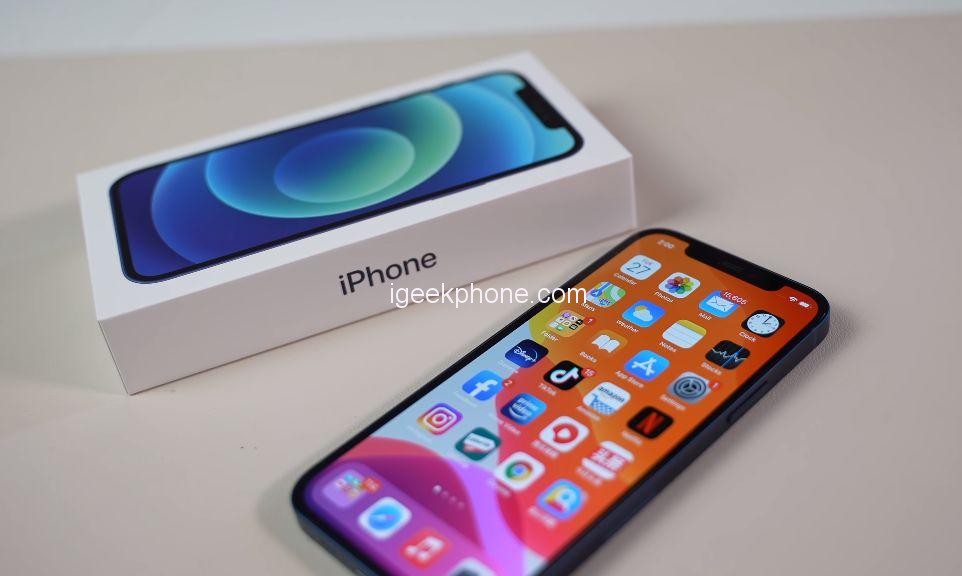
    However, the mobile phone files, software and so on seem to be very important, delete which is not convenient, in the face of this situation we should solve?

    The unique sandbox mechanism of the iPhone prevents users from directly accessing the system files of each software, which can ensure the security of users’ data, but it does bring some inconvenience.

    Not enough to worry about, in fact, iPhone users also have three ways to maximize the use of memory, including some software cache files can also be effectively cleaned, if you have this memory trouble may wish to take a look.

    1. Clear cached files by software

    Although the iPhone does not support clearing cache files directly from system files with one click, each software has developed a cache clearing function for the IOS system, such as our commonly used social software, entertainment software, audio software and so on can be cleared in this way. Especially social software, with daily use, all kinds of videos, pictures, files and so on have taken up a large amount of space on the phone. You can directly delete the unimportant ones.

    2. Clear system cache by uninstalling the software

    A very strange problem, obviously a software download only a few hundred MB, over a period of time to use several gigabytes of memory, and can not be reduced by software cleaning the cache. In this case, a large number of system data cache files are generated in the continuous upgrade process. This part of data can be cleared by uninstalling and then installing it back. Although it is a little more troublesome, it can effectively clear the space.
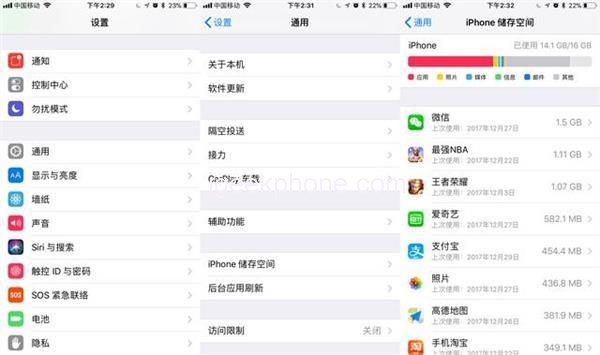
    It should be noted that social software with important data should not be cleaned up in this way, which is easy to cause data loss.

    3. Use iCloud wisely

    Apple users know that every Apple account comes with a free 5GB of iCloud cloud space, which is handy if you use Apple devices a lot, especially when it comes to syncing between devices. Of course, this part of space only rely on the free 5GB is obviously not enough, if the usual photo demand is relatively large, you can spend a small amount of money to pay for a larger space, photos can be uploaded to iCloud flexibly, albums can also be directly seen, want to share and send is also convenient, much better than the cloud disk.
    In a word, in this era, memory has become a very important factor to buy a machine, memory shortage of mobile phone use is not only very annoying, but also easy to cause mobile phone lag flash back, so it is recommended that you start a new machine, as far as possible to choose a large memory version.

    Share. Facebook Twitter Pinterest LinkedIn Tumblr Email

    Related Posts

    How to Turn Off Location Services Permissions for Apps on iPhone

    OPPO F35 Pro Could Feature a 10000mAh Battery With Three New Colors

    Xiaomi Mi Watch S5 41mm Launches This Month With 14-Day Battery Life

    Leave A Reply Cancel Reply

    You must be logged in to post a comment.

    voopoopintch
    oxva nexlim 2
    shopify
    • Popular
    • 3D Printer REVIEW
    • XIAOMI
    July 13, 2026

    OXVA Nexlim 2 Mini Pod Vape Hands on Review

    July 13, 2026

    OXVA Nexlim 2 Pod Vape Hands on Review

    June 21, 2026

    iPlay LUMO 8K Review – A Compact Prefilled Pod Kit with Big Flavor and Everyday Convenience

    June 21, 2026

    iPlay HOOLA 150K Review – A Cloud-Chasing Giant with Music, Modes & Massive Longevity

    December 26, 2025

    ACMER ASCARVA 4S: Precision CNC Power for Makers, DIYers & Small Workshops

    June 23, 2024

    ACMER P2 20W Laser Engraver Fixed Focus Engraving: Hands on Review

    May 30, 2024

    xTool F1 Ultra Review: World’s First 20W Fiber & 20W Diode Laser Engraver

    May 30, 2024

    Anycubic Kobra 3 Combo Review: The Multicolor Masterpiece?

    September 15, 2026

    Xiaomi Mi Watch S5 41mm Launches This Month With 14-Day Battery Life

    September 15, 2026

    Xiaomi 18 Pro Series Launch Confirmed for September With Major Upgrades

    September 14, 2026

    Xiaomi Smart Door Lock 5 Max Starts Pre-Sale at 3,699 Yuan With AI and UWB Unlocking

    September 14, 2026

    Mijia Mop and Vacuum Robot 7 Max Uses AI to Recognize Dirt and Adjust Cleaning Automatically

    fc 26 coins
    New Arrivals
    • iPhone 18 Pro iPhone 18 Pro
    • Apple iPhone 18 Pro Max Apple iPhone 18 Pro Max
    • Apple iPhone Fold Apple iPhone Fold
    • WASPE 10-in-1 Quinton 500K Disposable Vape WASPE 10-in-1 Quinton 500K Disposable Vape
    • Google Pixel 11 Pro Fold Google Pixel 11 Pro Fold
    • Google Pixel 11 Pro XL Google Pixel 11 Pro XL
    • EVO Switch Pro 50K Disposable Vape EVO Switch Pro 50K Disposable Vape
    • Lost Mary MT35000 Turbo Disposable Vape Lost Mary MT35000 Turbo Disposable Vape
    • Lost Vape Centaurus M120 S Vape Mod Kit Lost Vape Centaurus M120 S Vape Mod Kit
    About
  • Igeekphone.com provides the first global tech news and reviews about smartphone, vapes, e-cigar, smart home, 3D printers, e-bike,tablets, RC drones, VR headset, and other accessories. It's the best platform to improve your brand and product.
  • Contact us: info@igeekphone.com
  • Check Our Privacy Policy Here.
  • Note: *Right now we have US editor and EU editors for review, especially for Amazon US and EU.
  • *Shop and Compare Price Here*
  • Facebook
  • Youtube
  • OUR BEST VAPE PARTNERS
  • VAPE ONLINE STORE
  • VAPORESSO
  • VOOPOO
  • OXVA
  • NEXA
  • MASKKING
  • SP2S
  • IPLAY
  • TODOO
  • OTHER BEST PARTNERS
  • SVBONY
  • Chuwi
  • Blackview
  • Fossibot
  • Unihertz
  • Flsun
  • Anycubic
  • Xtool
  • Oukitel
  • Mukkpet Ebike
  • Ugreen
  • Copyright © 2026 igeekphone

    Type above and press Enter to search. Press Esc to cancel.