










Losing an iPhone can be stressful, whether it slipped between couch cushions, was left at a café, or was stolen while traveling. Fortunately, Apple has built several powerful security features into iOS that make it easier to locate a missing device, protect your personal data, and increase the chances of recovery.
In this guide, we’ll explain the best ways to track a lost iPhone and what to do if you can’t get it back immediately.
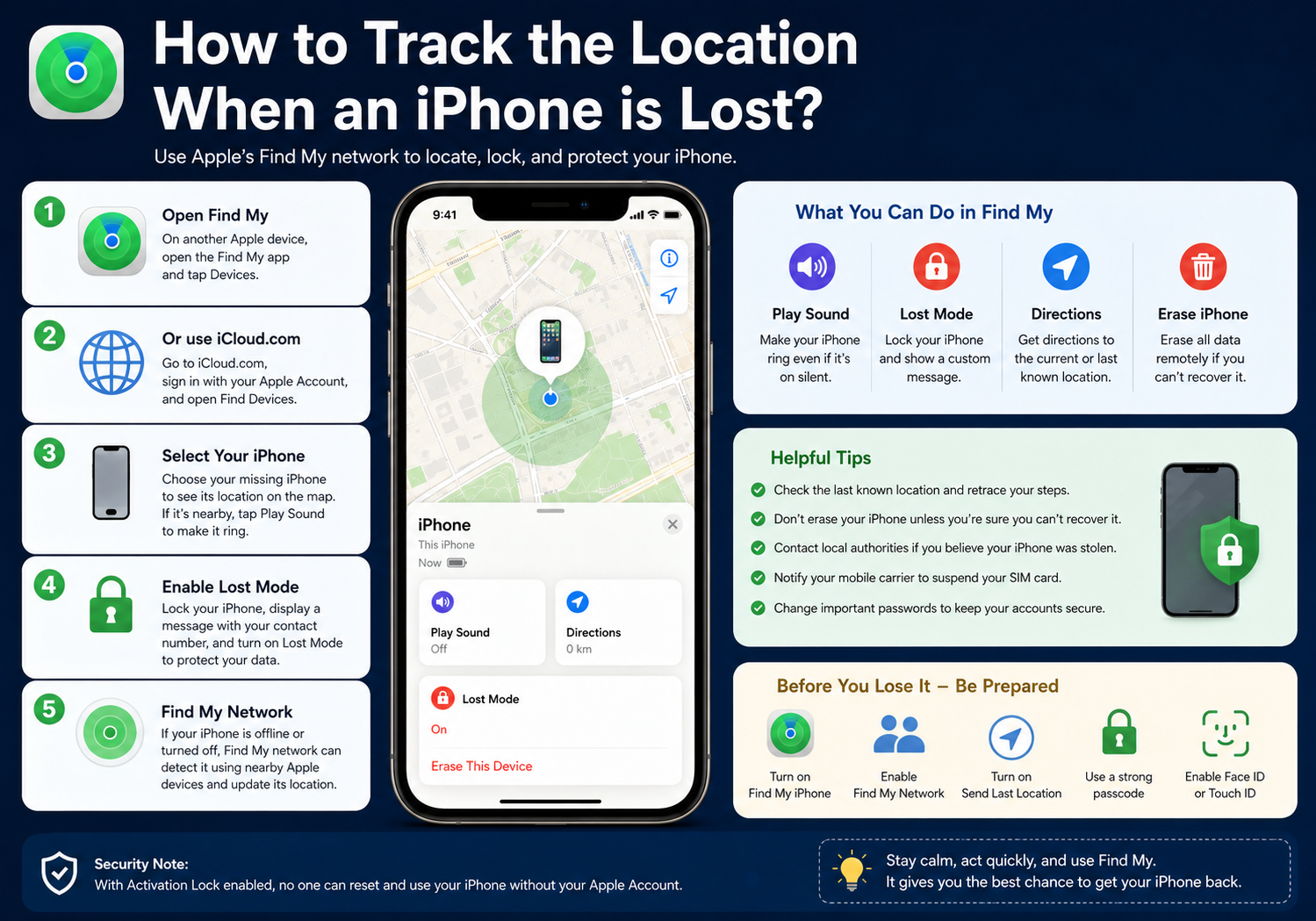
1. Use Apple’s Find My App
The quickest and most effective way to locate a lost iPhone is through Apple’s Find My service.
On Another Apple Device
If you own another Apple device:
- Open the Find My app.
- Tap the Devices tab.
- Select your missing iPhone.
- View its current or last known location on the map.
If the phone is nearby, you can tap Play Sound to make it ring—even if it’s in Silent Mode.
2. Find Your iPhone from Any Web Browser
Don’t have another Apple device? You can still locate your iPhone online.
- Visit iCloud.com in any web browser.
- Sign in with your Apple Account.
- Open Find Devices (or Find My, depending on the interface).
- Select your missing iPhone.
You’ll see:
- Current location (if online)
- Last known location (if offline)
- Battery level
- Available actions
3. Enable Lost Mode Immediately
If your iPhone isn’t nearby, activate Lost Mode.
Lost Mode will:
- Lock your iPhone remotely.
- Disable Apple Pay.
- Display a custom message and contact number on the Lock Screen.
- Continue reporting its location whenever it reconnects to a network.
This protects your personal information while allowing someone who finds your phone to contact you.
4. Use Apple’s Find My Network
Even if your iPhone is offline or turned off, you may still be able to locate it.
Apple’s Find My network uses millions of nearby Apple devices to securely detect and anonymously report the location of compatible lost devices.
This feature works on most recent iPhone models and can often locate a device long after it has lost internet connectivity.
5. Check the Last Known Location
If your iPhone battery has died, Find My may still display its final recorded location.
Think about where you were at that time:
- Home
- Office
- School
- Restaurant
- Public transport
- Hotel
- Shopping mall
Many lost phones are recovered simply by retracing recent locations.
6. If You Think Your iPhone Was Stolen
If theft is suspected:
- Do not confront anyone yourself.
- Leave Lost Mode enabled.
- Contact your local police if appropriate.
- Provide the serial number or IMEI if requested.
- Continue monitoring Find My for updated locations.
Never attempt to recover a stolen phone alone if doing so could put your safety at risk.
7. Mark the Device as Lost Without Erasing It
Avoid erasing the iPhone immediately unless you’re certain it cannot be recovered.
Why?
Once erased:
- Location tracking may stop.
- Find My may no longer be able to report its position.
- Recovery becomes much more difficult.
Keep the device in Lost Mode while waiting for updated location information.
8. Erase Your iPhone Remotely (Only as a Last Resort)
If recovery appears impossible and sensitive data is at risk:
- Open Find My.
- Select the lost iPhone.
- Choose Erase This Device.
- Confirm the action.
Remote erasure deletes your personal information, helping prevent unauthorized access.
9. Notify Your Mobile Carrier
If your iPhone cannot be recovered, contact your mobile carrier to:
- Suspend your SIM card.
- Prevent unauthorized calls or data usage.
- Request a replacement SIM if necessary.
Many carriers can also block the device from being used on their network.
10. Change Important Passwords
If your iPhone contained sensitive information, update passwords for important accounts, including:
- Apple Account
- Email accounts
- Banking apps
- Social media
- Password manager
- Work accounts
While Lost Mode offers strong protection, changing passwords adds another layer of security.
Tips to Improve Your Chances Before You Lose Your iPhone
Taking a few preventive steps can make a big difference if your iPhone ever goes missing.
- Keep Find My iPhone enabled.
- Turn on the Find My network.
- Enable Send Last Location so the phone automatically reports its location when the battery is low.
- Use a strong device passcode.
- Enable Face ID or Touch ID.
- Keep your Apple Account recovery information up to date.
Can Someone Turn Off Find My?
With Activation Lock enabled, someone cannot simply reset and use your iPhone without your Apple Account credentials.
Modern iPhones also make it difficult to disable Find My because doing so requires authentication through your Apple Account.
This significantly reduces the resale value of stolen devices and helps discourage theft.
Frequently Asked Questions
Can I find my iPhone if it’s turned off?
Yes. Many recent iPhone models can continue participating in Apple’s Find My network for a period after being powered off, allowing their location to be reported by nearby Apple devices.
Can I track my iPhone if it has no internet connection?
Yes. If Find My network is enabled, nearby Apple devices may anonymously detect your iPhone and securely relay its location.
Can someone access my personal data if they find my iPhone?
If your iPhone is protected with a passcode and you enable Lost Mode, your personal information remains well protected.
Can I track an iPhone using only its phone number?
No. Apple does not allow iPhones to be tracked using only a phone number. The official and secure method is through Find My, using the Apple Account associated with the device.
Final Thoughts
Losing an iPhone doesn’t necessarily mean it’s gone forever. Apple’s Find My ecosystem provides one of the most advanced device recovery systems available, allowing you to locate your phone, play a sound, lock it remotely, display contact information, and even erase it if necessary.
The key is to act quickly: enable Lost Mode, monitor the device’s location, and avoid erasing it until you’re confident it cannot be recovered. By preparing in advance and using Apple’s built-in security features, you can greatly improve the chances of getting your iPhone back while keeping your personal information safe.