







Facebook Twitter Instagram
    Trending
    • Global REDMI Note 17 Pro Max Spotted on Geekbench with Snapdragon 6 Gen 5 and 9,210mAh Battery Rumors
    • OnePlus 16 Rumored to Feature Snapdragon 8 Elite Gen6 Pro Chip and N79 5G Support
    • REDMI K100 Pro Max “Blazing Blue” Edition Revealed Ahead of August 11 Launch with Snapdragon 8 Elite Gen5 and 185Hz Display
    • Xiaomi Mijia Launches Its First Standalone Ice Maker, Producing Ice in Just 6 Minutes
    • Xiaomi Mijia Fog-Free Humidifier 3 Launches with 1500mL/h Humidification Capacity and Smart Home Features
    • iQOO Neo11 Supreme Edition Colors Revealed Ahead of August 18 Launch, Featuring 2K Display and 9,100mAh Battery
    • ATTACK SHARK X87ULTRA Mechanical Keyboard Review: Dual 8K Wireless Gaming Keyboard with 10000mAh Battery and RGB Display
    • XKJ KY105 WiFi FPV RC Drone Review: Foldable Brushless Quadcopter with HD Dual Camera and Optical Flow Positioning
    Facebook YouTube
    IGeeKphone China Phone, Tablet PC, VR, RC Drone News, Reviews
    • HOME
    • BREAKING NEWS
      • AI NEWS
    • Amazon
    • PHONE
      • Top Phones For Your First Choice
      • Phone Comparison
      • Xiaomi
      • Blackview
      • Doogee
      • Black Shark
      • Geekbuying
      • Banggood
      • TEMU
      • TikTok
      • Aliexpress
      • Walmart
      • MercadoLibre
      • Lazada
    • TOP VAPE Awards for 2026
    • VAPES
      • E-CIGAR Upcoming
      • Vape News
      • Vape Deals
      • Vape Comparison
      • Vape Guide
      • VAPE LAWS
      • Giveaway
    • BEST VAPE
      • Best Vape Stores
      • Best Starter Vape Kits
      • Best Vapes for Beginners
      • Best Disposable Vapes
      • Best Pod Systems
      • Best Pod Mod Vapes
      • Best Mods
      • Best Nicotine Pouches
      • Best Clearomizers/Tanks
      • Best E-Liquid
      • Best EGO/Pens
      • Best Vapes for Nic Salt E-Juice
      • Best Vapes to Quit Smoking
      • RDA vs. RDTA vs. RTA
    • Best Vape Brand 2026
      • VAPORESSO
      • VOOPOO
      • OXVA
      • NEXA BAR
      • MASKKING VAPE
      • SP2S
      • IPLAY
      • TODOO
      • MRFOG
      • LOSTVAPE
      • VEIIK
    • REVIEW
      • E-cigar Review
      • Phones
      • Tablet PC
      • TV Box
      • RC Drone
      • Wearables
      • Camera
      • Accessories
      • VR Headset
    • MORE
      • TABLET
        • Chuwi
        • INNOCN
        • Teclast
        • Top Tablet for Your First Choice
        • Tablet/Laptop Comparison
      • RC DRONE
      • CAMERA
      • WEARABLES
        • OneOdio
        • BlitzWolf
        • Top Smartwatch for First Choice
      • 3D PRINTER
        • 3D Printer Review
        • Anycubic
        • FLSUN
        • Xtool
        • LONGER
        • Top 3D printer to Choose First
      • POWER STATION
        • Oukitel
        • FOSSIBOT
      • GAMING
        • Top Gaming Products
      • E-BIKE
        • Samebike
        • Happyrun
        • ENGWE
      • SMART HOME
      • TV BOX
      • ACCESSORIES
      • VR HEADSET
      • CLOTHES
      • AUTO CAR
    • DEAL
    • Shop
    IGeeKphone China Phone, Tablet PC, VR, RC Drone News, Reviews
    You are at:Home»Guide»How to Uninstall the App on the Phone Completely
    Guide

    How to Uninstall the App on the Phone Completely

    Brady CottonBy Brady CottonMay 22, 2023
    Facebook Twitter Pinterest LinkedIn Tumblr Email

    Many friends have installed a lot of apps on their mobile phones. When they don’t need to use them, the uninstallation method is wrong. The following is to teach you the correct way to uninstall the mobile App, thoroughly clean up the data, free up a lot of space.

    Android unloading method

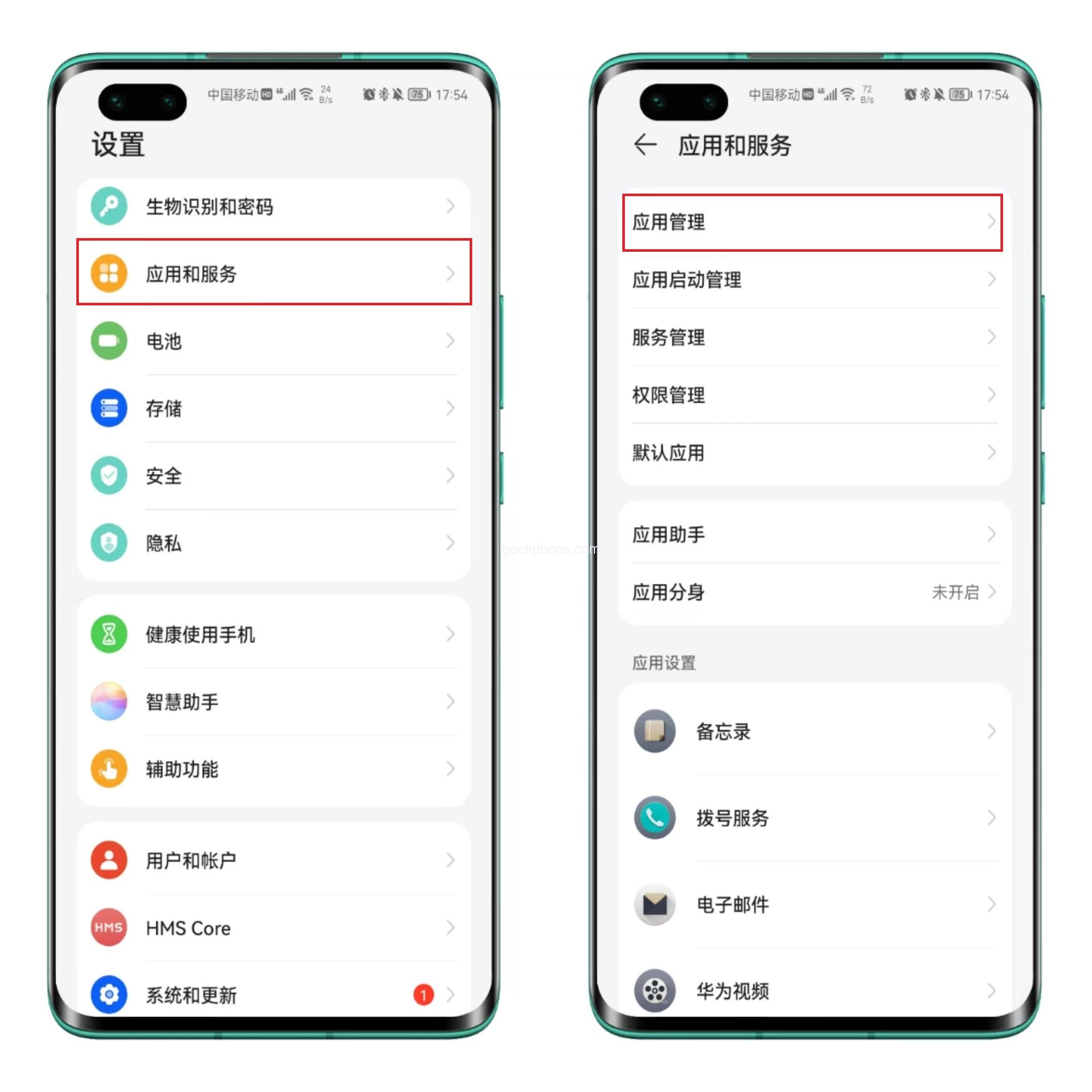
    1. Although many different kinds of android phones, but the unloading process is basically the same. First open [Settings] of the phone, find [Apps and services], enter [App Management].
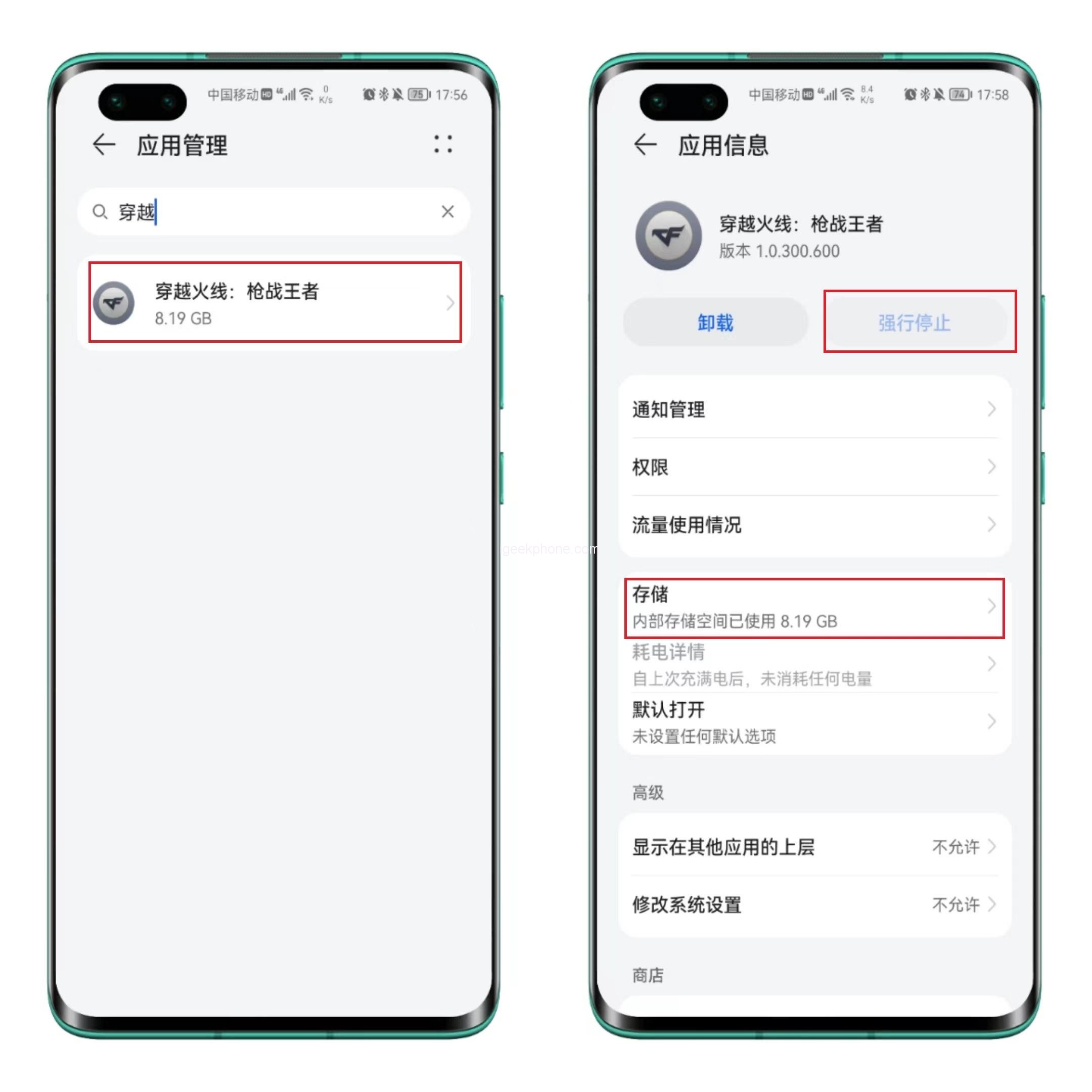
    2. Then we find the application we want to uninstall, check the application information, do not uninstall directly, this is not clean delete. First click on the “forced to stop”, to prevent the app continues to generate cache.
    3. Click “Save” again, and you will see the occupied space. The volume of this software is 2.39GB, and the cache is 5.80GB, so click “Delete data” first.
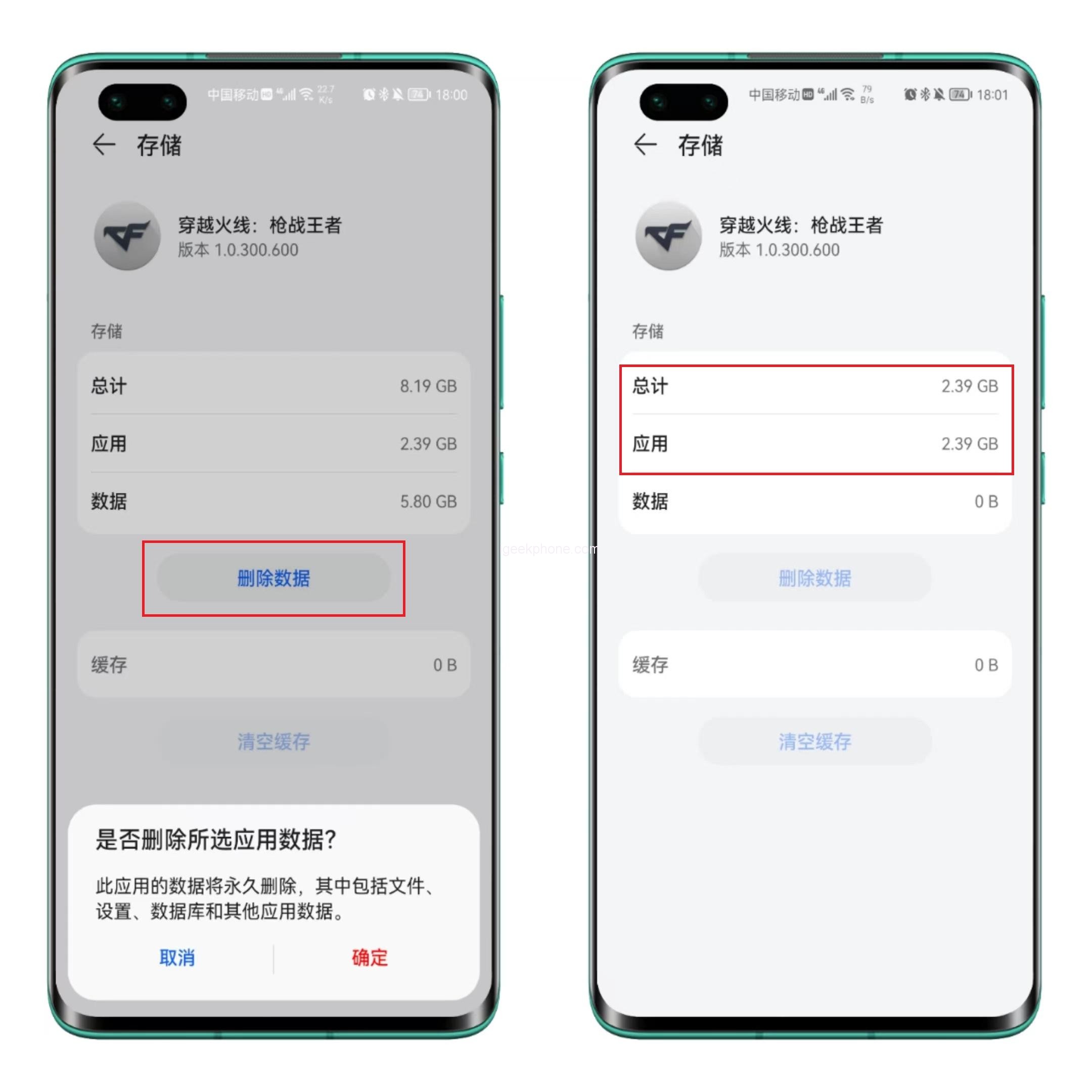
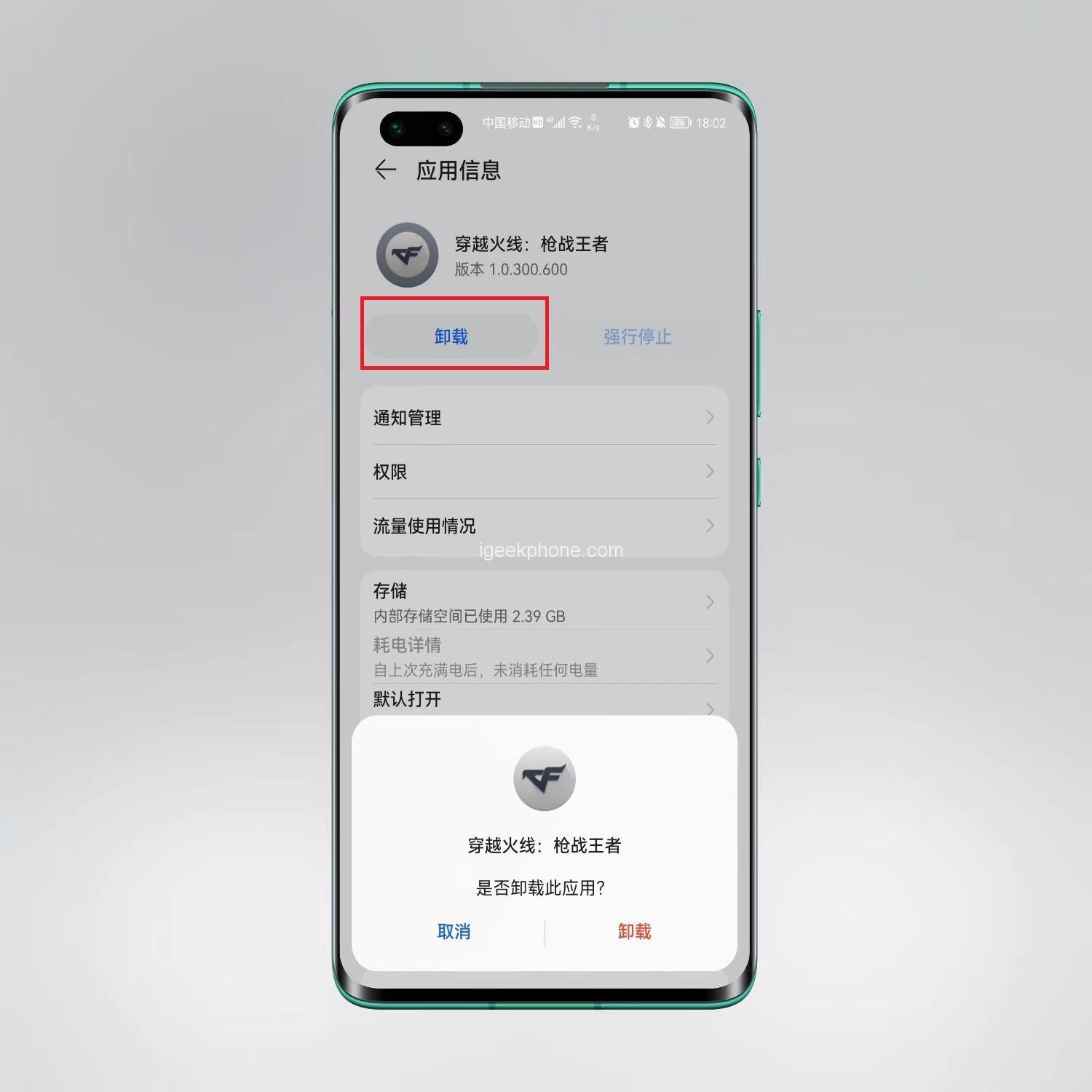
    4. After the data delete, just left this App occupied volume, return to a layer, this time you can feel free to click “uninstall” button, clean up the App.
    Apple uninstall method

    1. How to uninstall iPhone? Directly press and hold the App icon on the desktop, then the menu bar will be displayed. Click Remove App. At this time, be careful not to remove the App from the screen, but to delete the app completely.
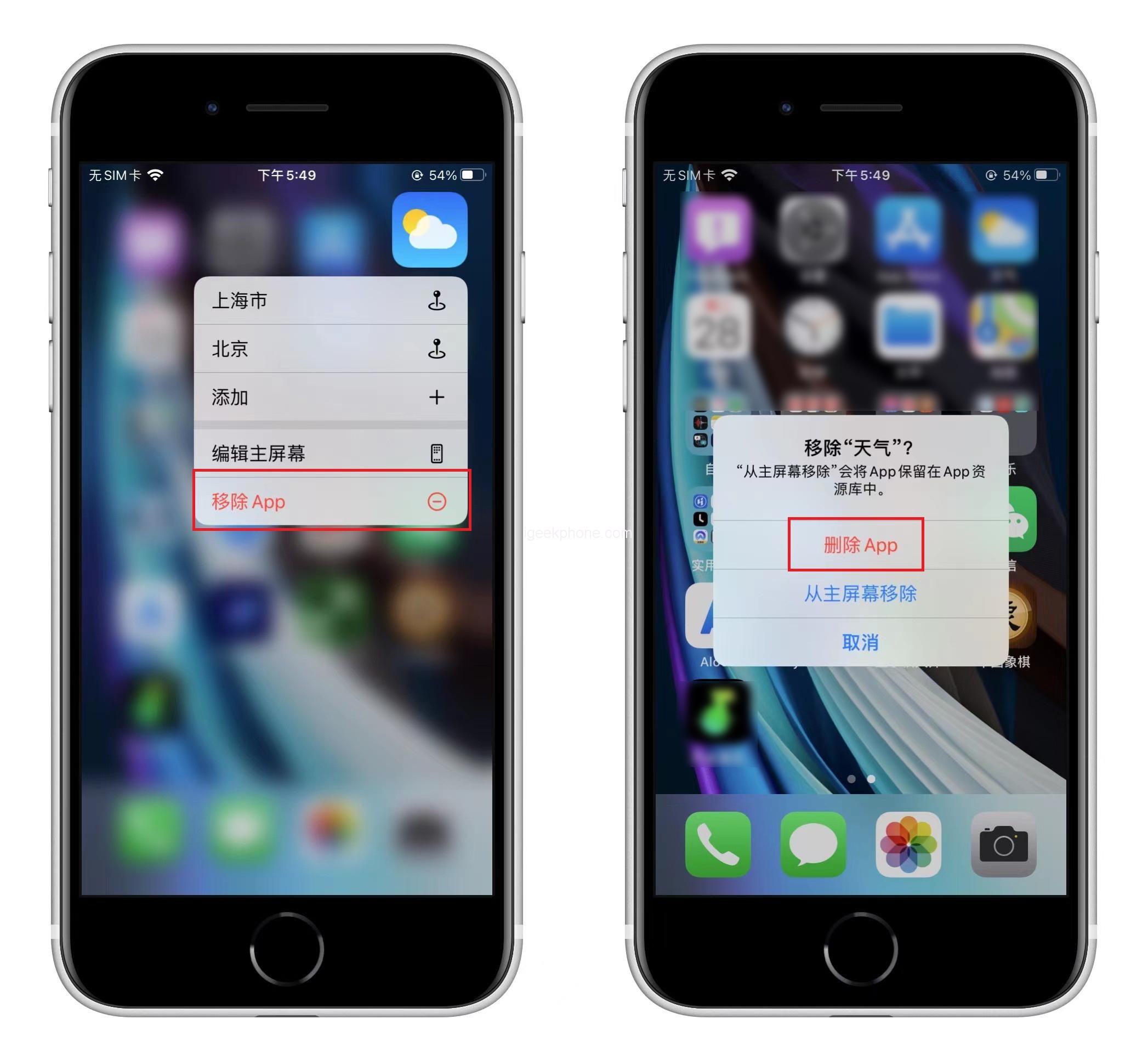
    2. If you are worried that this uninstallation is not clean, you can also open [Settings] – [General] – [iPhone Storage Space], find the corresponding App, select [Delete App], then the relevant data will be cleaned.

    This is the correct way to uninstall the App on the phone, completely cleaning up the data and freeing up a lot of space.

    Share. Facebook Twitter Pinterest LinkedIn Tumblr Email

    Related Posts

    Global REDMI Note 17 Pro Max Spotted on Geekbench with Snapdragon 6 Gen 5 and 9,210mAh Battery Rumors

    OnePlus 16 Rumored to Feature Snapdragon 8 Elite Gen6 Pro Chip and N79 5G Support

    REDMI K100 Pro Max “Blazing Blue” Edition Revealed Ahead of August 11 Launch with Snapdragon 8 Elite Gen5 and 185Hz Display

    Leave A Reply Cancel Reply

    You must be logged in to post a comment.

    voopoopintch
    oxva nexlim 2
    sp2s sen x disposable vape
    • Popular
    • 3D Printer REVIEW
    • XIAOMI
    July 13, 2026

    OXVA Nexlim 2 Mini Pod Vape Hands on Review

    July 13, 2026

    OXVA Nexlim 2 Pod Vape Hands on Review

    June 21, 2026

    iPlay LUMO 8K Review – A Compact Prefilled Pod Kit with Big Flavor and Everyday Convenience

    June 21, 2026

    iPlay HOOLA 150K Review – A Cloud-Chasing Giant with Music, Modes & Massive Longevity

    December 26, 2025

    ACMER ASCARVA 4S: Precision CNC Power for Makers, DIYers & Small Workshops

    June 23, 2024

    ACMER P2 20W Laser Engraver Fixed Focus Engraving: Hands on Review

    May 30, 2024

    xTool F1 Ultra Review: World’s First 20W Fiber & 20W Diode Laser Engraver

    May 30, 2024

    Anycubic Kobra 3 Combo Review: The Multicolor Masterpiece?

    August 10, 2026

    Global REDMI Note 17 Pro Max Spotted on Geekbench with Snapdragon 6 Gen 5 and 9,210mAh Battery Rumors

    August 10, 2026

    REDMI K100 Pro Max “Blazing Blue” Edition Revealed Ahead of August 11 Launch with Snapdragon 8 Elite Gen5 and 185Hz Display

    August 10, 2026

    Xiaomi Mijia Launches Its First Standalone Ice Maker, Producing Ice in Just 6 Minutes

    August 10, 2026

    Xiaomi Mijia Fog-Free Humidifier 3 Launches with 1500mL/h Humidification Capacity and Smart Home Features

    fc 26 coins
    New Arrivals
    • VOZOL SWAP 70K Disposable Vape VOZOL SWAP 70K Disposable Vape
    • Oppo Reno16 F Oppo Reno16 F
    • Oppo Reno16c Oppo Reno16c
    • RODMAN Playoffs 50K Zero Nicotine Disposable Vape RODMAN Playoffs 50K Zero Nicotine Disposable Vape
    • Vivo T5 Lite Vivo T5 Lite
    • Vivo T5e Vivo T5e
    • Vivo X Fold 6 Vivo X Fold 6
    • Huawei MatePad Pro 2026 Huawei MatePad Pro 2026
    • VOOPOO Vmate Max 2 Pod System Kit VOOPOO Vmate Max 2 Pod System Kit
    About
  • Igeekphone.com provides the first global tech news and reviews about smartphone, vapes, e-cigar, smart home, 3D printers, e-bike,tablets, RC drones, VR headset, and other accessories. It's the best platform to improve your brand and product.
  • Contact us: info@igeekphone.com
  • Check Our Privacy Policy Here.
  • Note: *Right now we have US editor and EU editors for review, especially for Amazon US and EU.
  • *Shop and Compare Price Here*
  • Facebook
  • Youtube
  • OUR BEST VAPE PARTNERS
  • VAPE ONLINE STORE
  • VAPORESSO
  • VOOPOO
  • OXVA
  • NEXA
  • MASKKING
  • SP2S
  • IPLAY
  • TODOO
  • OTHER BEST PARTNERS
  • SVBONY
  • Chuwi
  • Blackview
  • Fossibot
  • Unihertz
  • Flsun
  • Anycubic
  • Xtool
  • Oukitel
  • Mukkpet Ebike
  • Ugreen
  • Copyright © 2026 igeekphone

    Type above and press Enter to search. Press Esc to cancel.