









The Google Camera App, also known as Gcam, has gained notoriety for its ability to produce “miraculous” photos on the Google Pixel line of smartphones. This is due to the sophisticated software and HDR capabilities. The best part is that this app can be installed on other phones.
What is the Google Camera App?
In this section, we will delve into the workings and history of this app. If you are not interested or short on time, you can skip to the installation tutorials by clicking here.
The Beginning of the Google Camera
Google initiated the development of the Google Camera in 2014. Its initial version was for Android 4.4 KitKat and was available on any smartphone. However, after the release of the Pixel line, the company made the app more exclusive, dedicating more resources to improving its algorithm.
Google Camera Logo
The Google Camera app was first released on April 16, 2014, on the Google Play store, but was removed on February 17, 2016, and became available only on Google devices.
Why is Google Camera Superior to Other Camera Apps?
Google places a greater emphasis on the software rather than hardware in its Pixel line cameras. This is where the Google Camera app comes into play. Behind its simple appearance lies a powerful and improved algorithm with several unique features.
Google Pixel Camera
In conclusion, the Google Camera app boasts a powerful algorithm with unique functions, setting it apart from other camera apps.
The HDR+ Feature: The Magic Behind the Camera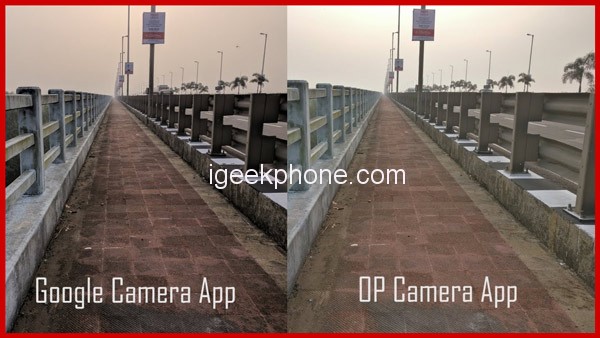
The HDR+ feature sets the Google camera apart from its competitors, as it produces photos with an exceptional dynamic range. Normal cameras tend to conceal shadow areas, but the HDR+ feature brings out all the details hidden in these areas.
Google Camera vs Stock Camera
The Google Camera app’s HDR+ feature enhances the dynamic range of photos by combining multiple under-exposed images. This process not only increases the dynamic range but also improves the colors beyond regular standards.
In essence, the camera takes multiple shots and then blends them together. The algorithm then analyzes these shots to identify any dark or overexposed areas and balances the light and shadow digitally. This combination of over and under-exposed images enhances the dynamic range, leading to stunning results.
Think of it as creating a photo collage – multiple photos of yourself are taken, the best parts are selected, and then combined into one picture.
What is Dynamic Range?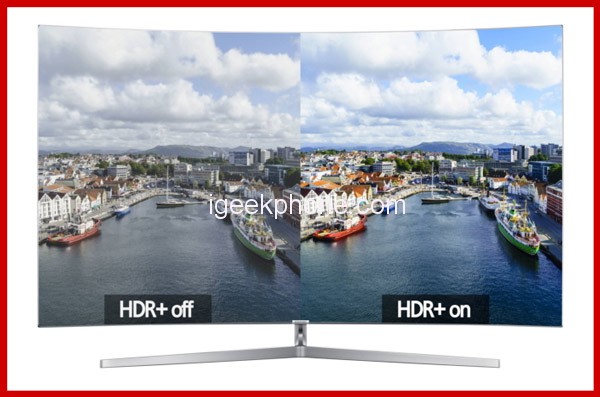
Dynamic range refers to the ratio between the lightest and darkest tones in a photo. The dynamic range of a camera is the range of tones that a sensor can capture, from saturation (when a pixel is completely white) to the point where the texture can no longer be distinguished from the background noise (which is almost, but not completely, black).
The dynamic range of a scene often surpasses the ability of the camera to capture it, particularly at night. Controlling this range is crucial for maintaining photo quality, especially when there are lights or highlights in the scene.
What is HDR in Smartphones?
HDR stands for High Dynamic Range and is designed to create clearer images by balancing the light and dark areas in the image by adjusting the exposure. The software automatically takes multiple photos with different exposure times in a single trigger and then combines the high-exposure photos (to improve dark surroundings) and the under-exposed photos (to enhance burst photos).
Improved Android 10 + HDR+: With AI, everything gets better
With the improved Android 10 + HDR + and the use of AI, the quality of the Google camera has been elevated to a whole new level. When Google introduced Android Oreo and the Google Pixel 3, they announced the arrival of the advanced HDR+. The HDR+ now utilizes artificial intelligence and machine learning, making the algorithm more efficient in identifying the best photos.
The best part of this improvement is that the camera continues to learn and get better over time as it analyzes more photos. However, it’s worth noting that the Google camera’s function on the Pixel line will always be better compared to other devices, as Google has integrated hardware and software like Apple.
Thanks to the Google Visual Core, the Pixel line has new features such as Top Shot and Photobooth. The Top Shot feature captures multiple photos before and after the user presses the shutter, and then the algorithm selects the best photo with open eyes and big smiles. Photobooth is a new mode that automatically captures the best photos depending on the subject in hand, and it only works with the Pixel 3 dual front camera.
Google AI is also utilized in Photobooth mode to take photos when people smile, show their tongue, make a face, or blink. The camera will identify your face and automatically start capturing the best photos as soon as it’s activated. All these improvements in the Google camera are a testament to the power of AI in improving the overall photography experience.
How to Use GCam app offers a wide range of features, including: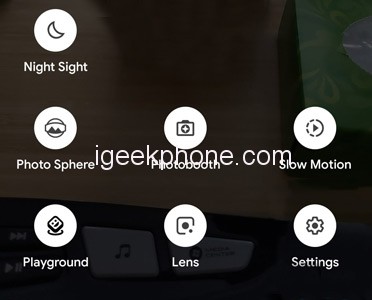
- HDR+: Captures photos with enhanced dynamic range and improved performance in low light conditions.
- Night Sight: Provides even better low-light performance.
- Video Stabilization: Electronic stabilization outperforms many optical systems.
- Smartburst: Allows for the creation of moving GIFs simply by holding down the shutter button.
- Photosphere: Creates spherical photos.
- Lens Blur: Applies background blur after taking the photo in portrait or bokeh mode.
- SlowMotion: Allows for slow motion capture in videos (up to 240 frames/second on compatible devices).
- Auto Focus Motion Tracking: Follows a selected object by touching it on the screen and maintaining focus.
- Photobooth: Automatically captures photos when faces or expressions are detected.
- Super Res Zoom: Zoom with improved resolution.
- Playground: A new mode that enables creativity and plays by bringing photos and videos to life with Playmojia and more.
The Google Camera is not accessible to everyone, and that is a shame. Unfortunately, the Google Pixel series devices are not available for purchase in Brazil, limiting access to this remarkable tool. However, it is possible to install modifications of the Google Camera application (unofficially, of course) on other devices by downloading the apk from websites such as Apk Mirror.
While it is also possible to install the original Google Camera apk from Pixel 3, extracted from the source code, not all functions may work properly. Before installing the Google Camera on your smartphone, certain conditions must be met. Firstly, your device must have at least Android 7.1 Nougat installed. However, for the latest version with improved HDR + (the Pixel 3 version), only Android 9 Pie is supported.
Additionally, there are hardware limitations to consider. The Google Camera is compatible with the artificial intelligence co-processor in the Pixel 3, but not with similar chips in devices from Huawei or Samsung. Furthermore, the original version of the Google Camera apk will only work on Qualcomm processors, unless modified.
Instructions on Downloading Google Camera for Samsung, Xiaomi, Realme, and Nokia Phones Installing the Google Camera app. apk MOD is now possible on various Android versions such as Android 8 Oreo, Android 9 Pie, and Android 10. This is due to the hard work of all the developers involved in creating this MOD app.
Furthermore, the Google Camera offers a wealth of features, including a new user interface, RAW support, a revamped panorama mode, facial editing options in portrait mode, a focus slider, quick access to lens mode, night vision, and more.
How To Download Google Camera For Xiaomi Devices:
- To view All Xiaomi Redmi available Gcam App – Please Click Here
How To Download Google Camera For Samsung Devices:
- To view All Samsung Galaxy available Gcam App – Please Click Here
How To Download Google Camera For Nokia Devices:
- To view All Nokia available Gcam App – Please Click Here
How To Download Google Camera For Realme Devices:
- To view All Realme disponibles Gcam App – Please Click Here
Read Also: Google has Rolled out Android 13 QPR2 Beta 3.1 to Pixel Devices
Do not forget to follow us on our Facebook group and page to keep you always aware of the latest advances, News, Updates, review, and giveaway on smartphones, tablets, gadgets, and more from the technology world of the future.