




Facebook Twitter Instagram
    Trending
    • IPLAY OOKA 150K Disposable Vape Review: A Flavor-Powered Marathon of Vaping
    • IPLAY LUMO 8K Prefilled Pod Kit Review: Bridging Convenience and Performance
    • JNR Falcon-X⁺ 28K: The Christmas Countdown Deal: Precision, Power & Pure Convenience
    • How to Keep Your Rummy Skills Sharp
    • Uwell Caliburn G5 Lite SE Pod System Kit Review: Premium Simplicity Refined
    • Uwell Caliburn G5 Lite KOKO Pod System Kit Review: Compact Power, Uncompromised Flavor
    • Uwell Caliburn G5 Lite Pod System Kit Review: Refined Simplicity, Unmatched Flavor
    • Quantum AI App, Useful or Not?
    Facebook YouTube
    Login Register
    IGeeKphone China Phone, Tablet PC, VR, RC Drone News, Reviews
    • HOME
      • NEWS
        • DeepSeek
        • ChatGPT
        • Minecraft
    • Amazon
    • CHRISTMAS
    • PHONE
      • Top Phones For Your First Choice
      • Phone Comparison
      • Xiaomi
      • Blackview
      • Unihertz
      • Doogee
      • Black Shark
      • Geekbuying
      • Banggood
      • TEMU
      • TikTok
      • Aliexpress
      • Walmart
      • Newegg
      • MercadoLibre
      • Lazada
    • TOP VAPE Awards for 2025
    • VAPES
      • E-CIGAR Upcoming
      • Vape News
      • Vape Market Trend
      • Vape Deals
      • Expo News
      • Vape Comparison
      • Vape Guide
        • Guide For Beginners
        • Guide for Best Users
      • Giveaway
    • BEST VAPE
      • Best Vape Stores
      • Best Starter Vape Kits
      • Best Vapes for Beginners
      • Best Disposable Vapes
      • Best Pod Systems
      • Best Pod Mod Vapes
      • Best Mods
      • Best Nicotine Pouches
      • Best Clearomizers/Tanks
      • Best E-Liquid
      • Best EGO/Pens
      • Best Vapes for Nic Salt E-Juice
      • Best Vapes to Quit Smoking
      • RDA vs. RDTA vs. RTA
    • Best Vape Brand 2025
      • VAPORESSO
      • VOOPOO
      • OXVA
      • NEXA BAR
      • ORIONBARTECH
      • MASKKING VAPE
      • VEIIK
      • MEMERS
      • SP2S
      • JNR
      • TODOO
      • MRFOG
    • REVIEW
      • E-cigar Review
      • Phones
      • Tablet PC
      • TV Box
      • RC Drone
      • Wearables
      • Camera
      • Accessories
      • VR Headset
    • MORE
      • 3D PRINTER
        • 3D Printer Review
        • Anycubic
        • FLSUN
        • Xtool
        • LONGER
        • Top 3D printer to Choose First
      • TREND
      • CLOTHES
      • AUTO CAR
      • POWER STATION
        • Oukitel
        • FOSSIBOT
      • GAMING
        • Top Gaming Products
      • E-BIKE
        • Samebike
        • Happyrun
        • ENGWE
      • TABLET
        • Chuwi
        • INNOCN
        • Teclast
        • Top Tablet for Your First Choice
        • Tablet/Laptop Comparison
      • WEARABLES
        • OneOdio
        • BlitzWolf
        • Top Smartwatch for First Choice
      • SMART HOME
      • TV BOX
        • Chuwi mini pc
        • Beelink
        • GMKTEC
        • MOREFINE
      • RC DRONE
        • DJI
        • MJX
        • JJRC
        • Hubsan
        • Top RC Drone
      • CAMERA
        • Gopro
        • Insta360
        • Andoer
      • ACCESSORIES
      • VR HEADSET
      • ROM
        • SAMSUNG
        • XIAOMI
        • ASUS
        • MEIZU
        • LENOVO
        • HUAWEI
        • ONEPLUS
        • ZTE
        • UMIDIGI
        • DOOGEE
        • HOMTOM
        • ELEPHONE
        • ULEFONE
        • BLACKVIEW
        • VERNEE
        • LEAGOO
        • CHUWI
        • TECLAST
        • PIPO
        • TV BOX ROM
    • DEAL
    • Shop
    IGeeKphone China Phone, Tablet PC, VR, RC Drone News, Reviews
    You are at:Home»Apple»iOS 17 Beta 2 Beta Released: A Step by Step Guide
    Apple

    iOS 17 Beta 2 Beta Released: A Step by Step Guide

    HabibBy HabibJune 28, 2023
    Facebook Twitter Pinterest LinkedIn Tumblr Email

    Despite the numerous feature updates in iOS 17 beta 2, it is essential to note that it is still a beta version with several accompanying adaptation bugs.

    Users considering upgrading to iOS 17 beta two should review the current list of issues before proceeding:

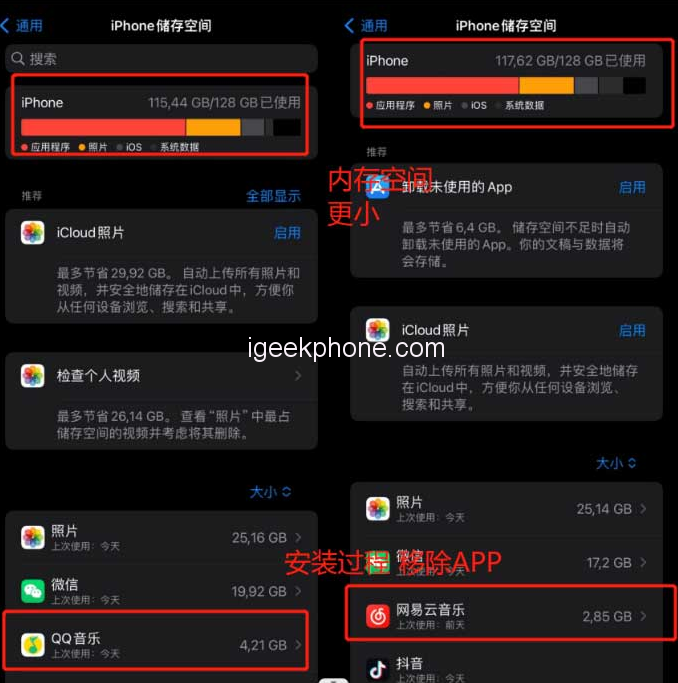
    Reduced storage space: Upgrading from beta 1 decreased approximately 3GB, and an additional 2GB decrease occurred after updating to beta 2.
    Picture display problem: iOS 17 beta 2 introduces image display issues in Ali systems and most applets. Specifically, a square shadow appears in material images. Developers are not required to fix this bug as it falls under Apple’s responsibility. Users can wait for Apple to address it in future beta updates or consider updating their content in the official version.

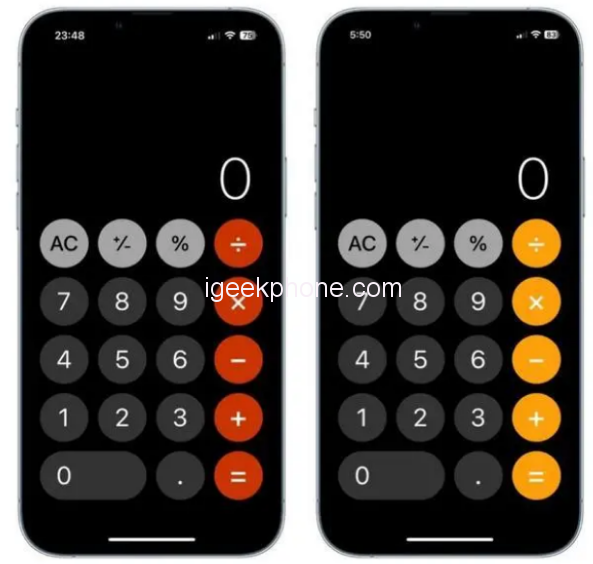
    It’s important to note that this bug does not affect everyday tasks like energy collection. Also, various application materials may exhibit noticeable color differences, including Apple’s official applications. If you notice incorrect colors on your phone, it is likely not an issue with your eyes.

    The color difference bug can be saved and reproduced. (Refer to the image below for an example of chromatic aberration in the system calculator.)
    App Store icon loading issue: iOS 17 beta two may cause icons in the App Store to fail to load. This problem occurs randomly and is not universal. It may also be related to the bug above.

    Dynamic Earth wallpaper malfunction: iOS 17 beta two can cause issues with the dynamic Earth wallpaper, such as the Earth being displayed above the widget or wandering away altogether. This problem occurs randomly and may affect other planets or the entire solar system.

    WeChat payment turned off: iOS 17 beta two might accidentally turn off the WeChat payment function, even on an iPhone 14 Pro device. The system prompts disabling Touch ID and password functions, rendering the payment function unavailable. This problem may also affect Alipay and various applications utilizing facial payment. Restarting the device may solve the issue to some extent. It is hoped that Apple will fix this problem promptly.

    Additional bugs:

    • Bilibili app crashes
    • Some banking apps experience flashbacks or payment failures
    • Notability fails to open PDF Random Whiteboard
    • All-weather display lock screen time may not appear in bold
    • The Pinduoduo watering page fails to display
    • In-app applets of major domestic platforms cannot be opened
    • iMessage activation fails, or text messages cannot be sent
    • Pull-down search may cause the keyboard to disappear or become transparent
    • Screenshots may have random rounded or right-angled borders
    • Desktop icons randomly display subtitles and cannot be removed
    • The bottom menu in WeChat disappears randomly
    • Siri may not respond to wake commands
    • The share button shortcut text disappears
    • The sogou input method cannot use Jiugongge
    • Additionally, numerous adaptation bugs can be caused by Apple or applications not being fully adapted to iOS 17.

    If you encounter a bug after updating to iOS 17 beta 2, consider the following three solutions:

    Restart your iPhone: After successfully upgrading the iPhone system via OTA, it is generally recommended to restart the device to resolve minor bugs such as white screens for small components or memory display errors.

    Force restart your iPhone: If it experiences problems like a black screen, white Apple logo, automatic restarts, or crashes, try power restarting it. This method can resolve many common basic faults and address bugs after updating to iOS 17. To force restart a full-screen iPhone, quickly press the volume up and volume down buttons, then press and hold the power button until the Apple logo appears on the black screen. Release all buttons and wait for the device to restart.

    Downgrade to the official version: As iOS 17 is still a beta version, many software programs may not be fully adapted, resulting in more bugs. If you find that the new features are not helpful for your daily use or if specific bugs significantly impact your iPhone’s functionality, it is recommended to downgrade to the official version of the system.

    To simplify the process, you can use Xuechang Niu’s Apple mobile phone repair tool, which offers easy operation and includes an “iOS upgrade/downgrade” feature to help users quickly return to the official system version. The device also supports fixing 150+ iOS system faults, making it especially useful for novice users.

    Here’s a step-by-step guide to downgrading with the tool:

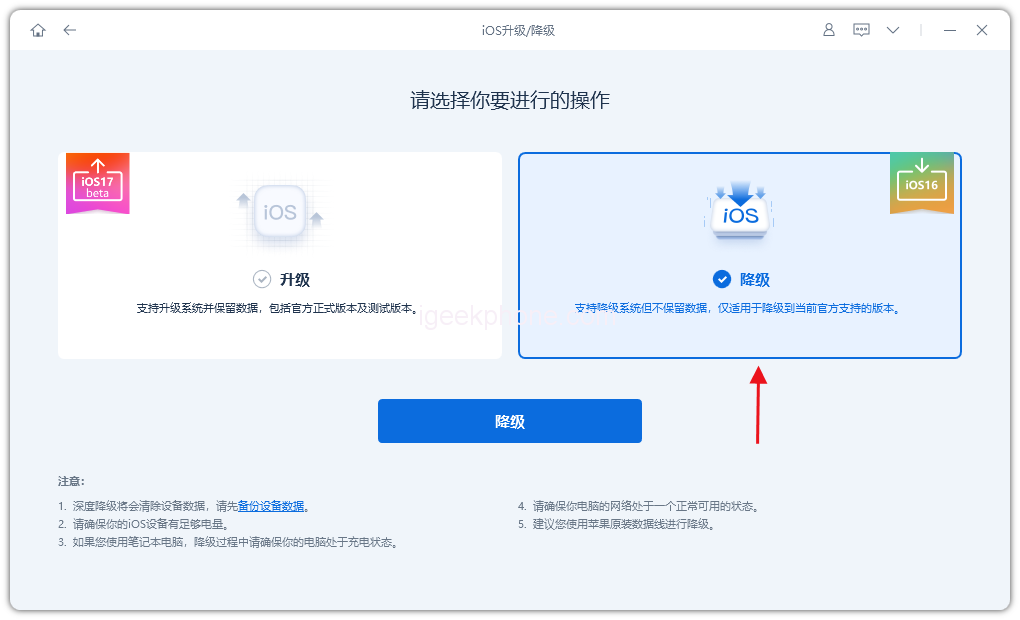
    Step 1: Launch the tool and connect your device to the computer using a data cable. Click “iOS upgrade/downgrade” and select the “downgrade” mode.
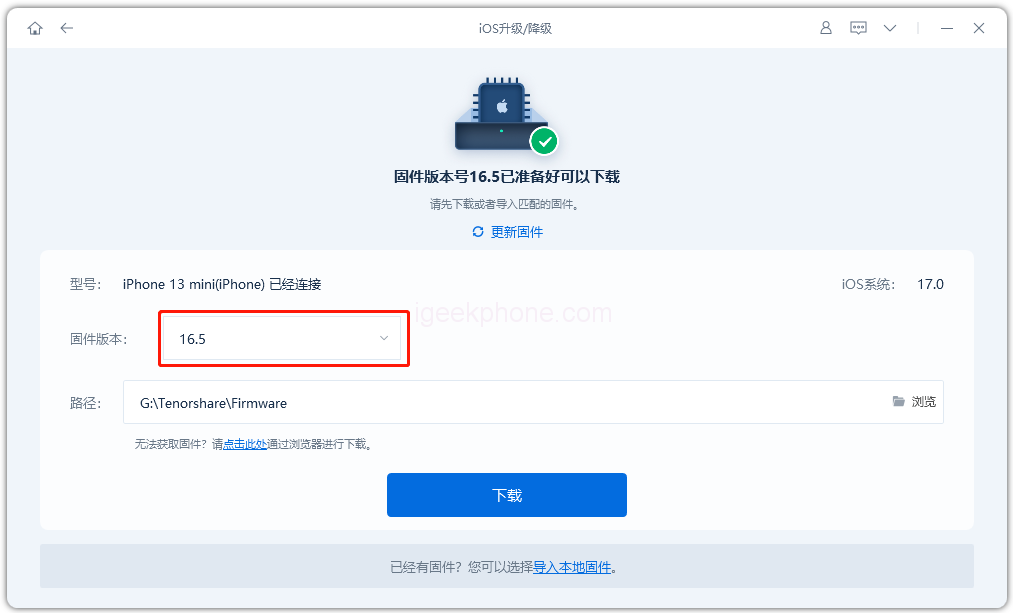
    Step 2: On the downgrade interface, the tool will display the official system version your iPhone supports downgrading. Click “Download Firmware” and wait for the firmware to download.
    Step 3: Successful downgrade. Once the firmware download is complete, the iOS downgrade process will begin.
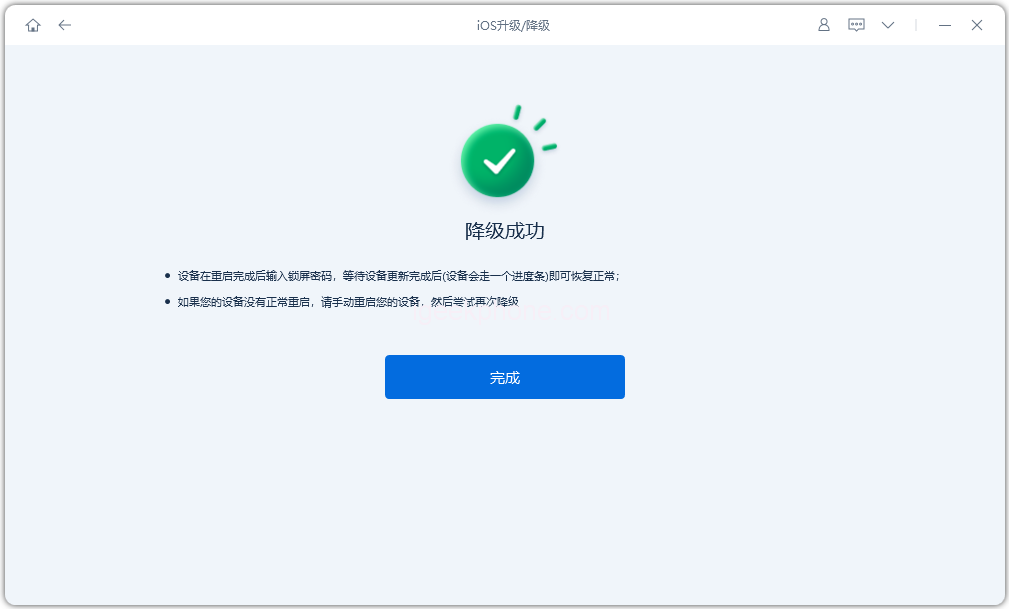
    The entire downgrade process takes approximately 10 minutes. Do not disconnect the data cable and wait for the “downgrade successful” message to appear.
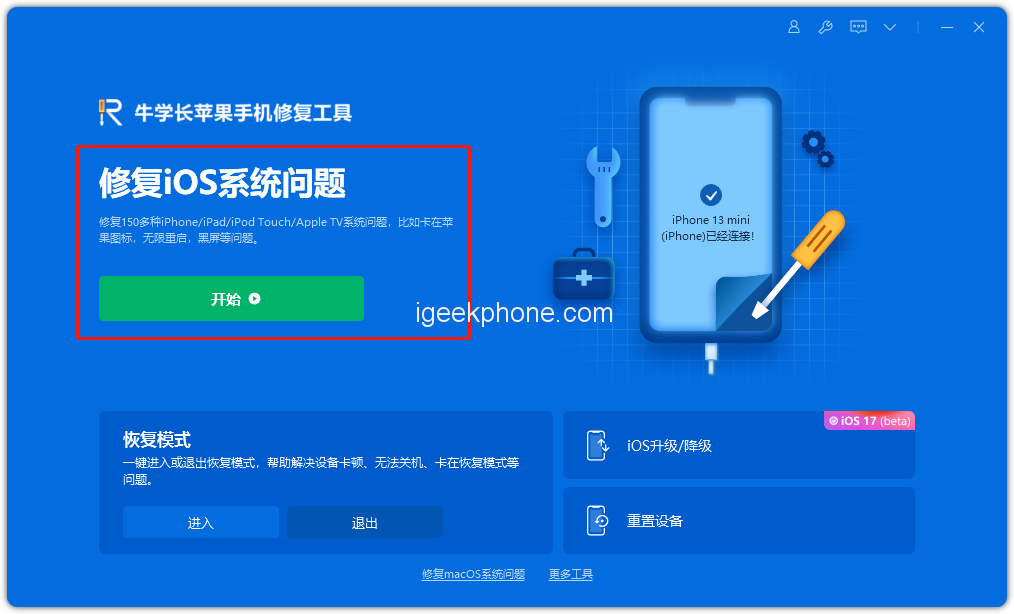
    After successfully downgrading to the iOS 16 system, if you encounter issues like white Apple logos or recovery mode, you can use the “iOS System Repair” function provided by the tool to fix them.

    Read Also: How to Enable StandBy Mode on iPhone with iOS 17

    Do not forget to follow us on our Facebook group and page to keep you always aware of the latest advances, News, Updates, review, and giveaway on smartphones, tablets, gadgets, and more from the technology world of the future.

    Share. Facebook Twitter Pinterest LinkedIn Tumblr Email

    Related Posts

    Quantum AI App, Useful or Not?

    How to Troubleshoot iPhone Personal Hotspot Issues

    The Battery Capacity of Samsung Galaxy Buds4/Pro Headphones has been Exposed: 42mAh and 57mAh

    Leave A Reply Cancel Reply

    You must be logged in to post a comment.

    voopoo drag s3
    oxva xlim go 2
    sp2s sen x disposable vape
    jnr 100k
    • Popular
    • 3D Printer REVIEW
    • XIAOMI
    November 23, 2025

    VOOPOO DRAG X3 – Big Battery, Smart Tech, Pod-Mod Powerhouse (Review)

    November 23, 2025

    VOOPOO VINCI S: Pocket-Power Pod with a 2,000 mAh Heart — Big Battery, Simple Use (Review)

    November 19, 2025

    OXVA XLIM PRO 3 Pod Vape Quick Hands-on Review (Video Test Included)

    November 19, 2025

    OXVA XLIM 3 Ultra Pod Vape: Hands-on Review (Video Test Included)

    June 23, 2024

    ACMER P2 20W Laser Engraver Fixed Focus Engraving: Hands on Review

    May 30, 2024

    xTool F1 Ultra Review: World’s First 20W Fiber & 20W Diode Laser Engraver

    May 30, 2024

    Anycubic Kobra 3 Combo Review: The Multicolor Masterpiece?

    May 15, 2024

    SCULPFUN SF-A9 40W Laser Engraver Cutting Machine: Hands On Review

    December 2, 2025

    Xiaomi REDMI Turbo5 Pro phone will be launched before the Spring Festival, equipped with the only flagship chip in its class

    December 2, 2025

    Xiaomi has Released REDMI TV X55/65/75 2026: Mini LED starts at only 2,499 yuan

    November 28, 2025

    The Exclusive Camera Handle of Xiaomi 17 Ultra has passed the 3C certification and can be used as a power bank

    November 27, 2025

    Code name “Nezha” : Xiaomi 17 Ultra phone exposed, with a triple rear camera setup

    fc 26 coins
    New Arrivals
    • IPLAY OOKA150k Disposable vape IPLAY OOKA150k Disposable vape
    • IPLAY LUMO 8K Puffs 2+10ml Prefilled Pod Kit IPLAY LUMO 8K Puffs 2+10ml Prefilled Pod Kit
    • Uwell Caliburn G5 Lite SE Pod System Kit Uwell Caliburn G5 Lite SE Pod System Kit
    • Uwell Caliburn G5 Lite KOKO Pod System Kit Uwell Caliburn G5 Lite KOKO Pod System Kit
    • Uwell Caliburn G5 Lite Pod System Kit Uwell Caliburn G5 Lite Pod System Kit
    • Freeton Trimax 60k Disposable Vape Freeton Trimax 60k Disposable Vape
    • Smoant Pasito 3 Vape Smoant Pasito 3 Vape
    • Yocan Flat 2.0 series Yocan Flat 2.0 series
    • Snowplus Swift Pod Vape Snowplus Swift Pod Vape
    About
  • Igeekphone.com provides the first global tech news and reviews about smartphone, vapes, e-cigar, smart home, 3D printers, e-bike,tablets, RC drones, VR headset, and other accessories. It's the best platform to improve your brand and product.
  • Contact us: info@igeekphone.com
  • Check Our Privacy Policy Here.
  • Note: *Right now we have US editor and EU editors for review, especially for Amazon US and EU.
  • *Shop and Compare Price Here*
  • Facebook
  • Youtube
  • OUR BEST VAPE PARTNERS
  • VAPE ONLINE STORE
  • HAYATI PRO MAX PLUS
  • VAPORESSO
  • VOOPOO
  • OXVA
  • NEXA
  • MASKKING
  • LOSTVAPE ORIONBAR
  • VEIIK
  • MEMERS
  • TODOO
  • SP2S
  • JNR
  • OTHER BEST PARTNERS
  • SVBONY
  • Chuwi
  • Blackview
  • Fossibot
  • Unihertz
  • Flsun
  • Anycubic
  • Xtool
  • Oukitel
  • Mukkpet Ebike
  • Ugreen
  • Copyright © 2025 igeekphone

    Type above and press Enter to search. Press Esc to cancel.