Facebook Twitter Instagram
    Trending
    • Vaporesso Luxe X3 Pod Kit System Review: The “Smartphone” of Your Vaping Experience
    • MTL, DTL, or RDL: How to Choose Your Vaping Style?
    • From Breakthroughs to Accolades: The VOOPOO 2025 Journey
    • With a Capacity of 80,000 puffs, 6 Power Settings and 3 air intake options, UWELL has launched the one-time-use Vape CALIBURN BAR 80K
    • How to Set Up Portrait Photography on Red Magic 11 Pro+ Smartphone?
    • Honor Magic8 Pro Air has Officially been Announced to be Equipped with an AI Zoom Array Flash
    • The Benchmark Scores of Xiaomi REDMI Turbo 5 MAX Phone have been Revealed
    • Apple’s iPhone 18 series and Air 2 Screen Specifications have been Revealed
    Facebook YouTube
    Login Register
    IGeeKphone China Phone, Tablet PC, VR, RC Drone News, Reviews
    • HOME
      • NEWS
        • DeepSeek
        • ChatGPT
        • Minecraft
    • Amazon
    • NEW YEAR
    • PHONE
      • Top Phones For Your First Choice
      • Phone Comparison
      • Xiaomi
      • Blackview
      • Doogee
      • Black Shark
      • Geekbuying
      • Banggood
      • TEMU
      • TikTok
      • Aliexpress
      • Walmart
      • MercadoLibre
      • Lazada
    • TOP VAPE Awards for 2026
    • VAPES
      • E-CIGAR Upcoming
      • Vape News
      • Vape Deals
      • Vape Comparison
      • Vape Guide
      • Giveaway
    • BEST VAPE
      • Best Vape Stores
      • Best Starter Vape Kits
      • Best Vapes for Beginners
      • Best Disposable Vapes
      • Best Pod Systems
      • Best Pod Mod Vapes
      • Best Mods
      • Best Nicotine Pouches
      • Best Clearomizers/Tanks
      • Best E-Liquid
      • Best EGO/Pens
      • Best Vapes for Nic Salt E-Juice
      • Best Vapes to Quit Smoking
      • RDA vs. RDTA vs. RTA
    • Best Vape Brand 2026
      • VAPORESSO
      • VOOPOO
      • OXVA
      • NEXA BAR
      • ORIONBARTECH
      • MASKKING VAPE
      • MEMERS
      • SP2S
      • JNR
      • TODOO
      • MRFOG
      • VEIIK
    • REVIEW
      • E-cigar Review
      • Phones
      • Tablet PC
      • TV Box
      • RC Drone
      • Wearables
      • Camera
      • Accessories
      • VR Headset
    • MORE
      • TABLET
        • Chuwi
        • INNOCN
        • Teclast
        • Top Tablet for Your First Choice
        • Tablet/Laptop Comparison
      • RC DRONE
      • CAMERA
      • WEARABLES
        • OneOdio
        • BlitzWolf
        • Top Smartwatch for First Choice
      • 3D PRINTER
        • 3D Printer Review
        • Anycubic
        • FLSUN
        • Xtool
        • LONGER
        • Top 3D printer to Choose First
      • POWER STATION
        • Oukitel
        • FOSSIBOT
      • GAMING
        • Top Gaming Products
      • E-BIKE
        • Samebike
        • Happyrun
        • ENGWE
      • SMART HOME
      • TV BOX
      • ACCESSORIES
      • VR HEADSET
      • CLOTHES
      • AUTO CAR
    • DEAL
    • Shop
    IGeeKphone China Phone, Tablet PC, VR, RC Drone News, Reviews
    You are at:Home»NEWS»iPadOS 17 Beta 6 Released with Refinements and Stability Updates
    NEWS

    iPadOS 17 Beta 6 Released with Refinements and Stability Updates

    HabibBy HabibAugust 17, 2023
    Facebook Twitter Pinterest LinkedIn Tumblr Email

    Apple has just rolled out the sixth beta update of iOS 17 and iPadOS 17 for developers, bringing a series of improvements and changes to enhance the user experience. This latest update, labeled 21A5312c, arrives a week after the previous release.

    Key highlights from iOS 17 and iPadOS 17 Beta 6 include:
    1. Messages Enhancement: The Messages app now offers an enhanced experience where you can conveniently access the photo picker by long-pressing the “+” button, eliminating the need to navigate a list of options.
    2. Phone App Adjustment: In an earlier beta version, Apple relocated the red hang-up button in the Phone app to the bottom right corner, a change that faced resistance from users accustomed to its previous center position. Addressing user feedback, Apple has reverted the hang-up button to its original center placement in this sixth beta.
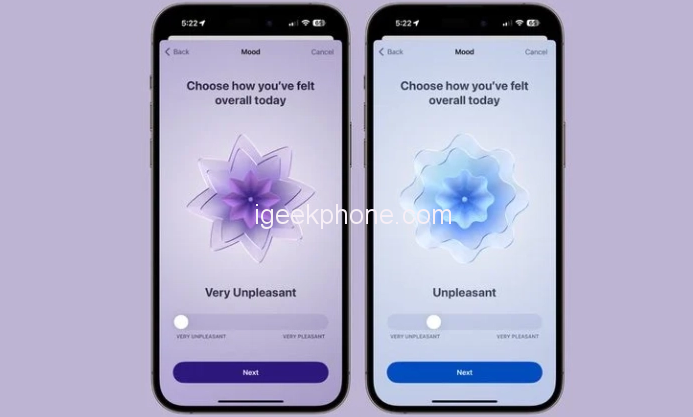
    3. Mood Tracking Animation: The Mood Tracking feature sees a refined animation update. The mood icons now exhibit quicker and more dynamic spinning motion, accompanied by an increased number of surrounding rings.
    4. Photos App Introduction: For first-time users of the Photos app, a new welcoming screen will greet you, introducing the latest features and enhancements.
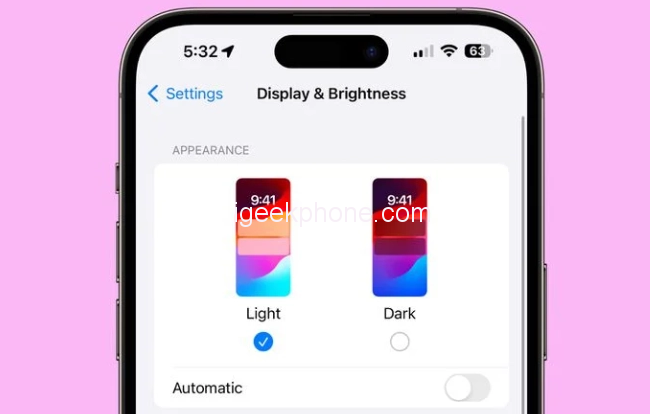
    5. Display and Brightness Personalization: Within the Settings app’s Display and Brightness section, the wallpaper icon has been refreshed to match the iPadOS 17 Beta 6 aesthetic.
    As the official release of iOS 17 draws closer, Apple’s focus has shifted toward crucial optimizations and system enhancements. Despite this, the most recent beta iteration boasts notable alterations that continue to shape the operating system.

    Read Also: How to Downgrade Your iPhone to iOS 16 from iOS 17 Beta.

    If you’re already using a beta version of iOS 17, updating to Beta 6 is straightforward through the [Software Update] section. However, for those venturing into the iOS 17 experience for the first time, here are a couple of methods to consider:

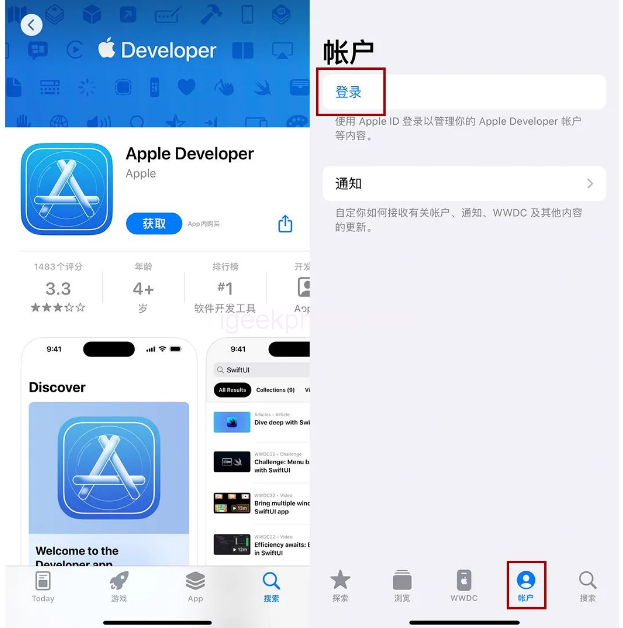
    1. Using the “Apple Developer” App:
      • Begin by locating and downloading the “Apple DevelAccountpp from the AAccounte.
      • After launching the app, access your account by tapping [Account] at the app’s bottom section, followed by the [Login] button.
      • If prompted, log in with your Apple ID and accept the “Apple Developer Agreement.”
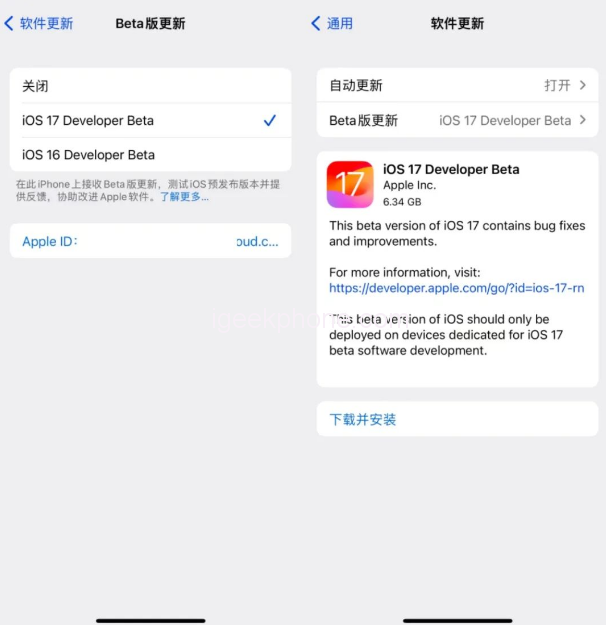
      • Once logged in, navigate to “Settings” > “General” > “Software Update” on your device. Look for the “Beta Version Update” option, select “iOS 17 Developer Beta,” and follow the prompts to complete the update. It’s worth noting that if your iPhone runs an older system version, you may need to update to iOS 16.5 beforehand.
    1. Leveraging iOS Upgrade Tools:
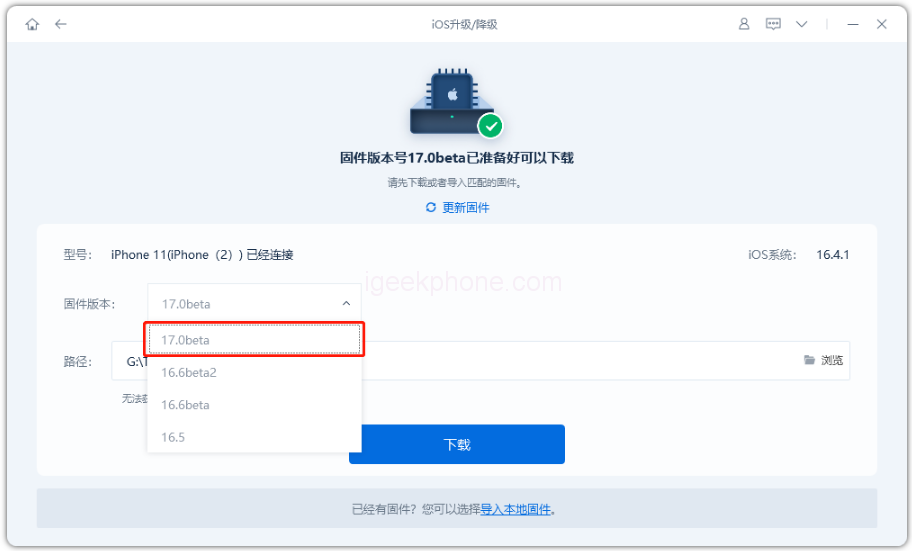
      • Utilize the iOS upgrading and upgrading tools, such as Xuechang Niu’s Apple mobile phone repair tool, which now includes an “iOS Upgrade/Downgrade” option.
      • Launch the tool and access the “iOS Upgrade/Downgrade” section. Choose the “Upgrade” function.
      • Select the iOS 17 Beta system that corresponds to your device from the options provided, and then follow the tool’s prompts to update your system successfully.

    Stay tuned for further developments as iOS 17 nears its official release, and explore these methods to make the most of the beta testing experience.

    Share. Facebook Twitter Pinterest LinkedIn Tumblr Email

    Related Posts

    How to Set Up Portrait Photography on Red Magic 11 Pro+ Smartphone?

    Honor Magic8 Pro Air has Officially been Announced to be Equipped with an AI Zoom Array Flash

    The Benchmark Scores of Xiaomi REDMI Turbo 5 MAX Phone have been Revealed

    Leave A Reply Cancel Reply

    You must be logged in to post a comment.

    voopoo drag s3
    oxva xlim 3 ultra
    sp2s sen x disposable vape
    jnr 100k
    • Popular
    • 3D Printer REVIEW
    • XIAOMI
    January 1, 2026

    VOOPOO ARGUS P3: The Touchscreen Pod That Feels Like a Mini Mod (Review)

    December 26, 2025

    Vaporesso XROS 5 Nano: Touchscreen Control Meets True Nano Portability (Review)

    December 9, 2025

    OXVA Xlim Go vs. OXVA Xlim Go 2: Hands-On Review

    December 9, 2025

    OXVA XLIM PRO 3 VS XLIM PRO 2 Review: Hands-on Comparison

    December 26, 2025

    ACMER ASCARVA 4S: Precision CNC Power for Makers, DIYers & Small Workshops

    June 23, 2024

    ACMER P2 20W Laser Engraver Fixed Focus Engraving: Hands on Review

    May 30, 2024

    xTool F1 Ultra Review: World’s First 20W Fiber & 20W Diode Laser Engraver

    May 30, 2024

    Anycubic Kobra 3 Combo Review: The Multicolor Masterpiece?

    January 13, 2026

    Xiaomi 17 Max is the First Model to be Equipped with 8000mAh Battery Capacity

    January 8, 2026

    How to Switch to 4G Network Mode on Redmi K90?

    January 8, 2026

    Xiaomi Smart Camera 3 3K Released: 5 million Pixels, Supports low-light full color

    January 7, 2026

    Xiaomi Wireless Mouse 3 Review-Smart, Stylish & Multi-Device Friendly

    fc 26 coins
    New Arrivals
    • Vivo V70 FE SmartPhone Vivo V70 FE SmartPhone
    • Uwell Nunchaku 10000 Pod System Kit Uwell Nunchaku 10000 Pod System Kit
    • OnePlus Turbo 6V OnePlus Turbo 6V
    • Uwell Caliburn G5 KOKO Pod System Kit Uwell Caliburn G5 KOKO Pod System Kit
    • Oppo Reno15 Pro Mini Oppo Reno15 Pro Mini
    • Xiaomi Poco M8 Xiaomi Poco M8
    • LALA BAR VIBE 40K Disposable Vape LALA BAR VIBE 40K Disposable Vape
    • LALA BAR FLUX 40K Disposable LALA BAR FLUX 40K Disposable
    • Realme Pad 3 Realme Pad 3
    About
  • Igeekphone.com provides the first global tech news and reviews about smartphone, vapes, e-cigar, smart home, 3D printers, e-bike,tablets, RC drones, VR headset, and other accessories. It's the best platform to improve your brand and product.
  • Contact us: info@igeekphone.com
  • Check Our Privacy Policy Here.
  • Note: *Right now we have US editor and EU editors for review, especially for Amazon US and EU.
  • *Shop and Compare Price Here*
  • Facebook
  • Youtube
  • OUR BEST VAPE PARTNERS
  • VAPE ONLINE STORE
  • HAYATI PRO MAX PLUS
  • VAPORESSO
  • VOOPOO
  • OXVA
  • NEXA
  • MASKKING
  • LOSTVAPE ORIONBAR
  • MEMERS
  • TODOO
  • SP2S
  • JNR
  • VEIIK
  • OTHER BEST PARTNERS
  • SVBONY
  • Chuwi
  • Blackview
  • Fossibot
  • Unihertz
  • Flsun
  • Anycubic
  • Xtool
  • Oukitel
  • Mukkpet Ebike
  • Ugreen
  • Copyright © 2026 igeekphone

    Type above and press Enter to search. Press Esc to cancel.