







Facebook Twitter Instagram
    Trending
    • How AI Cameras Are Changing Everyday Photography?
    • NEXA ULTRA II vs RODMAN Playoffs 50K: 50K Puff Disposable Vape Comparison
    • Your Phone Is Your Crypto Wallet: 9 Security Settings to Check Before Your First Trade
    • Vaporesso ARMOUR G2 vs ARMOUR GS2: Which Pod Mod Should You Choose?
    • HMD Slate Tab 5G Full Specifications Leak: 10.6-Inch 2K 90Hz Display and Snapdragon 7s Gen 2
    • Amazfit T-Rex Dual Solar Launches in China with Dual-Sided Solar Charging
    • Google Fitbit Edge Fitness Tracker Leaked: 7-Day Battery, GPS and Altimeter
    • AULA L99 Review: A Gaming Keyboard That Puts a Touchscreen on Your Desk
    Facebook YouTube
    IGeeKphone China Phone, Tablet PC, VR, RC Drone News, Reviews
    • HOME
    • BREAKING NEWS
      • AI NEWS
    • Amazon
    • PHONE
      • Top Phones For Your First Choice
      • Phone Comparison
      • Xiaomi
      • Blackview
      • Doogee
      • Black Shark
      • Geekbuying
      • Banggood
      • TEMU
      • TikTok
      • Aliexpress
      • Walmart
      • MercadoLibre
      • Lazada
    • TOP VAPE Awards for 2026
    • VAPES
      • E-CIGAR Upcoming
      • Vape News
      • Vape Deals
      • Vape Comparison
      • Vape Guide
      • VAPE LAWS
      • Giveaway
    • BEST VAPE
      • Best Vape Stores
      • Best Starter Vape Kits
      • Best Vapes for Beginners
      • Best Disposable Vapes
      • Best Pod Systems
      • Best Pod Mod Vapes
      • Best Mods
      • Best Nicotine Pouches
      • Best Clearomizers/Tanks
      • Best E-Liquid
      • Best EGO/Pens
      • Best Vapes for Nic Salt E-Juice
      • Best Vapes to Quit Smoking
      • RDA vs. RDTA vs. RTA
    • Best Vape Brand 2026
      • VAPORESSO
      • VOOPOO
      • OXVA
      • NEXA BAR
      • MASKKING VAPE
      • SP2S
      • IPLAY
      • TODOO
      • MRFOG
      • LOSTVAPE
      • VEIIK
    • REVIEW
      • E-cigar Review
      • Phones
      • Tablet PC
      • TV Box
      • RC Drone
      • Wearables
      • Camera
      • Accessories
      • VR Headset
    • MORE
      • TABLET
        • Chuwi
        • INNOCN
        • Teclast
        • Top Tablet for Your First Choice
        • Tablet/Laptop Comparison
      • RC DRONE
      • CAMERA
      • WEARABLES
        • OneOdio
        • BlitzWolf
        • Top Smartwatch for First Choice
      • 3D PRINTER
        • 3D Printer Review
        • Anycubic
        • FLSUN
        • Xtool
        • LONGER
        • Top 3D printer to Choose First
      • POWER STATION
        • Oukitel
        • FOSSIBOT
      • GAMING
        • Top Gaming Products
      • E-BIKE
        • Samebike
        • Happyrun
        • ENGWE
      • SMART HOME
      • TV BOX
      • ACCESSORIES
      • VR HEADSET
      • CLOTHES
      • AUTO CAR
    • DEAL
    • Shop
    IGeeKphone China Phone, Tablet PC, VR, RC Drone News, Reviews
    You are at:Home»Guide»IPhone 14 tip: How do I hide the Spirit Island and Red Indicator during screen recording?
    Guide

    IPhone 14 tip: How do I hide the Spirit Island and Red Indicator during screen recording?

    Brady CottonBy Brady CottonFebruary 18, 2023
    Facebook Twitter Pinterest LinkedIn Tumblr Email

    On the iPhone, users can use the system’s built-in screen recording function to record what they are doing on the iPhone screen, such as demonstrating how to open a feature, use a piece of software, or record the best moments of a game, which is very useful.

    Previously, on iphones with bangs, the bangs were not included in the video when the screen was being recorded. But in 14 Pro and equipped with clever iPhone ‌ iPhone 14 Pro ‌ Max on the two models, video recording, clever island recording indicator shows red, and you can see in the video recording clever island.

    This can affect the overall effect of the video, especially if you want the viewer’s attention to be focused on the main content recorded on the screen. However, there are ways to hide “Spirit Island” from the on-screen video.
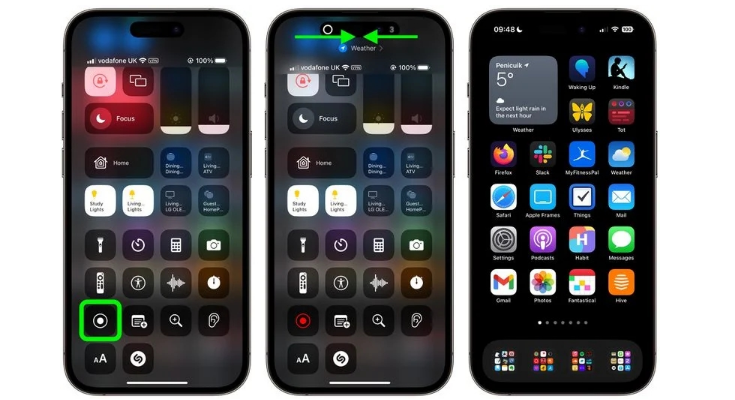
    Perform operations as follows:

    1. Swipe down from the upper right corner of the screen to bring up the Control center.

    2. Click the screen recording icon in the Control Center (If you do not see the screen recording icon, please add the “Screen Recording” function through Settings – Control Center).

    3. Slide horizontally from any edge of Spirit Island toward the center before the three-second countdown expires.

    Performing the actions described in the previous step will make the countdown timer disappear and prevent the “Spirit Island” and red screen recording indicators from appearing in the screen recording you captured. When you want to stop recording, simply click “Dynamic Island” to display the “Stop” button.

    Share. Facebook Twitter Pinterest LinkedIn Tumblr Email

    Related Posts

    How AI Cameras Are Changing Everyday Photography?

    Your Phone Is Your Crypto Wallet: 9 Security Settings to Check Before Your First Trade

    Orlistat for Weight Management: How It Works and What to Know

    Leave A Reply Cancel Reply

    You must be logged in to post a comment.

    voopoopintch
    oxva vprime 2
    nomadz
    • Popular
    • 3D Printer REVIEW
    • XIAOMI
    October 1, 2026

    VOOPOO ARGUS Z3 Review – Flip the Pod, Change the Vape! Keep It Simple!

    September 27, 2026

    Vaporesso ARMOUR OCTA Review – Built Like a Tank, Vapes Like a Beast

    September 27, 2026

    VOOPOO ARGUS Multi-Ohm Cartridge Review – One Magic Pod, Three Completely Different Vapes

    September 18, 2026

    OXVA VPRIME 2 vs VPRIME: What’s New in the Latest Version

    December 26, 2025

    ACMER ASCARVA 4S: Precision CNC Power for Makers, DIYers & Small Workshops

    June 23, 2024

    ACMER P2 20W Laser Engraver Fixed Focus Engraving: Hands on Review

    May 30, 2024

    xTool F1 Ultra Review: World’s First 20W Fiber & 20W Diode Laser Engraver

    May 30, 2024

    Anycubic Kobra 3 Combo Review: The Multicolor Masterpiece?

    October 5, 2026

    Xiaomi 18 Pro Max Transparent Edition Review: 200MP LOFIC & 8500mAh

    October 2, 2026

    REDMI Headphones Neo Review: Is 42dB ANC and 72-Hour Battery Enough?

    September 30, 2026

    Xiaomi Door and Window Sensor 3 Launches With Tunnel Magnetoresistance Sensor and 3-Year Battery

    September 23, 2026

    Xiaomi Pad 9 Pro Launches With 12.5-Inch 3.2K 144Hz Display and 11,000mAh Battery

    fc 26 coins
    New Arrivals
    • Vaporesso Armour GS2 Pod System Kit 80W Vaporesso Armour GS2 Pod System Kit 80W
    • iJOY XP100K Zero Nicotine Refillable Disposable Vape Kit iJOY XP100K Zero Nicotine Refillable Disposable Vape Kit
    • JNR PowerMate Pro JNR PowerMate Pro
    • MAXRAY RUSH 80K Disposable Vape MAXRAY RUSH 80K Disposable Vape
    • MERRYMI Blade 30000 Disposable Vape MERRYMI Blade 30000 Disposable Vape
    • Dip Devices Dipper Portable Vaporizer Dip Devices Dipper Portable Vaporizer
    • Exxus Vape Mini Plus Vaporizer Exxus Vape Mini Plus Vaporizer
    • JNR Lion King Shisha JNR Lion King Shisha
    • Fumot Eco 4-in-1 80K Disposable Vape Fumot Eco 4-in-1 80K Disposable Vape
    About
  • Igeekphone.com provides the first global tech news and reviews about smartphone, vapes, e-cigar, smart home, 3D printers, e-bike,tablets, RC drones, VR headset, and other accessories. It's the best platform to improve your brand and product.
  • Contact us: info@igeekphone.com
  • Check Our Privacy Policy Here.
  • Note: *Right now we have US editor and EU editors for review, especially for Amazon US and EU.
  • *Shop and Compare Price Here*
  • Facebook
  • Youtube
  • OUR BEST VAPE PARTNERS
  • VAPE ONLINE STORE
  • VAPORESSO
  • VOOPOO
  • OXVA
  • NEXA
  • MASKKING
  • SP2S
  • IPLAY
  • TODOO
  • OTHER BEST PARTNERS
  • SVBONY
  • Chuwi
  • Blackview
  • Fossibot
  • Unihertz
  • Flsun
  • Anycubic
  • Xtool
  • Oukitel
  • Mukkpet Ebike
  • Ugreen
  • Copyright © 2026 igeekphone

    Type above and press Enter to search. Press Esc to cancel.