







Facebook Twitter Instagram
    Trending
    • SriHome SH070 IP Camera Review: A Comprehensive Look at Performance and Features
    • ZLL SG618 MAX Review: The Ultimate High-Speed Off-Road RC Car
    • IPLAY ADJUST 35K VS IPLAY STAR 35K Quick Comparison Review
    • Bitpunter.io Lists Trusted Bitcoin casino Sites
    • Completely changing the rules of the game! I’ve replaced my only gaming earphones
    • Bakeey P007 22.5W 10000mAh Wireless Charger Power Bank Specs: A Game-Changer for Mobile Charging
    • OXVA XLIM GO LITE VS XLIM GO 2 Quick Comparison Review
    • Our Complete Guide to Poker Chips
    Facebook YouTube
    IGeeKphone China Phone, Tablet PC, VR, RC Drone News, Reviews
    • HOME
      • NEWS
        • DeepSeek
        • ChatGPT
        • Minecraft
    • Amazon
    • PHONE
      • Top Phones For Your First Choice
      • Phone Comparison
      • Xiaomi
      • Blackview
      • Doogee
      • Black Shark
      • Geekbuying
      • Banggood
      • TEMU
      • TikTok
      • Aliexpress
      • Walmart
      • MercadoLibre
      • Lazada
    • TOP VAPE Awards for 2026
    • VAPES
      • E-CIGAR Upcoming
      • Vape News
      • Vape Deals
      • Vape Comparison
      • Vape Guide
      • Giveaway
    • BEST VAPE
      • Best Vape Stores
      • Best Starter Vape Kits
      • Best Vapes for Beginners
      • Best Disposable Vapes
      • Best Pod Systems
      • Best Pod Mod Vapes
      • Best Mods
      • Best Nicotine Pouches
      • Best Clearomizers/Tanks
      • Best E-Liquid
      • Best EGO/Pens
      • Best Vapes for Nic Salt E-Juice
      • Best Vapes to Quit Smoking
      • RDA vs. RDTA vs. RTA
    • Best Vape Brand 2026
      • VAPORESSO
      • VOOPOO
      • OXVA
      • NEXA BAR
      • ORIONBARTECH
      • MASKKING VAPE
      • MEMERS
      • SP2S
      • TODOO
      • MRFOG
      • VEIIK
    • REVIEW
      • E-cigar Review
      • Phones
      • Tablet PC
      • TV Box
      • RC Drone
      • Wearables
      • Camera
      • Accessories
      • VR Headset
    • MORE
      • TABLET
        • Chuwi
        • INNOCN
        • Teclast
        • Top Tablet for Your First Choice
        • Tablet/Laptop Comparison
      • RC DRONE
      • CAMERA
      • WEARABLES
        • OneOdio
        • BlitzWolf
        • Top Smartwatch for First Choice
      • 3D PRINTER
        • 3D Printer Review
        • Anycubic
        • FLSUN
        • Xtool
        • LONGER
        • Top 3D printer to Choose First
      • POWER STATION
        • Oukitel
        • FOSSIBOT
      • GAMING
        • Top Gaming Products
      • E-BIKE
        • Samebike
        • Happyrun
        • ENGWE
      • SMART HOME
      • TV BOX
      • ACCESSORIES
      • VR HEADSET
      • CLOTHES
      • AUTO CAR
    • DEAL
    • VAPE LAWS
    • Shop
    IGeeKphone China Phone, Tablet PC, VR, RC Drone News, Reviews
    You are at:Home»Guide»Lost Data from Memory Card? Stop Worrying and Recover It Now
    Guide

    Lost Data from Memory Card? Stop Worrying and Recover It Now

    Brady CottonBy Brady CottonSeptember 15, 2025
    Facebook Twitter Pinterest LinkedIn Tumblr Email

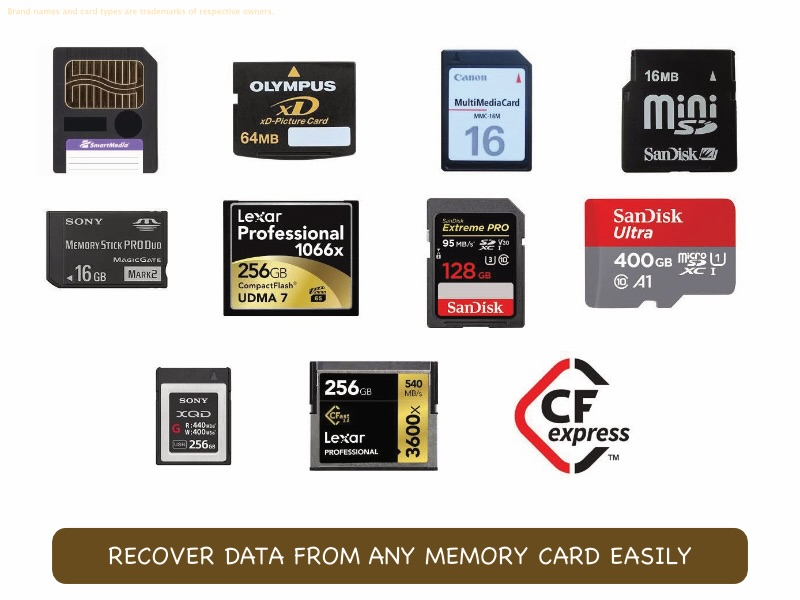
    Your first encounter with a memory card was likely thanks to the need for more storage on your phone. Phones have long allowed the use of memory cards as a cheap way for users to expand their phone storage. DSLR cameras use one or two memory cards to store what the users capture with them, be it photos or videos. As is understandable, memory cards hold our most precious, more-often-than-not irreplaceable, memories. What happens when a memory card gets corrupted, or we accidentally delete some data off it? Do we have a data recovery software that performs memory card recovery as well? Yes, absolutely!

    Part I: Can Memory Card Data Be Recovered?

    There are two broad kinds of storage media you deal with – internal and external. Internal storage media is your hard disk drive/ solid state drive, or flash drive as it is often called. External media is anything from floppy disks to CD-ROMs to USB flash drives to external (portable) hard disks and external solid state drives you connect to your computer with a USB-A/ USB Micro-B connector or lately, a USB-C connector. A good data recovery software recovers data from both internal and external locations. So yes, SD card data recovery is very much possible, when using a data recovery software that recovers data from external media sources as well. Any recommendations on such a software? You bet!

    Part II: SD Card Data Recovery with Wondershare Recoverit – The Best Memory Card Recovery Software
    The ultimate data recovery software claim by Wondershare Recoverit is backed by real performance and feature set, as reviewers and users around the world have discovered. and the claim is valid. Its leading recovery rates mated with a simple, easy to use interface makes data recovery from any media a breeze. Furthermore, the Recoverit development team knows what it’s about, as proven with 25 patents to their name and research spanning over 17 years.

    Some features:

    – Wondershare Recoverit can recover data on Macs and Windows PCs with modern, native apps for reach operating system.

    – Wondershare Recoverit is developed to recover data from practically any which way it was lost, so you don’t have to worry about how you lost it and see if the data recovery software supports that particular data loss scenario.

    – Wondershare Recoverit consumes minimal system resources.

    – Wondershare Recoverit features an easy to use and easy to understand user interface, so you can recover data confidently without worrying about taking a misstep.

    Here’s how to recover SD card data with Recoverit:

    Step 1: Within the app, select your SD card under Hard Drives and Locations > External Drives.
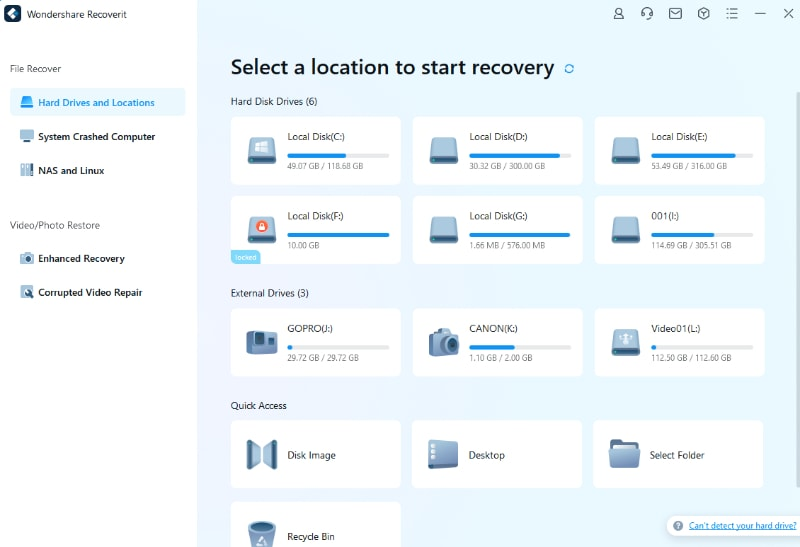
    Recoverit scans for data immediately upon choosing the memory card.
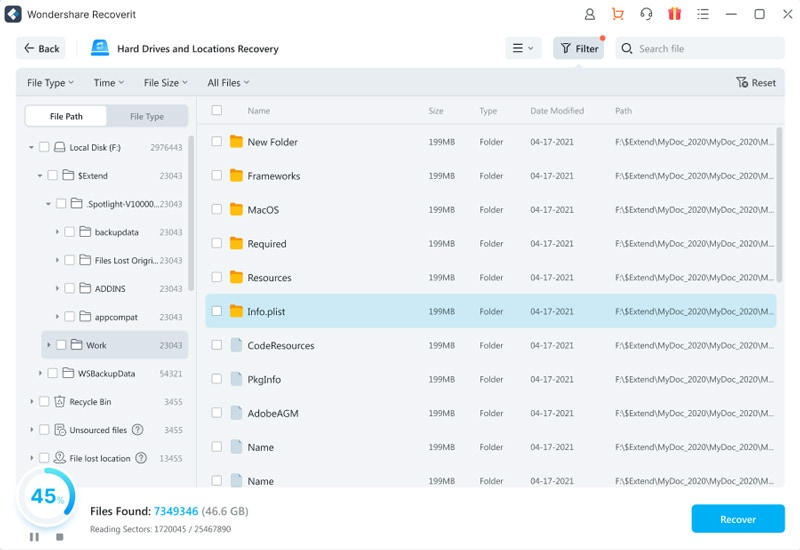
    You can see the progress and pause/ cancel the scan at any time.

    Filters such as the File Type filter give you the power to quickly get to what you want to recover.
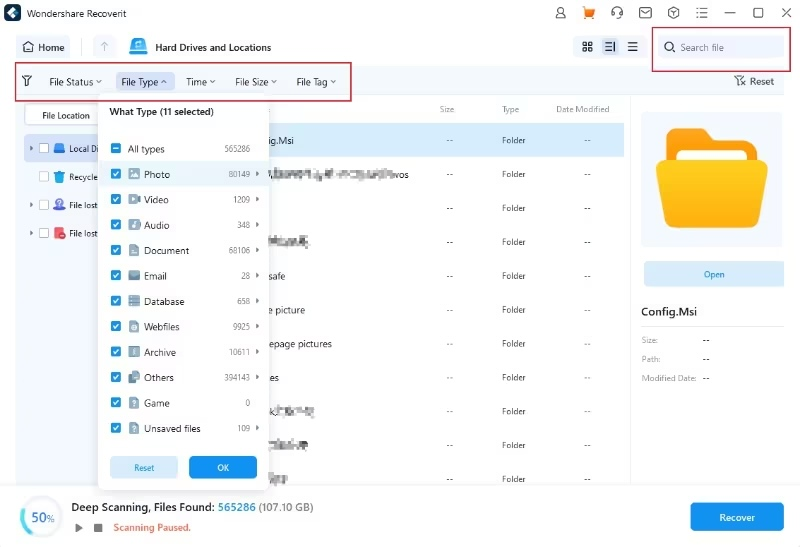
    Step 2: Choose the data you want to recover and click the Recover button.
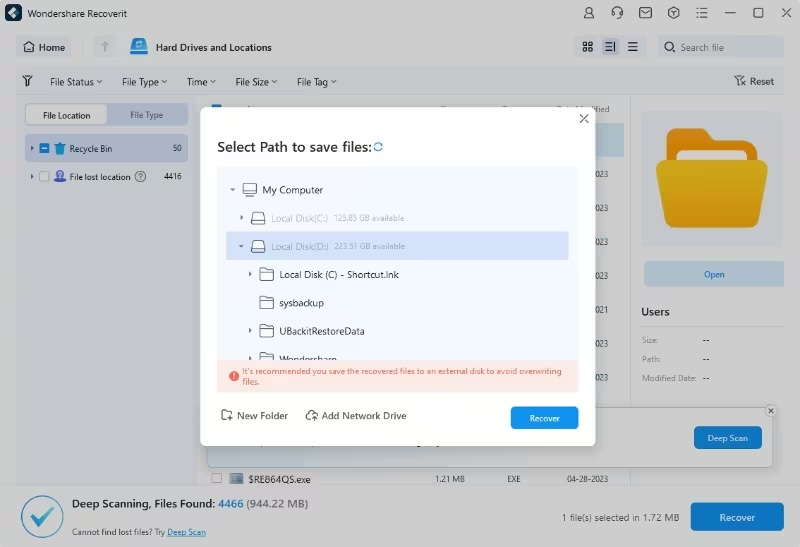
    Step 3: Pick a location to export recovered files to and click Recover again.

    FEATURE: FILE PREVIEW

    File previewer comes in handy when dealing with memory card recovery, as you can see photos and videos right from Recoverit before you recover them. That way, you know what you are recovering.

    Part III: Memory Card Recovery Tips

    Memory cards are external storage media just like USB flash drives or external hard drives. How you handle other external storage media is how you handle memory cards, too.

    Tip 1: Do Not Eject the SD Memory Card Directly

    SD memory cards are just as prone to data loss as any other external media when you take them out of their slots unexpectedly. Today or tomorrow, you will face data loss if you do that regularly. Always shut the device down before taking the memory card out of its slot when in a phone or DSLR camera. For computers, use the operating system to eject the card, just like USB flash drives.

    Tip 2: Take Backups Regularly

    Memory cards contain photos and videos that are irreplaceable. As such, you should take great care that you have copies of data held in memory cards so that in case you get a nasty surprise by way of SD card corruption or accidental data deletion, you have at least one backup copy to fall back upon without worry. To help you create backups of your smartphone directly, Wondershare’s Dr.Fone Phone Backup will work brilliantly, allowing you to take and restore not only complete device backups but selective backups as well. Try it today!

    Closing Words

    The last thing you want or need when dealing with SD memory card data loss is a memory card recovery software that is either incompetent or difficult to use, or worse, both. Try Wondershare Recoverit – a multipurpose data recovery tool that recovers data from both internal and external media sources, including memory cards. Memory card recovery with Wondershare Recoverit is easy, and there are just three steps to the process. Download Recoverit from the link below and experience a professional SD memory card data recovery software that works and is easy on the wallet, too.

    Wondershare Recoverit Free Download:

    Download Wondershare Recoverit

    Share. Facebook Twitter Pinterest LinkedIn Tumblr Email

    Related Posts

    Completely changing the rules of the game! I’ve replaced my only gaming earphones

    Exploring the profitability of bitcoin trading ideas

    Effective Programming Languages for iOS Development

    Leave A Reply Cancel Reply

    You must be logged in to post a comment.

    voopoo drag 6
    oxva xlim 3 ultra
    sp2s sen x disposable vape
    • Popular
    • 3D Printer REVIEW
    • XIAOMI
    April 18, 2026

    VOOPOO DRAG 6 Hands on Review: Vape Beast with Smart Power & Premium Control

    April 8, 2026

    OXVA NeXLIM vs XLIM Pro 2 Pod Hands-On Review (2026)

    March 16, 2026

    OXVA Slimstick VS OXVA Slimstick X Vape Hands-on Review

    March 5, 2026

    OXVA XLIM PRO 3 vs XLIM GO 2: Hands-On Review

    December 26, 2025

    ACMER ASCARVA 4S: Precision CNC Power for Makers, DIYers & Small Workshops

    June 23, 2024

    ACMER P2 20W Laser Engraver Fixed Focus Engraving: Hands on Review

    May 30, 2024

    xTool F1 Ultra Review: World’s First 20W Fiber & 20W Diode Laser Engraver

    May 30, 2024

    Anycubic Kobra 3 Combo Review: The Multicolor Masterpiece?

    April 30, 2026

    Xiaomi Gaming Mouse 2 officially Announced, equipped with the latest Pixart flagship sensor

    April 29, 2026

    Based on Android 17 Beta 2, the developer preview version of Xiaomi Hyper OS has been Released

    April 27, 2026

    It is Reported that a Certain Factory has Launched a 7-inch 2K Ultra-high Refresh Rate Straight Screen

    April 27, 2026

    Review: Is REDMI K90 MAX the Ultimate Gaming Phone in 2026?

    fc 26 coins
    New Arrivals
    • Lost Vape Thelema Go Pro Mod Kit Lost Vape Thelema Go Pro Mod Kit
    • Voopoo Argus Rise Vape Voopoo Argus Rise Vape
    • Lost Vape Thelema Q200 Pro Box Mod 200W Lost Vape Thelema Q200 Pro Box Mod 200W
    • Motorola Razr 70 Plus Motorola Razr 70 Plus
    • Motorola Razr Ultra 2026 Motorola Razr Ultra 2026
    • Realme 16x 5G Realme 16x 5G
    • SMOK Arco Nano Pod System Kit SMOK Arco Nano Pod System Kit
    • IPLAY SPARK 50k Disposable Pod IPLAY SPARK 50k Disposable Pod
    • vivo Y500s vivo Y500s
    About
  • Igeekphone.com provides the first global tech news and reviews about smartphone, vapes, e-cigar, smart home, 3D printers, e-bike,tablets, RC drones, VR headset, and other accessories. It's the best platform to improve your brand and product.
  • Contact us: info@igeekphone.com
  • Check Our Privacy Policy Here.
  • Note: *Right now we have US editor and EU editors for review, especially for Amazon US and EU.
  • *Shop and Compare Price Here*
  • Facebook
  • Youtube
  • OUR BEST VAPE PARTNERS
  • VAPE ONLINE STORE
  • HAYATI PRO MAX PLUS
  • VAPORESSO
  • VOOPOO
  • OXVA
  • NEXA
  • MASKKING
  • TODOO
  • SP2S
  • VEIIK
  • OTHER BEST PARTNERS
  • SVBONY
  • Chuwi
  • Blackview
  • Fossibot
  • Unihertz
  • Flsun
  • Anycubic
  • Xtool
  • Oukitel
  • Mukkpet Ebike
  • Ugreen
  • Copyright © 2026 igeekphone

    Type above and press Enter to search. Press Esc to cancel.