









You open a dusty photo album and notice that many cherished pictures have faded or torn edges. The joy of reliving old memories turns into disappointment when images appear blurry, scratched, or discolored. Fortunately, modern technology allows you to restore photos online without expensive software or professional help.
AI-powered tools can intelligently reconstruct missing details, adjust colors, and remove damage automatically. By using online free photo restoration solutions, you can breathe new life into treasured photographs. This article explores why images deteriorate, common restoration mistakes, and provides a step-by-step guide to renew old photo memories effectively.
Part 1. Understanding Photo Damage: Why Your Old Images Deteriorate
Before attempting to renew old photos, it’s important to understand the factors causing their deterioration. Recognizing these helps in choosing the right restoration method or tool.
- Physical Wear and Tear: Repeated handling, folding, or exposure to air and dust can cause scratches, tears, or fading. These damages make the image appear blurred or incomplete over time.
- Environmental Effects: Humidity, temperature fluctuations, and sunlight exposure accelerate chemical reactions in photo paper. This often leads to discoloration, yellowing, or brittleness.
- Improper Storage: Storing photos in non-archival materials or near magnetic sources can affect image integrity. Over time, even slight chemical reactions degrade the photo quality.
- Aging of Photographic Materials: Ink, dyes, and emulsions naturally deteriorate with time. Older photos are more prone to fading, color shifts, and loss of detail.
- Digital Scanning or Conversion Errors: When old photos are scanned or digitized, improper settings or low-resolution captures can reduce clarity. This often introduces pixelation, noise, or color distortion.
Part 2. Restoring Old Photos Online? Watch Out for These Mistakes
Even when using AI photo restoration, beginners can make mistakes that reduce effectiveness. Avoiding these ensures better results.
- Over-Reliance on Automatic Filters: Some online tools over-enhance images, making them look unnatural. Excessive sharpening or color correction can distort original features.
- Ignoring File Format Compatibility: Uploading unsupported or low-quality images can prevent restoration tools from fully repairing them. Always check format guidelines before restoring your photos.
- Neglecting Backup Copies: Working directly on the original file may result in permanent changes. Always keep a backup before restoration attempts.
- Skipping Advanced Repair Options: Many online tools offer reference-based or AI-guided advanced repairs. Ignoring these can leave severe damage unrepaired.
- Using Low-Quality Tools: Free tools with limited AI capabilities may fail to reconstruct damaged areas properly. This often produces incomplete or pixelated results.
Part 3. Step-by-Step Guide: Restore Old Photos for Free Online with Repairit Online
Online photo restoration has never been easier thanks to AI-driven solutions. Repairit Online is designed to restore old, damaged images efficiently while preserving original quality. Users can upload faded, torn, or partially corrupted images, and the tool quickly analyzes pixels, colors, and textures.
Its AI technology intelligently reconstructs missing or broken elements, ensuring a natural appearance. Supported formats include JPG, PNG, and RAW. For complex cases, an advanced mode uses a reference image to accurately recover lost details. Users can download the repaired images instantly.
Coherent Features of Repairit Online
- Multiple Restoration Models: Repairit provides various restoration AI models depending on the type of damage that occurred to the image.
- Repair History: The platform maintains a record of all restored photos for easy reference and organization.
- Preview Before Saving: Users can examine repaired images before downloading to confirm the restoration meets expectations.
Step-by-Step Guide on How to Repair Images With Repairit Online
As mentioned, Repairit Online provides comprehensive AI photo restoration for images and other file types. The following steps show how to fix corrupted photos with this tool:
Step 1. Begin By Uploading Old Damaged Photos
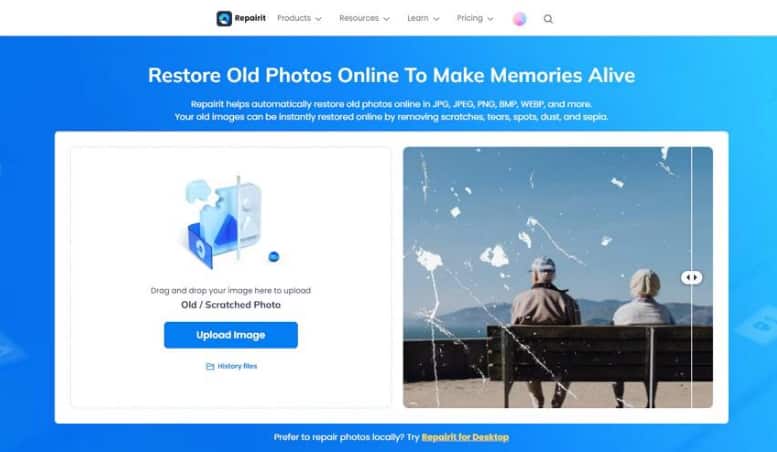
Open Repairit Online on your browser and go to the old photo restoration section. Then click the “Upload Image” button to upload your corrupted images to the interface.
Step 2. Start with the Repair Process
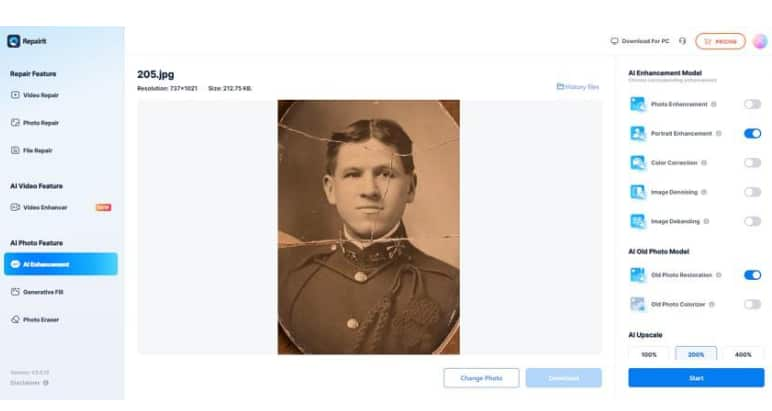
After uploading, select the restoration model from the options on the right. Click the “Start” button at the bottom and wait a few seconds for completion.
Step 3. Preview and Save Photos
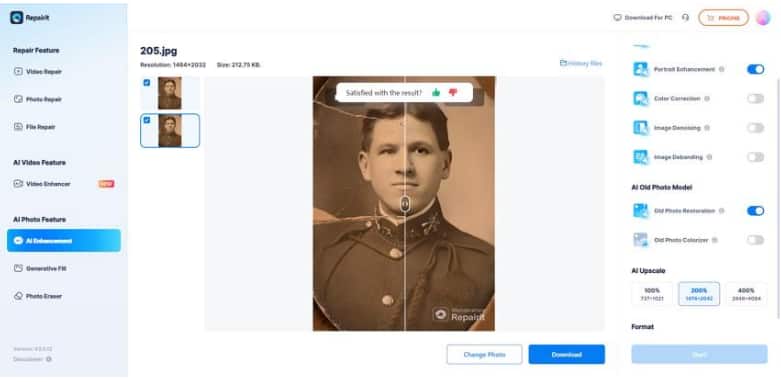
Once the restoration finishes, preview the restored images within the interface. When satisfied with the results, click the “Download” button to save them to your device.
Part 4. Repairit Online vs. Other Tools: Why It’s the Best Option
When comparing online photo restoration tools, Repairit Online stands out for its AI capabilities. Provided next is a comparison table between Repairit Online and other online tools available across the internet:
| Feature | Repairit Online | Other Tools |
| AI-Powered Repair | Uses advanced AI to reconstruct damaged pixels accurately | Limited AI or manual fixes |
| Supported Formats | JPG, PNG, RAW, and many more | Often limited to JPG or PNG |
| Batch Repair | Repair multiple images at once | Rarely available |
| Repair History | Keeps a record of all repaired photos | Not included |
| Preview Before Saving | Allows users to check restored images before downloading | Limited or unavailable |
| Ease of Use | Intuitive interface suitable for beginners | Medium to complex |
Conclusion
To sum it up, this article provided a detailed guide on restoring old photos using AI technology. Repairit Online is highly recommended for anyone looking for online free photo restoration. Its AI-powered features, reference-based repair, and secure processing make renewing old photo memories simple and reliable. By choosing Repairit Online, users can restore image quality, recover details, and preserve cherished moments efficiently.