







Facebook Twitter Instagram
    Trending
    • Seconds to Connect: TransAir4 Simplified Operation Guide
    • Vaporesso ARMOUR G/GS VS VOOPOO DRAG 6 Quick Comparison
    • FOG X Connect 30K Disposable Kit Review-Long‑Lasting, Customizable Vaping
    • Revolutionizing Home Cleaning: Exploring the Advanced Features of the Newest Robotic Vacuum Cleaner
    • How to Recover When the Keyboard of a Laptop Cannot Be Pressed: A Step-by-Step Guide
    • The Tax Reform bill in Delaware, the United States, intends to increase the tax rates on e-cigarettes, nicotine pouches and other tobacco products.
    • Uncover effective strategies on How to Win Big In Baccarat Online Casinos
    • The Healing Powers of CBD: A Holistic Ally for Emotional and Physical Wellness
    Facebook YouTube
    IGeeKphone China Phone, Tablet PC, VR, RC Drone News, Reviews
    • HOME
      • NEWS
        • DeepSeek
        • ChatGPT
        • Minecraft
    • Amazon
    • PHONE
      • Top Phones For Your First Choice
      • Phone Comparison
      • Xiaomi
      • Blackview
      • Doogee
      • Black Shark
      • Geekbuying
      • Banggood
      • TEMU
      • TikTok
      • Aliexpress
      • Walmart
      • MercadoLibre
      • Lazada
    • TOP VAPE Awards for 2026
    • VAPES
      • E-CIGAR Upcoming
      • Vape News
      • Vape Deals
      • Vape Comparison
      • Vape Guide
      • Giveaway
    • BEST VAPE
      • Best Vape Stores
      • Best Starter Vape Kits
      • Best Vapes for Beginners
      • Best Disposable Vapes
      • Best Pod Systems
      • Best Pod Mod Vapes
      • Best Mods
      • Best Nicotine Pouches
      • Best Clearomizers/Tanks
      • Best E-Liquid
      • Best EGO/Pens
      • Best Vapes for Nic Salt E-Juice
      • Best Vapes to Quit Smoking
      • RDA vs. RDTA vs. RTA
    • Best Vape Brand 2026
      • VAPORESSO
      • VOOPOO
      • OXVA
      • NEXA BAR
      • ORIONBARTECH
      • MASKKING VAPE
      • MEMERS
      • SP2S
      • TODOO
      • MRFOG
      • VEIIK
    • REVIEW
      • E-cigar Review
      • Phones
      • Tablet PC
      • TV Box
      • RC Drone
      • Wearables
      • Camera
      • Accessories
      • VR Headset
    • MORE
      • TABLET
        • Chuwi
        • INNOCN
        • Teclast
        • Top Tablet for Your First Choice
        • Tablet/Laptop Comparison
      • RC DRONE
      • CAMERA
      • WEARABLES
        • OneOdio
        • BlitzWolf
        • Top Smartwatch for First Choice
      • 3D PRINTER
        • 3D Printer Review
        • Anycubic
        • FLSUN
        • Xtool
        • LONGER
        • Top 3D printer to Choose First
      • POWER STATION
        • Oukitel
        • FOSSIBOT
      • GAMING
        • Top Gaming Products
      • E-BIKE
        • Samebike
        • Happyrun
        • ENGWE
      • SMART HOME
      • TV BOX
      • ACCESSORIES
      • VR HEADSET
      • CLOTHES
      • AUTO CAR
    • DEAL
    • VAPE LAWS
    • Shop
    IGeeKphone China Phone, Tablet PC, VR, RC Drone News, Reviews
    You are at:Home»Amazon»Seconds to Connect: TransAir4 Simplified Operation Guide
    Amazon

    Seconds to Connect: TransAir4 Simplified Operation Guide

    Brady CottonBy Brady CottonApril 25, 2026
    Facebook Twitter Pinterest LinkedIn Tumblr Email

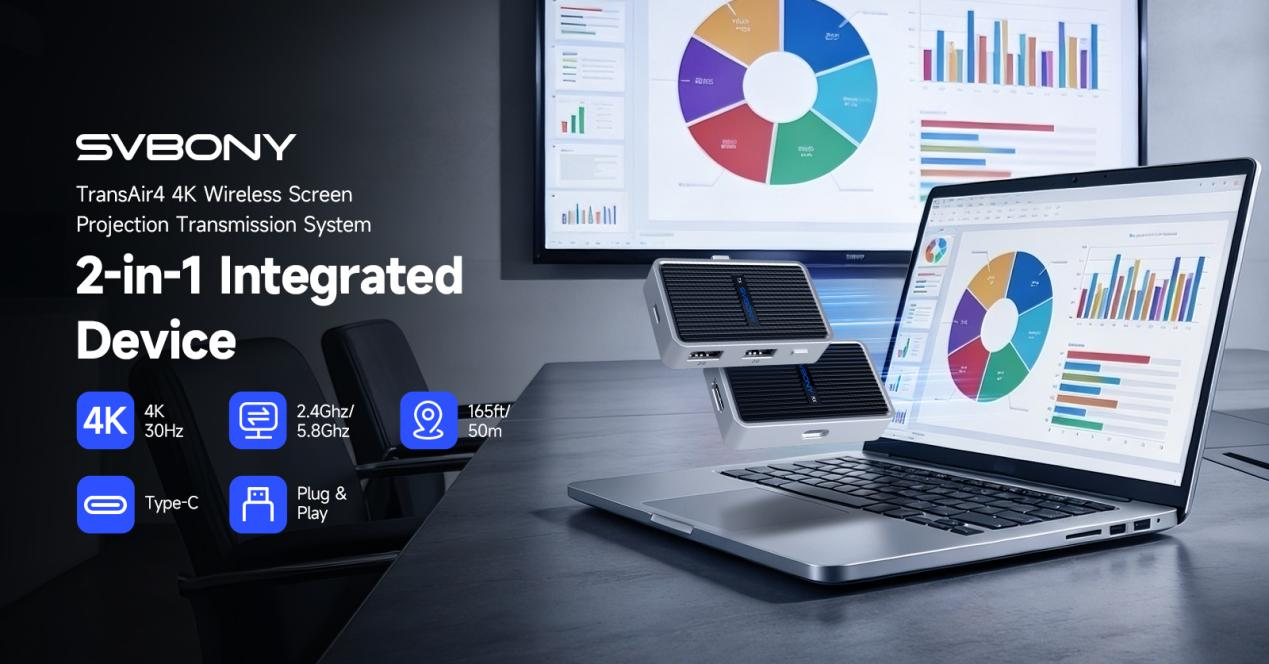
    In a world where every second counts, seamless connectivity between your devices and displays isn’t just a convenience—it’s a necessity. The TransAir4 HDMI wireless transmitter and receiver system delivers exactly that: a smooth, intuitive, and lightning-fast way to cast screens from your phone, tablet, or computer to any HDMI-enabled display. Whether you’re running a high-stakes presentation, sharing a movie with friends, or expanding your desktop workspace, TransAir4 makes it effortless. Here’s your ultimate guide to setting up and using it in seconds.

    One Receiver, Unlimited Possibilities
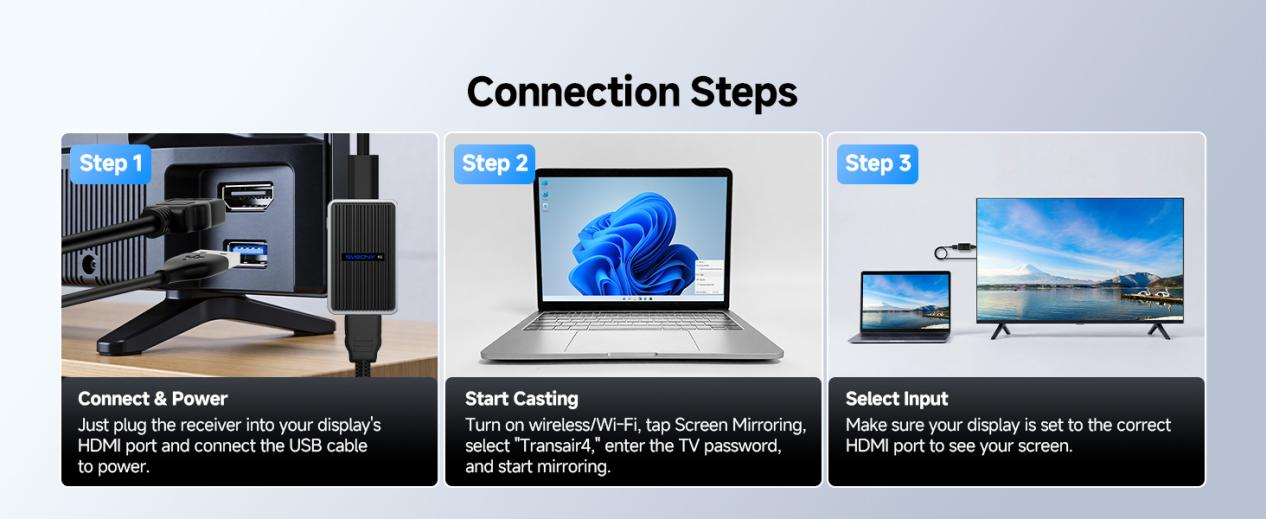
    For those who prefer simplicity, the receiver-only configuration of TransAir4 offers a clean and minimalistic solution. With just one receiver, you can connect multiple devices without juggling multiple transmitters. The setup is straightforward and requires almost no technical know-how.

    Step 1: Connect & Power

    Plug the receiver into your display’s HDMI port. Use the included USB cable to power it—either through a wall adapter or a USB port on your monitor or TV. Once powered, the receiver lights up and is ready for pairing.

    Step 2: Start Casting

    On your phone, tablet, or computer, enable wireless/Wi-Fi and select Screen Mirroring (iOS) or the wireless display option (Android and Windows). Find “TransAir4” in the device list, enter the password displayed on the receiver, and start mirroring instantly.

    Step 3: Select Input

    Ensure your display is set to the HDMI input where the receiver is connected. With a correct input selection, your device screen will appear seamlessly on the big display.

    Receiver-Only Connections for Mobile Devices
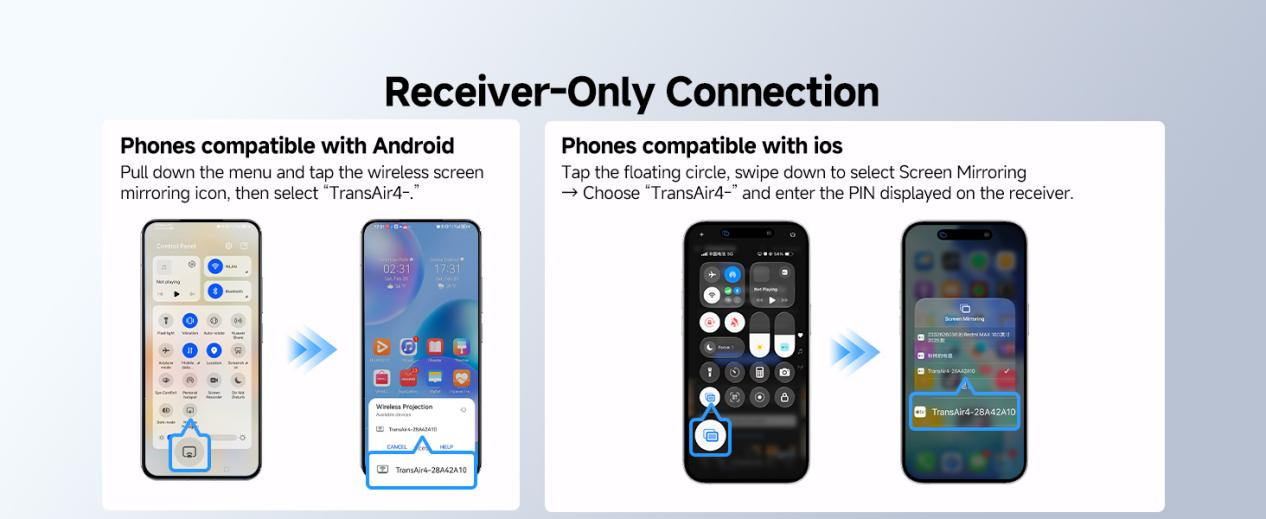
    TransAir4 makes mobile casting intuitive for both iOS and Android users.

    iOS Devices: Tap the floating control circle on your screen, swipe down to Screen Mirroring, and choose your TransAir4- device. Enter the PIN displayed on the receiver, and your screen is live in seconds.

    Android Devices: Pull down your notification menu and tap the wireless screen mirroring icon. Select TransAir4- from the list and start mirroring immediately.
    Receiver-Only Connections for Computers

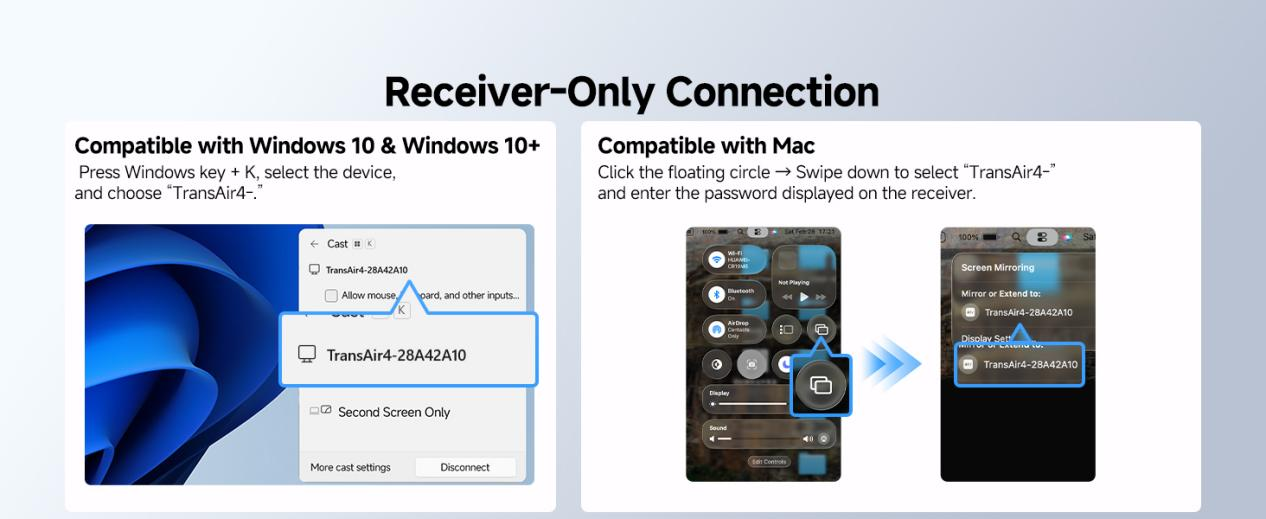
    Desktop users can also enjoy hassle-free wireless casting without additional transmitters.

    Mac: Click the floating circle, swipe down to select TransAir4-, and enter the displayed password. Your Mac screen will appear instantly on your HDMI display.

    Windows 10 & 11: Press Windows key + K, select TransAir4-, and begin wireless casting. It’s that simple.

    One-to-One TransAir4: The Full Wireless HDMI Experience
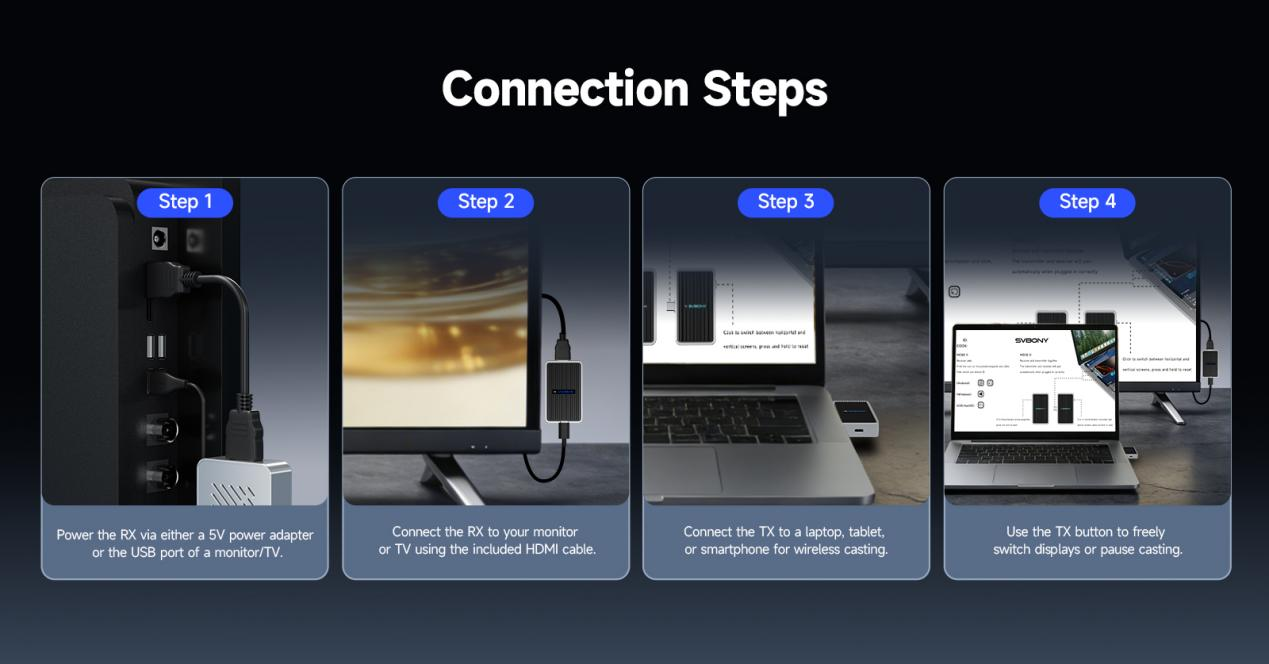
    For users seeking the ultimate control, the one-to-one configuration pairs a transmitter (TX) with a receiver (RX) for full-featured wireless HDMI streaming. This setup is perfect for high-performance needs like professional presentations, streaming, or classroom use.

    Step 1: Power the RX

    The receiver can be powered via a 5V power adapter or a USB port on your monitor or TV. Once connected, the RX is ready to receive signals from the transmitter.

    Step 2: Connect RX to Display

    Use the included HDMI cable to link the RX to your monitor or TV. This ensures high-quality video and audio transmission without complicated setups.

    Step 3: Connect TX to Your Device

    Plug the transmitter into a laptop, tablet, or smartphone. TransAir4 automatically establishes a wireless connection between the TX and RX, delivering your content with minimal delay.

    Step 4: Control Your Casting

    The TX button allows you to freely switch between displays or pause casting whenever necessary. This flexibility ensures that presentations, movies, or collaborative sessions run smoothly.

    Why TransAir4 Stands Out

    The TransAir4 HDMI wireless transmitter and receiver system isn’t just about connection—it’s about efficiency, speed, and simplicity. Here’s why it’s the perfect choice for modern users:

    • Seconds to Connect: One-touch pairing eliminates complicated setups.
    • Versatile Device Support: Works flawlessly with iOS, Android, Mac, Windows, and more.
    • Flexible Configurations: Choose between a single receiver or one-to-one TX/RX setups.
    • High-Quality Transmission: HDMI output ensures crisp video and accurate color reproduction.
    • Portable and Compact: Small form factor fits in any workspace or entertainment setup without clutter.

    Whether you are presenting at a meeting, streaming content at home, or expanding your workstation, TransAir4 provides a smooth, lag-free wireless HDMI experience.

    Quick Tips for Optimal Performance

    • Stay Within Range: Keep devices within the recommended wireless range for uninterrupted streaming.
    • Check Your Input: Always ensure your display is set to the correct HDMI port.
    • Keep Software Updated: Regular updates on your phone, tablet, or computer can help maintain seamless compatibility.
    • One-Touch Pairing: Use the one-click pairing function to reconnect devices instantly when switching between multiple sources.

    Final Thoughts

    Gone are the days of tangled cables and complicated adapters. With TransAir4, your content moves wirelessly from your device to your display in seconds, making presentations more professional, streaming more immersive, and collaboration more efficient. Here is official site to check.

    From its intuitive receiver-only setup to the powerful one-to-one TX/RX configuration, TransAir4 proves that wireless HDMI doesn’t have to be complicated—it just works, the moment you need it.

    Experience the future of screen sharing today with TransAir4, where seconds make all the difference.

    Share. Facebook Twitter Pinterest LinkedIn Tumblr Email

    Related Posts

    YLRC C6 Mini RC Drift Car Review: A Thrilling Toy for Kids and RC Enthusiasts

    HOBBY PLUS CR18P EVO V2 RC Car Review: The Ultimate 1/18 Scale Rock Crawler for Off-Road Adventures

    Bakeey P007 22.5W 10000mAh Wireless Charger Power Bank Specs: A Game-Changer for Mobile Charging

    Leave A Reply Cancel Reply

    You must be logged in to post a comment.

    voopoo drag 6
    oxva xlim 3 ultra
    sp2s sen x disposable vape
    • Popular
    • 3D Printer REVIEW
    • XIAOMI
    April 18, 2026

    VOOPOO DRAG 6 Hands on Review: Vape Beast with Smart Power & Premium Control

    April 8, 2026

    OXVA NeXLIM vs XLIM Pro 2 Pod Hands-On Review (2026)

    March 16, 2026

    OXVA Slimstick VS OXVA Slimstick X Vape Hands-on Review

    March 5, 2026

    OXVA XLIM PRO 3 vs XLIM GO 2: Hands-On Review

    December 26, 2025

    ACMER ASCARVA 4S: Precision CNC Power for Makers, DIYers & Small Workshops

    June 23, 2024

    ACMER P2 20W Laser Engraver Fixed Focus Engraving: Hands on Review

    May 30, 2024

    xTool F1 Ultra Review: World’s First 20W Fiber & 20W Diode Laser Engraver

    May 30, 2024

    Anycubic Kobra 3 Combo Review: The Multicolor Masterpiece?

    April 23, 2026

    The largest battery-powered Xiaomi flagship of all time is here! Xiaomi 17 Max will be unveiled in May: A versatile large-screen flagship.

    April 22, 2026

    Starting from 3399 yuan! Redmi K Pad 2 Released: 8.8-inch + Dimensity 950

    April 22, 2026

    Redmi Buds 8 Released: 50dB deep noise reduction, supports location tracking and loss prevention

    April 22, 2026

    Xiaomi S Mini LED 2026 Series Released: 2000nits Anti-Reflection Screen + 288Hz Ultra-High Refresh Rate

    fc 26 coins
    New Arrivals
    • FOG X Connect 30K Disposable Kit FOG X Connect 30K Disposable Kit
    • Tomoro D15 35K Disposable Vape Tomoro D15 35K Disposable Vape
    • Ploox Mini Hookah 25K Disposable Vape Kit Ploox Mini Hookah 25K Disposable Vape Kit
    • Lost Vape Thelema Solo 100 Pro Vape Mod Kit Lost Vape Thelema Solo 100 Pro Vape Mod Kit
    • SMOK Vaporock X1 Pod System Kit SMOK Vaporock X1 Pod System Kit
    • WASPE 4-in-1 100K Disposable Vape WASPE 4-in-1 100K Disposable Vape
    • SMOK Alpha Mix Pod System Kit SMOK Alpha Mix Pod System Kit
    • VOOPOO Argus G4 Mini Pod System Kit VOOPOO Argus G4 Mini Pod System Kit
    • IPLAY NEXUS 45k Disposable Pod IPLAY NEXUS 45k Disposable Pod
    About
  • Igeekphone.com provides the first global tech news and reviews about smartphone, vapes, e-cigar, smart home, 3D printers, e-bike,tablets, RC drones, VR headset, and other accessories. It's the best platform to improve your brand and product.
  • Contact us: info@igeekphone.com
  • Check Our Privacy Policy Here.
  • Note: *Right now we have US editor and EU editors for review, especially for Amazon US and EU.
  • *Shop and Compare Price Here*
  • Facebook
  • Youtube
  • OUR BEST VAPE PARTNERS
  • VAPE ONLINE STORE
  • HAYATI PRO MAX PLUS
  • VAPORESSO
  • VOOPOO
  • OXVA
  • NEXA
  • MASKKING
  • TODOO
  • SP2S
  • VEIIK
  • OTHER BEST PARTNERS
  • SVBONY
  • Chuwi
  • Blackview
  • Fossibot
  • Unihertz
  • Flsun
  • Anycubic
  • Xtool
  • Oukitel
  • Mukkpet Ebike
  • Ugreen
  • Copyright © 2026 igeekphone

    Type above and press Enter to search. Press Esc to cancel.