






Facebook Twitter Instagram
    Trending
    • Nordic Spirit Partners With Co-op Live as UK Nicotine Rules Tighten
    • Fifty Bar Mini Vape: Compact Design, 7mL Capacity and Key Features
    • Bang Blaze 15-in-1 500K: 15 Flavors, 850mAh Battery and Mesh Coil
    • CHUWI UniBox AI495 Pro Unveiled with Ryzen AI MAX+ PRO 495 and 192GB Memory
    • Huawei Mate XT 2 Officially Launches with Kirin 9050 Pro and New Triple-Folding Design
    • Zombies Cat B22: Bluetooth 6.0 Open-Ear Earphones with 14mm Drivers
    • Imou Ranger Dual Pro 10MP: Dual-Lens 3K Indoor Security Camera with Smart Tracking
    • MJX Hyper Go 43308 1:43 RC Drift Car: Tiny GR Yaris, Real 4WD Drifting
    Facebook YouTube
    IGeeKphone China Phone, Tablet PC, VR, RC Drone News, Reviews
    • HOME
    • BREAKING NEWS
      • AI NEWS
    • Amazon
    • PHONE
      • Top Phones For Your First Choice
      • Phone Comparison
      • Xiaomi
      • Blackview
      • Doogee
      • Black Shark
      • Geekbuying
      • Banggood
      • TEMU
      • TikTok
      • Aliexpress
      • Walmart
      • MercadoLibre
      • Lazada
    • TOP VAPE Awards for 2026
    • VAPES
      • E-CIGAR Upcoming
      • Vape News
      • Vape Deals
      • Vape Comparison
      • Vape Guide
      • VAPE LAWS
      • Giveaway
    • BEST VAPE
      • Best Vape Stores
      • Best Starter Vape Kits
      • Best Vapes for Beginners
      • Best Disposable Vapes
      • Best Pod Systems
      • Best Pod Mod Vapes
      • Best Mods
      • Best Nicotine Pouches
      • Best Clearomizers/Tanks
      • Best E-Liquid
      • Best EGO/Pens
      • Best Vapes for Nic Salt E-Juice
      • Best Vapes to Quit Smoking
      • RDA vs. RDTA vs. RTA
    • Best Vape Brand 2026
      • VAPORESSO
      • VOOPOO
      • OXVA
      • NEXA BAR
      • MASKKING VAPE
      • SP2S
      • IPLAY
      • TODOO
      • MRFOG
      • LOSTVAPE
      • VEIIK
    • REVIEW
      • E-cigar Review
      • Phones
      • Tablet PC
      • TV Box
      • RC Drone
      • Wearables
      • Camera
      • Accessories
      • VR Headset
    • MORE
      • TABLET
        • Chuwi
        • INNOCN
        • Teclast
        • Top Tablet for Your First Choice
        • Tablet/Laptop Comparison
      • RC DRONE
      • CAMERA
      • WEARABLES
        • OneOdio
        • BlitzWolf
        • Top Smartwatch for First Choice
      • 3D PRINTER
        • 3D Printer Review
        • Anycubic
        • FLSUN
        • Xtool
        • LONGER
        • Top 3D printer to Choose First
      • POWER STATION
        • Oukitel
        • FOSSIBOT
      • GAMING
        • Top Gaming Products
      • E-BIKE
        • Samebike
        • Happyrun
        • ENGWE
      • SMART HOME
      • TV BOX
      • ACCESSORIES
      • VR HEADSET
      • CLOTHES
      • AUTO CAR
    • DEAL
    • Shop
    IGeeKphone China Phone, Tablet PC, VR, RC Drone News, Reviews
    You are at:Home»NEWS»Video File Corruption Forever With This Simple Solution!
    NEWS

    Video File Corruption Forever With This Simple Solution!

    HabibBy HabibJune 28, 2023
    Facebook Twitter Pinterest LinkedIn Tumblr Email

    Nowadays, recording or downloading videos from the internet has become effortless, allowing us to view them or share them on social media platforms using various devices such as laptops, TVs, or smartphones. However, there are instances when a video Video File Corruption and cannot be played correctly. If you encounter this issue, here’s what you can do:

    File Transfer Errors: Video files can get corrupted during transfers between devices or media due to errors or interruptions. To mitigate this, ensure stable and reliable transfer methods.

    Storage Media Failure: Faulty or damaged storage media like hard drives, flash drives, or memory cards can prevent proper reading or writing of video files. Regularly check your storage devices for any signs of failure, and consider backing up essential videos.
    Malware or Virus Infection: Infections from malware or viruses on your computer can lead to corrupted, encrypted, or deleted video files. Maintain up-to-date antivirus software and exercise caution when downloading files from untrusted sources.

    Operation Errors: Mistakes such as mishandling video editing software, accidental file deletion, or formatting storage media can damage video files. Take care when performing operations on video files, and double-check your actions.
    Incomplete Download or Compression: Downloading errors, interruptions during the download process, or problems with file compression can cause video file corruption. Verify the integrity of downloaded files and ensure proper compression techniques.

    Incompatible Codec: Playing a video file with an incompatible codec or attempting to use a different codec on a device can lead to file corruption. Ensure you install the necessary codecs and use compatible formats for your intended device.

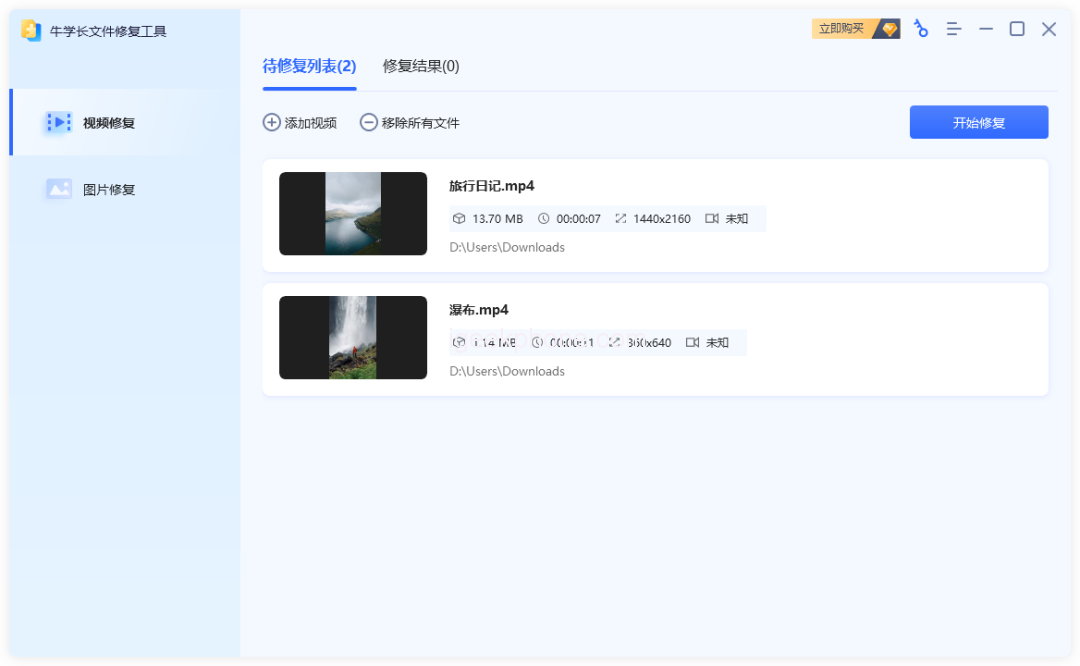
    If you encounter a corrupted video file, repairing it can be a straightforward process. Utilize a professional video file repair tool, such as the Niu Xuechang file repair tool, which offers one-click repair functionality. Here’s a step-by-step guide:

    Step 1: Download and install the Niu Xuechang file repair tool on your computer. The software provides two repair function modules: “Video Repair” and “Photo Repair.” Select the “Video Repair” function and click “Add” to upload damaged video files or drag them directly into the software. Batch uploading is also supported.

    Step 2: After uploading the video files requiring repair, you can view them in the “to be repaired list.” Click “Start Repair,” and the software will commence the repair process.

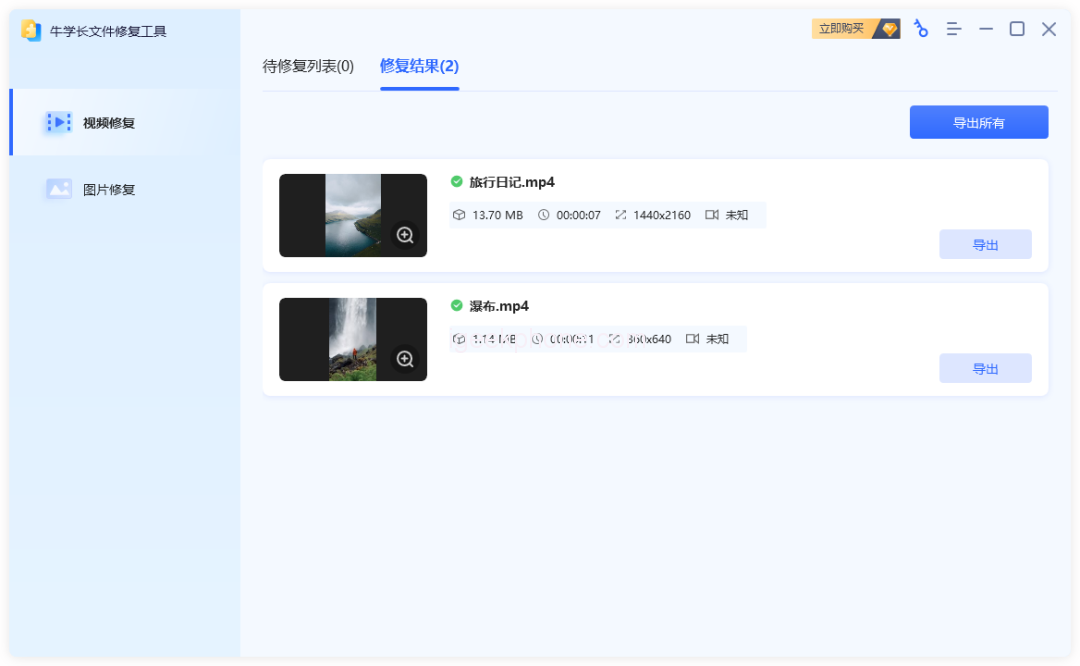
    Step 3: Once the video repair is complete, a pop-up box will appear indicating, “All videos have been repaired!” Click “View Result” to access the “Repair Result” interface, where you can preview the repaired videos online.

    Step 4: Export the repaired video. After previewing the repair effect, you can click the “Export” button beside a specific video to export it individually. Alternatively, use the “Export All” button in the upper right corner to export all the videos in the list.

    These are the common causes of video file corruption and repair methods. However, it is essential to adopt preventive measures to avoid such issues. Regularly back up your video files, ensure the proper functioning of storage devices, and avoid operational errors. Taking these precautions can significantly reduce the risk of video file damage.

    Read Also: TikTok Sensation: The Viral Water Guns Video Amassing Millions of Views

    Do not forget to follow us on our Facebook group and page to keep you always aware of the latest advances, News, Updates, review, and giveaway on smartphones, tablets, gadgets, and more from the technology world of the future.

    Share. Facebook Twitter Pinterest LinkedIn Tumblr Email

    Related Posts

    CHUWI UniBox AI495 Pro Unveiled with Ryzen AI MAX+ PRO 495 and 192GB Memory

    Huawei Mate XT 2 Officially Launches with Kirin 9050 Pro and New Triple-Folding Design

    Nubia NaviX Ultra Launches September 16 as the World’s First AI Agent Smartphone

    Leave A Reply Cancel Reply

    You must be logged in to post a comment.

    voopoopintch
    oxva nexlim 2
    shopify
    • Popular
    • 3D Printer REVIEW
    • XIAOMI
    July 13, 2026

    OXVA Nexlim 2 Mini Pod Vape Hands on Review

    July 13, 2026

    OXVA Nexlim 2 Pod Vape Hands on Review

    June 21, 2026

    iPlay LUMO 8K Review – A Compact Prefilled Pod Kit with Big Flavor and Everyday Convenience

    June 21, 2026

    iPlay HOOLA 150K Review – A Cloud-Chasing Giant with Music, Modes & Massive Longevity

    December 26, 2025

    ACMER ASCARVA 4S: Precision CNC Power for Makers, DIYers & Small Workshops

    June 23, 2024

    ACMER P2 20W Laser Engraver Fixed Focus Engraving: Hands on Review

    May 30, 2024

    xTool F1 Ultra Review: World’s First 20W Fiber & 20W Diode Laser Engraver

    May 30, 2024

    Anycubic Kobra 3 Combo Review: The Multicolor Masterpiece?

    September 7, 2026

    Xiaomi 18 Fold Ceramic Edition Unveiled With New Pink Finish and Flagship Specs

    September 5, 2026

    Xiaomi HyperOS 4 Adds Cross-Device Chat Sync for Super XiaoAI

    September 3, 2026

    Xiaomi 18 Fold Brings New Camera Tricks, From a Large 4:3 Preview to PC-Class Editing

    September 3, 2026

    Xiaomi Wireless Mouse 4 Pro: A Lightweight Mouse Designed Around Smarter Everyday Control

    fc 26 coins
    New Arrivals
    • Fifty Bar Mini Disposable Vape Fifty Bar Mini Disposable Vape
    • Bang Blaze 15-in-1 500K Disposable Vape Bang Blaze 15-in-1 500K Disposable Vape
    • HQD SNAP 50K Nixodine Disposable Vape Kit HQD SNAP 50K Nixodine Disposable Vape Kit
    • HQD Shisha Solo 50K Disposable Vape HQD Shisha Solo 50K Disposable Vape
    • GEEKPOD 40K Disposable Vape Kit GEEKPOD 40K Disposable Vape Kit
    • Fifty Bar V2 20K Disposable Vape Fifty Bar V2 20K Disposable Vape
    • Eleaf iStick iJust X Starter Kit Eleaf iStick iJust X Starter Kit
    • BD Vape Rayden 100 Kit with Blaster 2 BD Vape Rayden 100 Kit with Blaster 2
    • SMOK Zrex RF 2 Pod System Kit SMOK Zrex RF 2 Pod System Kit
    About
  • Igeekphone.com provides the first global tech news and reviews about smartphone, vapes, e-cigar, smart home, 3D printers, e-bike,tablets, RC drones, VR headset, and other accessories. It's the best platform to improve your brand and product.
  • Contact us: info@igeekphone.com
  • Check Our Privacy Policy Here.
  • Note: *Right now we have US editor and EU editors for review, especially for Amazon US and EU.
  • *Shop and Compare Price Here*
  • Facebook
  • Youtube
  • OUR BEST VAPE PARTNERS
  • VAPE ONLINE STORE
  • VAPORESSO
  • VOOPOO
  • OXVA
  • NEXA
  • MASKKING
  • SP2S
  • IPLAY
  • TODOO
  • OTHER BEST PARTNERS
  • SVBONY
  • Chuwi
  • Blackview
  • Fossibot
  • Unihertz
  • Flsun
  • Anycubic
  • Xtool
  • Oukitel
  • Mukkpet Ebike
  • Ugreen
  • Copyright © 2026 igeekphone

    Type above and press Enter to search. Press Esc to cancel.