







Facebook Twitter Instagram
    Trending
    • Xiaomi Announces POCO M8 Power Launch for August 4, Expected to Be a Global Version of the REDMI Note 17
    • What Should You Do If There Are Green Lines on Your iPhone Screen?
    • SJCAM C100 Pro Review: A Tiny 4K Action Camera Built for Everyday Adventures
    • Xiaomi Mijia Portable Handheld Fan Review: 100-Speed Cooling, 40-Hour Battery Life, and Smart Portable Design
    • Lenovo GL1 Smart Bluetooth 5.4 Glasses Review: Stylish Open-Ear Audio with Smart Features and Photochromic Lenses
    • Z16 Simulation Little Bird MD500 RC Helicopter Review: A Beginner-Friendly Scale Helicopter with Stable Flight
    • Apple Reportedly Planning First Smart Glasses for 2027, Focusing on Privacy and AI Integration
    • Apple Reportedly Preparing MacBook Ultra with OLED Touchscreen, Marking a New Era for the Mac
    Facebook YouTube
    IGeeKphone China Phone, Tablet PC, VR, RC Drone News, Reviews
    • HOME
    • BREAKING NEWS
      • AI NEWS
    • Amazon
    • PHONE
      • Top Phones For Your First Choice
      • Phone Comparison
      • Xiaomi
      • Blackview
      • Doogee
      • Black Shark
      • Geekbuying
      • Banggood
      • TEMU
      • TikTok
      • Aliexpress
      • Walmart
      • MercadoLibre
      • Lazada
    • TOP VAPE Awards for 2026
    • VAPES
      • E-CIGAR Upcoming
      • Vape News
      • Vape Deals
      • Vape Comparison
      • Vape Guide
      • VAPE LAWS
      • Giveaway
    • BEST VAPE
      • Best Vape Stores
      • Best Starter Vape Kits
      • Best Vapes for Beginners
      • Best Disposable Vapes
      • Best Pod Systems
      • Best Pod Mod Vapes
      • Best Mods
      • Best Nicotine Pouches
      • Best Clearomizers/Tanks
      • Best E-Liquid
      • Best EGO/Pens
      • Best Vapes for Nic Salt E-Juice
      • Best Vapes to Quit Smoking
      • RDA vs. RDTA vs. RTA
    • Best Vape Brand 2026
      • VAPORESSO
      • VOOPOO
      • OXVA
      • NEXA BAR
      • MASKKING VAPE
      • SP2S
      • IPLAY
      • TODOO
      • MRFOG
      • LOSTVAPE
      • VEIIK
    • REVIEW
      • E-cigar Review
      • Phones
      • Tablet PC
      • TV Box
      • RC Drone
      • Wearables
      • Camera
      • Accessories
      • VR Headset
    • MORE
      • TABLET
        • Chuwi
        • INNOCN
        • Teclast
        • Top Tablet for Your First Choice
        • Tablet/Laptop Comparison
      • RC DRONE
      • CAMERA
      • WEARABLES
        • OneOdio
        • BlitzWolf
        • Top Smartwatch for First Choice
      • 3D PRINTER
        • 3D Printer Review
        • Anycubic
        • FLSUN
        • Xtool
        • LONGER
        • Top 3D printer to Choose First
      • POWER STATION
        • Oukitel
        • FOSSIBOT
      • GAMING
        • Top Gaming Products
      • E-BIKE
        • Samebike
        • Happyrun
        • ENGWE
      • SMART HOME
      • TV BOX
      • ACCESSORIES
      • VR HEADSET
      • CLOTHES
      • AUTO CAR
    • DEAL
    • Shop
    IGeeKphone China Phone, Tablet PC, VR, RC Drone News, Reviews
    You are at:Home»Guide»What Should You Do If There Are Green Lines on Your iPhone Screen?
    Guide

    What Should You Do If There Are Green Lines on Your iPhone Screen?

    Brady CottonBy Brady CottonJuly 27, 2026
    Facebook Twitter Pinterest LinkedIn Tumblr Email

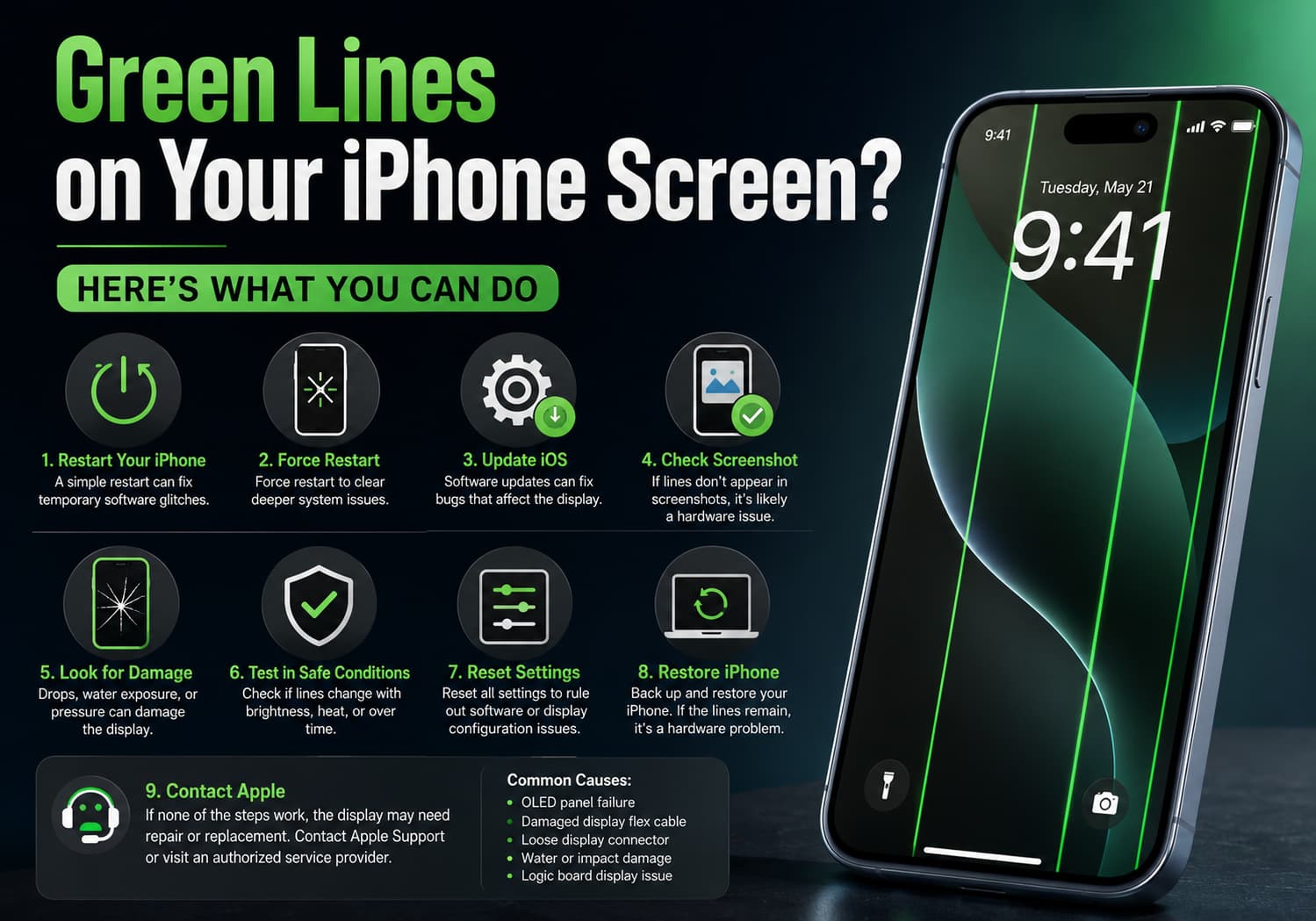
    Seeing green vertical or horizontal lines appear on your iPhone display can be alarming. The issue may be caused by a software glitch, a loose display connection, physical damage, or a failing OLED panel. Fortunately, there are several troubleshooting steps you can try before considering a screen replacement.

    1. Restart Your iPhone

    The first step is a simple restart. Temporary software bugs can sometimes cause display abnormalities.

    • iPhone with Face ID: Press and hold the Side button and either Volume button, then slide to power off.
    • Wait 30 seconds and turn it back on.

    If the green lines disappear, the issue was likely temporary.

    2. Force Restart the Device

    If a normal restart doesn’t help, try a force restart.

    For iPhone 8 and later:

    1. Quickly press and release Volume Up.
    2. Quickly press and release Volume Down.
    3. Press and hold the Side button until the Apple logo appears.

    3. Update iOS

    Occasionally, display issues can be related to software bugs that Apple fixes in later updates.

    Go to:

    Settings → General → Software Update

    Install the latest available version of iOS.
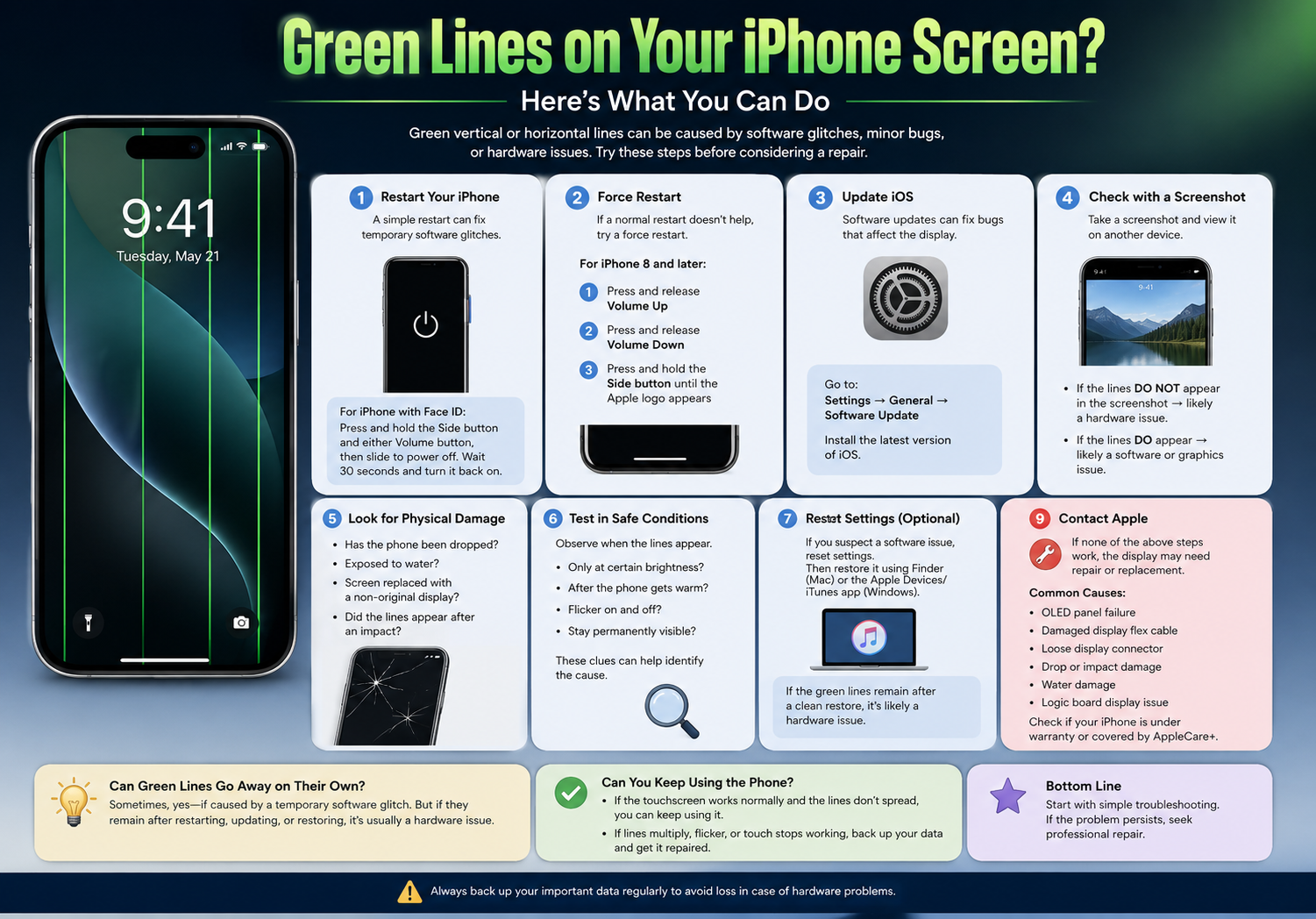
    4. Check Whether the Lines Appear in Screenshots

    Take a screenshot:

    • Face ID models: Side button + Volume Up.

    Then view the screenshot on another device.

    • If the green lines do not appear in the screenshot, the problem is almost certainly hardware-related (the display itself).
    • If they do appear, it may indicate a software or graphics issue.

    5. Look for Signs of Physical Damage

    Ask yourself:

    • Has the iPhone been dropped recently?
    • Has it been exposed to water?
    • Has the screen been replaced with a non-original display?
    • Did the lines appear after an impact?

    Physical damage is one of the most common causes of permanent green lines.

    6. Test in Safe Conditions

    Observe whether the lines:

    • Only appear at certain brightness levels
    • Appear only after the phone gets warm
    • Flicker on and off
    • Stay permanently visible

    These clues can help determine whether the OLED panel is beginning to fail.

    7. Reset Settings (Optional)

    If you suspect a software issue, you can reset system settings without deleting your data.

    Go to:

    Settings → General → Transfer or Reset iPhone → Reset → Reset All Settings

    This resets settings such as Wi-Fi passwords and display preferences but does not erase your photos or apps.

    8. Restore iPhone (Last Software Step)

    Back up your iPhone first.

    Then restore it using Finder (Mac) or the Apple Devices/iTunes app (Windows).

    If the green lines remain immediately after a clean restore, the problem is almost certainly hardware-related.

    9. Contact Apple or an Authorized Service Provider

    If none of the above steps work, the display may need to be repaired or replaced.

    Common hardware causes include:

    • OLED panel failure
    • Damaged display flex cable
    • Loose display connector
    • Damage from drops or pressure
    • Water damage
    • Logic board display circuit issues (less common)

    If your iPhone is still under warranty or covered by AppleCare+, Apple may repair it depending on the cause of the issue.

    Can Green Lines Go Away on Their Own?

    Sometimes, yes—but only if they were caused by a temporary software glitch.

    If the lines:

    • Stay visible after restarting,
    • Appear immediately when the phone boots,
    • Continue after updating or restoring iOS,

    they usually indicate a hardware problem that will not resolve itself.

    Can You Keep Using the Phone?

    You generally can if:

    • The touchscreen still responds normally.
    • The lines don’t spread.
    • The display remains readable.

    However, if the lines begin multiplying, the screen flickers, or touch stops working, it’s best to back up your data immediately and arrange for repair.

    Final Thoughts

    Green lines on an iPhone screen are most often associated with display hardware issues, especially on OLED-equipped models, although software glitches can occasionally produce similar symptoms. Start with simple troubleshooting—restart the device, update iOS, and test with a screenshot. If the issue persists after these steps, professional diagnosis is the safest next step.

    Share. Facebook Twitter Pinterest LinkedIn Tumblr Email

    Related Posts

    How to Take Stunning Night Photos with iPhone 16 Pro?

    OSRS: Top Bosses for Gold Earning

    Leveling Up: How Artificial Intelligence is Transforming Game Development

    Leave A Reply Cancel Reply

    You must be logged in to post a comment.

    voopoopintch
    oxva nexlim 2
    sp2s sen x disposable vape
    • Popular
    • 3D Printer REVIEW
    • XIAOMI
    July 13, 2026

    OXVA Nexlim 2 Mini Pod Vape Hands on Review

    July 13, 2026

    OXVA Nexlim 2 Pod Vape Hands on Review

    June 21, 2026

    iPlay LUMO 8K Review – A Compact Prefilled Pod Kit with Big Flavor and Everyday Convenience

    June 21, 2026

    iPlay HOOLA 150K Review – A Cloud-Chasing Giant with Music, Modes & Massive Longevity

    December 26, 2025

    ACMER ASCARVA 4S: Precision CNC Power for Makers, DIYers & Small Workshops

    June 23, 2024

    ACMER P2 20W Laser Engraver Fixed Focus Engraving: Hands on Review

    May 30, 2024

    xTool F1 Ultra Review: World’s First 20W Fiber & 20W Diode Laser Engraver

    May 30, 2024

    Anycubic Kobra 3 Combo Review: The Multicolor Masterpiece?

    July 27, 2026

    Xiaomi Mijia Portable Handheld Fan Review: 100-Speed Cooling, 40-Hour Battery Life, and Smart Portable Design

    July 27, 2026

    Xiaomi to Debut Qualcomm Snapdragon 8E6 Pro with Exclusive AI Frame Generation Technology

    July 27, 2026

    Xiaomi HyperOS 4 Leak Reveals Advanced AI Features, Real-Time Light Field Rendering, and Smarter User Interaction

    July 25, 2026

    Xiaomi’s Next Flagship Clears Certification: In-House Chip, HyperOS 4, and AI Models Expected to Debut Together

    fc 26 coins
    New Arrivals
    • Moto G58 Power Moto G58 Power
    • OnePlus Ace 8T OnePlus Ace 8T
    • OnePlus 17 OnePlus 17
    • OnePlus Ace 7 Racing OnePlus Ace 7 Racing
    • Alp Nicotine Pouches Alp Nicotine Pouches
    • American Standard 50K Disposable Kit American Standard 50K Disposable Kit
    • Evol Arc 70K Disposable Kit Evol Arc 70K Disposable Kit
    • Elfbar Elfa Master Luxe Edition Pod System Elfbar Elfa Master Luxe Edition Pod System
    • Bang Legend 5-in-1 120K Disposable Vape Bang Legend 5-in-1 120K Disposable Vape
    About
  • Igeekphone.com provides the first global tech news and reviews about smartphone, vapes, e-cigar, smart home, 3D printers, e-bike,tablets, RC drones, VR headset, and other accessories. It's the best platform to improve your brand and product.
  • Contact us: info@igeekphone.com
  • Check Our Privacy Policy Here.
  • Note: *Right now we have US editor and EU editors for review, especially for Amazon US and EU.
  • *Shop and Compare Price Here*
  • Facebook
  • Youtube
  • *Yahoo Finance is a platform that provides financial news, press releases, market data, and useful tools to help users make informed investment decisions.*

    For inquiries, please contact:
    financeyahoocompany@gmail.com

    OUR BEST VAPE PARTNERS
  • VAPE ONLINE STORE
  • HAYATI PRO MAX PLUS
  • VAPORESSO
  • VOOPOO
  • OXVA
  • NEXA
  • MASKKING
  • SP2S
  • IPLAY
  • TODOO
  • OTHER BEST PARTNERS
  • SVBONY
  • Chuwi
  • Blackview
  • Fossibot
  • Unihertz
  • Flsun
  • Anycubic
  • Xtool
  • Oukitel
  • Mukkpet Ebike
  • Ugreen
  • Copyright © 2026 igeekphone

    Type above and press Enter to search. Press Esc to cancel.