







Facebook Twitter Instagram
    Trending
    • The Game Compatibility Progress of the Red Magic Game Tablet 5 PRO has been Announced
    • The Real Photos of Samsung Galaxy Z Fold8 Foldable Phone have been Released
    • The Core Specifications of Redmi Note 17 series have been Announced
    • It is reported that Huawei Mate 80 Air phone will be released in the second half of the year
    • VisionRay Flow Pro Smart Glasses Released: 20MP Camera, 35g Weight, $19
    • What is Certificate-Based Authentication?
    • Vaporesso XROS 6 vs SP2S URANUS: Quick Comparison Review
    • VOOPOO DRAG H40 Pro vs DRAG 6: The Ultimate Pod Mod vs Mod Comparison
    Facebook YouTube
    IGeeKphone China Phone, Tablet PC, VR, RC Drone News, Reviews
    • HOME
    • BREAKING NEWS
      • AI NEWS
    • Amazon
    • PHONE
      • Top Phones For Your First Choice
      • Phone Comparison
      • Xiaomi
      • Blackview
      • Doogee
      • Black Shark
      • Geekbuying
      • Banggood
      • TEMU
      • TikTok
      • Aliexpress
      • Walmart
      • MercadoLibre
      • Lazada
    • TOP VAPE Awards for 2026
    • VAPES
      • E-CIGAR Upcoming
      • Vape News
      • Vape Deals
      • Vape Comparison
      • Vape Guide
      • VAPE LAWS
      • Giveaway
    • BEST VAPE
      • Best Vape Stores
      • Best Starter Vape Kits
      • Best Vapes for Beginners
      • Best Disposable Vapes
      • Best Pod Systems
      • Best Pod Mod Vapes
      • Best Mods
      • Best Nicotine Pouches
      • Best Clearomizers/Tanks
      • Best E-Liquid
      • Best EGO/Pens
      • Best Vapes for Nic Salt E-Juice
      • Best Vapes to Quit Smoking
      • RDA vs. RDTA vs. RTA
    • Best Vape Brand 2026
      • VAPORESSO
      • VOOPOO
      • OXVA
      • NEXA BAR
      • MASKKING VAPE
      • SP2S
      • IPLAY
      • TODOO
      • MRFOG
      • LOSTVAPE
      • VEIIK
    • REVIEW
      • E-cigar Review
      • Phones
      • Tablet PC
      • TV Box
      • RC Drone
      • Wearables
      • Camera
      • Accessories
      • VR Headset
    • MORE
      • TABLET
        • Chuwi
        • INNOCN
        • Teclast
        • Top Tablet for Your First Choice
        • Tablet/Laptop Comparison
      • RC DRONE
      • CAMERA
      • WEARABLES
        • OneOdio
        • BlitzWolf
        • Top Smartwatch for First Choice
      • 3D PRINTER
        • 3D Printer Review
        • Anycubic
        • FLSUN
        • Xtool
        • LONGER
        • Top 3D printer to Choose First
      • POWER STATION
        • Oukitel
        • FOSSIBOT
      • GAMING
        • Top Gaming Products
      • E-BIKE
        • Samebike
        • Happyrun
        • ENGWE
      • SMART HOME
      • TV BOX
      • ACCESSORIES
      • VR HEADSET
      • CLOTHES
      • AUTO CAR
    • DEAL
    • Shop
    IGeeKphone China Phone, Tablet PC, VR, RC Drone News, Reviews
    You are at:Home»Guide»What to Do If Redmi Note 13 System Consumes Power Too Quickly?
    Guide

    What to Do If Redmi Note 13 System Consumes Power Too Quickly?

    Brady CottonBy Brady CottonJune 17, 2026
    Facebook Twitter Pinterest LinkedIn Tumblr Email

    Many users of Redmi Note 13 series notice battery drain issues where the system itself (MIUI/HyperOS system processes) consumes unusually high power. This can reduce screen-on time and make the phone feel less efficient even when apps are not heavily used.

    In most cases, this is caused by background system activity, misconfigured settings, or software optimization issues rather than hardware defects.

    Below is a complete guide to help you identify and fix the problem.
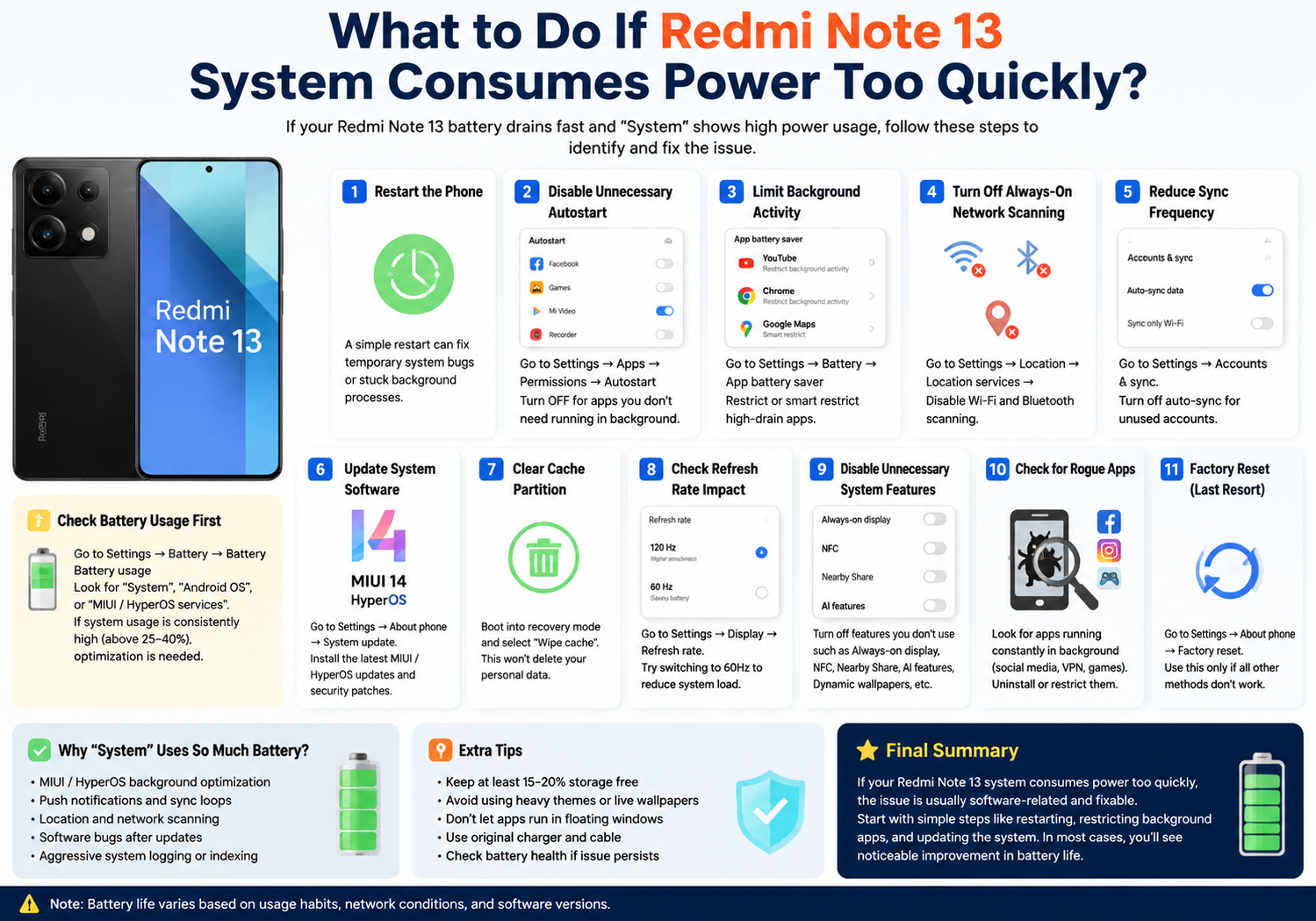
    1. Check Battery Usage First

    Before making changes, confirm what is draining your battery:

    Go to:
    Settings → Battery → Battery usage

    Look for:

    • “System”
    • “Android OS”
    • “MIUI / HyperOS services”

    If system usage is consistently high (above 25–40%), optimization is needed.

    2. Restart the Phone (Quick Fix)

    A simple restart can immediately reduce system drain caused by:

    • Stuck background processes
    • Temporary system bugs
    • Sync loops

    Hold power button → Restart → check battery again after a few hours

    3. Disable Unnecessary Background Autostart

    Many system apps run in the background unnecessarily.

    Steps:
    Settings → Apps → Permissions → Autostart

    Turn OFF for:

    • Unused Xiaomi apps
    • Third-party apps not needed for notifications

    This reduces system wake-ups.

    4. Limit Background Activity

    Go to:
    Settings → Battery → App battery saver

    For high-drain apps:

    • Set to “Restrict background activity”
    • Or “Smart restrict”

    This prevents system services from constantly waking apps.

    5. Turn Off Always-On Network Scanning

    System drain often comes from constant scanning.

    Disable:

    • Wi-Fi scanning
    • Bluetooth scanning

    Path:
    Settings → Location → Location services → Disable scanning

    6. Reduce Sync Frequency

    Cloud and account sync can heavily affect system power usage.

    Check:
    Settings → Accounts & sync

    You can:

    • Turn off auto-sync for unused accounts
    • Reduce sync frequency for Xiaomi Cloud, Gmail, etc.

    7. Update System Software

    Battery drain is often fixed in updates.

    Go to:
    Settings → About phone → System update

    Install:

    • MIUI updates
    • HyperOS updates
    • Security patches

    Many “system drain” bugs are patched in updates.

    8. Clear Cache Partition (Advanced Fix)

    System cache corruption can increase battery usage.

    Steps:

    • Power off phone
    • Enter recovery mode
    • Select “Wipe cache”

    ⚠️ This does NOT delete personal data.

    9. Check for High Refresh Rate Impact

    Redmi Note 13 supports high refresh rates, which increase system workload.

    Try:

    • Switch from 120Hz → 60Hz
      Path:
      Settings → Display → Refresh rate

    If battery improves significantly, system load is partly display-related.

    10. Disable Unnecessary System Features

    Turn off features you don’t use:

    • Always-on display
    • Nearby device scanning
    • NFC (if unused)
    • AI assistant features
    • Dynamic wallpapers

    These contribute to background system activity.

    11. Check for Rogue Apps Triggering System Drain

    Sometimes system battery usage is actually caused by apps.

    Look for:

    • Social media apps running constantly
    • VPN apps
    • Poorly optimized games

    Uninstall or restrict suspicious apps.

    12. Factory Reset (Last Resort)

    If nothing works, a reset may be needed:

    Settings → About phone → Factory reset

    Use this only if:

    • System drain persists after updates
    • Phone behaves abnormally
    • Battery drops even in idle mode

    Why “System” Uses So Much Battery on Redmi Note 13

    Common causes include:

    • MIUI/HyperOS background optimization
    • Push notifications and sync loops
    • Location and network scanning
    • Software bugs after updates
    • Aggressive system logging or indexing

    Final Summary

    If your Redmi Note 13 system consumes power too quickly, the issue is usually software-related and fixable. Start with simple steps like restarting, restricting background apps, and updating the system. If needed, move to deeper fixes like cache wiping or factory reset.

    In most cases, users see noticeable improvement after adjusting background activity and updating the system.

    Share. Facebook Twitter Pinterest LinkedIn Tumblr Email

    Related Posts

    What is Certificate-Based Authentication?

    Why can’t the computer connect to the phone hotspot

    How to Fix the Black Screen Issue on a Lenovo G510 Computer in 5 Simple Steps

    Leave A Reply Cancel Reply

    You must be logged in to post a comment.

    voopoopintch
    oxva nexlim 2
    sp2s sen x disposable vape
    • Popular
    • 3D Printer REVIEW
    • XIAOMI
    June 21, 2026

    iPlay LUMO 8K Review – A Compact Prefilled Pod Kit with Big Flavor and Everyday Convenience

    June 21, 2026

    iPlay HOOLA 150K Review – A Cloud-Chasing Giant with Music, Modes & Massive Longevity

    June 21, 2026

    Vaporesso VIBE SE 2 Review – Simple on the Outside, Surprisingly Smart on the Inside

    June 21, 2026

    VOOPOO DRAG H40 Pro Review – The Return of the Pocket Powerhouse

    December 26, 2025

    ACMER ASCARVA 4S: Precision CNC Power for Makers, DIYers & Small Workshops

    June 23, 2024

    ACMER P2 20W Laser Engraver Fixed Focus Engraving: Hands on Review

    May 30, 2024

    xTool F1 Ultra Review: World’s First 20W Fiber & 20W Diode Laser Engraver

    May 30, 2024

    Anycubic Kobra 3 Combo Review: The Multicolor Masterpiece?

    July 12, 2026

    The Core Specifications of Redmi Note 17 series have been Announced

    July 11, 2026

    Xiaomi Redmi Note 17 Series Specifications Leak Ahead of July 14 Launch: Snapdragon 4 Gen 4, Up to 9,000mAh Battery

    July 10, 2026

    Xiaomi Band 11 Series Certified Ahead of Launch, Retains 233mAh Battery Capacity

    July 9, 2026

    Xiaomi 18 Pro Specifications Leak: 2nm Snapdragon 8 Elite Gen 6, Dual 200MP Cameras, and 7,000mAh Battery

    fc 26 coins
    New Arrivals
    • Veev One Plus Pod System Kit Veev One Plus Pod System Kit
    • Xiaomi 18T Xiaomi 18T
    • Xiaomi 18T Pro Xiaomi 18T Pro
    • Huawei Mate 80 Air Huawei Mate 80 Air
    • Xiaomi Poco F9 Ultra Xiaomi Poco F9 Ultra
    • JNR Falcon Mini 20K Puffs Refillable Vape Kit JNR Falcon Mini 20K Puffs Refillable Vape Kit
    • Hyrise Hybrid Vaporizer Kit Hyrise Hybrid Vaporizer Kit
    • Hyrise Hydden 510 Thread Battery 1000mAh Hyrise Hydden 510 Thread Battery 1000mAh
    • Smoant Flex Neo Pod System Kit Smoant Flex Neo Pod System Kit
    About
  • Igeekphone.com provides the first global tech news and reviews about smartphone, vapes, e-cigar, smart home, 3D printers, e-bike,tablets, RC drones, VR headset, and other accessories. It's the best platform to improve your brand and product.
  • Contact us: info@igeekphone.com
  • Check Our Privacy Policy Here.
  • Note: *Right now we have US editor and EU editors for review, especially for Amazon US and EU.
  • *Shop and Compare Price Here*
  • Facebook
  • Youtube
  • OUR BEST VAPE PARTNERS
  • VAPE ONLINE STORE
  • HAYATI PRO MAX PLUS
  • VAPORESSO
  • VOOPOO
  • OXVA
  • NEXA
  • MASKKING
  • SP2S
  • IPLAY
  • TODOO
  • OTHER BEST PARTNERS
  • SVBONY
  • Chuwi
  • Blackview
  • Fossibot
  • Unihertz
  • Flsun
  • Anycubic
  • Xtool
  • Oukitel
  • Mukkpet Ebike
  • Ugreen
  • Copyright © 2026 igeekphone

    Type above and press Enter to search. Press Esc to cancel.